1. መግቢያ
This manual provides essential instructions for the setup, operation, and maintenance of your SUNMI T2 Smart POS Terminal. The T2 is an integrated point-of-sale device featuring a 15.6-inch Full HD touch screen and a built-in thermal printer, designed for various commercial applications.
2. ምርት አብቅቷልview
2.1 የመሣሪያ ክፍሎች
The SUNMI T2 terminal integrates a high-resolution display, a powerful processor, and a thermal printer into a single unit. Key components include:
- 15.6-inch Full HD Touch Screen (1920x1080)
- Integrated Thermal Printer (80mm paper width, 200mm/s print speed)
- Base Unit with connectivity ports
- የኃይል ግቤት
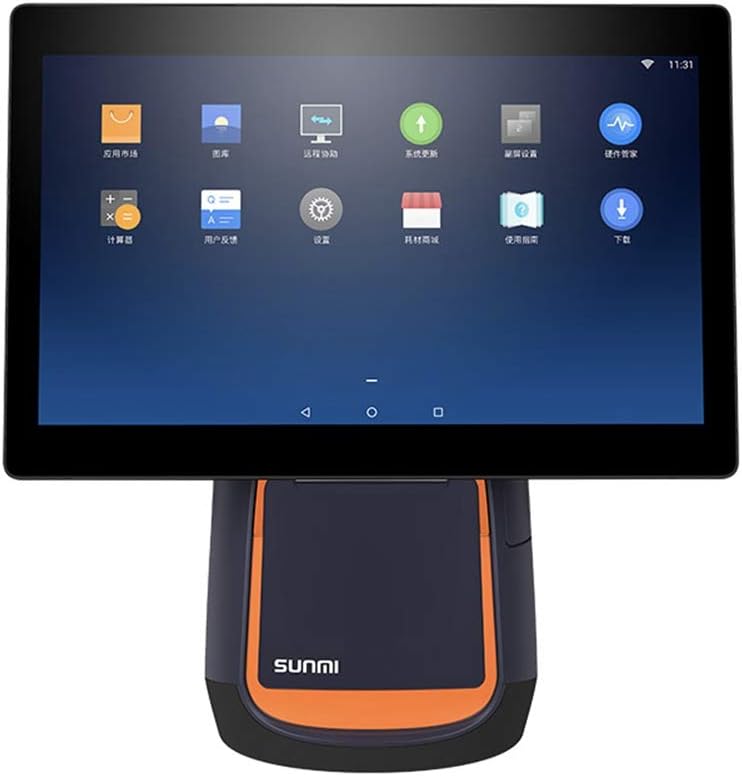
ምስል 2.1: የፊት view of the SUNMI T2 Smart POS Terminal. The 15.6-inch touch screen is visible, displaying various application icons, indicating its Android operating system interface.

ምስል 2.2: ጎን view of the SUNMI T2 terminal, illustrating the design of the stand and the adjustable angle of the main display unit.
2.2 የጥቅል ይዘቶች
ሲከፍቱት ሁሉም እቃዎች መኖራቸውን ያረጋግጡ፡
- SUNMI T2 Printer (T2 model)
- የኃይል ገመድ
- የተጠቃሚ መመሪያ (ይህ ሰነድ)
3. የማዋቀር መመሪያዎች
3.1 ማሸግ እና አቀማመጥ
- Carefully remove the SUNMI T2 terminal from its packaging.
- Place the device on a stable, flat surface, ensuring adequate ventilation around the unit.
- Avoid placing the device near heat sources, direct sunlight, or in areas with high humidity or dust.
3.2 የኃይል ግንኙነት
- Connect the provided power cable to the power input port located at the rear of the device base.
- የኃይል ገመዱን ሌላኛውን ጫፍ ወደ መደበኛ የኤሌክትሪክ ሶኬት ይሰኩት።
- The device will typically power on automatically or can be powered on using the power button.
3.3 የመነሻ ኃይል ማብራት እና ማዋቀር
- Press and hold the power button (refer to Section 5.1 for button location) until the screen illuminates.
- Follow the on-screen prompts to complete the initial setup, including language selection, Wi-Fi connection, and time zone settings.
- Connect to your local network via Wi-Fi or Ethernet (if available) to ensure proper functionality and updates.
4. የአሠራር መመሪያዎች
4.1 የንክኪ ማያ ገጽ አሠራር
The SUNMI T2 features a capacitive multi-touch screen. Operate the device using standard touch gestures:
- መታ ያድርጉ፡ እቃዎችን ይምረጡ ወይም ተግባራትን ያግብሩ።
- ያንሸራትቱ በምናሌዎች ውስጥ ያስሱ ወይም ይዘቱን ያሸብልሉ።
- ለማጉላት መቆንጠጥ; Adjust the size of on-screen content.
4.2 Integrated Printer Operation
The T2 includes an 80mm thermal printer for receipts and order tickets.
4.2.1 Loading Printer Paper
- Locate the printer cover on the front of the device base.
- Press the release button or latch to open the printer cover.
- Insert a new roll of 80mm thermal paper, ensuring the paper feeds from the bottom and the leading edge extends slightly out of the printer slot.
- የአታሚውን ሽፋን ወደ ቦታው እስኪገባ ድረስ በጥብቅ ይዝጉት።
- Tear off any excess paper.
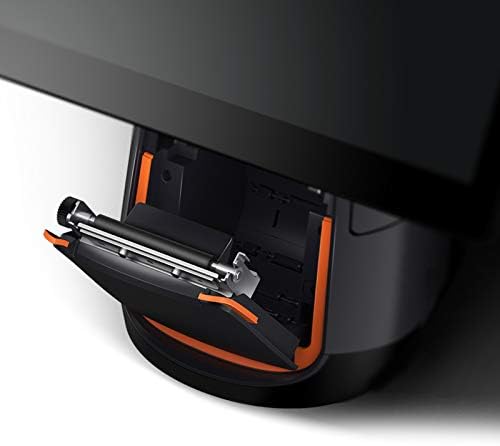
ምስል 4.1: ዝርዝር view of the integrated thermal printer compartment with the cover open, illustrating the correct method for inserting a new 80mm thermal paper roll.

ምስል 4.2 - ውስጣዊ view of the SUNMI T2's thermal printer mechanism, highlighting its design for efficient paper handling and high-speed printing up to 200mm/s.
4.2.2 Printing Receipts
Once paper is loaded, the printer will automatically activate when a print command is issued from your POS software application. Ensure your application is correctly configured to use the integrated printer.
4.3 ግንኙነት
The SUNMI T2 supports various connectivity options:
- ዋይ ፋይ፡ 2.4G/5G (IEEE 802.11 a/b/g/n) for wireless network access.
- ብሉቱዝ፡ Supports Bluetooth 2.1/3.0/4.0 (BLE) for connecting peripherals.
- የዩኤስቢ ወደቦች፡ USB Type A port x1, USB 3.1 Type C x1, USB 2.0 x2 (total 3 USB ports).
- RJ11፡ Cash drawer port x1.
- RJ45፡ LAN port x1 for wired network connection.
- የጆሮ ማዳመጫ ጃክ 3.5 ሚሜ የድምጽ ውፅዓት.
- ማይክሮ ዩኤስቢ፡- Debug port x1.
Connect external devices such as barcode scanners, external keyboards, or cash drawers to the appropriate ports as needed.
5. ጥገና
5.1 መሳሪያውን ማጽዳት
- Power off the device and disconnect the power cable before cleaning.
- ለስላሳ፣ ከቆሸሸ ነፃ የሆነ ጨርቅ በትንሹ ተጠቀምampened with water or a mild, non-abrasive cleaner to wipe the screen and exterior surfaces.
- Do not use harsh chemicals, abrasive pads, or excessive moisture.
- For the thermal printer head, use a specialized thermal printer cleaning pen or card to ensure optimal print quality.
5.2 የሶፍትዌር ዝመናዎች
Regularly check for and install software updates for the SUNMI OS and your POS application to ensure optimal performance, security, and access to new features. Updates can typically be found in the device's settings menu or through your POS software provider.
6. መላ መፈለግ
6.1 የተለመዱ ጉዳዮች እና መፍትሄዎች
- መሣሪያው አይበራም፦
- የኃይል ገመዱ ከመሳሪያው እና ከሚሰራ የኤሌክትሪክ ሶኬት ጋር ደህንነቱ በተጠበቀ ሁኔታ መገናኘቱን ያረጋግጡ።
- የኃይል መውጫው የሚሰራ መሆኑን ያረጋግጡ።
- የኃይል አዝራሩን ለ10-15 ሰከንዶች ተጭነው ለመያዝ ይሞክሩ።
- ስክሪን ምላሽ የማይሰጥ ነው፡-
- መሣሪያውን እንደገና ያስጀምሩ.
- ማያ ገጹ ንጹህ እና ከቆሻሻ የጸዳ መሆኑን ያረጋግጡ።
- Printer is not printing:
- Check if thermal paper is loaded correctly and not jammed.
- Ensure the printer cover is securely closed.
- Verify that the POS application is sending print commands and is configured for the integrated printer.
- መሣሪያውን እንደገና ያስጀምሩ.
- No network connection (Wi-Fi/Ethernet):
- Check Wi-Fi settings and ensure you are connected to the correct network.
- For Ethernet, ensure the cable is securely connected to the RJ45 port and your router/switch.
- Restart your network equipment (router/modem).
If issues persist, refer to the support section or contact your vendor.
7. ዝርዝሮች
The following table details the technical specifications of the SUNMI T2 Smart POS Terminal:

ምስል 7.1 - ተጠናቀቀview of SUNMI T2 Technical Specifications, detailing hardware and software components.
| ባህሪ | ዝርዝር |
|---|---|
| ሞዴል | T2 |
| ዋና ማሳያ | 15.6" FHD, 1920x1080 |
| ፕሮሰሰር | Qualcomm Snapdragon Octa-core processor |
| ስርዓተ ክወና | Android 7.1, SUNMI OS |
| ማህደረ ትውስታ | 2 ጊባ ራም ፣ 16 ጊባ ሮም |
| የንክኪ ማያ ገጽ | G+G capacitive multi-touch screen |
| አታሚ | Built-in high speed 80mm thermal printer with automatic cutter, print speed 200mm/s |
| ዋይ ፋይ | 2.4G/5G (IEEE 802.11 a/b/g/n) |
| ብሉቱዝ | Supports Bluetooth 2.1/3.0/4.0 (BLE) |
| ውጫዊ ወደቦች | USB Type A x1, RJ11 cash drawer x1, RJ45 LAN x1, Headphone jack x1, Power port x1, Micro-USB debug x1 |
| የዩኤስቢ ወደቦች | USB 3.1 Type C x1, USB 2.0 x2 |
| ውጫዊ ማህደረ ትውስታ | Supports MicroSD (TF) up to 64GB |
| የኃይል አስማሚ | ግቤት፡ AC100-240V/1.7A፣ ውፅዓት፡ DC24V/2.5A |
| መጠኖች | 37.4 ሴሜ x 33.8 ሴሜ x 22.4 ሴ.ሜ |
| የእቃው ክብደት | 17.6 ፓውንድ (በግምት 7.98 ኪግ) |
| የሥራ አካባቢ | Temp: 0°C - 40°C |
| የማከማቻ አካባቢ | Temp: -20°C - 60°C |
8. ዋስትና እና ድጋፍ
For warranty information and technical support, please refer to the documentation provided with your purchase or contact the vendor/manufacturer directly. Keep your purchase receipt as proof of purchase.
Manufacturer: Kunxilin Electronic CO. (Brand: SUNMI)


