1. ምርት አብቅቷልview
The Schneider SC600SND is a versatile 2.0 channel soundbar designed to enhance your audio experience. It offers a total output power of 30W (15W x 2) and supports multiple connectivity options including Bluetooth, HDMI (ARC), Optical, and Aux. A unique feature of this soundbar is its convertible design, allowing it to be used as a single horizontal unit or split into two vertical speaker columns.

Image 1.1: The Schneider SC600SND Soundbar in its standard monoblock configuration.
2. ማዋቀር
2.1 ማሸግ እና አቀማመጥ
Carefully remove all components from the packaging. Ensure you have the soundbar unit, remote control, and 3.5mm Jack cable.
The SC600SND soundbar offers two primary placement options:
- Monoblock Configuration: Use the soundbar as a single horizontal unit, ideal for placing below your television.
- Split Column Configuration: The soundbar can be separated into two vertical speaker columns. This allows for flexible placement on either side of your television or entertainment unit. To split, gently twist and pull the two halves apart at the central connection point. Attach the provided bases to each column for stability.

Image 2.1: Detail of the central connection point, allowing the soundbar to be split into two columns.
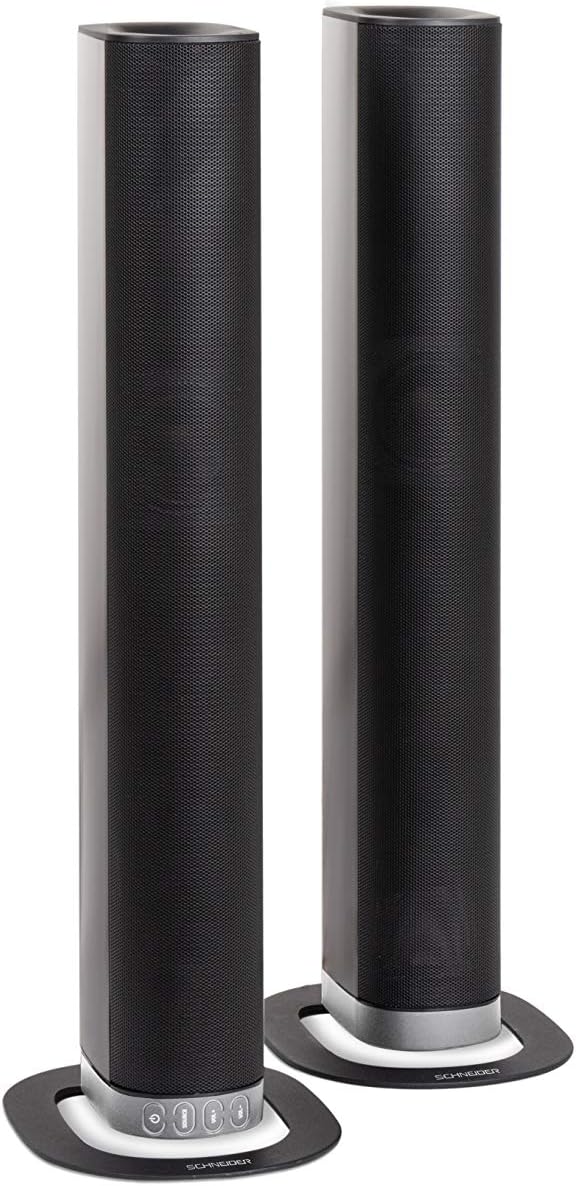
Image 2.2: The soundbar configured as two independent vertical speaker columns.
2.2 ከኃይል ጋር መገናኘት
Connect the power cable to the soundbar's power input and then to a suitable wall outlet. The soundbar will enter standby mode.
2.3 የድምጽ ግንኙነቶች
የድምጽ ምንጭዎን ለማገናኘት ከሚከተሉት ዘዴዎች ውስጥ አንዱን ይምረጡ፡
- ኤችዲኤምአይ (አርአክ) For optimal audio quality and control, connect an HDMI cable from the soundbar's HDMI ARC port to your TV's HDMI ARC port. This allows your TV remote to control the soundbar's volume.
- ኦፕቲካል፡ Connect an optical cable from the soundbar's OPTICAL input to your TV's optical output.
- AUX፡ Use the included 3.5mm Jack cable to connect the soundbar's AUX input to the headphone jack or audio output of your device (e.g., TV, smartphone, MP3 player).
- ብሉቱዝ፡ For wireless connection, refer to the Bluetooth pairing instructions in the Operating section.
3. የአሠራር መመሪያዎች
3.1 ማብራት / ማጥፋት
የሚለውን ይጫኑ ኃይል መሳሪያውን ለማብራት ወይም ለማጥፋት በድምጽ አሞሌው ወይም በርቀት መቆጣጠሪያው ላይ ያለውን ቁልፍ ይጫኑ።
3.2 የምንጭ ምርጫ
የሚለውን ይጫኑ ምንጭ button on the soundbar or the remote control to cycle through the available input sources: Bluetooth (BT), HDMI (ARC), Optical, and AUX.

Image 3.1: On-unit control buttons for power, source selection, and volume adjustment.
3.3 የድምጽ መቆጣጠሪያ
የሚለውን ተጠቀም ቮል+ እና ድምጽ- buttons on the soundbar or remote control to adjust the volume. Press the ሙት የድምጽ ምልክቱን ለጊዜው ለማዘጋት በርቀት መቆጣጠሪያው ላይ ያለውን ቁልፍ ይጫኑ።
3.4 የብሉቱዝ ማጣመር
- Select Bluetooth as the source input. The soundbar will enter pairing mode, indicated by a flashing LED.
- በተንቀሳቃሽ መሣሪያዎ (ስማርትፎን ፣ ታብሌቱ ፣ ወዘተ) ላይ ብሉቱዝን ያንቁ እና የሚገኙ መሳሪያዎችን ይፈልጉ።
- Select "SC600SND" from the list of devices.
- Once paired, the LED indicator on the soundbar will stop flashing and remain solid. You can now play audio wirelessly from your device.
3.5 የድምጽ ሁነታዎች
The remote control includes dedicated buttons for different sound modes to optimize your listening experience:
- ዜና፡ Enhances vocal clarity for news broadcasts and dialogue.
- ፊልም: Provides a more immersive soundstagለፊልሞች ኢ።
- ሙዚቃ፡ ለሙዚቃ መልሶ ማጫወት ኦዲዮን ያመቻቻል።

Image 3.2: The included remote control with dedicated buttons for power, source, volume, mute, and sound modes.
4. ጥገና
የድምጽ አሞሌዎን ረጅም ዕድሜ እና ጥሩ አፈጻጸም ለማረጋገጥ እነዚህን የጥገና መመሪያዎች ይከተሉ፡
- ማጽዳት፡ Use a soft, dry cloth to clean the exterior surfaces of the soundbar. Do not use liquid cleaners, aerosols, or abrasive materials, as these can damage the finish or internal components.
- የአየር ማናፈሻ; Ensure that the soundbar's ventilation openings are not blocked. Proper airflow prevents overheating.
- ማከማቻ፡ የድምፅ አሞሌውን ለረጅም ጊዜ ካከማቹ፣ ከኃይል ያላቅቁት እና ቀዝቃዛና ደረቅ ቦታ ላይ፣ ከፀሐይ ብርሃን እና ከፍተኛ የሙቀት መጠን ራቅ አድርገው ያስቀምጡት።
- አያያዝ፡ የድምፅ አሞሌውን ለጠንካራ ተጽእኖዎች ከመጣል ወይም ከመጫን ይቆጠቡ።
5. መላ መፈለግ
If you encounter issues with your SC600SND soundbar, refer to the following common problems and solutions:
- ኃይል የለም፡
- የኃይል ገመዱ ከድምጽ አሞሌው እና ከሚሰራው የኃይል መውጫ ጋር ደህንነቱ በተጠበቀ ሁኔታ መገናኘቱን ያረጋግጡ።
- ሌላ መሳሪያ በመጫን የኃይል ማከፋፈያው የሚሰራ መሆኑን ያረጋግጡ።
- ድምጽ የለም፡
- Verify that the correct input source (HDMI, Optical, AUX, Bluetooth) is selected on the soundbar.
- Increase the volume on both the soundbar and your connected audio source (e.g., TV, smartphone).
- Ensure the soundbar is not muted.
- Check all audio cables for secure connections and damage. Try a different cable if possible.
- If using HDMI ARC, ensure your TV's HDMI ARC function is enabled in its settings.
- Poor Sound Quality / Distorted Audio:
- የተዛባ እንዳይሆን የድምጽ መጠኑን ያስተካክሉ።
- Try switching between the different sound modes (NEWS, MOVIE, MUSIC) to see if one improves the audio for your content.
- Ensure the soundbar is placed on a stable surface and not vibrating excessively.
- If using Bluetooth, ensure your device is within range and there are no obstructions causing interference.
- የብሉቱዝ ማጣመሪያ ጉዳዮች፡-
- Ensure the soundbar is in Bluetooth pairing mode (flashing LED).
- Make sure your device's Bluetooth is enabled and it is searching for new devices.
- መሣሪያዎን ወደ ድምፅ አሞሌው ያቅርቡ።
- ከዚህ በፊት ከተጣመረ፣ መሳሪያውን ለማላቀቅ እና እንደገና ለማጣመር ይሞክሩ።
- የርቀት መቆጣጠሪያ አይሰራም;
- በርቀት መቆጣጠሪያው ውስጥ ያሉትን ባትሪዎች ይፈትሹ እና ይተኩ.
- በርቀት መቆጣጠሪያው እና በድምፅ አሞሌው ዳሳሽ መካከል ምንም እንቅፋቶች አለመኖራቸውን ያረጋግጡ።
- የርቀት መቆጣጠሪያውን በቀጥታ በድምጽ አሞሌው ላይ ያመልክቱ።
6. ዝርዝሮች
| ባህሪ | ዝርዝር መግለጫ |
|---|---|
| የሞዴል ቁጥር | SC600SND |
| ቻናሎች | 2.0 |
| የውጤት ኃይል | 30 ዋ (15 ዋ x 2) |
| የግንኙነት ቴክኖሎጂ | Bluetooth, HDMI (ARC), Optical, Aux |
| የገመድ አልባ ግንኙነት | ብሉቱዝ |
| የመቆጣጠሪያ ዘዴ | የርቀት መቆጣጠሪያ |
| የድምጽ ማጉያ አይነት | የድምጽ አሞሌ |
| የድምጽ ማጉያ መጠን | 2 ኢንች |
| የኃይል ምንጭ | የኬብል ኤሌክትሪክ |
| Product Dimensions (Monoblock) | 80.5 x 6.2 x 9 ሴ.ሜ |
| የምርት ክብደት | 2.5 ኪ |
| የተካተቱ አካላት | Remote Control, 3.5mm Jack Cable |
| ቀለም | ጥቁር |
7. ዋስትና እና ድጋፍ
7.1 የተወሰነ ዋስትና
This Schneider SC600SND Soundbar is covered by a Limited Warranty. Please refer to the warranty card included with your product or contact your retailer for specific terms and conditions regarding warranty coverage and duration.
7.2 የደንበኛ ድጋፍ
For technical assistance, troubleshooting beyond this manual, or warranty claims, please contact the retailer where you purchased the product or visit the official Schneider webየድጋፍ መረጃ ለማግኘት ጣቢያ.


