1. መግቢያ
This manual provides essential information for the safe and efficient operation of your OMNITRONIC PM-322P 3-Channel DJ Mixer. Please read these instructions thoroughly before using the device to ensure proper functionality and to prevent damage.
The OMNITRONIC PM-322P is a robust and versatile 3-channel DJ mixer designed for various audio mixing applications, featuring integrated Bluetooth connectivity and a USB MP3 player.

ምስል 1፡ አንግል view of the OMNITRONIC PM-322P DJ Mixer, showcasing its compact design and accessible controls.
2. የደህንነት መመሪያዎች
- መሣሪያውን ከመጠቀምዎ በፊት ሁሉንም መመሪያዎች ያንብቡ.
- ይህንን መመሪያ ለወደፊት ማጣቀሻ ያቆዩት።
- መሳሪያውን ለዝናብ ወይም ለእርጥበት አያጋልጡት.
- ትክክለኛውን አየር ማናፈሻ ማረጋገጥ; የአየር ማናፈሻ ክፍተቶችን አያግዱ.
- Only connect to a grounded power outlet with the specified voltagሠ (240 ቮልት).
- መሣሪያውን አይክፈቱ ሐasinሰ; ሁሉንም አገልግሎቶች ብቁ ለሆኑ ሠራተኞች ያመልክቱ።
- መሳሪያውን በሙቀት ምንጮች አጠገብ ወይም በቀጥታ የፀሐይ ብርሃን ላይ ከማስቀመጥ ይቆጠቡ.
- በደረቅ ጨርቅ ብቻ አጽዳ.
3. ቁልፍ ባህሪያት
- 3 የግቤት ቻናሎች፡- Each channel features gain control, a 3-band equalizer (High, Mid, Low), a Cue button for pre-listening, and a smooth channel fader.
- Integrated Bluetooth Audio Streaming: Seamlessly stream music wirelessly from your Bluetooth-enabled portable devices directly to the mixer.
- DJ Microphone Channel: Dedicated microphone input with independent volume control and a 2-band equalizer for vocal adjustments.
- MP3 Player with USB Port: ኦዲዮ አጫውት። files directly from a USB storage device, with track information displayed on a clear blue LCD.
- ጠንካራ ግንባታ; ለጥንካሬ እና አስተማማኝ አፈፃፀም የተነደፈ።
4. መቆጣጠሪያዎች እና ግንኙነቶች
4.1 የፊት ፓነል መቆጣጠሪያዎች

ምስል 2፡ ከፍተኛ view of the OMNITRONIC PM-322P DJ Mixer, highlighting the main control surface.
- የዩኤስቢ ወደብ፡ For connecting USB storage devices to the integrated MP3 player.
- MP3/Bluetooth Module: Includes LCD display, playback controls (Play/Stop, Skip), and Pairing button for Bluetooth.
- Channel Gain Controls (CH 1-3): ለእያንዳንዱ ሰርጥ የግቤት ደረጃን ያስተካክሉ።
- 3-Band Equalizer (High, Mid, Low): Tone controls for each channel.
- Cue Buttons (CH 1-3): Activates pre-listening for the respective channel through headphones.
- Channel Faders (CH 1-3): Adjust the volume level of each channel in the mix.
- Microphone Level Control (MIC LEVEL): የተገናኘውን ማይክሮፎን ድምጽ ያስተካክላል።
- Microphone 2-Band Equalizer (MIC HIGH, MIC LOW): Tone controls for the microphone input.
- X-Fader Reverse Switch: Reverses the direction of the crossfader.
- X-Fader Curve Control: Adjusts the crossfader curve from sharp to smooth.
- Crossfader (CH 2/CH 3): Blends between channels 2 and 3.
- የማስተር ደረጃ ቁጥጥር፡- አጠቃላይ የውጤት መጠንን ያስተካክላል.
- Cue Level Control: የጆሮ ማዳመጫውን የውጤት መጠን ያስተካክላል።
- Cue Mix/PGM Control: Blends between the Cued signal and the Program (Master) signal in the headphones.
- የ LED ደረጃ መለኪያዎች; Visual indication of output levels.
- Headphone Output (1/4" TRS): ለክትትል የጆሮ ማዳመጫዎችን ለማገናኘት።
4.2 የኋላ ፓነል ግንኙነቶች
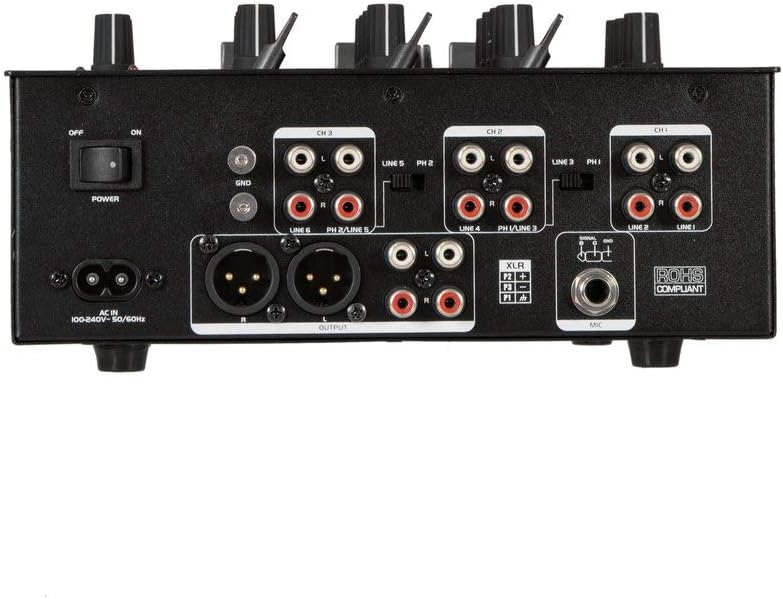
ምስል 3፡ Rear panel of the OMNITRONIC PM-322P DJ Mixer, showing all input and output ports.
- የኃይል ማብሪያ / ማጥፊያ/ ማደባለቅ ያብራል ወይም ያጠፋል።
- ኤሲ ውስጥ Power input for the included power cable (100-240V AC, 50/60Hz).
- Ground Terminal (GND): For connecting a turntable ground wire.
- Channel 3 Inputs (LINE 5/PH 2, LINE 6): RCA inputs for line-level devices (CD players, media players) and phono-level devices (turntables).
- Channel 2 Inputs (LINE 3/PH 1, LINE 4): RCA inputs for line-level devices and phono-level devices.
- Channel 1 Inputs (PLAYER/LINE 1, LINE 2): RCA inputs for line-level devices.
- Master Output (XLR, RCA): Balanced XLR and unbalanced RCA outputs for connecting to a power ampማነቃቂያ ወይም ንቁ ድምጽ ማጉያዎች.
- የማይክሮፎን ግቤት (XLR)፦ ተለዋዋጭ ማይክሮፎን ለማገናኘት የተመጣጠነ የXLR ግብዓት።
5. ማዋቀር
- የኃይል ግንኙነት; Connect the provided power cable to the AC IN socket on the rear panel and then to a suitable grounded power outlet (240V).
- የውጤት ግንኙነት፡- Connect the MASTER OUTPUT (XLR or RCA) to your amplifier or active speaker system.
- የግቤት መሳሪያዎች፡-
- Connect turntables to the PHONO inputs (CH 2 or CH 3) and ensure the PH/LINE switch is set to PH. Connect the turntable's ground wire to the GND terminal.
- Connect CD players, media players, or other line-level devices to the LINE inputs (CH 1, CH 2, or CH 3). Ensure the PH/LINE switch is set to LINE for channels 2 and 3.
- Connect a microphone to the XLR MIC input on the rear panel.
- የጆሮ ማዳመጫዎች Connect your headphones to the 1/4" TRS HEADPHONE output on the front panel.
- የመነሻ ቅንብሮች Before powering on, ensure all channel faders are down, gain controls are at minimum, and the Master Level is at minimum.
- አብራ፡ Flip the POWER switch on the rear panel to the ON position.
6. ኦፕሬሽን
6.1 Playing Audio from Input Channels
- Select the desired input source (LINE or PHONO) using the switch on the rear panel for Channels 2 and 3. Channel 1 is LINE only.
- Start playback on your connected audio source (turntable, CD player).
- Slowly increase the GAIN control for the selected channel until the LED level meter shows a strong signal without clipping (red LEDs).
- Adjust the 3-band EQ (HIGH, MID, LOW) to shape the sound of the channel.
- Raise the channel fader to bring the audio into the main mix.
- Adjust the MASTER LEVEL control to set the overall output volume.
- Use the CUE button to pre-listen to a channel through your headphones before fading it into the mix. Adjust CUE LEVEL and CUE MIX/PGM as needed.
6.2 Using the MP3 Player (USB)
- Insert a USB storage device (formatted as FAT32) containing MP3 fileወደ ዩኤስቢ ወደብ
- The LCD display will show track information.
- Use the PLAY/STOP button to start or pause playback.
- በትራኮች መካከል ለማሰስ የዝላይ ቁልፎችን (<< / >>) ይጠቀሙ።
- The MP3 player typically routes to Channel 1. Adjust Channel 1's GAIN, EQ, and FADER controls as described above.
6.3 የብሉቱዝ ኦዲዮ ዥረት
- Press the PAIRING button on the MP3/Bluetooth module. The Bluetooth indicator will flash, indicating it's in pairing mode.
- On your Bluetooth-enabled device (smartphone, tablet), search for available Bluetooth devices and select "OMNITRONIC PM-322P".
- ከተጣመረ በኋላ የብሉቱዝ አመልካች ያለማቋረጥ ያበራል።
- Start playing audio on your connected device. The Bluetooth audio will route to Channel 1.
- Adjust Channel 1's GAIN, EQ, and FADER controls to mix the Bluetooth audio.
6.4 ማይክሮፎኑን መጠቀም
- Connect a dynamic microphone to the XLR MIC input on the rear panel.
- Speak into the microphone and slowly increase the MIC LEVEL control until the desired volume is achieved without distortion.
- Use the MIC HIGH and MIC LOW controls to adjust the tone of your voice.
7. ጥገና
- ማጽዳት፡ Disconnect the device from power before cleaning. Use a soft, dry cloth to wipe the surface. Do not use liquid cleaners or solvents.
- ማከማቻ፡ When not in use for extended periods, store the mixer in a dry, dust-free environment.
- አገልግሎት፡ በውስጡ ለተጠቃሚ አገልግሎት የሚውሉ ክፍሎች የሉም። ሁሉንም አገልግሎት ወደ ብቃት ላለው የአገልግሎት ሠራተኛ ያማክሩ።
8. መላ መፈለግ
| ችግር | ሊሆን የሚችል ምክንያት | መፍትሄ |
|---|---|---|
| ኃይል የለም | Power cable disconnected; Power switch off; Outlet fault. | የኃይል ገመድ ግንኙነትን ያረጋግጡ፤ የኃይል ማብሪያ / ማጥፊያው መብራቱን ያረጋግጡ፤ ሶኬቱን በሌላ መሳሪያ ይሞክሩ። |
| ምንም የድምፅ ውፅዓት የለም። | Master Level too low; Channel fader down; Gain too low; Amplifier/speakers off or disconnected. | Increase Master Level; Raise channel fader; Increase channel Gain; Check ampየሊፋየር/ድምጽ ማጉያ ግንኙነቶች እና ኃይል። |
| የተዛባ ድምጽ | Gain too high (clipping); Input signal too strong; Faulty cable. | Reduce channel Gain; Check input signal level; Replace cables. |
| ብሉቱዝ አይጣመርም። | Mixer not in pairing mode; Device too far; Device already paired to another unit. | Press PAIRING button; Move device closer; Disconnect from other Bluetooth devices. |
| USB MP3 player not working | USB device not formatted correctly (FAT32); No MP3 files; USB device faulty. | Ensure USB is FAT32 and contains MP3s; Try a different USB device. |
9. ዝርዝሮች
| ሞዴል፡ | PM-322P |
| አምራች፡ | Steinigke Showtechnic GmbH |
| የሰርጦች ብዛት፡- | 3 |
| የግንኙነት ቴክኖሎጂ; | ብሉቱዝ ፣ ዩኤስቢ |
| የኃይል ምንጭ፡- | የኤሌክትሪክ ገመድ |
| ጥራዝtage: | 240 tsልት ኤሲ |
| የእቃው ክብደት፡ | 3.18 ኪ |
| የድምጽ ግቤት፡- | XLR (Microphone), RCA (Line/Phono) |
| የውጤት ማገናኛ አይነት፡- | XLR, TRS 1/4", RCA |
| Model Number (Manufacturer): | 8283410 |
| ዩፒሲ፡ | 04026397653403 |
10. ዋስትና እና ድጋፍ
For warranty information and technical support, please contact the manufacturer, Steinigke Showtechnic GmbH, or your authorized dealer. Keep your proof of purchase for any warranty claims.
For further assistance, please visit the official OMNITRONIC webድህረ ገጽዎን ይጎብኙ ወይም የአካባቢዎን አከፋፋይ ያማክሩ።


