1. ምርት አብቅቷልview
This manual provides instructions for the JVC KD-TD71BT CD Receiver and the PAC SWI-RC Steering Wheel Control Interface. The JVC KD-TD71BT is a car audio receiver featuring Bluetooth connectivity, front USB and AUX inputs, and Amazon Alexa compatibility. The PAC SWI-RC allows for the retention of factory steering wheel control functions when installing an aftermarket radio.
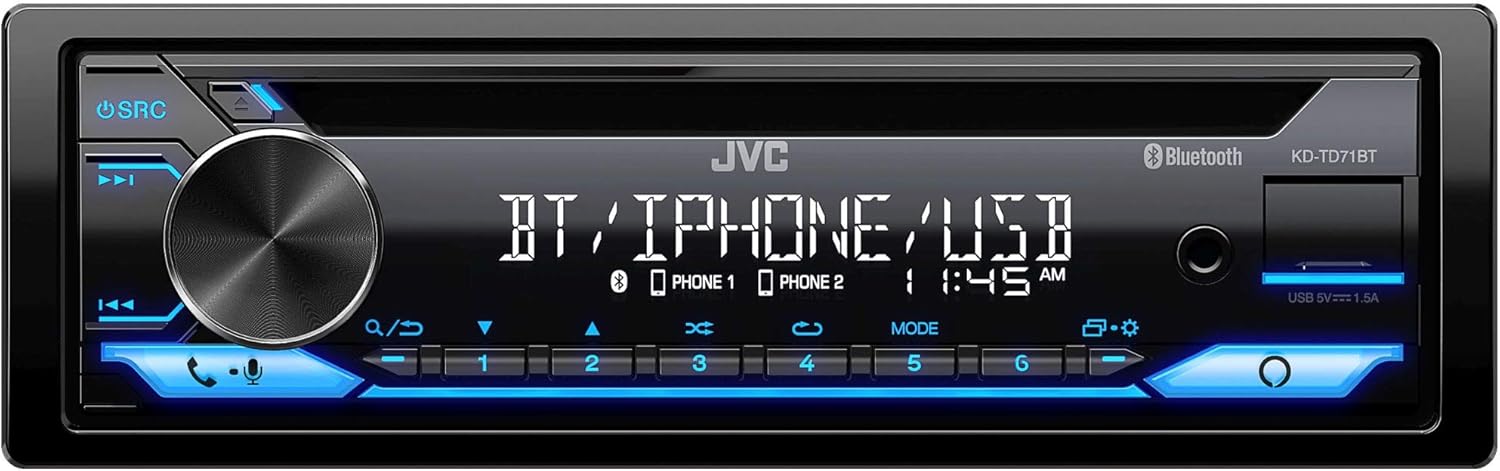
ምስል 1: የፊት view of the JVC KD-TD71BT CD Receiver, showing the display, control knob, and various buttons.
2. በሳጥኑ ውስጥ ያለው
መጫኑን ከመጀመርዎ በፊት ሁሉም አካላት መኖራቸውን ያረጋግጡ።
- JVC KD-TD71BT CD Receiver
- PAC SWI-RC Steering Wheel Control Interface
- Wired Microphone (for JVC KD-TD71BT)
- Wiring Harnesses and Connectors
- ሃርድዌር ማፈናጠጥ
3. ቁልፍ ባህሪያት
- አማዞን አሌክሳ ተኳሃኝ፡ Integrate voice commands for various functions.
- የብሉቱዝ ሽቦ አልባ ቴክኖሎጂ፡ Supports hands-free calling (HFP 1.7) and audio streaming (A2DP, AVRCP) with JVC Streaming DJ (up to 5 BT-Audio connections). Includes a wired microphone.
- የፊት ዩኤስቢ ግቤት፡ Provides up to 1.5A charging and supports FLAC (96kHz/24bit), MP3, WMA, WAV, AAC playback.
- የፊት AUX ግቤት፡ ውጫዊ የድምጽ መሳሪያዎችን ለማገናኘት.
- የድምጽ መቆጣጠሪያ፡- 13-Band Graphic EQ with 11 Preset EQ Settings, Time Alignment, Space Enhancement, Sound Lift, K2 Technology, Loudness Control, Bass Boost Control.
- ቅድመ-ውጤቶች፡ 1 Pair 2.5V Pre-Outs (Rear/Subwoofer Selectable) with High-Pass and Low-Pass Filters, and Subwoofer Level Control.
- ማሳያ፡- 2-Line VA (Vertical Alignment) LCD Display with Music Sync Illumination Effect.
- Steering Wheel Control Retention: The PAC SWI-RC retains factory steering wheel control functions (volume, mode, track) for compatible radios.
- የማይለዋወጥ ማህደረ ትውስታ፡ The PAC SWI-RC retains programming even if the vehicle's battery is disconnected.
4. የደህንነት መረጃ
Read all instructions carefully before installation and use. Improper installation or operation can lead to serious injury or damage. Always consult a professional for installation if you are unsure.
- መሳሪያውን ከመንዳት የሚያዘናጋዎት ነገር በሚፈጥር መንገድ አያንቀሳቅሱት።
- አጭር ወረዳዎችን ወይም ጉዳቶችን ለመከላከል ሁሉም ሽቦዎች በትክክል መገናኘታቸውን ያረጋግጡ።
- Avoid installing the unit in locations exposed to direct sunlight, high temperatures, or excessive moisture.
- የተገለጹ ፊውዝዎችን ብቻ ይጠቀሙ።
- ከትራፊክ ውጪ የሚሰሙ ድምፆችን መስማት በሚችሉበት ደረጃ ድምጹን ያስቀምጡ።
5. ማዋቀር እና መጫን
Professional installation is recommended. Disconnect the vehicle's negative battery terminal before starting any electrical work.
5.1 JVC KD-TD71BT CD Receiver Installation
Follow the wiring diagram provided with your unit. Connect the power, ground, speaker, and accessory wires correctly. Secure the unit in the dashboard opening using the supplied mounting hardware.

ምስል 2: የኋላ view of the JVC KD-TD71BT CD Receiver, illustrating the various wiring harness connections and audio output ports.
5.2 PAC SWI-RC Steering Wheel Control Interface Installation
The SWI-RC connects between your vehicle's factory steering wheel control wiring and the JVC KD-TD71BT's wired remote input. Refer to the specific vehicle application guide provided by PAC for detailed wiring instructions for your vehicle model.
- Identify the steering wheel control wires in your vehicle.
- Connect the SWI-RC's wires to the vehicle's wiring and the JVC receiver's wired remote input.
- Program the SWI-RC according to the PAC instructions to map the steering wheel buttons to the desired functions on the JVC receiver.

Figure 3: The PAC SWI-RC Steering Wheel Control Interface packaging and included components, including the main module and wiring harness.
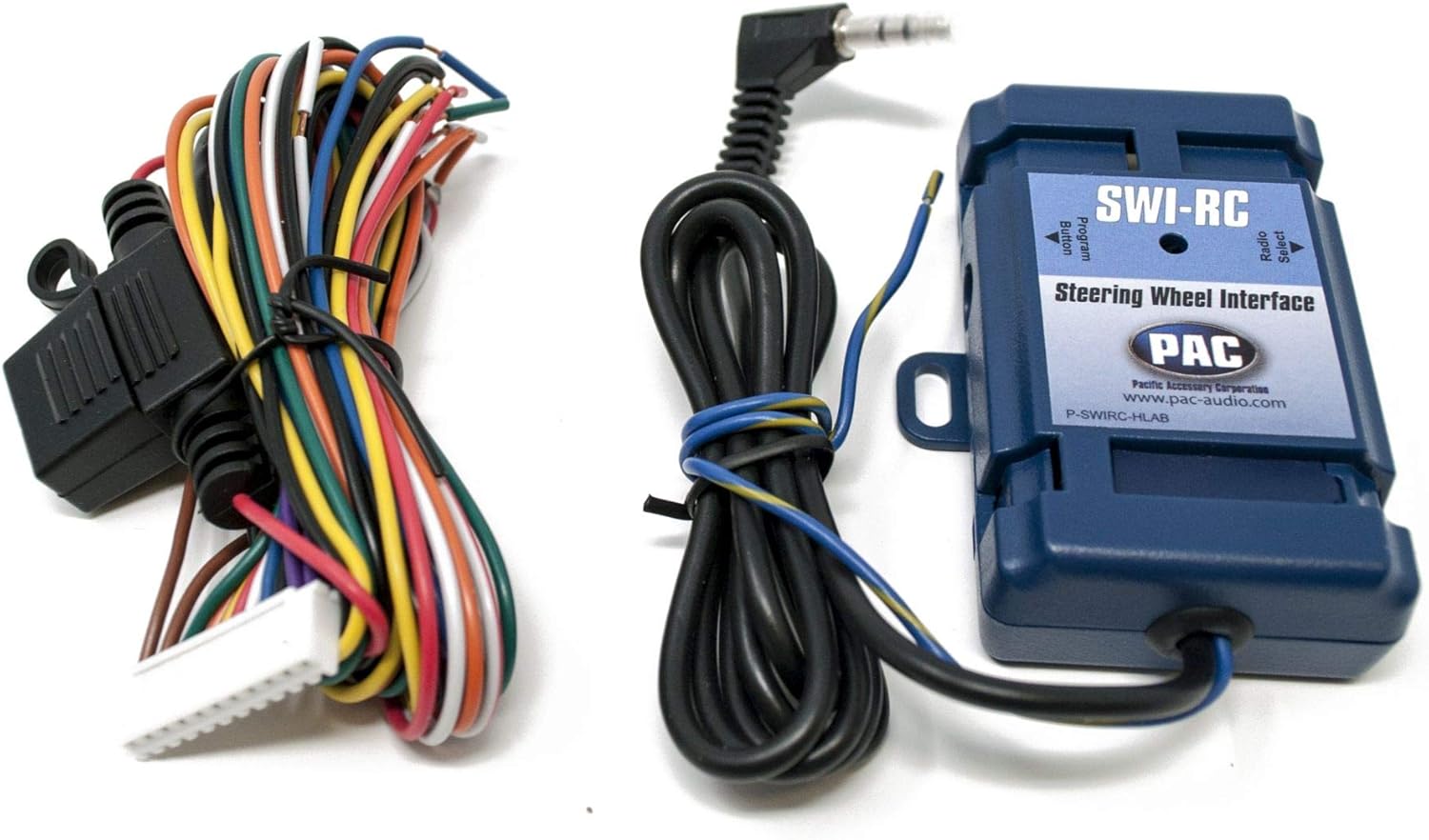
ምስል 4፡ ዝርዝር view of the PAC SWI-RC module and its multi-colored wiring harness, essential for connecting to the vehicle's electrical system.
6. የአሠራር መመሪያዎች
6.1 JVC KD-TD71BT Basic Operation
- ማብራት/ማጥፋት፡ Press the SRC button to turn the unit on. Press and hold SRC to turn it off.
- የድምጽ መቆጣጠሪያ፡- Rotate the large rotary knob to adjust the volume.
- የምንጭ ምርጫ፡- Press the SRC button repeatedly to cycle through available sources (CD, Tuner, Bluetooth, USB, AUX, Alexa).
6.2 የብሉቱዝ ኦፕሬሽን
- ማጣመር፡ Enable Bluetooth on your smartphone. Select 'KD-TD71BT' from the device list. Confirm the pairing code if prompted.
- የድምፅ ዥረት Once paired, select Bluetooth as the source. Play audio from your smartphone, and it will stream to the receiver. Use the receiver's controls or your phone to manage playback (play/pause, skip track).
- ከእጅ ነጻ ጥሪ፡ When a call comes in, the display will show the caller ID. Press the phone button to answer, or press and hold to reject. Use the wired microphone for clear communication.
- የጄቪሲ ዥረት ዲጄ፡ Connect up to 5 Bluetooth audio devices simultaneously. Switch between devices for audio playback.
6.3 USB/AUX Operation
- ዩኤስቢ፡ Connect a USB storage device to the front USB port. The unit will automatically switch to the USB source and begin playback.
- AUX፡ የ3.5ሚሜ ስቴሪዮ ገመድ በመጠቀም የውጭ ኦዲዮ ማጫወቻን ከፊት AUX ግብዓት ጋር ያገናኙ። እንደ ምንጭ AUX ን ይምረጡ።
6.4 የአማዞን አሌክሳ ውህደት
To use Amazon Alexa, ensure your smartphone is connected via Bluetooth and the JVC Alexa app is installed and configured. Press the dedicated Alexa button on the receiver to activate Alexa and issue voice commands for music, navigation, and more.
6.5 የድምጽ ቅንብሮች
Access the audio menu to adjust sound settings:
- አመጣጣኝ Select from 11 preset EQ settings or customize the 13-band graphic equalizer.
- የጊዜ አሰላለፍ፡ Adjust the sound output timing for each speaker to create an optimal sound stage.
- Space Enhancement / Sound Lift: Digital sound processing features to enhance the listening experience.
- የK2 ቴክኖሎጂ፡ JVC's proprietary technology to reproduce the original master sound by expanding the bit rate and frequency range.
- Loudness Control / Bass Boost: Enhance low and high frequencies at lower volumes.
6.6 Steering Wheel Control (via SWI-RC)
Once the PAC SWI-RC is correctly installed and programmed, your vehicle's factory steering wheel buttons will control corresponding functions on the JVC KD-TD71BT, such as:
- ድምጽ ወደ ላይ/ወደታች
- ተከታተል/ታች
- ሁነታ/ምንጭ ምርጫ
- መልስ/ ጥሪን ጨርስ
7. ጥገና
- ማጽዳት፡ የቤቱን የፊት ፓነል ለማጽዳት ለስላሳ እና ደረቅ ጨርቅ ይጠቀሙ። ለጠንካራ ቆሻሻ፣ dampጨርቁን በውሃ. ገላጭ ማጽጃዎችን ወይም ፈሳሾችን ያስወግዱ።
- የሲዲ ማስገቢያ; የሲዲ ማስገቢያውን ከአቧራ እና ከቆሻሻ ነፃ ያድርጉት። የውጭ ነገሮችን አያስገቡ።
- ግንኙነቶች፡ ደህንነታቸው የተጠበቀ መሆኑን ለማረጋገጥ ሁሉንም የገመድ ግንኙነቶችን በየጊዜው ያረጋግጡ።
8. መላ መፈለግ
| ችግር | ሊሆን የሚችል ምክንያት | መፍትሄ |
|---|---|---|
| ኃይል የለም | የተነፈሰ ፊውዝ፤ የተሳሳተ ሽቦ፤ የተሽከርካሪ ባትሪ ዝቅተኛ። | Check and replace fuse; verify wiring connections; charge vehicle battery. |
| ድምጽ የለም። | Volume too low; speaker wires disconnected; incorrect source selected. | Increase volume; check speaker connections; select correct audio source. |
| የብሉቱዝ ማጣመር አልተሳካም። | Bluetooth not enabled on phone; incorrect device selected; interference. | Ensure phone Bluetooth is on; select 'KD-TD71BT'; move closer to unit; restart both devices. |
| የማሽከርከር መቆጣጠሪያዎች አይሰሩም | SWI-RC incorrectly wired; SWI-RC not programmed; radio not compatible. | Verify SWI-RC wiring; reprogram SWI-RC; ensure JVC unit has wired remote input. |
| የዩኤስቢ መሣሪያ አልታወቀም። | የማይጣጣም file ቅርጸት፤ የተበላሸ የዩኤስቢ መሣሪያ፤ መሳሪያው በጣም ብዙ ኃይል ይፈልጋል። | ይፈትሹ file formats; try a different USB device; ensure device is self-powered if needed. |
9. ዝርዝሮች
| ባህሪ | ዝርዝር መግለጫ |
|---|---|
| የምርት ስም | JVC |
| የሞዴል ቁጥር | KD-TD71BT |
| የምርት ልኬቶች | 17 x 15.25 x 9.75 ኢንች |
| የእቃው ክብደት | 5 ፓውንድ |
| የግንኙነት ቴክኖሎጂ | ረዳት፣ ብሉቱዝ፣ ዩኤስቢ |
| የመቆጣጠሪያ አይነት | አማዞን አሌክሳ፣ አንድሮይድ |
| ልዩ ባህሪያት | Equalizer, Pandora, Spotify |
| ተስማሚ መሣሪያዎች | ስማርትፎን ፣ ድምጽ ማጉያ |
| የማገናኛ አይነት | 3.5 ሚሜ ጃክ ፣ ዩኤስቢ |
| የድምጽ ውፅዓት ሁኔታ | ሞኖ ፣ እስቲሪዮ |
| የውጤት ዋትtage | 50 Watts (MOS-FET 50W x 4 Power Output, 22W RMS x 4) |
10. ዋስትና እና ድጋፍ
This product is covered by a manufacturer's warranty. Please refer to the warranty card included with your purchase for specific terms and conditions. For technical support, troubleshooting assistance, or warranty claims, please contact JVC customer service or visit the official JVC website. For support regarding the PAC SWI-RC interface, please refer to PAC Audio's official documentation and support channels.


