1. መግቢያ
The EPEVER Tracer1210AN MPPT Solar Charge Controller is designed to efficiently manage power from your solar panels to charge batteries. It features advanced Maximum Power Point Tracking (MPPT) technology, ensuring high tracking efficiency of over 99.5%. This controller supports 12V and 24V battery systems automatically and can handle a maximum PV input voltage of 100V. It is compatible with various battery types, including sealed lead-acid, gel, flooded, and lithium batteries. The built-in LCD screen displays key charging parameters, and multiple connectivity options allow for personalized settings and monitoring via remote meter, mobile app, or PC software.
2. የምርት ባህሪዎች
The Tracer1210AN controller integrates several features for optimal performance and user interaction.

- LCD ማሳያ፡- Shows real-time operating data and fault information.
- አዝራር ይምረጡ፡- Used to navigate through different display interfaces.
- አዝራር አስገባ፡ Used to confirm selections or enter settings menus.
- የመገጣጠም ቀዳዳዎች; For secure installation of the controller.
- የሙቀት ዳሳሽ ወደብ፡ Connects the Remote Temperature Sensor (RTS) for accurate battery temperature compensation.
- Solar Panel Terminals: Connects to the solar panel array.
- የባትሪ ተርሚናሎች፡- ከባትሪው ባንክ ጋር ይገናኛል.
- የጭነት ተርሚናሎች፡ Connects to DC loads.
- COM Port (RS485): For communication with accessories like the MT50 remote meter, PC software, or mobile app.

3. ማዋቀር እና መጫን
Proper installation is crucial for the safe and efficient operation of your solar charge controller. Follow these steps carefully.
3.1 Unboxing እና ክፍሎች
Before installation, ensure all components are present and undamaged. The package typically includes the Tracer1210AN controller, an MT50 remote meter, a Remote Temperature Sensor (RTS), and an RS485 PC communication cable.

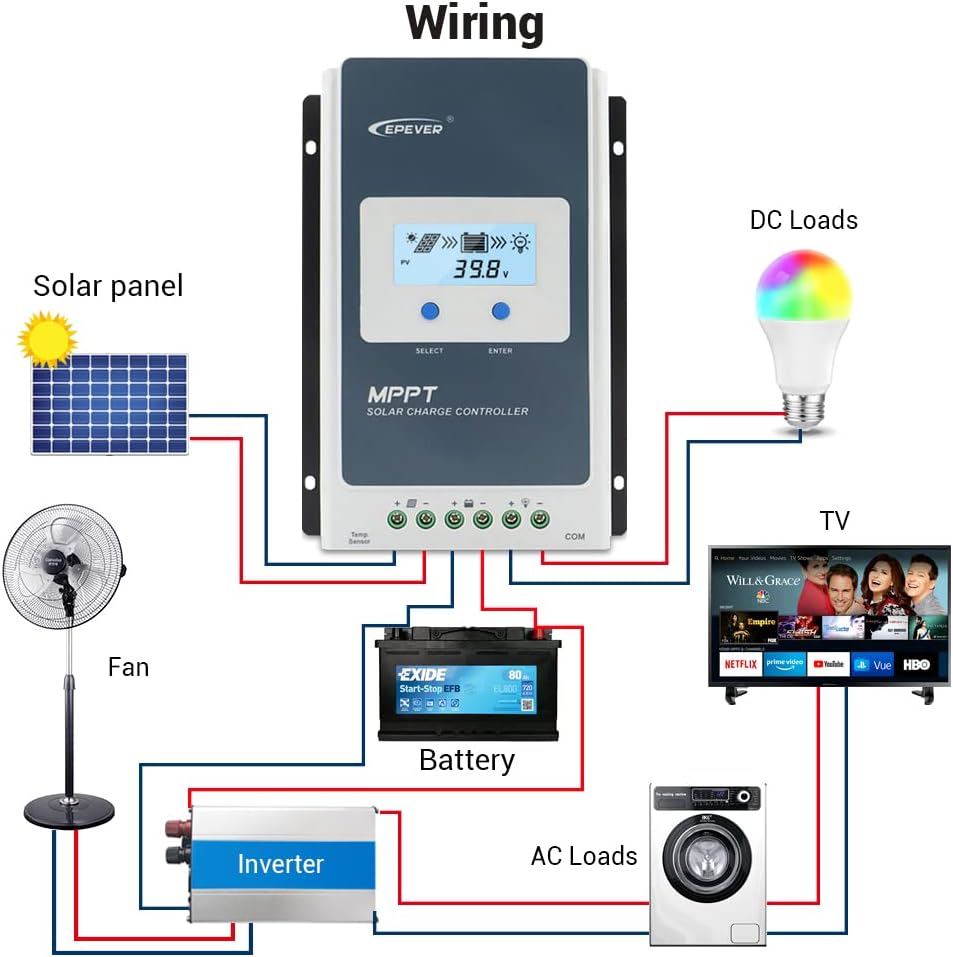
3.2 የሽቦ ዲያግራም
Connect the components in the specified order to prevent damage. The connection order is: Battery → Solar Panel → Load. The disassembly order is the reverse: Load → Solar Panel → Battery.
3.3 Communication Ports and Accessories
The controller features various ports for enhanced monitoring and control.

- Remote Temperature Sensor (RTS): Connect the RTS300R47K3.81A to the designated port for accurate battery temperature compensation. The standard cable length is 3m.
- RS485 የመገናኛ ወደብ፡ This RJ45 port allows connection to various accessories for monitoring and parameter setting.
3.4 የመጫኛ ደረጃዎች
- Mount the controller securely using the provided mounting holes.
- Connect the battery to the controller's battery terminals. Ensure correct polarity.
- Connect the solar panel to the controller's solar panel terminals. Ensure correct polarity.
- Connect the DC loads to the controller's load terminals. Ensure correct polarity.
- Connect the temperature sensor probe to the controller.
3.5 Video: Unboxing and Installation
Watch this video for a visual guide on unboxing and installing the EPEVER Tracer-AN controller and its accessories.
4. የአሠራር መመሪያዎች
This section covers basic operation and how to configure essential settings on your controller.
4.1 Manual Control Mode
The controller supports manual control of the load. Press the 'ENTER' button to toggle the load on or off.
4.2 Setting the Battery Type
It is essential to set the correct battery type for optimal charging and battery longevity. The controller supports various battery types including Sealed (default), Gel, Flooded, and different Lithium battery configurations.
የባትሪውን አይነት ለማዘጋጀት፡-
- Press and hold the 'ENTER' button for 5 seconds when the battery voltage interface is displayed.
- Press the 'SELECT' button when the battery type interface is flashing to cycle through available battery types.
- Press the 'ENTER' button to confirm your selection.
4.3 Setting the Load Mode
The load working mode determines how the connected DC loads operate. Options include Light ON/OFF, various timer settings, test mode, and manual mode.
To set the load mode:
- Press and hold the 'ENTER' button for 5 seconds when the load mode interface is displayed.
- Press the 'SELECT' button when the load mode interface is flashing to cycle through available modes.
- Press the 'ENTER' button to confirm your selection.
5. ዝርዝሮች
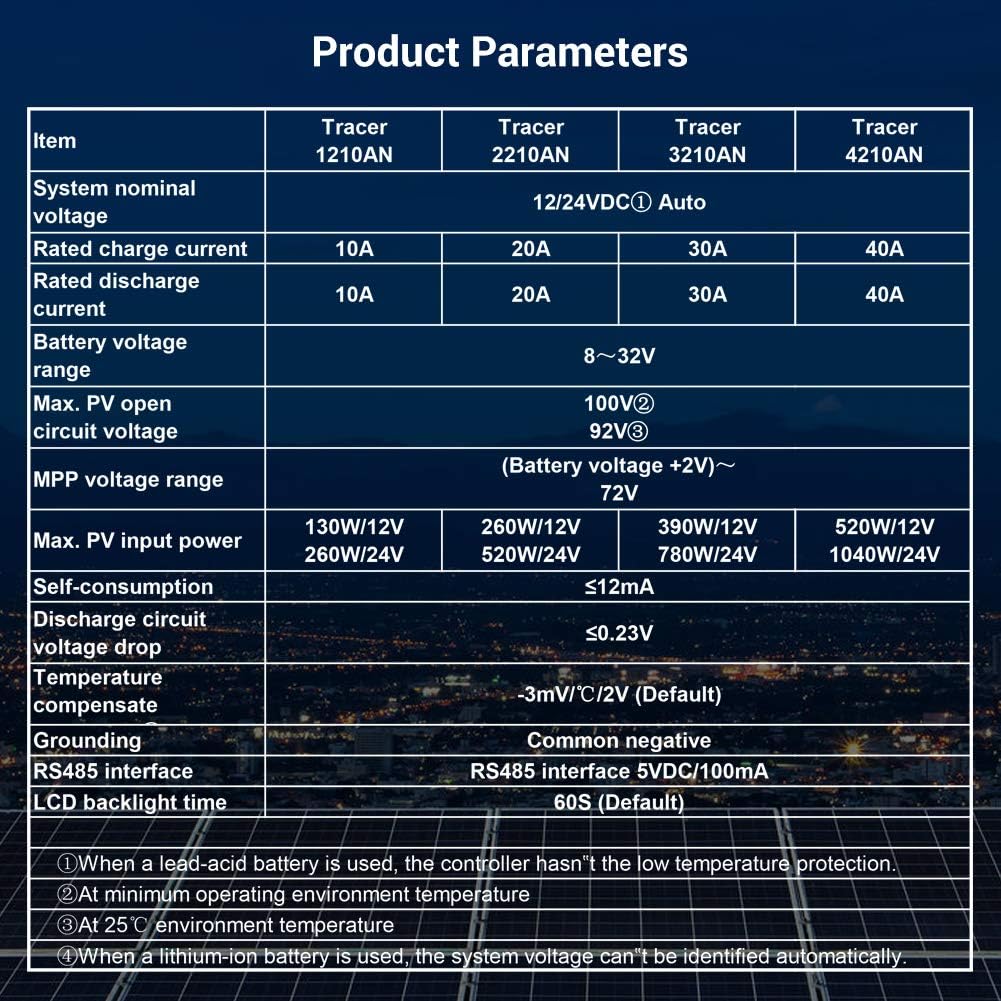
Below are the technical specifications for the Tracer1210AN MPPT Solar Charge Controller.
| መለኪያ | Value (Tracer1210AN) |
|---|---|
| የስርዓት ስም ጥራዝtage | 12/24 ቪዲሲ ራስ-ሰር |
| ደረጃ የተሰጠው ክፍያ የአሁኑ | 10 ኤ |
| ደረጃ የተሰጠው መፍሰስ ወቅታዊ | 10 ኤ |
| ባትሪ ቁtagሠ ክልል | 8 ~ 32 ቪ |
| ከፍተኛ. PV ክፍት ዑደት ጥራዝtage | 100V (በ25°ሴ የአካባቢ ሙቀት) |
| MPP ጥራዝtagሠ ክልል | ባትሪ ቁtage +2V ~ 72V |
| ከፍተኛ. የ PV ግቤት ኃይል | 130W/12V፣ 260W/24V |
| ራስን መጠቀሚያ | ≤12mA |
| የማፍሰሻ ዑደት ጥራዝtage ጣል | ≤0.23 ቪ |
| Temperature Compensate | -3mV/°C/2V (ነባሪ) |
| መሬቶች | የተለመደ አሉታዊ |
| RS485 በይነገጽ | 5VDC / 100mA |
| LCD የኋላ ብርሃን ጊዜ | 60S (ነባሪ) |
6. መለዋወጫዎች
The EPEVER Tracer1210AN controller is often bundled with or compatible with several accessories to enhance its functionality.
- MT50 Remote Meter: This remote meter can display various operating data and fault information. It features easy-to-operate buttons and a clear numeric display. It is used for monitoring and setting controller parameters.
- Remote Temperature Sensor (RTS300R47K3.81A): Acquires battery temperature for accurate temperature compensation of control parameters. The standard length of the cable is 3m.
- USB to RS485 Cable (CC-USB-RS485-150U): Used to connect the controller to a PC for monitoring and setting parameters via Solar Station PC software. The cable length is 1.5m.
- OTG Cable (OTG-12CM): Used to connect a mobile communication cable to achieve real-time monitoring and parameter modification via a mobile APP.
- WiFi Serial Adapter (eBox-WiFi-01): Allows monitoring and setting parameters via mobile APP software through WiFi signals.
- RS485 to Bluetooth Adapter (eBox-BLE-01): Enables monitoring and setting parameters via mobile APP software through Bluetooth signals.
- Logger (eLOG01): Records the operating status of the controller for later review.

7. መላ መፈለግ
If you encounter issues with your EPEVER Tracer1210AN controller, refer to the following common troubleshooting tips:
- በ LCD ላይ ማሳያ የለም የባትሪውን ግንኙነት ይፈትሹ እና የባትሪውን መጠን ያረጋግጡtagሠ በሚሠራበት ክልል ውስጥ ነው።
- መሙላት የለም፡ Verify solar panel connections and ensure sufficient sunlight. Check for any shading on the solar panels. Confirm the battery type setting is correct.
- ጭነት እየሰራ አይደለም፦ Check load connections and ensure the load mode is set correctly (e.g., Manual ON, Light ON/OFF). Verify that the battery voltage ከዝቅተኛው ጥራዝ በላይ ነውtagኢ-ማቋረጥ ገደብ።
- ትክክለኛ ያልሆነ የሙቀት ንባብ; Ensure the Remote Temperature Sensor (RTS) is properly connected and positioned near the battery.
- የግንኙነት ጉዳዮች፡- Check the RS485 cable connections to the remote meter, PC, or adapter. Ensure drivers are installed for PC communication.
For more detailed troubleshooting, consult the full product manual or contact EPEVER customer support.
8. ጥገና
መደበኛ ጥገና የፀሐይ ኃይል መሙያ መቆጣጠሪያዎ ረጅም ዕድሜ እና ጥሩ አፈፃፀም ለማረጋገጥ ይረዳል።
- ንጽህና፡- መቆጣጠሪያውን ንፁህ እና ከአቧራ እና ፍርስራሾች ነፃ ያድርጉት። ለማጽዳት ደረቅ ጨርቅ ይጠቀሙ.
- ግንኙነቶች፡ ሁሉንም የሽቦ ግንኙነቶች ጥብቅነት እና ዝገት ለማረጋገጥ በየጊዜው ያረጋግጡ። ልቅ የሆኑ ግንኙነቶች ከመጠን በላይ ሙቀት እና ጉዳት ሊያስከትሉ ይችላሉ።
- የአየር ማናፈሻ; Ensure adequate airflow around the controller to facilitate heat dissipation. Do not block the heat sink fins.
- የባትሪ ጤና፡ የባትሪውን መጠን ይቆጣጠሩtage and health regularly. Ensure the battery type setting on the controller matches your battery.
- የጽኑዌር ዝማኔዎች ፦ የአምራቹን ያረጋግጡ webአፈጻጸምን ለማሻሻል ወይም አዳዲስ ባህሪያትን ለመጨመር የሚገኙ የጽኑዌር ዝማኔዎችን ለማግኘት ጣቢያ።
9. ዋስትና እና ድጋፍ
EPEVER products are designed for reliability and performance. For warranty information and technical support, please refer to the official EPEVER webጣቢያ ወይም የአካባቢዎን አከፋፋይ ያነጋግሩ።
You can also visit the official iSunergy store on Amazon for product information and support: iSunergy Amazon Store.


