1. መግቢያ
ስለገዙ እናመሰግናለንasing the Antec Sensio Pie Maker Model KP8104. This appliance is designed to simplify the process of making delicious pies. Please read this manual thoroughly before operating the pie maker to ensure safe and efficient use. Keep this manual for future reference.
2. ጠቃሚ የደህንነት መመሪያዎች
የኤሌክትሪክ ዕቃዎችን በሚጠቀሙበት ጊዜ, የሚከተሉትን ጨምሮ መሰረታዊ የደህንነት ጥንቃቄዎች ሁልጊዜ መከተል አለባቸው.
- ከመጠቀምዎ በፊት ሁሉንም መመሪያዎች ያንብቡ.
- ትኩስ ቦታዎችን አይንኩ. እጀታዎችን ወይም ማዞሪያዎችን ይጠቀሙ.
- የኤሌክትሪክ ንዝረትን ለመከላከል ገመዱን፣ መሰኪያዎችን ወይም መሳሪያውን በውሃ ወይም በሌላ ፈሳሽ ውስጥ አታጥመቁ።
- ማንኛውም መሳሪያ በልጆች ወይም በአቅራቢያው በሚውልበት ጊዜ የቅርብ ክትትል አስፈላጊ ነው.
- ጥቅም ላይ በማይውልበት ጊዜ እና ከማጽዳትዎ በፊት ከመውጫው ይንቀሉ. ክፍሎችን ከመልበስ ወይም ከማውጣቱ በፊት እንዲቀዘቅዝ ይፍቀዱ.
- በተበላሸ ገመድ ወይም መሰኪያ ወይም መሳሪያው ከተበላሸ በኋላ ወይም በማንኛውም መልኩ ከተበላሸ በኋላ ማንኛውንም መሳሪያ አይጠቀሙ።
- በመሳሪያው አምራቹ ያልተመከሩ ተጓዳኝ አባሪዎችን መጠቀም ጉዳት ሊያስከትል ይችላል።
- ከቤት ውጭ አይጠቀሙ.
- ገመዱ በጠረጴዛው ጠርዝ ወይም በጠረጴዛው ጠርዝ ላይ እንዲንጠለጠል አይፍቀዱ, ወይም ትኩስ ቦታዎችን አይንኩ.
- በጋለ ጋዝ ወይም በኤሌክትሪክ ማቃጠያ ላይ ወይም በሙቀት ምድጃ ውስጥ አታስቀምጡ.
- ትኩስ ዘይት ወይም ሌላ ትኩስ ፈሳሾችን የያዘ መሳሪያ ሲንቀሳቀስ ከፍተኛ ጥንቃቄ መደረግ አለበት።
- ሁል ጊዜ ሶኬቱን ከመሳሪያው ጋር አያይዘው ከዚያ ገመዱን በግድግዳው መውጫ ላይ ይሰኩት። ግንኙነቱን ለማቋረጥ ማንኛውንም መቆጣጠሪያ ወደ "አጥፋ" ያጥፉት፣ ከዚያ መሰኪያውን ከግድግዳው መውጫ ያስወግዱት።
- መሳሪያን ከታቀደው ጥቅም ውጪ አይጠቀሙ.
3. ማዋቀር
Before first use, ensure all packaging materials are removed. Wipe the cooking plates with a damp cloth and dry thoroughly. The appliance is ready for use.
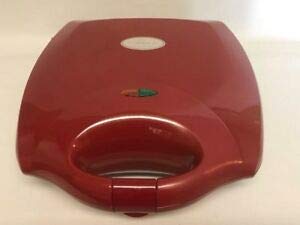
Figure 1: Antec Sensio Pie Maker Model KP8104. This image displays the compact red pie maker with its lid closed, ready for use.
4. የአሠራር መመሪያዎች
- አዘገጃጀት፥ Prepare your pie crust and filling according to your recipe. Ensure the pie maker is clean and dry.
- ቅድመ ማሞቂያ፡ Close the lid and plug the pie maker into a standard electrical outlet. The indicator light will illuminate, signaling that the appliance is preheating.
- Ready to Bake: Once the pie maker reaches the optimal baking temperature, the indicator light will turn off (or change color, depending on the model). This typically takes 3-5 minutes.
- ግብዓቶችን አክል፡ Carefully open the lid. Place one pie crust into each cooking cavity. Add your desired filling, ensuring not to overfill. Place the top crusts over the filling.
- መጋገር፡ Close the lid firmly. The indicator light will illuminate again as the appliance maintains its temperature. Bake for approximately 8-12 minutes, or until the crusts are golden brown and the filling is heated through. Baking time may vary based on recipe and desired crispness.
- ማስወገድ፡ Using a non-metallic utensil (e.g., plastic or wooden spatula), carefully remove the cooked pies from the cavities.
- ማቀዝቀዝ፡ Allow pies to cool slightly before serving.
- ጨርስ፡ Unplug the pie maker from the outlet when finished baking.
5. ጽዳት እና ጥገና
Proper cleaning and maintenance will extend the life of your pie maker.
- ረጋ በይ፥ ከማፅዳቱ በፊት ሁል ጊዜ መሣሪያው ሙሉ በሙሉ እንዲቀዘቅዝ ይፍቀዱ።
- ይንቀሉ፡ Ensure the pie maker is unplugged from the electrical outlet.
- የጽዳት ሳህኖች፡ የማይጣበቁ የማብሰያ ሳህኖችን በማስታወቂያ ይጥረጉamp cloth or sponge. For stubborn residue, use a small amount of cooking oil to soften it, then wipe clean. Do not use abrasive cleaners or metal scouring pads, as these can damage the non-stick coating.
- ውጫዊ፡ የመሳሪያውን ውጫዊ ክፍል ለስላሳ, መamp cloth. Do not immerse the pie maker in water or any other liquid.
- ማከማቻ፡ Store the pie maker in a clean, dry place.
6. መላ መፈለግ
| ችግር | ሊሆን የሚችል ምክንያት | መፍትሄ |
|---|---|---|
| መሣሪያ አይበራም። | አልተሰካም; የኃይል መውጫ ብልሽት. | Ensure the plug is securely inserted into a working outlet. Check the circuit breaker. |
| Pies are not cooking evenly. | Uneven filling; appliance not fully preheated. | Ensure filling is evenly distributed. Allow the pie maker to fully preheat before adding ingredients. |
| Pies stick to the cooking plates. | Insufficient non-stick coating; plates not clean. | Ensure cooking plates are clean. A light spray of cooking oil can be used if needed, though typically not required for non-stick surfaces. |
7. ዝርዝሮች
- የምርት ስም፡ አንቴክ
- ሞዴል፡ KP8104
- ቀለም፡ ቀይ
- ቅርጽ፡ ዙር
- አቅም፡ 1 Kilogram (approximate)
- የምርት እንክብካቤ; Hand Wash (for removable parts, if applicable; main unit wipe clean)
- የእቃው ክብደት፡ 1 ፓውንድ
- ዩፒሲ፡ 704455690631
8. ዋስትና እና ድጋፍ
Antec provides a limited warranty for this product. For detailed warranty information, product support, or to inquire about replacement parts, please refer to the warranty card included with your purchase or visit the official Antec website. Please have your model number (KP8104) and proof of purchase available when contacting support.


