1. መግቢያ
Thank you for choosing the FeinTech LED Desk Lamp LTL00600. This high-quality desk lamp is designed to provide optimal lighting for your workspace while offering convenient features such as a USB charging port, adjustable brightness, and customizable color temperature. Please read this manual thoroughly before use to ensure proper operation and to maximize the lifespan of your product.
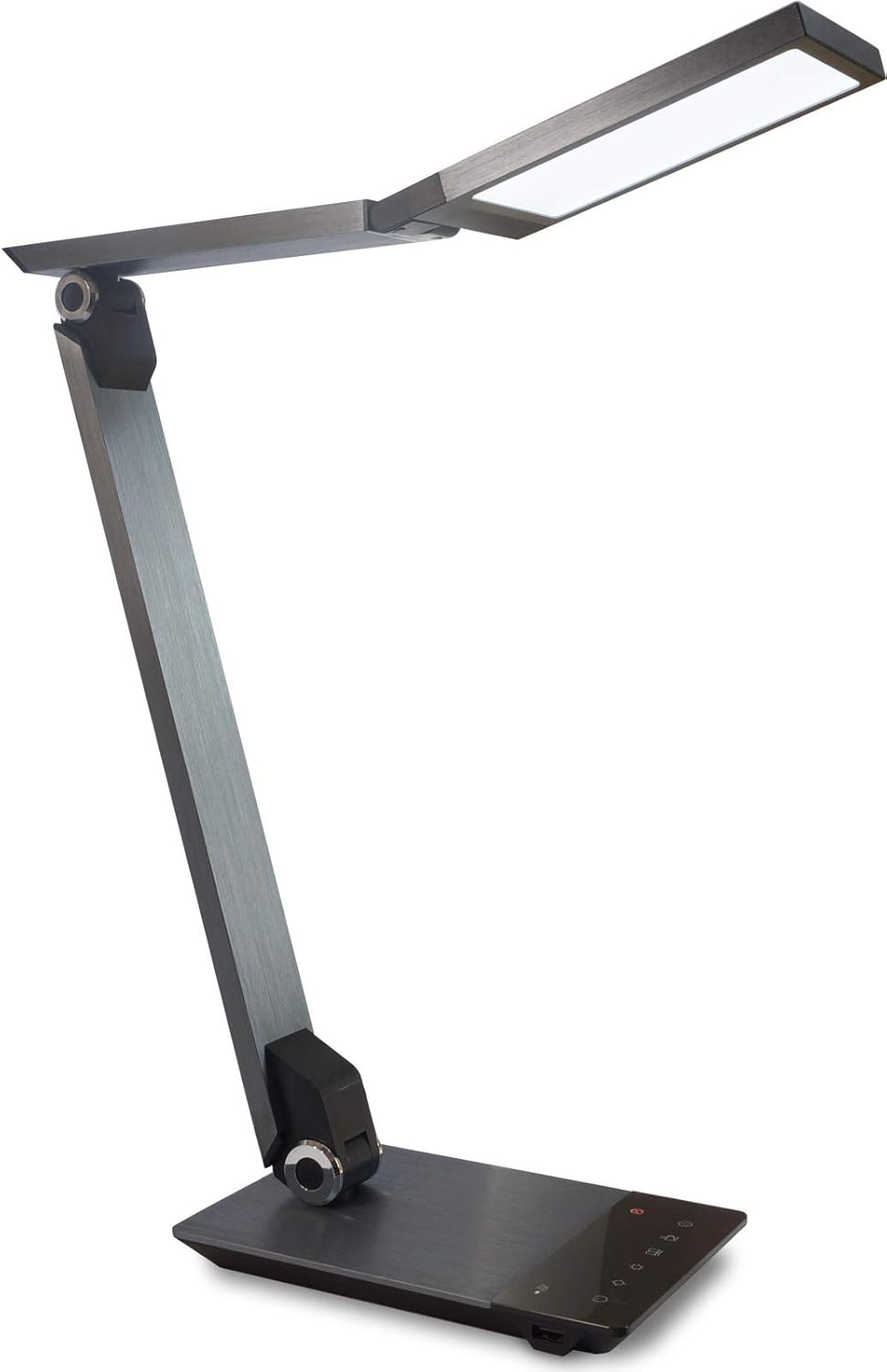
Image 1.1: FeinTech LED Desk Lamp LTL00600. This image displays the lamp ቀጥ ባለ ቦታው ላይ፣ አሳይasing its brushed aluminum finish and sleek design.
2. የደህንነት መመሪያዎች
ጉዳት ወይም ጉዳት እንዳይደርስ ለመከላከል የሚከተሉትን የደህንነት ጥንቃቄዎች ይከተሉ፡
- የኃይል አስማሚው ከተስማሚ የኃይል መውጫ ጋር መገናኘቱን ያረጋግጡ።
- ኤልን አታጋልጡamp ውሃ ወይም ከመጠን በላይ እርጥበት።
- Avoid disassembling or modifying the lampጥገናዎች በሰለጠኑ ባለሙያዎች ብቻ መከናወን አለባቸው።
- ኤልን አቆይamp ከሙቀት ምንጮች እና በቀጥታ የፀሐይ ብርሃን.
- ኤልን አጽዳamp ለስላሳና ደረቅ ጨርቅ ብቻ። ሻካራ ማጽጃዎችን ወይም ሟሟቶችን አይጠቀሙ።
- ለረጅም ጊዜ በቀጥታ ወደ LED መብራት ምንጭ አይመልከቱ።
3. የጥቅል ይዘቶች
እባክዎ ሁሉም እቃዎች በጥቅሉ ውስጥ እንዳሉ ያረጋግጡ፡-
- FeinTech LED ዴስክ ኤልamp (Model: LTL00600)
- የኃይል አስማሚ (12V/2A)
4. ምርት አብቅቷልview
Familiarize yourself with the components of your FeinTech LED Desk Lamp:
- Lamp ራስ፡ Contains the LED light source.
- የሚስተካከሉ ክንዶች; Multiple joints for flexible positioning.
- መሰረት፡ Provides stability and houses the control panel and USB port.
- የቁጥጥር ፓነል Touch-sensitive buttons for power, brightness, color temperature, and timer.
- የዩኤስቢ ኃይል መሙያ ወደብ Located on the side of the base for device charging.

ምስል 4.1፡ ከላይ ወደ ታች view የ lamp's base and control panel. This image highlights the touch-sensitive buttons for various functions.

ምስል 4.2፡ ጎን view የ lamp's base, showing the integrated USB charging port. This port allows for convenient charging of compatible devices.
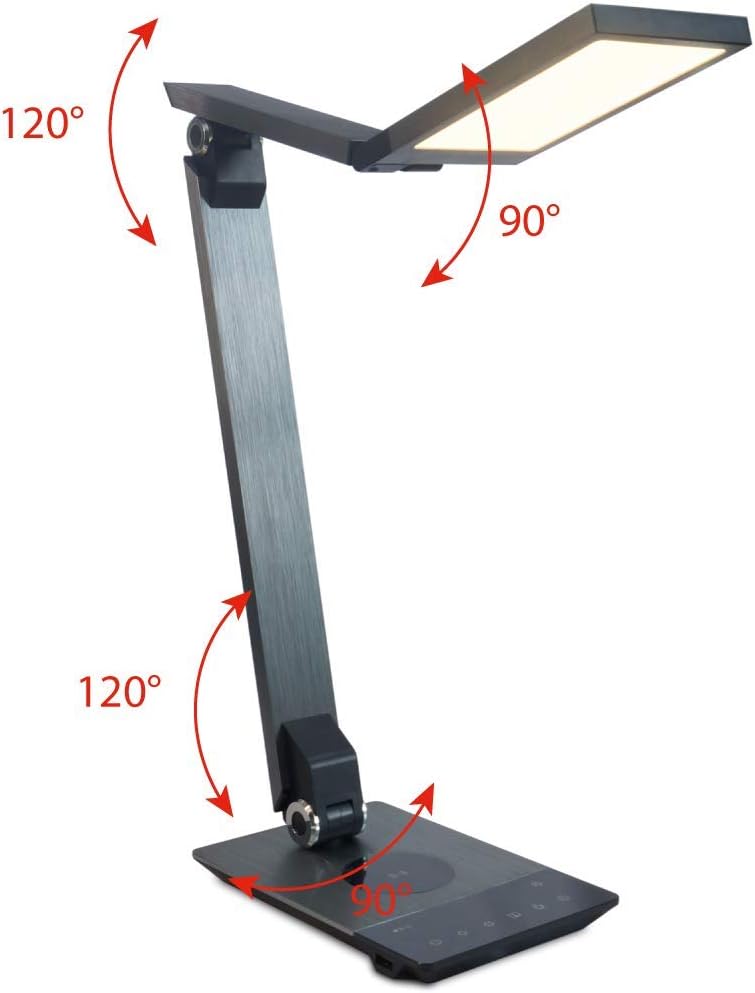
Image 4.3: Diagram illustrating the articulation angles of the lamp's joints. The lamp head can rotate 90 degrees, the upper arm 120 degrees, and the lower arm 120 degrees, allowing for flexible positioning.
5. ማዋቀር
ለመጀመር የሚከተሉትን ደረጃዎች ይከተሉ
- ማሸግ ፦ ሁሉንም ንጥረ ነገሮች ከማሸጊያው ውስጥ በጥንቃቄ ያስወግዱ.
- አቀማመጥ፡- ኤልን ያስቀምጡamp base on a stable, flat surface. Ensure there is enough space for the lamp to be adjusted without obstruction.
- የግንኙነት ኃይል; Insert the power adapter cable into the DC input port on the back of the lamp መሠረት። የኃይል አስማሚውን ወደ መደበኛ የኤሌክትሪክ ሶኬት ይሰኩ።
6. የአሠራር መመሪያዎች
The FeinTech LED Desk Lamp features intuitive touch controls on its base.
6.1 ማብራት / ማጥፋት
- የሚለውን ይንኩ። የኃይል አዝራር on the control panel (refer to Image 4.1) to turn the lamp በርቷል ወይም ጠፍቷል.
6.2 Brightness Adjustment (Dimming)
- ከ ኤልamp በርቷል፣ ይንኩ እና ይያዙ ብሩህነት ወደ ላይ or ብሩህነት ወደ ታች buttons (refer to Image 4.1) to steplessly adjust the light intensity.
- Lamp base will vibrate slightly when the minimum or maximum brightness level is reached.
6.3 የቀለም ሙቀት ማስተካከያ
- ከ ኤልamp በርቷል፣ ይንኩ እና ይያዙ Color Temperature Up or Color Temperature Down buttons (refer to Image 4.1) to steplessly adjust the light color from warm white (2700K) to cool white (6500K).
- Lamp base will vibrate slightly when the minimum or maximum color temperature is reached.
6.4 Favorite Settings
- Lamp allows you to store and recall 3 favorite light settings (brightness and color temperature).
- To save a setting: Adjust the brightness and color temperature to your desired level. Then, touch and hold one of the ተወዳጅ አዝራሮች (refer to Image 4.1) until the lamp flashes briefly, indicating the setting is saved.
- To recall a setting: Simply touch the corresponding ተወዳጅ አዝራር.
- The last used brightness and color temperature settings are automatically saved even after the lamp ጠፍቷል።
6.5 USB መሙላት ተግባር
- Connect your smartphone or other compatible device to the USB charging port on the side of the lamp base (refer to Image 4.2) using a suitable USB cable.
- The intelligent USB port delivers up to 2.4A for fast charging.
- An LED indicator will signal ongoing and completed charging status.
6.6 የሰዓት ቆጣሪ ተግባር
- የሚለውን ይንኩ። የሰዓት ቆጣሪ አዝራር (refer to Image 4.1) to activate the timer function.
- The first touch activates a 3-minute timer.
- A second touch activates a 1-hour timer.
- Lamp will automatically turn off after the selected time period.
7. ጥገና
የእርስዎን ኤል ለመጠበቅamp's appearance and functionality:
- ሁልጊዜ l ግንኙነትን ያላቅቁamp ከማጽዳት በፊት ከኃይል አቅርቦት.
- ኤልን ይጥረጉamp ለስላሳ ፣ ደረቅ ፣ ከቆሻሻ ነፃ በሆነ ጨርቅ።
- ፈሳሽ ወይም ኤሮሶል ማጽጃዎችን አይጠቀሙ, ምክንያቱም የመጨረሻውን ወይም የውስጥ ክፍሎችን ሊጎዱ ይችላሉ.
- Avoid scratching the brushed aluminum surface.
8. መላ መፈለግ
ከእርስዎ l ጋር ችግሮች ካጋጠሙዎትampየሚከተሉትን የተለመዱ ችግሮችን እና መፍትሄዎችን ተመልከት።
| ችግር | ሊሆን የሚችል ምክንያት | መፍትሄ |
|---|---|---|
| Lamp አይበራም። | የኃይል አቅርቦት የለም። | Check if the power adapter is securely connected to the lamp እና የኤሌክትሪክ መውጫው. መውጫውን በሌላ መሳሪያ ይሞክሩት። |
| የዩኤስቢ ኃይል መሙላት አይሰራም። | መሣሪያው ተኳሃኝ አይደለም ወይም የኬብሉ የተሳሳተ ነው። | Ensure your device is compatible with USB charging. Try a different USB cable. Verify the lamp በርቷል ። |
| የንክኪ መቆጣጠሪያዎች ምላሽ የማይሰጡ ናቸው። | ጊዜያዊ የሶፍትዌር ብልሽት ወይም የኃይል ችግር። | Disconnect the power adapter for 30 seconds, then reconnect it. Ensure your fingers are clean and dry when operating the touch controls. |
9. ዝርዝሮች
| የሞዴል ቁጥር | LTL00600 |
| ልኬቶች (L x W x H) | 36 x 13.5 x 44 ሴሜ (በግምት 14.2 x 5.3 x 17.3 ኢንች) |
| ክብደት | 1.84 ኪ.ግ (በግምት. 4.06 ፓውንድ) |
| ቁሳቁስ | ብሩሽ አልሙኒየም |
| የብርሃን ምንጭ | LED |
| Max. Light Output | 500 lumens (1000 lux at 40 cm distance) |
| የቀለም ሙቀት (CCT) | 2700 K (Warm White) to 6500 K (Cool White) |
| Power Consumption (Lamp ብቻ) | ከፍተኛ. 10 ዋ |
| Power Consumption (Lamp & Charging) | ከፍተኛ. 22 ዋ |
| የዩኤስቢ ውፅዓት | እስከ 2.4 ኤ |
| ግብዓት Voltagሠ (አስማሚ) | 12 ቮ / 2 አ |
| የመቀየሪያ አይነት | ንካ |

Image 9.1: Diagram showing the dimensions of the FeinTech LED Desk Lamp. የኤልamp measures approximately 36 cm in length, 13.5 cm in width, and 44 cm in height.
10. ዋስትና እና ድጋፍ
FeinTech products are designed for reliability and performance. For warranty information or technical support, please refer to the warranty card included with your purchase or visit the official FeinTech webጣቢያ. ለዋስትና ጥያቄዎች እባክዎ የግዢ ማረጋገጫዎን ያቆዩ።


