1. መግቢያ እና በላይview
The Unify OpenScape DeskPhone CP200T is an entry-level digital IP phone designed for essential communication needs in a professional environment. This manual provides detailed instructions for setting up, operating, and maintaining your CP200T phone, ensuring optimal performance and longevity.
Key features include a clear black and white display, programmable function keys, and hands-free operation. The phone is built for reliability and ease of use, making it suitable for various business communication requirements.
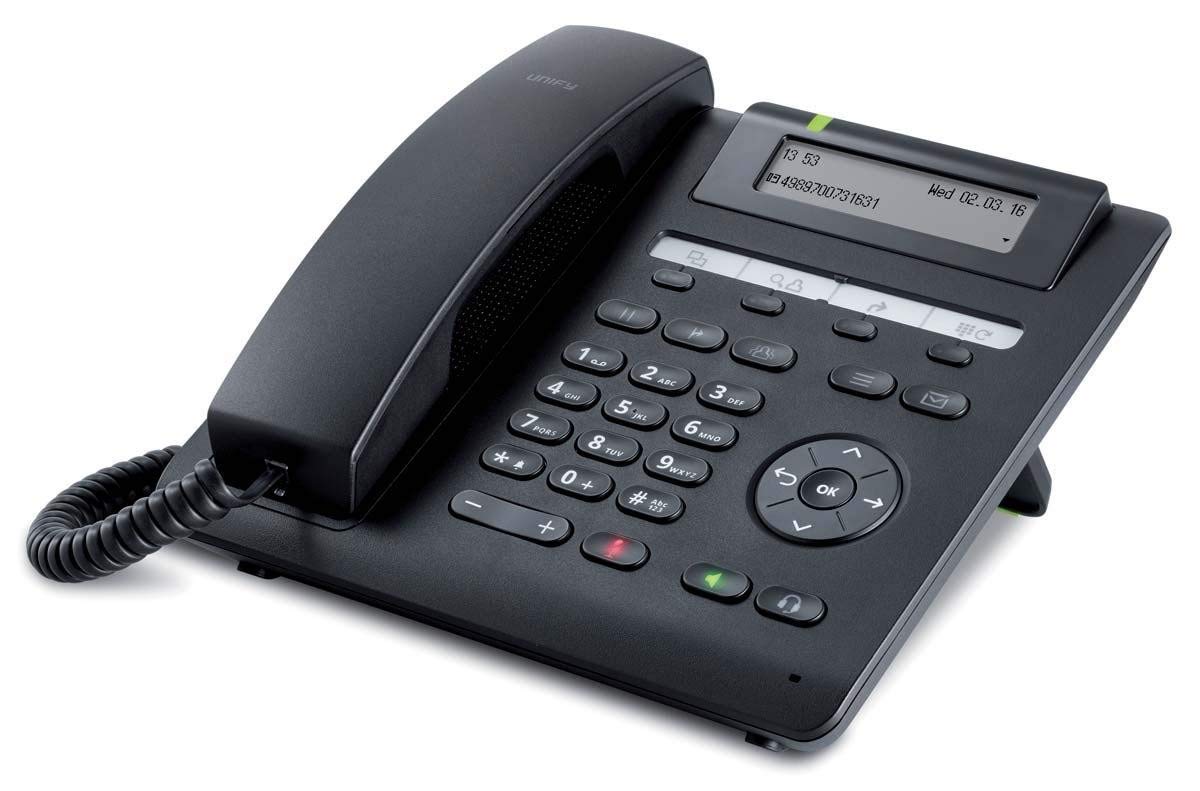
ምስል 1: የፊት view of the Unify OpenScape DeskPhone CP200T IP Phone, showcasinማሳያው እና የቁልፍ ሰሌዳው ግ.
2. የምርት ባህሪዎች
- ማሳያ፡- 2.7-inch black and white graphical display, 2-line view for clear information.
- ሊዘጋጁ የሚችሉ ቁልፎች፡- 4 freely programmable function keys with LED indicators for quick access to features.
- ቋሚ የተግባር ቁልፎች፡- 5 dedicated keys for common functions such as call transfer, message access, and speakerphone.
- ከእጅ-ነጻ አሰራር; Full-duplex speakerphone for clear conference calls and hands-free communication.
- የጆሮ ማዳመጫ ድጋፍ፡ Connect a wired headset via an adapter (sold separately) for private conversations.
- ግድግዳ ሊገጣጠም የሚችል; The phone can be mounted on a wall using an optional installation kit (sold separately).
- የደዋይ መታወቂያ፡- Supports caller identification for incoming calls.
3. የማዋቀር መመሪያዎች
Follow these steps to set up your Unify OpenScape DeskPhone CP200T:
- ስልኩን ይክፈቱት፦ ሁሉንም ክፍሎች ከማሸጊያው በጥንቃቄ ያስወግዱ። የስልክ ክፍሉ፣ ስልኩ፣ ስልኩ እና የኤተርኔት ገመድ እንዳለዎት ያረጋግጡ።
- ቀፎውን ያገናኙ፡ የተጠማዘዘውን የስልኩን ገመድ አንድ ጫፍ ወደ ስልኩ ስልክ ላይ ይሰኩት፣ ሌላኛውን ጫፍ ደግሞ በስልኩ መሰረት ላይ በተጠቀሰው ወደብ ላይ ይሰኩት (ብዙውን ጊዜ በሞባይል አዶ ምልክት የተደረገበት)።
- ከአውታረ መረብ ጋር ይገናኙ; Connect one end of the Ethernet cable to the LAN port on the back of the phone (often labeled "LAN" or with a network icon) and the other end to an active network port (e.g., a wall jack or network switch).
- የኃይል ግንኙነት (ካለ): If your network does not provide Power over Ethernet (PoE), connect an appropriate power adapter (sold separately) to the power port on the phone and then to a power outlet. The phone will power on automatically.
- Initial Boot-Up: The phone will display a boot-up sequence. This may take a few moments. It will then attempt to connect to your network and register with your IP PBX system.
- ውቅር፡ Network and system configuration is typically handled by your IT administrator. If the phone does not register automatically, contact your IT department for assistance.
4. የአሠራር መመሪያዎች
4.1 ጥሪዎችን ማድረግ እና መቀበል
- ጥሪ ለማድረግ፡- Lift the handset or press the speakerphone button. Dial the desired number using the keypad. Press the "Dial" or "Send" soft key (if available) or wait for the call to connect automatically.
- ጥሪን ለመመለስ፡- ስልኩ ሲጮህ፣ ስልኩን ያንሱ ወይም የድምጽ ማጉያውን ቁልፍ ይጫኑ።
- ጥሪን ለማቆም፡- ስልኩን ይተኩ ወይም የድምጽ ማጉያውን ቁልፍ እንደገና ይጫኑ።
4.2 ፕሮግራም ሊደረጉ የሚችሉ ቁልፎችን መጠቀም
The 4 programmable keys can be configured by your system administrator for various functions such as speed dial, line appearance, or feature access. Refer to your system's specific configuration for their assigned functions. The LED indicator next to each key shows its status (e.g., active, ringing).
4.3 የድምጽ ማስተካከያ
Use the volume control buttons (typically located on the side or bottom of the keypad) to adjust the handset, speakerphone, or ringer volume during a call or when idle.
4.4 Speakerphone and Mute
- የድምጽ ማጉያ ስልክ፡ Press the dedicated speakerphone button to activate or deactivate hands-free mode.
- ድምጸ-ከል አድርግ፡ Press the mute button (often indicated by a microphone icon with a slash) to mute your microphone during a call. Press it again to unmute.
4.5 የጥሪ ማስተላለፍ
To transfer an active call, press the "Transfer" fixed function key. Dial the number of the party you wish to transfer the call to. You may then either announce the call (consultative transfer) or complete the transfer directly (blind transfer) depending on your system's configuration and the soft key options displayed on the screen.
5. ጥገና
Proper care and maintenance will extend the life of your Unify OpenScape DeskPhone CP200T.
- ማጽዳት፡ የስልኩን ማሳያ ለማጽዳት ለስላሳ፣ ደረቅ እና ከንጣፍ ነፃ የሆነ ጨርቅ ይጠቀሙ እናasinሰ. ለግትር ምልክቶች፣ በትንሹ መampጨርቁን በውሃ ይሸፍኑ። ጠጣር ኬሚካሎችን፣ ሻካራ ማጽጃዎችን ወይም ሟሟቶችን አይጠቀሙ።
- ፈሳሾችን ያስወግዱ; Keep the phone away from liquids and moisture. Do not immerse the phone in water or expose it to excessive humidity.
- የሙቀት መጠን፡ Operate and store the phone within recommended temperature ranges. Avoid extreme heat or cold.
- የኬብል አስተዳደር Ensure all cables are securely connected and not strained or tangled to prevent damage.
6. መላ መፈለግ
If you encounter issues with your Unify OpenScape DeskPhone CP200T, refer to the following common problems and solutions:
| ችግር | ሊሆን የሚችል ምክንያት | መፍትሄ |
|---|---|---|
| ስልክ አይበራም። | ምንም የኃይል አቅርቦት ወይም የተሳሳተ ገመድ የለም. | Check if the Ethernet cable is properly connected (for PoE) or if the power adapter is securely plugged into both the phone and a working outlet. |
| የመደወያ ድምጽ የለም / ጥሪዎችን ማድረግ አይቻልም። | Network connection issue or phone not registered. | Verify the Ethernet cable connection. Restart the phone. Contact your IT administrator to check network connectivity and phone registration status. |
| ማሳያው ባዶ ወይም የቀዘቀዘ ነው። | የሶፍትዌር ብልሽት ወይም የኃይል ችግር። | Unplug the power/Ethernet cable, wait 10 seconds, then plug it back in to restart the phone. If the problem persists, contact IT support. |
| ደካማ የድምጽ ጥራት (echo፣ static)። | Network congestion, faulty cable, or handset issue. | Check network connection. Try adjusting volume. If using a headset, ensure it's properly connected. Contact IT support if the issue continues. |
For issues not listed here or if the suggested solutions do not resolve the problem, please contact your IT support department or the product vendor for further assistance.
7. ዝርዝሮች
| ባህሪ | ዝርዝር |
|---|---|
| የምርት ስም | አንድ አድርግ |
| የሞዴል ቁጥር | L30250-F600-C435 |
| ማሳያ | 2.7-inch black and white, 2-line |
| የፕሮግራም ቁልፎች | 4 with LED indicators |
| ቋሚ የተግባር ቁልፎች | 5 |
| የኃይል ምንጭ | Wired (PoE or optional power adapter) |
| ቁሳቁስ | ፕላስቲክ |
| ክብደት | 1.1 ኪ |
| መጠኖች (ጥቅል) | 25 x 22 x 10 ሴ.ሜ |
| የደዋይ መታወቂያ | አዎ |
| የመጫኛ ዓይነት | Wall (with separate kit) |
8. ዋስትና እና ድጋፍ
የዋስትና መረጃ፡- For specific warranty terms and conditions, please refer to the warranty card included with your product or contact your point of purchase. Warranty coverage typically includes defects in materials and workmanship under normal use.
የቴክኒክ ድጋፍ; If you require technical assistance, have questions about advanced features, or encounter issues not covered in this manual, please contact your IT administrator or the authorized Unify service provider. Ensure you have your product model number (L30250-F600-C435) and serial number ready when contacting support.


