መግቢያ
This manual provides detailed instructions for the setup, operation, maintenance, and troubleshooting of your Macally BTWKEYMB-ES Extended Wireless Bluetooth Keyboard. Please read this manual thoroughly to ensure proper use and to maximize the performance of your device.
The Macally BTWKEYMB-ES is an elegant and ultra-thin (17 mm thick) wireless Bluetooth keyboard with a brushed metallic finish. It is specifically designed for Mac, iPad, iPhone, PC, and Android devices with Bluetooth capability. It features a stable and reliable radio connection, allowing for a clean, wireless workspace. This keyboard supports connection to up to three Bluetooth devices simultaneously, with direct switching via the Quick-Switch function. It includes 110 flat keys with a scissor-lift mechanism for sensitive and responsive typing, 21 function buttons for easy access to Mac functions, and a 17-key numeric keypad to boost productivity. The keyboard features a Spanish layout.

ከላይ ወደታች view of the Macally BTWKEYMB-ES keyboard, showcasing its full Spanish QWERTY layout with numeric keypad and function keys.
ማዋቀር
1. የቁልፍ ሰሌዳውን መሙላት
Before first use, ensure the keyboard is fully charged. Connect the included USB charging cable to the keyboard's charging port and to a USB power source (e.g., computer USB port, USB wall adapter). The charging indicator light will show the charging status.
2. የብሉቱዝ ማጣመር
- ብዙውን ጊዜ ከጎን ወይም ከኋላ የሚገኘውን የኃይል ማብሪያ / ማጥፊያን በመጠቀም የቁልፍ ሰሌዳውን ያብሩ።
- Press and hold one of the Bluetooth channel keys (e.g., B1, B2, B3) for a few seconds until the corresponding indicator light starts blinking rapidly. This indicates the keyboard is in pairing mode.
- On your device (Mac, PC, iPad, iPhone, Android), go to Bluetooth settings.
- ፈልግ available Bluetooth devices. The keyboard should appear as "Macally BTWKEYMB-ES" or similar.
- Select the keyboard from the list to initiate pairing. Follow any on-screen prompts, such as entering a code displayed on your screen.
- Once paired, the indicator light for that channel will stop blinking and remain solid, indicating a successful connection.
3. Quick-Switch Pairing (Multi-Device Connection)
The keyboard supports connecting up to three devices. To connect additional devices, repeat the Bluetooth pairing steps using a different Bluetooth channel key (B2 or B3). Once multiple devices are paired, you can switch between them instantly by simply pressing the corresponding Bluetooth channel key (B1, B2, or B3).

The Macally BTWKEYMB-ES keyboard in a workspace setting, connected wirelessly to a desktop monitor and a tablet, demonstrating its multi-device capability.
የአሠራር መመሪያዎች
የተግባር ቁልፎች
The keyboard features 21 function keys (F1-F12 and additional media/system control keys) that provide quick access to various functions on your Mac or other compatible devices. These include brightness control, mission control, media playback, volume control, and more. For specific functions, refer to your device's operating system documentation.
ቁጥራዊ ቁልፍ ሰሌዳ
The integrated 17-key numeric keypad allows for efficient data entry and calculations. Ensure Num Lock is enabled if necessary for your operating system.
የመተየብ ልምድ
The scissor-lift key mechanism provides a comfortable and responsive typing experience with a satisfying tactile feedback. The Spanish layout includes specific characters and key placements relevant to the Spanish language.
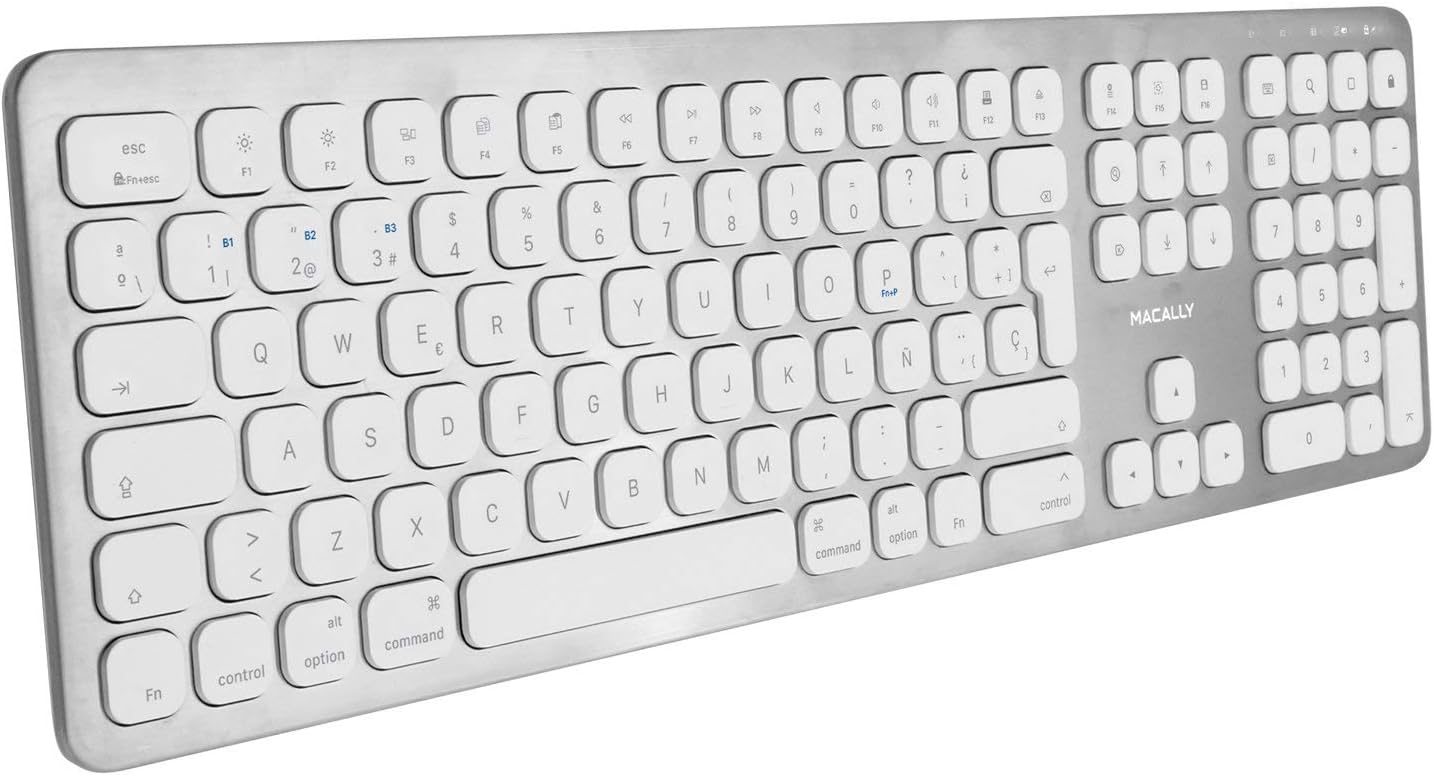
Overhead angled view of the Macally BTWKEYMB-ES keyboard, providing a clear look at all keys and the overall layout.
ጥገና
ማጽዳት
To clean the keyboard, first turn it off. Use a soft, lint-free cloth slightly dampened with water or a mild cleaning solution. Avoid using harsh chemicals, abrasive cleaners, or excessive moisture. Do not spray liquid directly onto the keyboard. For dust and debris between keys, use compressed air.
ማከማቻ
When not in use for extended periods, store the keyboard in a cool, dry place away from direct sunlight and extreme temperatures. Ensure the keyboard is turned off to conserve battery life.
መላ መፈለግ
የቁልፍ ሰሌዳው እየተገናኘ/እየተጣመረ አይደለም
- የቁልፍ ሰሌዳው መብራቱን እና ሙሉ በሙሉ መሙላቱን ያረጋግጡ።
- በመሳሪያዎ ላይ ብሉቱዝ መንቃቱን ያረጋግጡ።
- የቁልፍ ሰሌዳው በብሉቱዝ ክልል ውስጥ መሆኑን ለማረጋገጥ ወደ መሳሪያዎ ቅርብ ያድርጉት።
- Try unpairing the keyboard from your device's Bluetooth settings and then re-pairing it.
- Restart both the keyboard (turn off and on) and your device.
- ሌሎች የብሉቱዝ መሳሪያዎች ጣልቃ እየገቡ አለመሆናቸውን ያረጋግጡ።
ምላሽ የማይሰጡ ቁልፎች
- የቁልፍ ሰሌዳው በብሉቱዝ በኩል በትክክል መገናኘቱን ያረጋግጡ።
- Ensure the battery is not critically low. Charge the keyboard if needed.
- Clean the keyboard to remove any debris that might be obstructing the keys.
- Test the keyboard with another device to determine if the issue is with the keyboard or the original device.
መዘግየት ወይም የዘገየ ግብዓት
- በቁልፍ ሰሌዳው እና በመሳሪያዎ መካከል ያለውን ርቀት ይቀንሱ።
- ከሌሎች ገመድ አልባ መሳሪያዎች (የዋይፋይ ራውተሮች፣ ሌሎች የብሉቱዝ መሳሪያዎች) የሚመጣን ጣልቃ ገብነት ይቀንሱ።
- የመሣሪያዎ ኦፐሬቲንግ ሲስተም እና የብሉቱዝ ነጂዎች ወቅታዊ መሆናቸውን ያረጋግጡ።
ዝርዝሮች
| የሞዴል ቁጥር | BTWKEYMB-ES |
| የግንኙነት ቴክኖሎጂ | ብሉቱዝ |
| ልዩ ባህሪ | እንደገና ሊሞላ የሚችል |
| ተስማሚ መሣሪያዎች | ፒሲ፣ ስማርትፎን፣ ታብሌት |
| የቁልፎች ብዛት | 110 |
| የቁልፍ ሰሌዳ አቀማመጥ | QWERTY (Spanish) |
| Number of Buttons (Function) | 21 |
| አምራች | በመሣሪያ |
የዋስትና መረጃ
Specific warranty details for the Macally BTWKEYMB-ES keyboard are typically provided with the product packaging or on the manufacturer's official webድህረ ገጽ። እባክዎን እነዚህን ምንጮች ለአጠቃላይ የዋስትና ውሎች እና ሁኔታዎች ይመልከቱ።
ድጋፍ
For technical support, frequently asked questions, or additional assistance, please visit the official Macally support website. Contact information for customer service may also be found on the product packaging or the manufacturer's webጣቢያ.


