1. መግቢያ
This manual provides detailed instructions for the installation, operation, and maintenance of your EZoneTronics Android 10.1 2DIN Car Stereo. This unit features a 9-inch capacitive touchscreen, Android 10.1 operating system, GPS navigation, Bluetooth 4.0, Wi-Fi, AM/FM/RDS radio, and support for Mirror Link, Apple CarPlay, and Android Auto. Please read this manual thoroughly before using the product to ensure proper function and safety.
2. የተሽከርካሪ ተኳኋኝነት
This car stereo is designed for specific Mercedes-Benz models:
- Mercedes-Benz ML-W164 / ML300 / ML350 / ML450 / ML500 / ML320 / ML63 AMG (2005-2012)
- Mercedes-Benz GL-X164 / GL320 / GL350 / GL420 / GL450 / GL500 (2005-2012)
ጠቃሚ ማስታወሻ፡- If your vehicle is equipped with a Harman, Kardon, or BOSE amplification system, an additional fiber optic decoder box (e.g., ASIN B08K49SQSM) may be required for proper audio functionality. Consult a professional installer if you are unsure.
3. የጥቅል ይዘቶች
ከዚህ በታች የተዘረዘሩት ሁሉም እቃዎች በጥቅልዎ ውስጥ መካተታቸውን ያረጋግጡ፡-
- 1 x EZoneTronics Android Car Stereo Unit
- 1 x ጂፒኤስ አንቴና
- 1 x የኃይል ማሰሪያ
- 1 x RCA Output Cable
- 2 x የዩኤስቢ አስማሚዎች
- 1 x የካሜራ ግቤት ገመድ
- 1 x የተጠቃሚ መመሪያ (ይህ ሰነድ)
- 1 x Canbus Box
4. ማዋቀር እና መጫን
Installation of this car stereo requires technical knowledge and experience with automotive electrical systems. Professional installation is highly recommended to prevent damage to the unit or your vehicle.
4.1 የቅድመ-መጫኛ ማረጋገጫ
- ተከላ ከመጀመርዎ በፊት የተሽከርካሪው ማብሪያ / ማጥፊያ መጥፋቱን እና ባትሪው መቋረጡን ያረጋግጡ።
- ሁሉም የጥቅል ይዘቶች መኖራቸውን ያረጋግጡ።
- Review your vehicle's wiring diagram for specific connections.
4.2 የመጫኛ ደረጃዎች (አጠቃላይ)
- Carefully remove the original car stereo unit from your dashboard.
- Connect the provided power harness to the vehicle's wiring. Ensure all connections are secure.
- የጂፒኤስ አንቴናውን ያገናኙ እና ግልጽ በሆነ ቦታ ላይ ወዳለው ቦታ ያዛውሩት view የሰማይ (ለምሳሌ፣ የዳሽቦርድ ጥግ)።
- Connect the USB adapters and route them to an accessible location (e.g., glove compartment).
- If installing a rear camera, connect the camera input cable and route it to the camera location.
- Connect the RCA output cable for external ampሊፋየሮች ወይም ሾውወርፎች፣ ተገቢ ከሆነ።
- Connect the Canbus box as per the wiring diagram to enable steering wheel controls and other vehicle-specific functions.
- Carefully slide the new EZoneTronics unit into the dashboard opening.
- መሳሪያውን በቦታው ያስቀምጡ።
- Reconnect the vehicle battery and test the unit's functionality.

ምስል 4.1፡ Comparison of the car dashboard before and after the EZoneTronics car stereo installation. The top image shows the new unit installed, while the bottom images show the original radio (left) and the new unit (right) for direct comparison.
5. የአሠራር መመሪያዎች
5.1 መሠረታዊ አሠራር
- ማብራት/ማጥፋት፡ Press and hold the power button (usually on the front panel) to turn the unit on or off. A short press typically mutes/unmutes audio.
- የንክኪ ማያ ገጽ፡ The 9-inch capacitive touchscreen responds to touch gestures similar to a smartphone. Tap to select, swipe to scroll.
- መነሻ ስክሪን፡ The main interface provides access to various functions like Radio, Music, Navigation, Bluetooth, and Apps.
5.2 ሬዲዮ (ኤኤም/ኤፍኤም/አርዲኤስ)
The unit features a built-in AM/FM/RDS radio tuner for clear signal reception.
- Accessing Radio: Tap the 'Radio' icon on the home screen.
- በመቃኘት ላይ፡ Use the 'Scan' or 'Seek' buttons on the screen to automatically search for available stations.
- ቅድመ-ቅምጦችን በማስቀመጥ ላይ፡ Once a station is tuned, press and hold a preset number button on the screen to save it.
- የRDS ተግባር፡ Radio Data System (RDS) displays station information like song title or program type where available.

ምስል 5.2፡ The FM/AM/RDS Radio interface on the EZoneTronics car stereo, showing frequency display and preset buttons for easy station selection.
5.3 ብሉቱዝ 4.0
ነፃ የስልክ ጥሪ እና የድምጽ ዥረት ለማግኘት ስማርትፎንዎን በብሉቱዝ ያገናኙ።
- ማጣመር፡ Go to the 'Bluetooth' menu on the stereo. Enable Bluetooth on your phone and search for available devices. Select 'EZoneTronics' (or similar name) and confirm the pairing code.
- ከእጅ ነጻ ጥሪ፡ Once paired, you can make and receive calls directly from the stereo screen. Your phone's contact list may sync automatically.
- የድምጽ ዥረት (A2DP)፦ Play music from your phone through the car stereo speakers. Control playback (play/pause, skip) from the stereo.

ምስል 5.3፡ The Bluetooth 4.0 interface showing music playback controls and icons for phone video, dial-up, hang-up, and phone music functions.
5.4 የጂፒኤስ አሰሳ
The unit includes an integrated GPS receiver and comes with Google Maps pre-installed. Other navigation apps can be downloaded from the Google Play Store.
- የመስመር ላይ አሰሳ፡ Connect to Wi-Fi to use online maps and real-time traffic information.
- ከመስመር ውጭ አሰሳ፦ Download offline map data for specific regions via Wi-Fi for navigation without an internet connection.
- Using Navigation Apps: Tap the 'Navigation' icon to launch the default map application. Follow on-screen prompts to enter destinations and start routes.
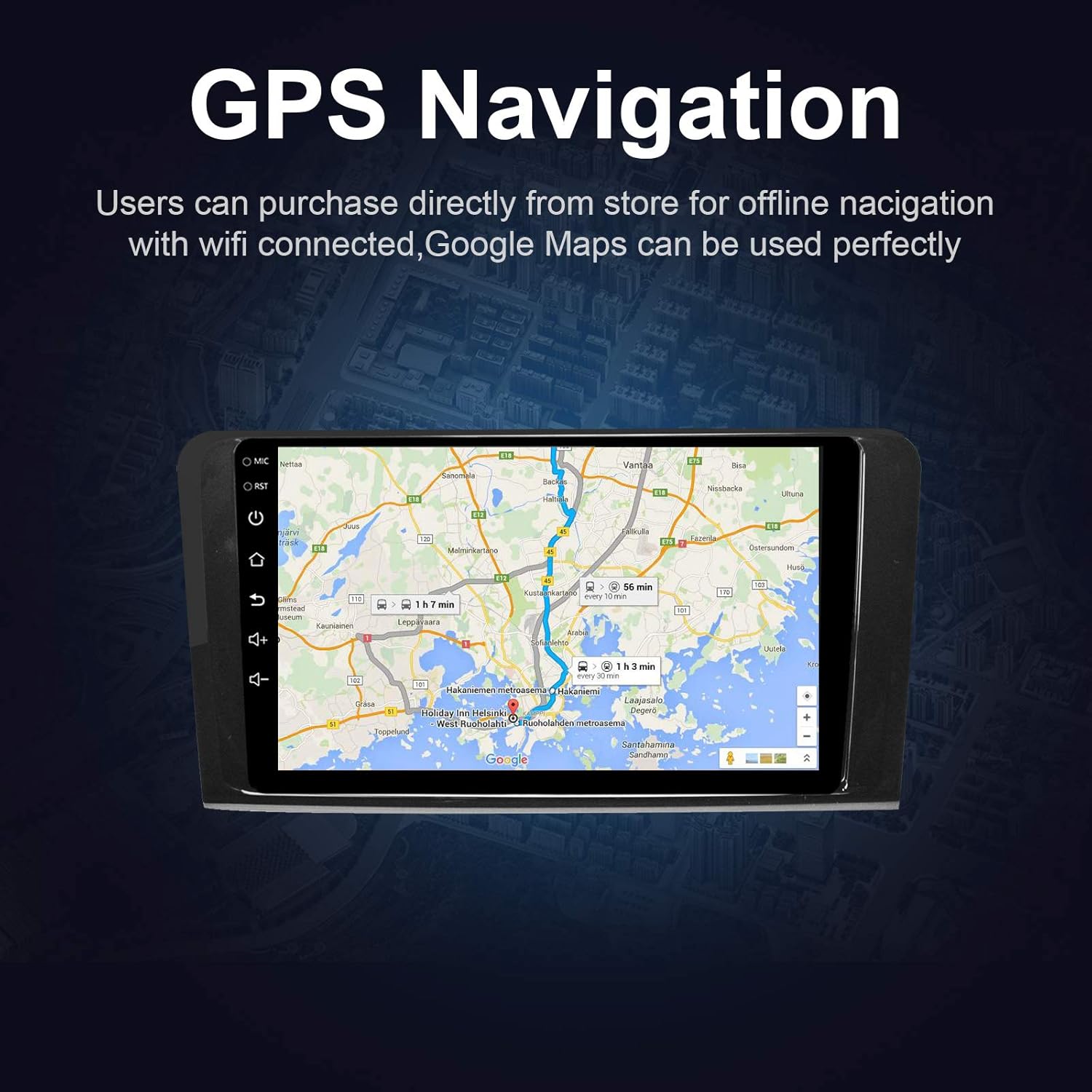
ምስል 5.4፡ The GPS Navigation screen showing a map with a highlighted route and estimated travel time.
5.5 አፕል ካርፕሌይ እና አንድሮይድ አውቶ
መሣሪያው ሁለቱንም ገመድ አልባ የአፕል ካርፕሌይ እና ባለገመድ አንድሮይድ አውቶን ይደግፋል፣ ይህም ከስማርት ስልክዎ ጋር እንከን የለሽ ውህደት ያስችላል።
- Apple CarPlay (Wireless): Connect your iPhone via Bluetooth and Wi-Fi. Follow the on-screen prompts to enable CarPlay.
- አንድሮይድ አውቶ (ባለገመድ)፦ Connect your Android phone via a USB cable. Ensure Android Auto is installed on your phone.
- ባህሪያት፡ Access phone calls, messages, music, and navigation apps directly from the car stereo interface, optimized for driving.
5.6 የመስታወት አገናኝ
Mirror Link allows you to display your smartphone's screen directly on the car stereo.
- ለ iOS መሣሪያዎች Supports AirPlay mirroring wirelessly.
- ለአንድሮይድ መሳሪያዎች፡- Connect via a USB cable.
- ማግበር፡- Select the 'Mirror Link' app on the stereo and follow the instructions for your specific phone model.

ምስል 5.6፡ The Mirror Link function showing a smartphone screen mirrored onto the car stereo display.
5.7 የተከፈለ ማያ ተግባር
The Android 10.1 system supports multitasking, allowing you to run two applications simultaneously on the screen.
- ማግበር፡- While one app is open, press and hold the recent apps button (or swipe up from the bottom and hold, depending on the Android version) and drag another compatible app to the other half of the screen.
- አጠቃቀም፡ ለ example, you can use navigation on one side and play music or radio on the other.

ምስል 5.7፡ The Split Screen function in action, showing a navigation map on one side and a music player on the other, enabling multitasking.
5.8 Digital Sound Processor (DSP) / Equalizer
Customize your audio experience with the built-in 14-band equalizer and sound processor.
- Accessing EQ: Tap the 'Equalizer' or 'Sound Settings' icon from the home screen or audio playback interface.
- ማስተካከያዎች፡- Adjust individual frequency bands (bass, treble, mid-range) to your preference.
- ቅድመ-ቅምጦች Select from various pre-defined sound modes (e.g., Pop, Rock, Classic, Jazz) or create custom profiles.
- Volume/Fader/Balance: Control overall volume, and adjust audio distribution between front/rear and left/right speakers.

ምስል 5.8፡ The Digital Sound Processor (DSP) system interface, showing a 14-band equalizer for precise audio adjustments.
5.9 የመልቲሚዲያ መልሶ ማጫወት (ዩኤስቢ)
ኦዲዮ እና ቪዲዮ አጫውት። files ከዩኤስቢ ማከማቻ መሳሪያዎች.
- ዩኤስቢን በማገናኘት ላይ፦ ከተሰጡት የዩኤስቢ ወደቦች ውስጥ የዩኤስቢ ድራይቭ ያስገቡ።
- መድረስ Files: The unit will automatically detect the USB device. Navigate to the 'Music' or 'Video' app to browse and play files.
- የሚደገፉ ቅርጸቶች፡ The unit supports various audio and video formats, including high-definition 1080P video.

ምስል 5.9፡ The car stereo displaying high-definition 1080P video content, demonstrating its multimedia playback capabilities.
6. ጥገና
ትክክለኛ ጥገና የመኪናዎን ስቲሪዮ ረጅም ዕድሜ እና ጥሩ አፈፃፀም ያረጋግጣል።
- ማያ ገጽ ማፅዳት; ለስላሳ፣ ከቆሸሸ ነፃ የሆነ ጨርቅ በትንሹ ተጠቀምampበውሃ የታሸገ ወይም በተለይ ለኤሌክትሮኒክስ የተነደፈ የስክሪን ማጽጃ። ገላጭ ማጽጃዎችን ወይም ፈሳሾችን አይጠቀሙ.
- አጠቃላይ ጽዳት; Wipe the unit's exterior with a soft, dry cloth. Avoid getting liquids into openings.
- የሶፍትዌር ማሻሻያ Periodically check for available software updates through the unit's settings menu (requires Wi-Fi connection) to ensure optimal performance and access to new features.
- ከፍተኛ የሙቀት መጠንን ያስወግዱ; መሣሪያውን ለረጅም ጊዜ ለከፍተኛ ሙቀት ወይም ለቅዝቃዛ አያጋልጡት፣ ምክንያቱም ይህ በአፈፃፀም እና በቆይታ ጊዜ ላይ ተጽዕኖ ሊያሳድር ይችላል።
7. መላ መፈለግ
If you encounter issues with your EZoneTronics car stereo, refer to the following common problems and solutions:
| ችግር | ሊሆን የሚችል ምክንያት | መፍትሄ |
|---|---|---|
| ዩኒት ኃይል የለውም። | የተሳሳተ ሽቦ፣ የተነፈሰ ፊውዝ፣ የተሽከርካሪ ባትሪ ግንኙነት ተቋርጧል። | Check power connections and fuses. Ensure battery is connected. Consult a professional installer. |
| ድምጽ የለም። | Volume too low, mute activated, incorrect speaker wiring, fiber optic box needed. | Increase volume, check mute status. Verify speaker connections. If your car has a premium sound system, ensure a fiber optic decoder box is installed. |
| የጂፒኤስ ምልክት ደካማ ነው ወይም አልተገኘም። | የጂፒኤስ አንቴና በአግባቡ አልተጫነም ወይም አልተዘጋም። | Ensure the GPS antenna is placed in a location with a clear view የሰማይ እና ደህንነቱ በተጠበቀ ሁኔታ የተገናኘ ነው. |
| የብሉቱዝ ግንኙነት ችግሮች። | ስልክ በማጣመር ሁነታ ላይ አይደለም፣ የተሳሳተ የማጣመር ኮድ፣ ጣልቃ ገብነት። | Ensure Bluetooth is enabled on both devices and in pairing mode. Re-pair the devices. Restart both the stereo and phone. |
| የማሽከርከር መቆጣጠሪያዎች አይሰሩም. | Canbus box not connected or configured correctly. | Verify the Canbus box connection and ensure it is properly configured in the unit's settings. Refer to installation instructions. |
| የንክኪ ማያ ገጽ ምላሽ አይሰጥም ወይም ቀርፋፋ። | Temporary software glitch, excessive background apps. | Restart the unit. Close unnecessary background applications. If the issue persists, perform a factory reset (note: this will erase all user data). |
8. ዝርዝሮች
Key technical specifications of the EZoneTronics Android Car Stereo:
| ባህሪ | ዝርዝር መግለጫ |
|---|---|
| የሞዴል ቁጥር | RMCT-BENZ-ML05-2G16-IP |
| ስርዓተ ክወና | አንድሮይድ 10.1 |
| የስክሪን መጠን | 9 ኢንች LCD |
| የስክሪን አይነት | አቅም ያለው የመዳሰሻ ገጽ |
| ጥራት | 1024 x 600 ፒክስል |
| ፕሮሰሰር | Quad Core 1.3G |
| ራም | 2GB DDR3 |
| የውስጥ ማከማቻ | 32GB ፍላሽ ማህደረ ትውስታ |
| ግንኙነት | Bluetooth 4.0 (A2DP, Hands-free), Wi-Fi, USB (2 rear inputs) |
| የጂፒኤስ ተቀባይ | Built-in, compatible with Waze, Google Maps, etc. |
| ሬዲዮ መቃኛ | AM/FM/RDS |
| የድምጽ ውፅዓት | 4 x 45W Power Output, 2.1 Channel RCA/Sub Output |
| የቪዲዮ ግቤት | 1 Channel (for rear camera) |
| የድምጽ ግቤት | 2 ቻናል |
| ልዩ ባህሪያት | Steering Wheel Control, Mirror Link, CarPlay, Android Auto, Multi-EQ Presets, Spotify, Digital Sound Processor |
| የምርት ልኬቶች (L x W x H) | 32 x 26 x 13 ሴ.ሜ |
| ክብደት | 1.38 ኪ.ግ |
9. ዋስትና እና ድጋፍ
9.1 የምርት ዋስትና
This EZoneTronics car stereo comes with a የ 1 ዓመት የአምራች ዋስትና ከተገዛበት ቀን ጀምሮ። ይህ ዋስትና በመደበኛ አጠቃቀም ወቅት በቁሳቁሶች እና በስራ ላይ ያሉ ጉድለቶችን ይሸፍናል። በአግባቡ ባልተጫኑ፣ አላግባብ በመጠቀም፣ በአደጋዎች ወይም ባልተፈቀደላቸው ማሻሻያዎች ምክንያት የሚደርሰውን ጉዳት አይሸፍንም።
9.2 የቴክኒክ ድጋፍ
For technical assistance, troubleshooting beyond this manual, or warranty claims, please contact our support team:
- ኢሜይል፡- sales2@rhythmhk.com
When contacting support, please provide your product model number (RMCT-BENZ-ML05-2G16-IP) and a detailed description of the issue.


