መግቢያ
This manual provides comprehensive instructions for setting up, operating, maintaining, and troubleshooting your Mercusys MR50G AC1900 Dual-Band Wi-Fi 5 Router. The MR50G is designed to deliver high-speed wireless connectivity with AC1900 speeds, Gigabit Ethernet ports, and advanced features like MU-MIMO and Beamforming.

ምስል፡ ፊት ለፊት view of the Mercusys MR50G router, illustrating its dual-band capabilities with 5GHz (1300 Mbps) and 2.4GHz (600 Mbps) speeds.
የማዋቀር መመሪያ
1. የጥቅል ይዘቶች
ጥቅልዎ የሚከተሉትን ንጥሎች መያዙን ያረጋግጡ፡-
- Mercusys MR50G AC1900 Dual-Band Wi-Fi 5 Router
- የኃይል አስማሚ
- የኤተርኔት ገመድ
- Quick Installation Guide (User Guide)
2. አካላዊ ግንኙነት
ራውተርዎን ለማገናኘት የሚከተሉትን ደረጃዎች ይከተሉ
- ኃይል ዝጋ: ኃይሉን ከእርስዎ ሞደም እና ራውተር ያላቅቁት (ካለ)።
- ሞደምን ከራውተር ጋር ያገናኙ፡ Connect one end of the provided Ethernet cable to the WAN port (usually blue) on your MR50G router and the other end to your modem's Ethernet port.
- መሣሪያዎችን ያገናኙ (ከተፈለገ) For wired connections, connect your computer or other devices to the LAN ports (yellow) on the MR50G router using Ethernet cables.
- አብራ፡ Connect the power adapter to the router's power port and plug it into a power outlet. Power on your modem, then power on the MR50G router.
- አመልካቾችን ይጠብቁ፡- Wait for the router's LED indicators to stabilize. The Power LED should be solid green.
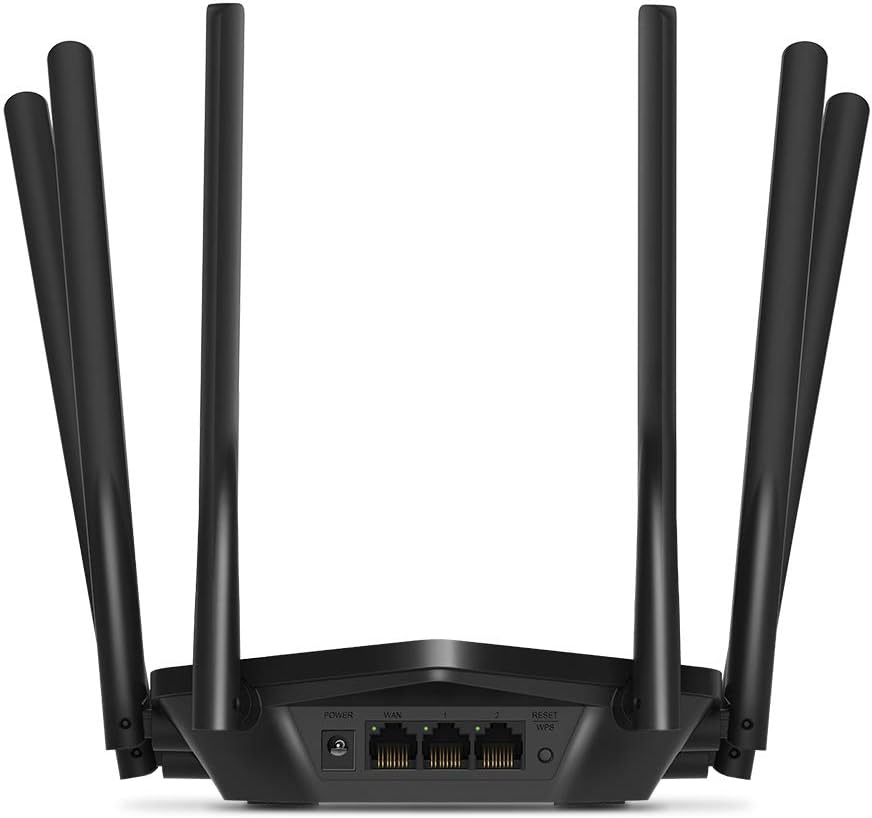
ምስል: የኋላ view of the Mercusys MR50G router, illustrating the power input, WAN port (blue), and three LAN ports (yellow) for wired connections, along with the Reset/WPS button.
3. የመጀመሪያ ውቅር
ራውተርዎን ለመጀመሪያ ጊዜ ለማዋቀር፡-
- ከWi-Fi ጋር ይገናኙ፡ Connect your computer or mobile device to the router's default Wi-Fi network (SSID and password are typically printed on a label on the bottom of the router).
- መዳረሻ Web በይነገጽ፡ ክፈት ሀ web አሳሽ እና አይነት
mwlogin.netor192.168.1.1በአድራሻ አሞሌው ውስጥ. - የመግቢያ የይለፍ ቃል ይፍጠሩ; Follow the on-screen instructions to create a login password for the router's management page.
- ፈጣን ማዋቀርን ይከተሉ፦ The Quick Setup wizard will guide you through basic internet and wireless settings.
የአሠራር መመሪያዎች
1. Basic Wi-Fi Settings
ወደ ውስጥ ከገቡ በኋላ web በይነገጽ፡
- የአውታረ መረብ ስም (SSID): Navigate to the Wireless settings to change your Wi-Fi network names (SSIDs) for both 2.4 GHz and 5 GHz bands.
- የይለፍ ቃል፥ Set a strong, unique password for your Wi-Fi networks. The MR50G supports WPA3 for enhanced security.
- የደህንነት አይነት፡ It is recommended to use WPA2-PSK/WPA3-Personal for optimal security.
2. ባለሁለት ባንድ ኦፕሬሽን
MR50G በሁለት የድግግሞሽ ባንዶች ላይ ይሰራል፡
- 2.4 GHz ለአጠቃላይ የኢንተርኔት አጠቃቀም እና ለአሮጌ መሳሪያዎች ተስማሚ የሆነ ሰፊ ሽፋን እና ግድግዳዎችን በተሻለ መንገድ ዘልቆ መግባትን ይሰጣል።
- 5 GHz Offers faster speeds and less interference, ideal for bandwidth-intensive activities like 4K streaming and online gaming, but with a shorter range.
You can configure separate SSIDs for each band or use Smart Connect to combine them into a single SSID, allowing the router to automatically assign devices to the optimal band.
3. የመዳረሻ ነጥብ ሁነታ
To use the MR50G as an Access Point (AP) to extend an existing wired network:
- አገናኝ፡ Connect an Ethernet cable from your existing router's LAN port to one of the MR50G's LAN ports (not the WAN port).
- አዋቅር Log into the MR50G's web interface, navigate to the Operation Mode settings, and select "Access Point Mode". Follow the prompts to complete the setup.
4. የላቁ ባህሪያት
- MU-MIMO፡ Multi-User, Multiple-Input, Multiple-Output technology allows the router to communicate with multiple devices simultaneously, improving network efficiency.
- ጨረሮች Focuses Wi-Fi signals towards connected devices, enhancing signal strength and range.
- የቪፒኤን ድጋፍ The router supports VPN functionality, allowing for secure remote access or connection to VPN services. Refer to the router's web interface for specific VPN client/server configurations.
- የወላጅ ቁጥጥሮች፡- ለተወሰኑ መሳሪያዎች ወይም ተጠቃሚዎች የበይነመረብ መዳረሻን ያቀናብሩ እና ይገድቡ።
- የእንግዳ አውታረ መረብ ለእንግዶች የተለየ የWi-Fi አውታረ መረብ ይፍጠሩ፣ ዋናውን አውታረ መረብዎን ደህንነቱ የተጠበቀ ያድርጉት።
ጥገና
1. የጽኑ ዝማኔዎች
Regularly check for and install firmware updates to ensure optimal performance, security, and access to new features. Firmware updates can typically be found in the router's web interface under System Tools or Advanced settings.
2. ራውተሩን እንደገና ማስጀመር
If you encounter persistent issues or forget your login password, you may need to reset the router to its factory default settings:
- With the router powered on, press and hold the Reset/WPS button on the back panel for approximately 5-10 seconds until the LED indicators flash.
- Release the button and wait for the router to restart. All settings will be restored to factory defaults.
3. ምርጥ አቀማመጥ
For the best Wi-Fi coverage and performance:
- Place the router in a central location in your home or office.
- እንደ ጥቅጥቅ ያሉ ግድግዳዎች፣ የብረት ነገሮች፣ ወይም ትላልቅ እቃዎች (ማይክሮዌቭ፣ ማቀዝቀዣዎች) የWi-Fi ምልክቶችን ሊያስተጓጉሉ ከሚችሉ መሰናክሎች አጠገብ ከማስቀመጥ ይቆጠቡ።
- የ Wi-Fi ምልክቶች ወደ ታች የመሰራጨት አዝማሚያ ስላላቸው ከተቻለ ራውተሩን ከፍ ያድርጉት።

Image: Mercusys MR50G router positioned on a table, demonstrating a typical placement for optimal signal distribution within a living space.
መላ መፈለግ
1. የኢንተርኔት መዳረሻ የለም
- ግንኙነቶችን ይፈትሹ፡ ሁሉም የኤተርኔት ገመዶች ከትክክለኛዎቹ ወደቦች (WAN ወደ ሞደም፣ LAN ከመሳሪያዎች) ጋር ደህንነቱ በተጠበቀ ሁኔታ መገናኘታቸውን ያረጋግጡ።
- መሣሪያዎችን እንደገና ያስጀምሩ Power cycle your modem, then the router, and then your connected devices.
- የWAN LED ን ይፈትሹ፦ Verify that the WAN LED on the router is lit, indicating a connection to the modem.
- የአይኤስፒ ሁኔታ፡- ምንም አገልግሎት እንደሌለህ ለማረጋገጥ የበይነመረብ አገልግሎት አቅራቢህን (አይኤስፒ) አግኝtagበእርስዎ አካባቢ ውስጥ es.
2. ቀርፋፋ የዋይፋይ ፍጥነት
- ራውተር አቀማመጥ፡- Ensure the router is placed optimally (refer to "Optimal Placement" section).
- ጣልቃ ገብነት፡- ጣልቃ-ገብነትን ሊያስከትሉ ከሚችሉ ሌሎች የኤሌክትሮኒክስ መሳሪያዎች ራውተሩን ያንቀሳቅሱት።
- የባንዱ ምርጫ For speed-critical applications, ensure your device is connected to the 5 GHz band.
- የሰርጥ ማመቻቸት፡ በራውተር ውስጥ web በይነገጽ፣ የWi-Fi ቻናሉን ለሁለቱም 2.4 GHz እና 5 GHz ባንዶች ወደ ያነሰ መጨናነቅ ለመቀየር ይሞክሩ።
- Firmware፡ የራውተርዎ ፈርምዌር የተዘመነ መሆኑን ያረጋግጡ።
3. የራውተር አስተዳደር ገጽን መድረስ አይቻልም
- አይፒ አድራሻ፡- Ensure you are using the correct address (
mwlogin.netor192.168.1.1). - ባለገመድ ግንኙነት፡ Try accessing the page from a computer connected directly to the router via an Ethernet cable.
- የአሳሽ መሸጎጫ አጽዳ፡ የእርስዎን ያጽዱ web የአሳሽ መሸጎጫ እና ኩኪዎች፣ ወይም ሌላ አሳሽ ይሞክሩ።
- ፋየርዎል/ጸረ-ቫይረስ፡ በኮምፒተርዎ ላይ ያለውን መዳረሻ የሚከለክል ማንኛውንም ፋየርዎል ወይም ጸረ-ቫይረስ ሶፍትዌር ለጊዜው ያሰናክሉ።
- ራውተርን ዳግም አስጀምር፡ If all else fails, perform a factory reset (refer to "Resetting the Router" section).
ዝርዝሮች
| ሞዴል | MR50G (EU) |
| የገመድ አልባ ደረጃዎች | IEEE 802.11a / b / g / n / ac |
| ድግግሞሽ | 2.4 ጊኸዝ እና 5 ጊኸዝ (ባለሁለት ባንድ) |
| የውሂብ መጠን | AC1900 (600 ሜጋ ባይት በ2.4 GHz፣ 1300 ሜጋ ባይት በ5 ጊኸ) |
| የኤተርኔት ወደቦች | 1x ጊጋቢት ዋን ወደብ፣ 3x ጊጋቢት ላን ወደቦች |
| አንቴናዎች | 6x ቋሚ ኦምኒ-አቅጣጫዊ አንቴናዎች |
| ደህንነት | WPA-PSK / WPA2-PSK / WPA3-Personal |
| መጠኖች (ወ x D x H) | 15.72 x 17.56 x 4.5 ሴ.ሜ |
| ክብደት | 450 ግ |
| ልዩ ባህሪያት | MU-MIMO, Beamforming, Access Point Mode, VPN Support, Parental Controls, Guest Network |
| የኃይል ግቤት | 100-240V ~ 50/60Hz |
ዋስትና እና ድጋፍ
Mercusys products come with a limited warranty. For detailed warranty information, please refer to the warranty card included with your product or visit the official Mercusys webጣቢያ.
For technical support, firmware updates, and additional resources, please visit the Mercusys support website. You can typically find contact information and FAQs there.
Official Mercusys Webጣቢያ፡ www.mercusys.com


