1. መግቢያ
This manual provides essential instructions for the safe and efficient operation of your PEKOKO LB100 Handheld Inkjet Printer. Please read this manual thoroughly before using the device to ensure proper functionality and to prevent damage.

Image 1.1: The PEKOKO LB100 Handheld Inkjet Printer. This image displays the printer's compact design with its integrated 4.3-inch LCD touch screen and ergonomic handle.
2. የጥቅል ይዘቶች
ከዚህ በታች የተዘረዘሩት ሁሉም እቃዎች በጥቅልዎ ውስጥ መኖራቸውን ያረጋግጡ፡
- PEKOKO Portable Handheld Mobile Inkjet Printer (1 unit)
- Original PEKOKO Ink Cartridge (Black) (1 unit)
- ዳሳሾች
- የኃይል አስማሚ (1 አሃድ)
- USB Flash Disk (1 unit)
- Sheet Metal Positioner (1 unit)
- Roller Component (1 unit)
- የተጠቃሚ መመሪያ (1 ክፍል)
- Packing Suitcase (1 unit)

ምስል 2.1፡ አልቋልview of the PEKOKO LB100 Handheld Inkjet Printer package contents. This image shows the printer, aluminum alloy suitcase, ink cartridge, charger, manual, print plate, and touch pen.
3. ማዋቀር
3.1. የቀለም ካርቶጅ መትከል
- የሻንጣውን ሽፋን ይክፈቱ።
- Open the cartridge slot.
- Insert the ink cartridge firmly into the slot.
- Close the cartridge slot.
- መሣሪያውን ለመጀመር የኃይል አዝራሩን ይጫኑ።

Image 3.1: Visual guide for installing the ink cartridge into the PEKOKO LB100 printer. The image illustrates the five steps: opening the cover, opening the slot, inserting the cartridge, closing the slot, and powering on.
3.2. Initial Power On and Screen Calibration
Upon first use or if the touch screen responsiveness is an issue, calibration may be required. Refer to the troubleshooting section for detailed screen calibration steps.
4. የአሠራር መመሪያዎች
4.1. መሰረታዊ የበይነገጽ አሰሳ
The PEKOKO LB100 features a 4.3-inch LCD touch screen for intuitive operation. Use the provided touch pen or your finger to navigate menus and input data.
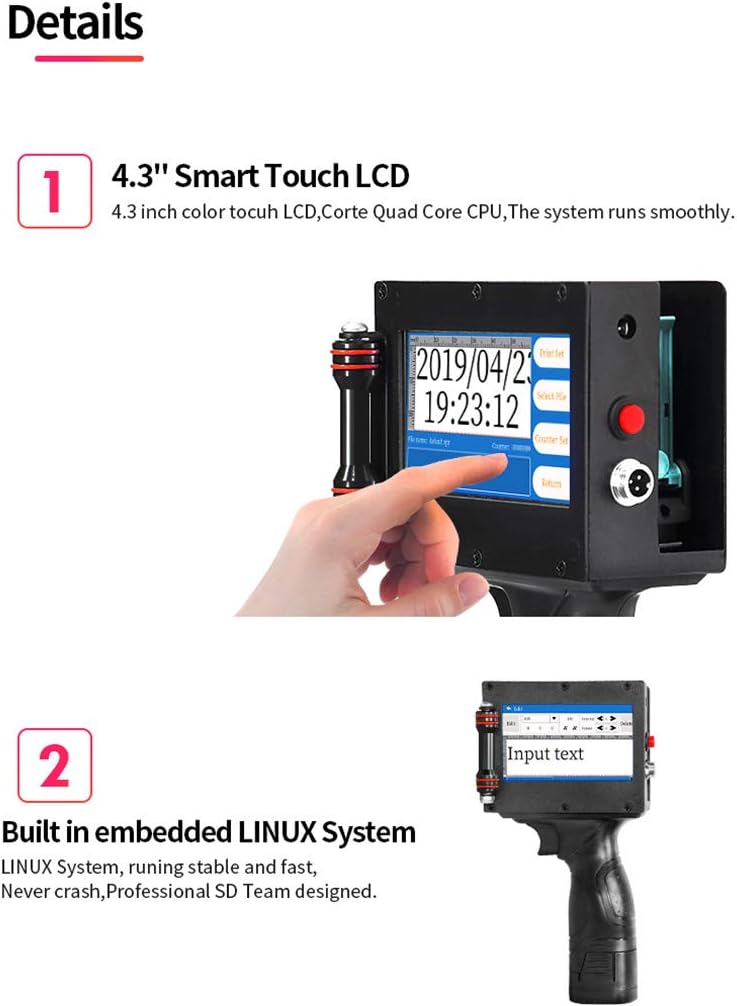
ምስል 4.1፡ መቀራረብ view of the PEKOKO LB100's 4.3-inch smart touch LCD screen. The screen displays the current date and time, along with options for print settings, file selection, and counter settings.
4.2. Creating and Editing Print Content
The printer supports various content types including text, numbers, symbols, QR codes, barcodes, pictures, time, and date. You can create and edit content directly on the device.
- የጽሑፍ ግቤት፡- Select the 'Add' or 'Edit' option to input alphanumeric characters.
- ቀን/ሰዓት፡ The device can automatically generate and print current date and time.
- Barcodes/QR Codes: Generate standard barcodes and QR codes. The printer supports various formats.
- ምስሎች፡ Import PNG, JPEG, or BMP format images via USB. The maximum resolution for printed pictures is 4800px by 150px.
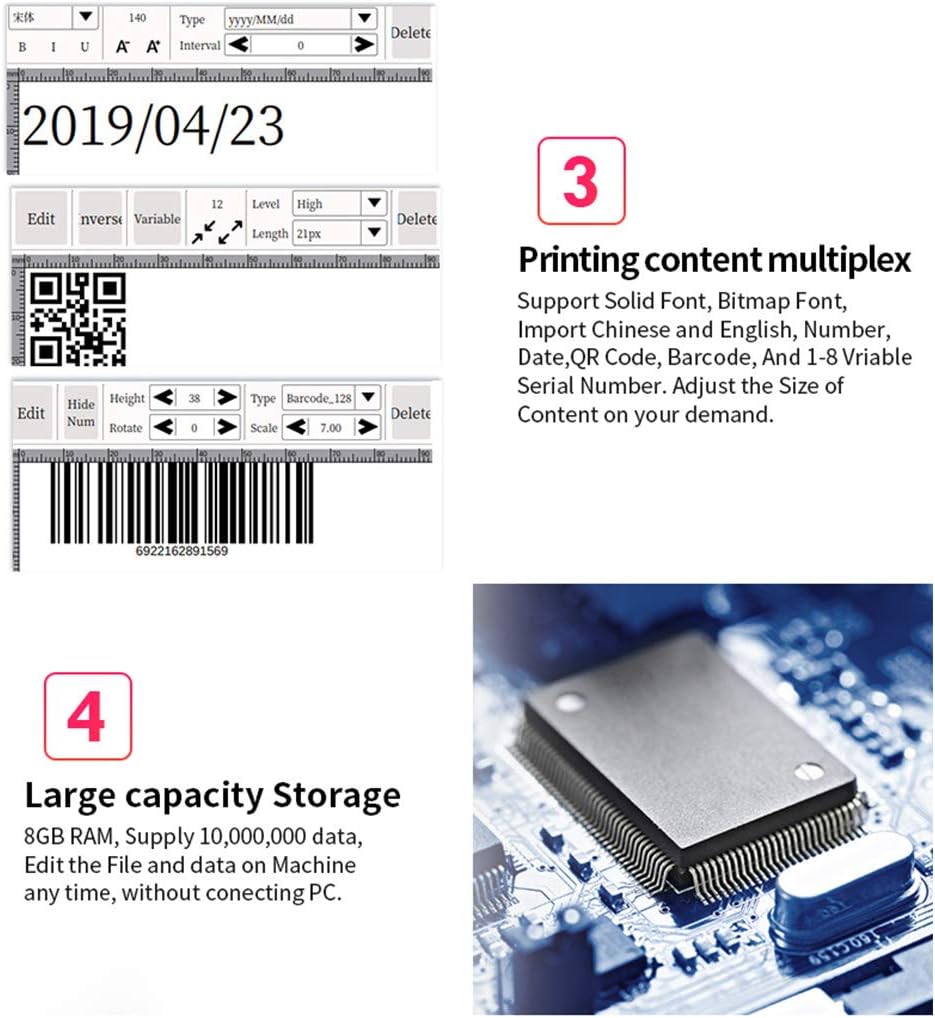
ምስል 4.2፡ ዘጸamples of printing content multiplex on the PEKOKO LB100. This image shows the ability to print dates, QR codes, and barcodes, with options to adjust font, size, and other parameters.
4.3. Adjusting Print Settings
The printer supports 1 to 5 lines of printing. The maximum font height is 12.7mm, and the minimum is 2.5mm. The length of a single print is not limited.
4.4. የህትመት ሂደት
To print, ensure the desired content is displayed on the screen. Position the printer over the target surface and press the print trigger. The integrated roller component assists in smooth and consistent application.

Image 4.3: A user operating the PEKOKO LB100 handheld printer to print a QR code and date onto a wooden surface. This demonstrates the portable nature and ease of use for various applications.
The PEKOKO LB100 can be used in handheld mode or integrated with a conveyor system for online printing on production lines.

Image 4.4: The PEKOKO LB100 printer set up for both handheld use and integration with a conveyor belt system. This highlights its versatility for different production environments.
5. ጥገና
5.1. Ink Cartridge Care
To ensure optimal print quality and prevent clogging, regularly clean the ink cartridge nozzle. If the ink cartridge is not producing ink, follow these steps:
- ማተሚያውን ያጥፉ።
- የቀለም ካርቶን ያስወግዱ.
- Use a cotton swab dipped in a small amount of alcohol to gently wipe the nozzle.
- Wipe the nozzle with a dry paper towel.
- Reinstall the cartridge and test the printer.
Video 5.1: Instructions for cleaning the ink cartridge nozzle if it is not producing ink. This video demonstrates the step-by-step process of removing the cartridge, cleaning the nozzle with alcohol, and reinstalling it.
5.2. አጠቃላይ ማከማቻ
When not in use, store the printer in its original packing suitcase in a cool, dry place to protect it from dust and physical damage. Ensure the ink cartridge is properly sealed or stored according to its specific instructions to prevent drying.
6. መላ መፈለግ
6.1. Ink Cartridge Not Producing Ink
If the printer is not producing ink, refer to the steps outlined in Section 5.1. Ink Cartridge Care, which details the cleaning process for the nozzle.
6.2. Screen Insensitivity
If the touch screen becomes unresponsive or inaccurate, it may require calibration. Follow these steps to recalibrate the screen:
- Turn on the power while long-pressing the screen.
- When the calibration symbol appears on the screen, click it one by one using the touch pen.
- Once all calibration points are clicked, the screen will be recalibrated.
- ቅንብሮቹን ያስቀምጡ.
Video 6.1: Guide for resolving screen insensitivity issues. This video demonstrates how to recalibrate the touch screen by long-pressing during power-on and tapping the calibration points.
6.3. General Printing Issues
- የደበዘዙ ህትመቶች፡ Ensure the print head is clean and the surface is flat and stable during printing. Adjust print speed if necessary.
- Skipped Lines: This often indicates a partially clogged nozzle. Perform the ink cartridge cleaning procedure (Section 5.1).
- Ink Not Drying: Ensure you are using the correct quick-drying solvent ink. Allow adequate drying time for the specific material.
7. ዝርዝሮች
| ባህሪ | ዝርዝር መግለጫ |
|---|---|
| የምርት ልኬቶች | 5.1D x 12.7W x 22.9H ሴንቲሜትር |
| የመቆጣጠሪያ አይነት | አንድሮይድ |
| ከፍተኛው የሚዲያ መጠን | 8.5 x 11 ኢንች |
| የህትመት ሚዲያ | Fabric, Labels, Wood, Acrylic, Aluminum, Chinaware, Cloth, Paper, Plastic, Metal, Glass, Leather |
| ከፍተኛው የቀለም ህትመት ጥራት | 600 x 600 ዲፒአይ |
| ከፍተኛው የጥቁር እና ነጭ የህትመት ጥራት | 600 ዲፒአይ |
| የማሳያ ዓይነት | 4.3 Inches LCD Touch Screen |
| ስርዓተ ክወና | ሊኑክስ |
| የማህደረ ትውስታ ማከማቻ አቅም | 64 ኪ.ባ |
| RAM ማህደረ ትውስታ የተጫነ መጠን | 8 ጊባ |
| ባትሪ | 1 Lithium Metal battery required (included), 2600mAh capacity, up to 10 hours after charge |
| የግንኙነት ቴክኖሎጂ | ዩኤስቢ፣ ደህንነቱ የተጠበቀ ዲጂታል ካርድ |
| የእቃው ክብደት | 1 ኪሎ ግራም |
8. ዋስትና እና ድጋፍ
8.1. የምርት ዋስትና
All PEKOKO LB100 printers come with a 12-month after-sales service warranty. Additionally, the ink cartridge provides a replacement service if it prints less than 300 times.
8.2. የደንበኛ ድጋፍ
For any questions, technical assistance, or warranty claims, please contact PEKOKO customer support through the Amazon platform. You can typically find a 'Ask a question' button on the product page or seller profile.

Image 8.1: Visual guide on how to contact PEKOKO customer support via Amazon. The image shows steps to navigate to the seller's page and use the 'Ask a question' feature.


