1. ምርት አብቅቷልview
The Logitech G513 Carbon is a high-performance mechanical gaming keyboard featuring LIGHTSYNC RGB lighting and GX Red Linear switches. Designed for durability and comfort, it includes a memory foam palm rest and a USB pass-through port for convenience.

ምስል 1.1፡ ከላይ ወደ ታች view of the Logitech G513 Carbon keyboard with its detachable palm rest.
ቁልፍ ባህሪዎች
- ላይት ሲንክ አርጂቢ መብራት፡ Personalize lighting for each individual key with a spectrum of 16.8 million colors. Customize lighting effects and integrate with in-game actions using Logitech G HUB software.
- GX Red Linear Switches: Experience a smooth and consistent keystroke, ideal for rapid, precise key presses during gaming.
- Memory Foam Palm Rest: Provides enhanced comfort during extended use, designed to quickly recover its shape.
- Aircraft-Grade Aluminum Top Case: Constructed from 5052 aluminum for a slim, premium design combined with rigid durability.
- USB Pass-Through Port: Conveniently connect a mouse, flash drive, or phone for direct data transmission or charging.
- Integrated Media Controls: Access volume, play/pause, skip track, mute, toggle lighting, and game mode functions directly via FN-F keys.
- Logitech G HUB Software: Customize lighting, game mode settings, and macro programming for a personalized experience.
2. የጥቅል ይዘቶች
ሁሉም እቃዎች በምርት ማሸጊያዎ ውስጥ መኖራቸውን ያረጋግጡ፡-
- Logitech G513 Carbon LIGHTSYNC RGB Mechanical Gaming Keyboard
- Detachable Memory Foam Palm Rest
- USB Cable (Integrated)
- User Documentation (This Manual)
3. የማዋቀር መመሪያዎች
የሎጌቴክ G513 ቁልፍ ሰሌዳዎን ለማዘጋጀት የሚከተሉትን ደረጃዎች ይከተሉ፡
- የቁልፍ ሰሌዳውን ያገናኙ; Plug the integrated USB cable from the keyboard into an available USB port on your computer. The keyboard requires a single USB port for full functionality.
- የፓልም እረፍት ያያይዙ (አማራጭ): Align the detachable memory foam palm rest with the front edge of the keyboard and position it for comfort.
- Install Logitech G HUB Software: For full customization of LIGHTSYNC RGB lighting, macro programming, and game mode settings, download and install the Logitech G HUB software from the official Logitech webጣቢያ (www.logitechg.com/ghub).
- የዩኤስቢ ማለፊያ፡- If you wish to use the USB pass-through port on the keyboard, ensure your computer has a second available USB port. Connect the secondary USB connector (if present on your keyboard's cable) to this port.
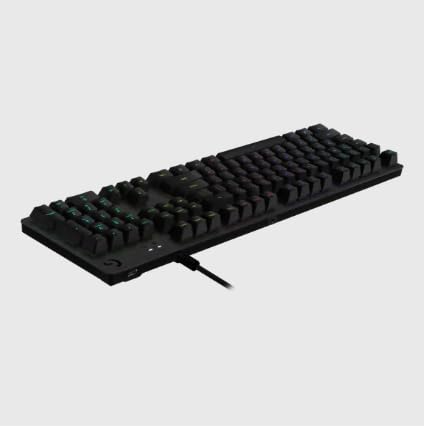
ምስል 3.1፡ የኋላ view of the keyboard illustrating the USB cable connection.
4. የአሠራር መመሪያዎች
This section details the primary functions and controls of your G513 keyboard.

ምስል 4.1: ማዕዘን view of the Logitech G513 Carbon keyboard in operation.
4.1. LIGHTSYNC RGB Lighting
The G513 features per-key LIGHTSYNC RGB lighting. You can control and customize this lighting:
- Onboard Controls: Use the FN + F5/F6/F7 keys to cycle through various lighting effects and brightness levels.
- Logitech G HUB Software: For advanced customization, including per-key color assignment, animation effects, and synchronization with other Logitech G devices, use the G HUB software.
4.2. GX Red Linear Switches
The GX Red switches provide a smooth, linear keystroke without a tactile bump or audible click. This design is favored by many gamers for its rapid actuation and consistent feel.
4.3. USB Pass-Through
The dedicated USB pass-through port on the keyboard allows you to connect a USB device directly to your keyboard, extending a USB port from your computer to a more accessible location. This is useful for connecting a gaming mouse, headset, or charging a mobile device.
4.4. Media and Function Keys
The G513 integrates media and function controls directly into the F-keys. To activate these functions, press the FN key simultaneously with the corresponding F-key:
- FN + F1-F4: Customizable function keys via G HUB.
- FN + F5፡ Cycle through LIGHTSYNC lighting effects.
- FN + F6፡ Decrease LIGHTSYNC brightness.
- FN + F7፡ Increase LIGHTSYNC brightness.
- FN + F8፡ Game Mode toggle (disables Windows key and other customizable keys).
- FN + F9፡ ሚዲያ አጫውት/ ለአፍታ አቁም
- FN + F10፡ Stop media.
- FN + F11፡ የቀድሞ ትራክ.
- FN + F12፡ ቀጣይ ትራክ.
- FN + PRTSC፡ ኦዲዮ ድምጸ-ከል አድርግ።
- FN + SCRLK፡ ድምጽ ዝቅ ያድርጉ።
- FN + ለአፍታ አቁም፡ ድምጽ ጨምር።
5. ጥገና
ትክክለኛው ጥገና የቁልፍ ሰሌዳዎን ረጅም ጊዜ እና አፈፃፀም ያረጋግጣል.
- የቁልፍ ሰሌዳውን ማጽዳት; ለስላሳ፣ ከቆሸሸ ነፃ የሆነ ጨርቅ በትንሹ ተጠቀምampened with water or a mild cleaning solution to wipe down the keycaps and chassis. Avoid harsh chemicals or abrasive materials.
- በቁልፍ ክዳኖች ስር ማጽዳት; For deeper cleaning, you may carefully remove keycaps using a keycap puller (not included) and use compressed air to remove dust and debris from beneath. Reattach keycaps by pressing them firmly onto the switch stems.
- Palm Rest Care: The memory foam palm rest can be wiped clean with a damp ጨርቅ. በውሃ ውስጥ ከመጥለቅ ይቆጠቡ.
- የኬብል አስተዳደር Ensure the USB cable is not kinked or strained to prevent damage.
6. መላ መፈለግ
If you encounter issues with your G513 keyboard, refer to the following common solutions:
- የቁልፍ ሰሌዳ ምላሽ አይሰጥም፡
- Ensure the USB cable is securely plugged into your computer.
- የቁልፍ ሰሌዳውን ወደ ሌላ የዩኤስቢ ወደብ ለመሰካት ይሞክሩ።
- ኮምፒተርዎን እንደገና ያስጀምሩ.
- LIGHTSYNC RGB Not Working/Incorrect:
- Verify Logitech G HUB software is installed and up to date.
- በጂ ሃብ ውስጥ የብርሃን ቅንብሮችን ያረጋግጡ።
- Ensure the keyboard's firmware is updated via G HUB.
- ያልተመዘገቡ ቁልፎች ወይም ድርብ-መተየብ;
- Clean the affected keycap and switch area for debris.
- If the issue persists, contact Logitech support for further assistance.
- USB Pass-Through Not Functioning:
- Ensure both USB connectors from the keyboard (if applicable) are plugged into your computer.
- Test the connected device directly in your computer's USB port to rule out device issues.
For more detailed troubleshooting or persistent issues, visit the Logitech support webጣቢያ ወይም የደንበኛ አገልግሎታቸውን ያነጋግሩ።
7. ዝርዝሮች
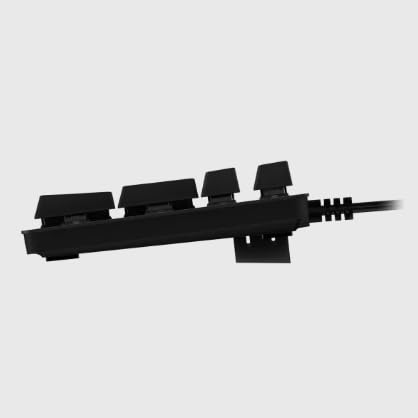
ምስል 7.1፡ ጎን view of the Logitech G513 Carbon keyboard.
| ባህሪ | ዝርዝር |
|---|---|
| የሞዴል ቁጥር | ጂ513 |
| ልኬቶች (L x W x H) | 17.52 x 3.46 x 0.85 ኢንች (44.5 x 8.8 x 2.16 ሴሜ) |
| ክብደት | 2.44 ፓውንድ (1.11 ኪ.ግ) |
| የመቀየሪያ አይነት | GX Red Linear Mechanical Switches |
| ማብራት | LIGHTSYNC RGB (በአንድ ቁልፍ ሊበጅ የሚችል) |
| ግንኙነት | USB 2.0 Pass-Through |
| የኬብል ርዝመት | በግምት 6 ጫማ (1.8 ሜትር) |
| ቁሳቁስ | Aircraft-grade 5052 aluminum top case |
8. ዋስትና እና ድጋፍ
Logitech products are manufactured to high quality standards. For information regarding your product's warranty, please refer to the warranty documentation included with your purchase or visit the official Logitech support webጣቢያ.
For technical support, driver downloads, FAQs, and community forums, please visit the Logitech G support page:


