1. መግቢያ
Thank you for choosing the FREESTYLE FH0955 LED Bluetooth Headphones. This manual provides essential information for the proper setup, operation, and maintenance of your new headphones. Please read it carefully before use to ensure optimal performance and longevity of the product.
2. ምርት አብቅቷልview
The FREESTYLE FH0955 headphones offer a wireless audio experience with integrated features designed for convenience and style. Key features include Bluetooth 5.0 + EDR connectivity, a built-in microSD card slot for direct music playback, a foldable headband for portability, and subtle LED backlighting on the earcups.

ምስል 2.1፡ ፊት view of the FREESTYLE FH0955 LED Bluetooth Headphones, showcasing the over-ear design and LED lighting.

ምስል 2.2፡ የጎን ፕሮfile of the FREESTYLE FH0955 LED Bluetooth Headphones, highlighting the earcup and headband design.

Image 2.3: A person wearing the FREESTYLE FH0955 LED Bluetooth Headphones, demonstrating typical usage.
3. ማዋቀር
3.1. የጆሮ ማዳመጫዎችን መሙላት
Before first use, fully charge the headphones. The FH0955LB model is equipped with a 400 mAh Lithium-ion battery.
- Connect the supplied MicroUSB charging cable to the charging port on the headphones.
- Connect the other end of the cable to a USB power source (e.g., computer USB port, USB wall adapter, or power bank).
- የ LED አመልካች ባትሪ በሚሞላበት ጊዜ ያበራል እና ሙሉ በሙሉ ሲሞላ ቀለሙን ያጠፋል ወይም ይለውጣል።
- A full charge typically takes approximately 2 hours and provides up to 10 hours of continuous music playback.
3.2. የብሉቱዝ ማጣመር
የጆሮ ማዳመጫዎችዎን ገመድ አልባ ከመሳሪያ ጋር ለማገናኘት፦
- የጆሮ ማዳመጫዎቹ መሞላታቸውን እና መጥፋታቸውን ያረጋግጡ።
- የ LED አመልካች እስኪበራ ድረስ በጆሮ ማዳመጫዎቹ ላይ የኃይል አዝራሩን ተጭነው ይያዙት፣ ይህም የማጣመሪያ ሁነታን ያሳያል።
- በመሳሪያዎ ላይ (ስማርትፎን፣ ታብሌት፣ ኮምፒውተር) ብሉቱዝን አንቃ እና የሚገኙ መሳሪያዎችን ፈልግ።
- Select "FH0955" or a similar name from the list of found devices.
- Once connected, the LED indicator will stop flashing and remain solid or turn off, depending on the model.
- The Bluetooth 5.0 + EDR technology allows for a stable connection up to 10 meters.
3.3. የማይክሮ ኤስዲ ካርድ መልሶ ማጫወት
The headphones feature an integrated microSD card slot for direct music playback without a connected device.
- Insert a microSD card (pre-loaded with audio files) into the designated slot on the headphones.
- The headphones should automatically switch to microSD playback mode. If not, use the Mode button (if available) to switch.
- Use the playback controls on the headphones to manage your music.
3.4. ባለገመድ ግንኙነት (3.5ሚሜ የድምጽ ጃክ)
For devices without Bluetooth or when the battery is depleted, you can use the included 3.5mm audio cable.
- የ3.5ሚሜ የድምጽ ገመድ አንዱን ጫፍ በጆሮ ማዳመጫዎች ላይ ካለው የድምጽ መሰኪያ ጋር ያገናኙ።
- ሌላውን ጫፍ ከመሣሪያዎ 3.5ሚሜ የድምጽ ውፅዓት ጋር ያገናኙት።
- የጆሮ ማዳመጫዎቹ በተግባራዊ ሁነታ ይሰራሉ፣ እና የብሉቱዝ ተግባር ይሰናከላል።
4. የአሠራር መመሪያዎች
4.1. ማብራት / ማጥፋት
- አብራ፡ የ LED አመልካች እስኪበራ ድረስ የኃይል አዝራሩን ተጭነው ለ 3 ሰከንድ ያህል ይያዙ።
- ኃይል ዝጋ: የ LED አመልካች እስኪጠፋ ድረስ የኃይል አዝራሩን ተጭነው በግምት ከ3-5 ሰከንድ ያቆዩት።
4.2. የሙዚቃ መልሶ ማጫወት
- አጫውት/ ለአፍታ አቁም፡ Play/Pause የሚለውን ቁልፍ አንዴ ተጫን።
- ቀጣይ ትራክ፡ Press the "Next" button (often Volume Up, long press).
- ቀዳሚ ትራክ Press the "Previous" button (often Volume Down, long press).
- ድምጽ ጨምር የድምጽ መጨመሪያውን አጭር ተጫን።
- ጥራዝ ታች የድምጽ ቁልቁል አዝራሩን በአጭሩ ይጫኑ።
4.3. የጥሪ አስተዳደር
አብሮ በተሰራው ማይክሮፎን፣ በብሉቱዝ ሲገናኙ የስልክ ጥሪዎችን ማስተዳደር ይችላሉ።
- መልስ/ጥሪ ጨርስ፡ በሚመጣ ጥሪ ወቅት የ Play/Pause አዝራሩን አንድ ጊዜ ይጫኑ።
- ጥሪን ውድቅ አድርግ፡ በሚመጣ ጥሪ ወቅት የPlay/Pause አዝራሩን ለ2 ሰከንዶች ያህል ተጭነው ይያዙት።
- የመጨረሻ ቁጥር አጫውት/አፍታ አቁም የሚለውን ቁልፍ ሁለቴ ተጫን።
4.4. LED Backlighting
The headphones feature subtle LED backlighting. Refer to the specific controls on your device for toggling or changing LED modes, if available. This feature is primarily aesthetic.
5. ጥገና
5.1. ማጽዳት
- Use a soft, dry cloth to clean the surface of the headphones.
- ሻካራ ማጽጃዎችን፣ አልኮልን ወይም ኬሚካል ማሟሟቶችን አይጠቀሙ፤ ምክንያቱም እነዚህ ማጠናቀቂያውን ሊጎዱ ይችላሉ።
- የኃይል መሙያ ወደቡን እና የድምጽ መሰኪያውን ከአቧራ እና ከቆሻሻ ነጻ ያድርጉት።
5.2. ማከማቻ
- የጆሮ ማዳመጫዎቹን በቀጥታ ከፀሀይ ብርሀን እና ከከፍተኛ ሙቀት ርቆ በቀዝቃዛና ደረቅ ቦታ ያከማቹ።
- When not in use for extended periods, charge the battery at least once every three months to maintain battery health.
- Utilize the foldable headband feature for compact storage and transport.
6. መላ መፈለግ
| ችግር | ሊሆን የሚችል ምክንያት | መፍትሄ |
|---|---|---|
| የጆሮ ማዳመጫዎች አይበሩም። | ዝቅተኛ ባትሪ. | የጆሮ ማዳመጫዎቹን ሙሉ በሙሉ ይሙሉ። |
| በብሉቱዝ በኩል ማጣመር አይቻልም። | የጆሮ ማዳመጫዎች በማጣመር ሁነታ ላይ አይደሉም; መሳሪያ ብሉቱዝ ጠፍቷል; ከመሳሪያው በጣም የራቀ. | Ensure headphones are in pairing mode. Turn device Bluetooth off/on. Move closer to device (within 10m). |
| ድምጽ የለም። | የድምጽ መጠኑ በጣም ዝቅተኛ ነው፤ የተሳሳተ የድምጽ ምንጭ፤ የጆሮ ማዳመጫዎች አልተገናኙም። | Increase volume on headphones and device. Check Bluetooth connection or 3.5mm cable. Ensure correct mode (Bluetooth/MicroSD). |
| MicroSD card not playing. | ካርዱ በትክክል አልገባም፤ አይደገፍም file ቅርጸት፤ ካርዱ ተበላሽቷል። | Reinsert card. Ensure audio files are in a supported format (e.g., MP3). Try a different microSD card. |
7. ዝርዝሮች
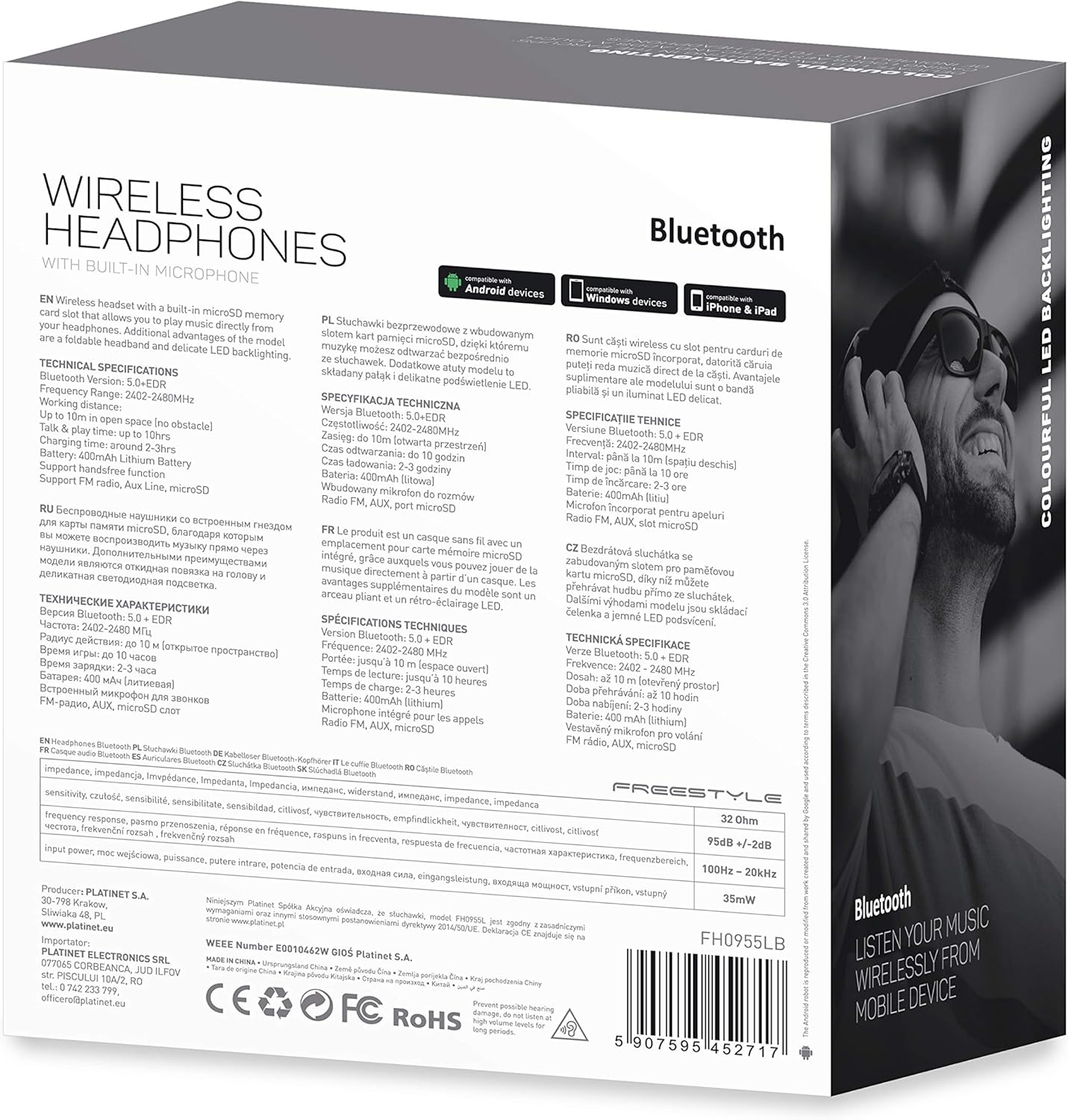
ምስል 7.1፡ ዝርዝር view of the product packaging, showing technical specifications and compliance information.
| ባህሪ | ዝርዝር መግለጫ |
|---|---|
| የሞዴል ቁጥር | FH0955LB |
| የምርት ስም | ፍሪስታይል |
| የግንኙነት ቴክኖሎጂ | ገመድ አልባ (ብሉቱዝ 5.0 + EDR) |
| ገመድ አልባ ክልል | እስከ 10 ሜትር |
| ኦዲዮ ጃክ | 3.5 ሚ.ሜ |
| የቅጽ ምክንያት | ከጆሮ በላይ (ክብ-ጆሮ) |
| ልዩ ባህሪያት | Noise Cancellation, LED Backlighting, MicroSD Card Slot |
| የባትሪ ዓይነት | Integrated Lithium-ion (400 mAh) |
| የመልሶ ማጫወት ጊዜ | እስከ 10 ሰዓታት ድረስ |
| የኃይል መሙያ ጊዜ | በግምት 2 ሰዓታት |
| የኃይል መሙያ ወደብ | ማይክሮ ዩኤስቢ |
| ቀለም | ጥቁር |
| ቁሳቁስ | Leather (earpads/headband) |
| የውሃ መቋቋም ደረጃ | ውሃን መቋቋም የሚችል |
| የተካተቱ አካላት | 1 ጥንድ የጆሮ ማዳመጫዎች |
| አምራች | ፕላቲኔት |
8. ዋስትና እና ድጋፍ
የተወሰኑ የዋስትና ዝርዝሮች በተለምዶ በግዢ ሰነድዎ ወይም በአምራቹ ኦፊሴላዊ ላይ ይሰጣሉ webጣቢያ. እባክዎ ለማንኛውም የዋስትና ጥያቄዎች የግዢ ማረጋገጫዎን ያቆዩ።
For technical support or inquiries, please refer to the contact information provided by your retailer or the manufacturer, Platinet.
9. የደህንነት መረጃ
- የጆሮ ማዳመጫዎቹን ለከፍተኛ ሙቀት፣ እርጥበት ወይም ፈሳሽ አያጋልጡ።
- የመስማት ችግርን ለመከላከል በከፍተኛ ድምጽ ደረጃ ለረጅም ጊዜ ማዳመጥን ያስወግዱ።
- Do not attempt to disassemble or modify the headphones, as this may void the warranty and cause damage.
- ልጆች በማይደርሱበት ቦታ ያስቀምጡ.
- Dispose of the product responsibly according to local electronic waste regulations.


