መግቢያ
This manual provides comprehensive instructions for the safe and efficient use of your SUNMI M2 MAX Industrial Tablet, model TF700. Please read this manual thoroughly before operating the device and retain it for future reference.

ምስል 1: የፊት view of the SUNMI M2 MAX Industrial Tablet, showing its display with various application icons.
ማዋቀር
1. Unboxing እና የመጀመሪያ ምርመራ
ሁሉንም ንጥረ ነገሮች ከማሸጊያው ውስጥ በጥንቃቄ ያስወግዱ. ከዚህ በታች የተዘረዘሩት ሁሉም እቃዎች መኖራቸውን እና ያልተበላሹ መሆናቸውን ያረጋግጡ፡
- SUNMI M2 MAX Industrial Tablet (TF700)
- የኃይል አስማሚ
- የዩኤስቢ ዓይነት- C ገመድ
- Hand Strap (optional, if included with your model)
2. መሣሪያውን በመሙላት ላይ
Before first use, fully charge the tablet. Connect the USB Type-C cable to the tablet's charging port and the other end to the power adapter. Plug the power adapter into a wall outlet. The charging indicator will illuminate.
The tablet is equipped with an 8360mAh non-removable lithium polymer battery. A full charge can provide over 12 hours of continuous operation.
3. Installing SIM Card and MicroSD Card (Optional)
The device supports MicroSIM or NanoSIM cards (Config 1) and an eSIM (Config 2). It also supports MicroSD cards up to 128GB for expanded storage.
- Locate the SIM/MicroSD card slot on the side of the tablet.
- ትሪውን ለመክፈት የቀረበውን የሲም ማስወጫ መሳሪያ (ካለ) ወይም ትንሽ የወረቀት ክሊፕ ይጠቀሙ።
- Carefully place the SIM card(s) and/or MicroSD card into the tray according to the diagram on the tray.
- ወደ ቦታው ጠቅ እስኪያደርግ ድረስ ትሪውን በቀስታ ወደ ማስገቢያው ይግፉት።

ምስል 2: የኋላ view of the SUNMI M2 MAX, highlighting the camera, pogo pin charging interface, and the location of the SIM/MicroSD card slot.
4. Attaching the Hand Strap (Optional)
If your model includes a hand strap, attach it to the designated points on the back of the tablet for secure handling during mobile operations.
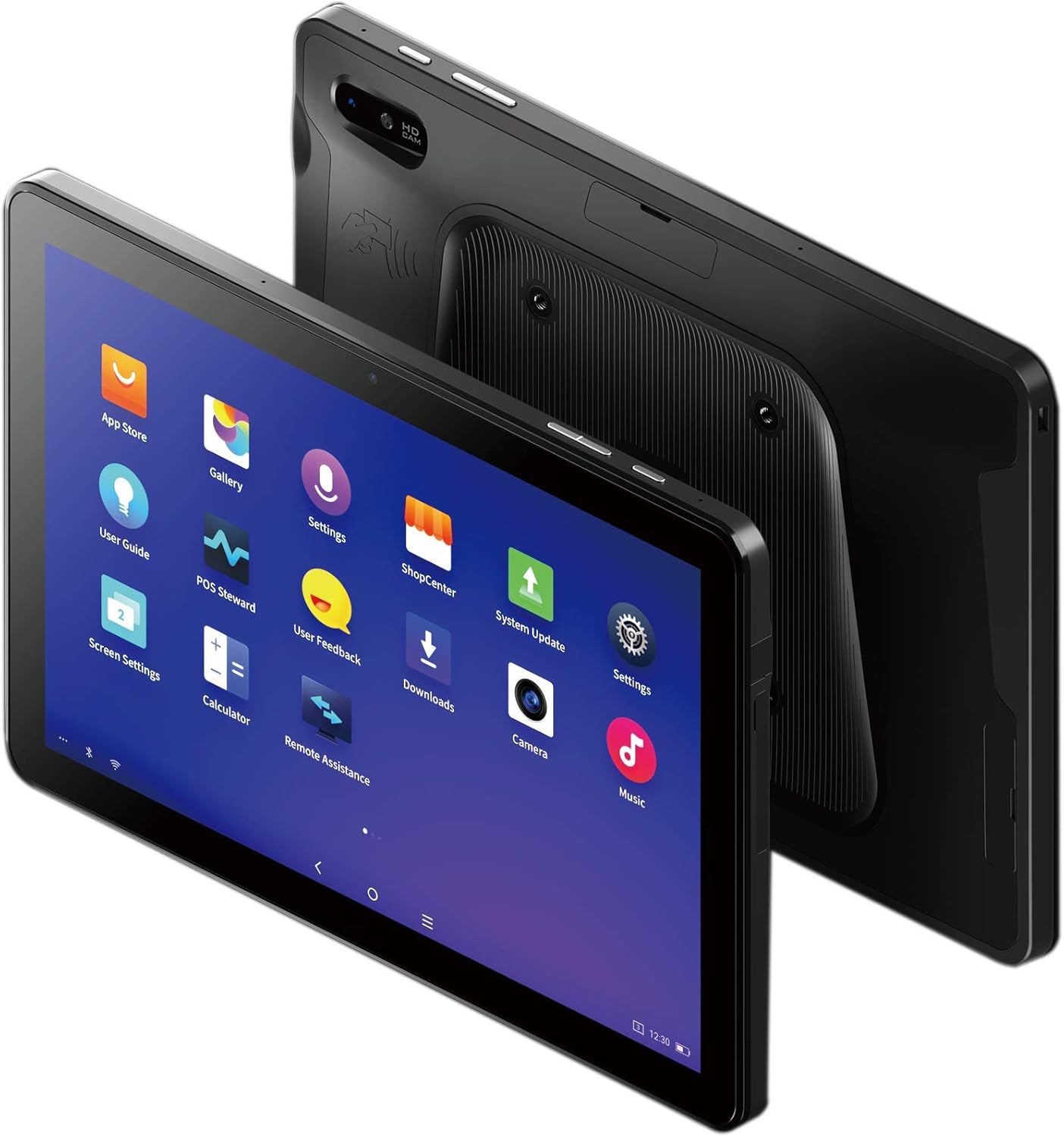
Figure 3: The SUNMI M2 MAX Industrial Tablet being held with an optional hand strap, demonstrating enhanced portability and secure grip.
መሣሪያውን በመሥራት ላይ
1. ማብራት / ማጥፋት
- አብራ፡ Press and hold the Power button (located on the side) until the SUNMI logo appears on the screen.
- ኃይል ዝጋ: የኃይል ማጥፊያ ምናሌ እስኪታይ ድረስ የኃይል አዝራሩን ተጭነው ይያዙ። "ፓወር አጥፋ" የሚለውን ይምረጡ እና ያረጋግጡ።
- እንደገና ጀምር፥ From the power-off menu, select "Restart" to reboot the device.
2. መሰረታዊ ዳሰሳ
The SUNMI M2 MAX runs on the Android operating system. Navigation is primarily touch-based:
- መታ ያድርጉ፡ አንድ ንጥል ለመምረጥ ወይም መተግበሪያ ለመክፈት.
- ያንሸራትቱ በዝርዝሮች ውስጥ ለማሸብለል ወይም በማያ ገጾች መካከል ለመቀያየር።
- ለማጉላት መቆንጠጥ; ምስሎችን ለማጉላት ወይም ለማሳነስ ወይም web ገጾች.
- መነሻ አዝራር፡- ወደ መነሻ ማያ ገጽ ይመለሳል።
- ተመለስ አዝራር፡- ወደ ቀዳሚው ማያ ገጽ ይመለሳል።
- የቅርብ ጊዜ መተግበሪያዎች አዝራር፡- በቅርቡ ያገለገሉ መተግበሪያዎችን ያሳያል።
3. ከአውታረ መረቦች ጋር መገናኘት
The tablet supports Wi-Fi (2.4GHz/5GHz, 802.11 a/b/g/n/ac) and cellular networks (2G, 3G, 4G).
- ዋይ ፋይ፡ ወደ ሂድ ቅንብሮች > አውታረ መረብ እና በይነመረብ > Wi-Fi. ዋይፋይን ያብሩ፣ የሚፈልጉትን አውታረ መረብ ይምረጡ እና አስፈላጊ ከሆነ የይለፍ ቃሉን ያስገቡ።
- የተንቀሳቃሽ ስልክ ውሂብ የሚሰራ ሲም ካርድ መግባቱን ያረጋግጡ። ወደ ሂድ ቅንብሮች > አውታረ መረብ እና በይነመረብ > የሞባይል አውታረ መረብ to enable mobile data and configure APN settings if necessary.
- ብሉቱዝ፡ ወደ ሂድ መቼቶች > የተገናኙ መሣሪያዎች > ብሉቱዝ to pair with Bluetooth devices (supports Bluetooth 5.0).
4. Using NFC
The SUNMI M2 MAX is equipped with NFC (Near Field Communication) for contactless transactions and data exchange. To use NFC, ensure it is enabled in settings and hold the tablet near a compatible NFC reader or device.
5. የካሜራ አሠራር
The tablet features a 13 MP rear camera with flash and autofocus, and a 5 MP front camera. Open the "Camera" application to capture photos or record videos.
ጥገና
1. መሣሪያውን ማጽዳት
ለስላሳ፣ ከቆሸሸ ነፃ የሆነ ጨርቅ በትንሹ ተጠቀምampened with water or a screen cleaner to wipe the display and exterior. Avoid using harsh chemicals, abrasive cleaners, or excessive moisture.
2. የባትሪ እንክብካቤ
- Avoid exposing the tablet to extreme temperatures (below -20°C or above 70°C).
- ባትሪው በተደጋጋሚ እንዲወጣ አትፍቀድ።
- Use only the original or certified compatible power adapter and cable.
3. የሶፍትዌር ዝመናዎች
ጥሩ አፈጻጸም እና ደህንነት ለማረጋገጥ የስርዓት ዝመናዎችን በመደበኛነት ያረጋግጡ እና ይጫኑ። ወደሚከተለው ይሂዱ ቅንብሮች > ስርዓት > የስርዓት ማሻሻያ.
4. የአካባቢ ጥበቃ
The SUNMI M2 MAX is designed with IP68 protection and a 1m drop specification, making it suitable for demanding environments. However, avoid intentional drops or prolonged submersion in water.
መላ መፈለግ
| ችግር | ሊሆን የሚችል ምክንያት | መፍትሄ |
|---|---|---|
| መሣሪያው አይበራም። | ዝቅተኛ ባትሪ; የሶፍትዌር ብልሽት. | መሣሪያውን ቢያንስ ለ 30 ደቂቃዎች ይሙሉ. ዳግም ለማስጀመር የኃይል ቁልፉን ለ10-15 ሰከንድ ተጭነው ይቆዩ። |
| ከWi-Fi ጋር መገናኘት አልተቻለም። | Incorrect password; Wi-Fi disabled; router issue. | Verify password. Ensure Wi-Fi is enabled in settings. Restart router. Forget and reconnect to the network. |
| የንክኪ ማያ ገጽ ምላሽ አይሰጥም። | ጊዜያዊ የሶፍትዌር ችግር። | የኃይል አዝራሩን በመያዝ መሳሪያውን እንደገና ያስጀምሩ. |
| Applications crashing. | Insufficient RAM; app bug. | Close background apps. Clear app cache/data (Settings > Apps). Update the app. |
ዝርዝሮች
The following table outlines the key technical specifications of the SUNMI M2 MAX Industrial Tablet (Model: TF700).

Figure 4: Comprehensive technical specifications for the SUNMI M2 MAX Industrial Tablet.
- ሞዴል፡ TF700
- ስርዓተ ክወና፡ Android 9.0 (SUNMI OS)
- ፕሮሰሰር፡ Kryo-260, Octa-core 2.2GHz (Qualcomm)
- ማህደረ ትውስታ፡ 3GB RAM + 32GB ROM (eMMC)
- ማሳያ፡- 10.1-inch FHD, 1920x1200, Capacitive multitouch, Corning Gorilla Glass 3
- ካሜራዎች፡ Front: 5MP FF; Rear: 13MP AF + Flashlight, supports 1D/2D barcode recognition
- NFC: Type-A&B card, Mifare card, Felica card, ISO/IEC 14443 and ISO/IEC 15693 compliant
- Speaker/MIC: 1W Speaker, 2x MIC
- PSAM ካርድ ማስገቢያ 1x PSAM
- ሲም ካርድ ማስገቢያ፡ 1x MicroSD (TF), 1x MicroSIM or 1x NanoSIM (TF700 Config 1), eSIM (TF700 Config 2)
- አውታረ መረብ፡ 2G & 3G & 4G
- ዋይ ፋይ፡ 2.4GHz/5GHz, 802.11 a/b/g/n/ac
- ብሉቱዝ፡ Supports Bluetooth 2.1/3.0/4.2/5.0 (BLE)
- ጂፒኤስ፡ Supports AGPS, GPS, GLONASS, Beidou (Config 2)
- ዳሳሽ፡- Gravity sensor, light sensor, compass, Hall
- አዝራሮች፡- 1x Power (lock screen), 2x Volume (+/-)
- ወደቦች፡ 1x Type-C (supports OTG), 1x Audio Jack, 1x MicroSD (up to 128GB expansion)
- ባትሪ፡ Non-removable Lithium Polymer battery, 8360mAh
- የኃይል አስማሚ፡- Input: AC 100-240V, Output: DC 5V/2A
- ልኬቶች (LxWxH)፦ 249.8 x 160 x 9.9 ሚሜ (0.39 x 6.3 x 9.84 ኢንች)
- ጠቅላላ ክብደት፡ 673 ግ (1.48 ፓውንድ)
- ጥበቃ፡ IP68, 1m drop spec
- የአሠራር ሙቀት; -20 ° ሴ እስከ 55 ° ሴ
- የማከማቻ ሙቀት፡ -40 ° ሴ እስከ 70 ° ሴ
ዋስትና እና ድጋፍ
For warranty information and technical support, please refer to the documentation provided with your purchase or visit the official SUNMI webጣቢያ. ለዋስትና ጥያቄዎች የግዢ ማረጋገጫዎን ያስቀምጡ።
SUNMI Official Webጣቢያ፡ www.sunmi.com


