1. መግቢያ
The ELEGOO Conqueror Robot Tank Kit is an advanced educational robotics platform designed for enthusiasts and learners interested in Arduino-based programming and robotics. This kit provides a comprehensive learning experience, allowing users to assemble a functional robot tank and explore various functionalities such as obstacle avoidance, line tracking, auto-following, FPV (First Person View) መቆጣጠሪያ፣ እና የኢንፍራሬድ የርቀት መቆጣጠሪያ።
Based on the Arduino development environment, this kit offers open-source resources and extensive learning materials. Its DIY assembly process helps develop concentration and practical skills. The graphical programming interface, featuring special building block functions, encourages creativity and imagination through diverse car functions. Experience first-person perspective control with a two-degree-of-freedom gimbal, allowing flexible camera angle adjustments.
2. የደህንነት መረጃ
Please read all instructions carefully before assembly and operation. Keep small components out of reach of young children to prevent choking hazards. This kit contains electronic components; avoid contact with water or extreme temperatures. Ensure all connections are secure before powering on the device. Adult supervision is recommended for younger users.
3. የጥቅል ይዘቶች
The ELEGOO Conqueror Robot Tank Kit includes all necessary components for assembly and operation. A detailed list of parts can be found in the physical instruction booklet included with your kit. Key modules include the UNO R3, line tracking module, ultrasonic sensor, Bluetooth module, and camera module.
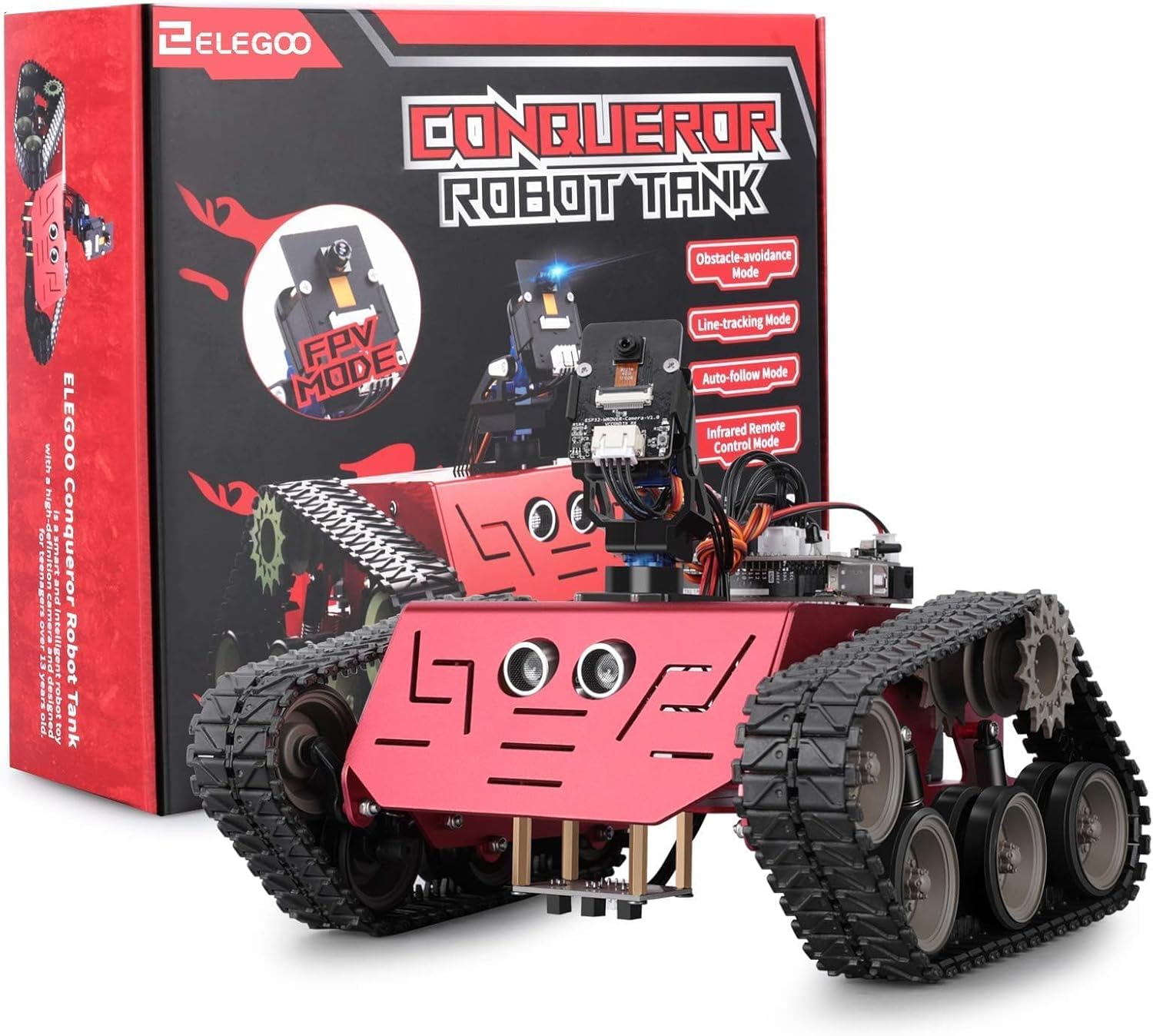
ምስል፡ አልቋልview of the ELEGOO Conqueror Robot Tank Kit, including the robot tank and its packaging, showcasing various components.
4. ማዋቀር እና መሰብሰብ
Assembly of the Conqueror Robot Tank requires careful attention to detail. Follow the step-by-step instructions provided in the included manual. The kit supports two primary installation types for the main control board and wiring, offering flexibility in component placement.

Image: Illustration showing two different methods for installing the electronic components within the robot tank chassis, highlighting wiring and module placement.
Ensure all modules, such as the ultrasonic sensor and camera, are securely mounted. The camera module is designed with a two-degree-of-freedom gimbal, allowing for adjustable viewing ማዕዘኖች.

ምስል፡ ፊት ለፊት view of the robot tank, emphasizing the camera module's rotational capabilities with indicators for 150-degree vertical and 180-degree horizontal movement.
5. የአሠራር መመሪያዎች
The ELEGOO Conqueror Robot Tank offers multiple operating modes and programming options. It can be controlled via a mobile application, graphical programming, or text-based coding using the Arduino IDE.
5.1 የመቆጣጠሪያ ሁነታዎች
- መሰናክል መራቅ ሁነታ፡ The robot uses its ultrasonic sensor to detect obstacles and navigate around them automatically.
- የመስመር መከታተያ ሁነታ፡ The robot follows a designated line on the ground using its line tracking module.
- Auto-Following Mode: The robot can be programmed to follow a moving object or person.
- FPV (የመጀመሪያ ሰው View) ሁነታ: Utilize the onboard camera to stream live video to a connected device, allowing for remote control from a first-person perspective.
- Infrared Remote Control Mode: Control the robot's movements using an infrared remote (if included or purchased separately).

Image: The ELEGOO Conqueror Robot Tank with icons illustrating its core functionalities: obstacle avoidance, line tracking, auto following, FPV, and infrared remote control.

Image: The robot tank performing obstacle avoidance, illustrating its ability to detect and navigate around objects.

Image: The robot tank in line tracking mode, following a white line on a green surface.
5.2 ፕሮግራሚንግ
The kit supports both graphical and text-based programming methods:
- Graphical Programming (Scratch-based): Use the ELEGOOKit APP for a visual, block-based programming experience, ideal for beginners.
- Text-based Programming (Arduino IDE): For advanced users, the robot can be programmed using the Arduino IDE, allowing for custom code development.

Image: A smartphone displaying a graphical programming interface (Scratch-like blocks) used to control the robot tank, with the robot shown in the background.

Image: A visual comparison showing the ElegooKit APP interface for graphical (Scratch) programming on a mobile device and the Arduino IDE for text-based programming on a laptop, demonstrating the dual programming options.
6. ጥገና
To ensure the longevity and optimal performance of your ELEGOO Conqueror Robot Tank, follow these maintenance guidelines:
- ማጽዳት፡ Regularly clean the chassis and tracks to remove dust and debris. Use a soft, dry cloth. Avoid using liquids directly on electronic components.
- ግንኙነቶች፡ Periodically check all wire connections to ensure they are secure. Loose connections can lead to erratic behavior or malfunction.
- ማከማቻ፡ ሮቦቱን ከፀሐይ ብርሃን እና ከፍተኛ የሙቀት መጠን ራቅ ባለ ቀዝቃዛና ደረቅ ቦታ ያስቀምጡት።
- የባትሪ እንክብካቤ If using rechargeable batteries (not included), follow the manufacturer's guidelines for charging and storage. Remove batteries if the robot will not be used for an extended period.
7. መላ መፈለግ
If you encounter issues with your ELEGOO Conqueror Robot Tank, consider the following common troubleshooting steps:
- ሮቦት የማይንቀሳቀስ;
- Check battery levels and ensure they are correctly installed.
- Verify all motor connections are secure.
- Ensure the code uploaded to the Arduino board is correct and running.
- የተሳሳተ ባህሪ፡-
- Inspect all wiring for loose connections or shorts.
- Re-upload the program to the Arduino board.
- Ensure sensors (ultrasonic, line tracking) are clean and unobstructed.
- የካሜራ ምግብ ጉዳዮች፡-
- Check the camera module's connection to the main board.
- Ensure your controlling device is properly connected to the robot's Wi-Fi/Bluetooth network.
- Verify the FPV application settings.
- Programming Upload Failure:
- Ensure the correct board and port are selected in the Arduino IDE.
- የዩኤስቢ ገመድ ግንኙነትን ያረጋግጡ።
- Install necessary drivers for the UNO R3 board.
For more detailed troubleshooting, refer to the official ELEGOO support resources or community forums.
8. ዝርዝሮች
| ባህሪ | ዝርዝር |
|---|---|
| የሞዴል ቁጥር | ES-GYE-KIT-027 |
| የምርት ስም | ELEGOO |
| የጥቅል ልኬቶች | 30.8 x 29 x 9.4 ሴ.ሜ |
| የእቃው ክብደት | 1.61 ኪ |
| የትምህርት ዋጋ | Develop programming and practical skills |
| ስብሰባ ያስፈልጋል | አዎ |
| ባትሪዎች ያስፈልጋሉ። | No (for kit, but robot requires lithium battery, not included) |
| የርቀት መቆጣጠሪያ ተካትቷል። | አይ |
9. ዋስትና እና ድጋፍ
For warranty information, technical support, or to inquire about replacement parts, please refer to the documentation included with your product or visit the official ELEGOO website. ELEGOO provides resources and community support for their educational kits.
ኦፊሴላዊ የELEGOO መደብር፡ Visit ELEGOO Store


