1. መግቢያ
This manual provides essential information for the safe operation, maintenance, and troubleshooting of your Coredy R580 Robot Vacuum Cleaner. Please read this manual thoroughly before using the product and retain it for future reference.
The Coredy R580 is a versatile robotic vacuum cleaner designed to simplify your cleaning routine. It features powerful 2000Pa suction, Wi-Fi connectivity for app control, and compatibility with voice assistants like Amazon Alexa and Google Assistant. It supports both sweeping and mopping functions (water tank and mop cloth sold separately) and can transition seamlessly from hard floors to carpets, automatically boosting suction when needed. Its slim design allows it to clean under furniture, and it supports virtual boundaries (strips sold separately) to define cleaning areas.
2. የደህንነት መመሪያዎች
- መሣሪያውን ከመሥራቱ በፊት ሁሉንም መመሪያዎች ያንብቡ።
- ልጆች ከሮቦቱ ጋር እንዲጫወቱ አይፍቀዱ። ሮቦቱ በሚሰራበት ጊዜ ልጆችን እና የቤት እንስሳትን ይቆጣጠሩ።
- በአምራቹ የቀረበውን የመጀመሪያውን የኃይል አስማሚ ብቻ ይጠቀሙ።
- ክፍት የእሳት ነበልባል ወይም ደካማ ነገሮች ባሉበት አካባቢ ሮቦቱን አይጠቀሙ።
- ከማጽዳቱ በፊት ወይም ጥገና ከማድረግዎ በፊት ሮቦቱ መጥፋቱን እና መሰካቱን ያረጋግጡ።
- Do not immerse the robot or its charging dock in water.
- ሮቦቱን እርጥብ በሆኑ ቦታዎች ላይ ወይም ውሃ ባለባቸው ቦታዎች ላይ ከመጠቀም ይቆጠቡ።
- Remove power cords, small objects, and loose rugs from the floor before operation to prevent entanglement.
3. የጥቅል ይዘቶች
ጥቅሉን ሲከፍቱ፣ ከዚህ በታች የተዘረዘሩት ሁሉም እቃዎች መያዛቸውን እና በጥሩ ሁኔታ ላይ መሆናቸውን ያረጋግጡ።
- Coredy R580 Robot Vacuum Cleaner
- የኃይል መሙያ መትከያ
- የኃይል አስማሚ
- የጎን ብሩሾች (4x)
- High Efficiency Filter (1x extra)
- የርቀት መቆጣጠሪያ
- የጽዳት ብሩሽ
Note: The 300ML water tank, cleaning mop cloth, and boundary strips are sold separately and are not included in the standard package.
4. ምርት አብቅቷልview

ምስል 4.1: ከፍተኛ view of the Coredy R580 Robot Vacuum Cleaner with an accompanying smartphone displaying the control application. The robot is black with bronze accents and features a central power button and home button.
የሮቦት አካላት
- ከፍተኛ ፓነል Power/Clean button, Home/Recharge button, Wi-Fi indicator.
- የፊት መከላከያ; የግጭት ዳሳሾች.
- የጎን ብሩሽዎች; Two rotating brushes for edge and corner cleaning.
- ማጭበርበር: Collects debris.
- ዋና ብሩሽ፡ ጥልቀት ለማጽዳት ማዕከላዊ ብሩሽ.
- መንኮራኩሮች; በተለያዩ ቦታዎች ላይ ለመንቀሳቀስ።
- እውቂያዎችን በመሙላት ላይ፡ For automatic charging with the dock.
- የገደል ዳሳሾች፡ ደረጃዎቹን እንዳይወርዱ ለመከላከል ጠብታዎችን ያገኛል።
5. ማዋቀር
5.1 ሮቦቱን መሙላት
Before first use, fully charge the robot. Place the charging dock against a wall in an open, uncluttered area. Ensure there is at least 1 meter (3 feet) of clear space to the front and 0.5 meters (1.5 feet) to each side of the charging dock. Connect the power adapter to the charging dock and plug it into a wall outlet. Place the robot on the charging dock, ensuring the charging contacts align. The indicator light on the robot will show charging status.
5.2 የጎን ብሩሽዎችን መትከል
Attach the side brushes by pressing them onto the square posts at the bottom of the robot until they click into place. Ensure the brushes are securely fastened.
5.3 ከWi-Fi እና ከመተግበሪያ ማዋቀር ጋር መገናኘት
To utilize smart features, download the Coredy app from your smartphone's app store. Follow the in-app instructions to connect your R580 to your home Wi-Fi network. Note that the robot supports 2.4 GHz Wi-Fi networks only.

Figure 5.1: The Coredy smartphone application allows users to control cleaning, monitor status, schedule cleaning, and access support.
6. የሮቦት ቫክዩም መስራት
6.1 ጽዳት መጀመር/ማቆም
- በእጅ ጅምር; Press the Power/Clean button on the robot or the remote control.
- የመተግበሪያ ጅማሬ፡ Use the Coredy app to initiate cleaning.
- የድምጽ ትዕዛዝ፡ If connected to Alexa or Google Assistant, use voice commands like "Alexa, ask Coredy to start cleaning."
- To pause cleaning, press the Power/Clean button again. To send the robot back to the charging dock, press the Home/Recharge button.
6.2 የጽዳት ሁነታዎች
- ራስ-ማጽዳት; ሮቦቱ በስርዓት በተሰራ ንድፍ በራስ-ሰር ይጸዳል።
- የቦታ ማጽዳት; ሮቦቱ የተወሰነ ቦታን በክብ ቅርጽ ያጸዳል።
- የጠርዝ ማጽዳት; ሮቦቱ ግድግዳዎችን እና የቤት እቃዎችን ጠርዝ ላይ ያጸዳል.
6.3 የድምጽ መቆጣጠሪያን መጠቀም
The Coredy R580 is compatible with Amazon Alexa and Google Assistant. Once connected through the Coredy app, you can use simple voice commands to start or stop cleaning.

Figure 6.1: The Coredy R580 can be controlled via voice commands through Amazon Alexa or Google Assistant for hands-free operation.
6.4 Virtual Boundary (Sold Separately)
The R580 supports virtual boundary strips to restrict the robot from entering certain areas. Place the boundary strips on the floor to create invisible barriers. The robot's specialized sensors will detect these strips and avoid crossing them.

Figure 6.2: Virtual boundary strips (sold separately) allow you to define specific areas where the robot vacuum should not clean.
6.5 Sweep and Mop Function (Accessories Sold Separately)
The R580 can perform wet-dry mopping when equipped with the optional 300ML water tank and cleaning mop cloth. Attach the water tank with the mop cloth to the robot for comprehensive cleaning on hard surface floors.
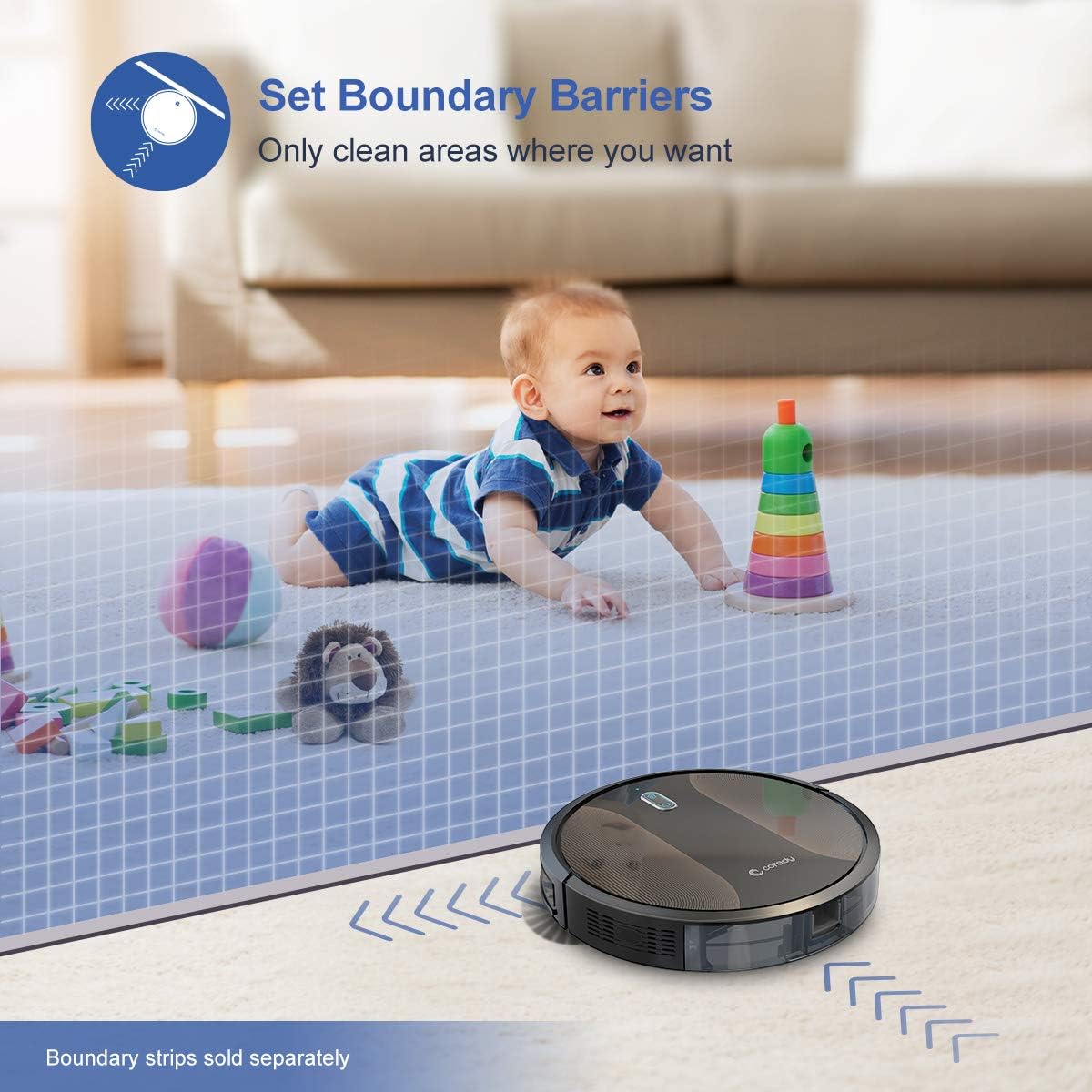
Figure 6.3: The Coredy R580 can be converted for mopping by attaching the optional water tank and mop cloth.
6.6 Boost-Intellect Technology
The robot is equipped with Boost-Intellect Technology, which automatically increases suction power when it detects carpeted surfaces, ensuring a deeper clean across different floor types.

Figure 6.4: Boost-Intellect Technology automatically adjusts suction power when the robot moves from hard floors to carpets.

Figure 6.5: The Coredy R580 provides strong suction power to effectively clean various types of debris from hard floors.
7. ጥገና
Regular maintenance is crucial for optimal performance and longevity of your robot vacuum. Perform the following cleaning procedures regularly:
7.1 Dustbinን ባዶ ማድረግ
Press the dustbin release button and pull out the dustbin. Open the dustbin cover and empty its contents into a trash can. It is recommended to empty the dustbin after each cleaning cycle.
7.2 ዋናውን ብሩሽ ማጽዳት
Remove the main brush cover and lift out the main brush. Use the provided cleaning tool or a pair of scissors to remove any hair or debris tangled around the brush. Reinstall the main brush and cover.
7.3 የጎን ብሩሽዎችን ማጽዳት
Periodically check the side brushes for tangled hair or debris. Gently pull them off their posts to clean. If they are worn or damaged, replace them with new ones. Push them back onto the posts until they click.
7.4 ማጣሪያውን ማጽዳት
Remove the filter from the dustbin. Tap the filter against a trash can to remove dust. Do not wash the filter with water, as this can damage it. Replace the filter every 2-3 months, or more frequently depending on usage.
7.5 የጽዳት ዳሳሾች እና እውቂያዎችን መሙላት
Wipe the cliff sensors (located on the bottom of the robot) and the charging contacts (on the robot and charging dock) with a clean, dry cloth. Keeping these clean ensures proper navigation and charging.
8. መላ መፈለግ
If your Coredy R580 encounters issues, refer to the following table for common problems and solutions:
| ችግር | ሊሆን የሚችል ምክንያት | መፍትሄ |
|---|---|---|
| ሮቦት አይበራም። | ዝቅተኛ ባትሪ; የኃይል ማብሪያ / ማጥፊያ | ሮቦቱን ይሙሉት፤ ዋናውን የኃይል ማብሪያ / ማጥፊያ ያብሩ። |
| ሮቦት አያስከፍልም | የኃይል መሙያ እውቂያዎች ቆሽሸዋል፤ የኃይል መሙያ መትከያ ኃይል የለውም | Clean charging contacts on robot and dock; Ensure charging dock is plugged in. |
| ሮቦት በተደጋጋሚ ይጣበቃል | Obstacles (cables, rugs); Cliff sensors dirty | Clear obstacles from cleaning path; Clean cliff sensors. |
| ደካማ የጽዳት አፈጻጸም | Dustbin ሙሉ; ብሩሽዎች ተጣብቀዋል; ማጣሪያ ተዘግቷል። | Empty dustbin; Clean main and side brushes; Clean or replace filter. |
| የWi-Fi ግንኙነት ችግሮች | የተሳሳተ የWi-Fi የይለፍ ቃል፤ ራውተር በጣም ሩቅ ነው፤ የ5GHz አውታረ መረብ | Re-enter password; Move robot closer to router; Ensure 2.4GHz network is used. |
If the problem persists after trying the above solutions, please contact Coredy customer support for further assistance.
9. ዝርዝሮች
| ባህሪ | ዝርዝር |
|---|---|
| የምርት ስም | ኮሪዲ |
| ሞዴል | R580 |
| ልዩ ባህሪ | HEPA Filtration, Pet Tools, Vacuums |
| ቀለም | ጥቁር |
| የማጣሪያ ዓይነት | ካርቶሪጅ |
| Dustbin አቅም | 0.3 ሊትር |
| የኃይል ምንጭ | ባትሪ የተጎላበተ (1 ሊቲየም አዮን ባትሪ ተካትቷል) |
| የመቆጣጠሪያ ዘዴ | Remote, Voice (Alexa, Google Home), App |
| የቅጽ ምክንያት | ሮቦቲክ |
| ልኬቶች (L x W x H) | 16.89 x 13.66 x 4.57 ኢንች |
| የእቃው ክብደት | 8.91 ፓውንድ |
| የመሳብ ኃይል | እስከ 2000 ፓ |
| የድምጽ ደረጃ | ከ65 ዲቢቢ በታች |
10. ዋስትና እና ድጋፍ
10.1 የዋስትና መረጃ
Coredy products are manufactured to the highest quality standards. For specific warranty details regarding your R580 Robot Vacuum Cleaner, please refer to the warranty card included in your product packaging or visit the official Coredy webጣቢያ. ዋስትናው በተለምዶ የቁሳቁሶችን ጉድለቶች እና በመደበኛ አጠቃቀም ላይ ያሉ የአሰራር ጉድለቶችን ይሸፍናል።
10.2 የደንበኛ ድጋፍ
If you have any questions, require technical assistance, or need to report an issue with your Coredy R580, please contact Coredy customer support. Contact information can usually be found on the official Coredy website or on the product packaging. Please have your model number (R580) and purchase information ready when contacting support.


