መግቢያ
This user manual provides comprehensive instructions for the installation, operation, and maintenance of your wansview W9 Outdoor Security Camera. Please read this manual carefully before using the product to ensure proper functionality and safety. Keep this manual for future reference.
በሣጥኑ ውስጥ ያለው
ሁሉም ክፍሎች በጥቅሉ ውስጥ መገኘታቸውን ያረጋግጡ፡-
- ዋንስview W9 የውጪ ደህንነት ካሜራ
- 5dBi WiFi Antenna
- የዩኤስቢ የኃይል አቅርቦት
- የመጫኛ ቅንፍ አዘጋጅ
ምርት አልቋልview
Familiarize yourself with the key components of your wansview W9 camera.

ምስል 1፡ ዋንስview W9 Outdoor Security Camera and Live View on Smartphone.
This image shows the wansview W9 outdoor security camera mounted on a wall, alongside a smartphone displaying a live feed from the camera. The camera is white with a black lens area, and the phone screen shows a dog in a grassy yard, illustrating the live monitoring capability.
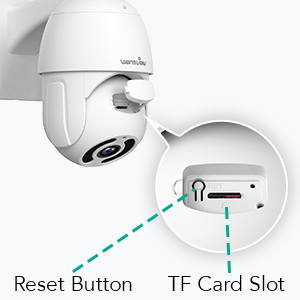
Figure 2: Reset Button and TF Card Slot Location.
This diagram highlights the location of the reset button and the TF (microSD) card slot on the wansview W9 camera, essential for initial setup and local storage.
የማዋቀር መመሪያ
1. በካሜራ ላይ ኃይል መስጠት
Connect the USB power supply to the camera and plug it into a power outlet. The camera will power on and initiate its self-test sequence.
2. የመተግበሪያ ጭነት
Download the "Wansview Cloud" app from your smartphone's app store (available on iOS and Android). Register for a new account or log in if you already have one.
3. የአውታረ መረብ ግንኙነት
ዋኖችview W9 camera supports both Wi-Fi (2.4GHz only) and Ethernet connections.
የWi-Fi ግንኙነት፡-
- ዋንስን ይክፈቱview Cloud app and tap the "+" icon to add a new device.
- Select your camera model (W9) and follow the on-screen instructions.
- ስልክዎ ከ2.4GHz Wi-Fi አውታረ መረብ ጋር መገናኘቱን ያረጋግጡ። ካሜራው 5GHz Wi-Fiን አይደግፍም።
- በካሜራ ሌንስ በስልክዎ ላይ የሚታየውን QR ኮድ ይቃኙ።
- Wait for the camera to connect to your Wi-Fi network.

Figure 3: Wi-Fi Compatibility (2.4GHz only).
This image illustrates the wansview W9 camera with its upgraded 5dBi antenna, emphasizing its compatibility with 2.4GHz Wi-Fi networks for extended signal range and faster connection speeds. It explicitly shows that 5GHz Wi-Fi is not supported.
የኤተርኔት ግንኙነት፡-
- Connect an Ethernet cable from your router to the RJ45 port on the camera.
- The camera will automatically connect to the network.
- ካሜራውን ወደ መለያዎ ለመጨመር የመተግበሪያውን መመሪያዎች ይከተሉ።
4. ካሜራውን መትከል
ዋኖችview W9 camera is designed for wall mounting and outdoor use (IP65 waterproof).
- ለመጫን ተስማሚ ቦታ ይምረጡ፣ ግልጽነትን ያረጋግጡ view እና የተረጋጋ የመጫኛ ወለል።
- Use the provided mounting bracket set to securely attach the camera to the wall.
- ከተሰቀለ በኋላ የካሜራውን አንግል እንደ አስፈላጊነቱ ያስተካክሉ።
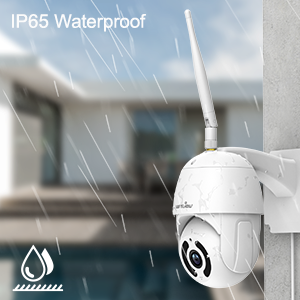
ምስል 4: IP65 የውሃ መከላከያ ባህሪ.
This image depicts the wansview W9 camera outdoors with rain falling on it, visually confirming its IP65 waterproof rating, making it suitable for various weather conditions.
የአሠራር መመሪያዎች
1. Pan-Tilt Control
The camera features a 350° horizontal pan and 90° vertical tilt range, allowing you to monitor a wide area.
- በዋንስ ውስጥview Cloud app, access the live view የካሜራዎ.
- Use the directional controls on the screen to remotely adjust the camera's pan and tilt angles.

Figure 5: 2K FHD PTZ Coverage.
This image demonstrates the wansview W9 camera's 2K FHD resolution and its Pan-Tilt-Zoom (PTZ) capabilities, showing a 350° pan and 95° tilt range for comprehensive area coverage, with a house in the background to illustrate its outdoor application.
2. የምሽት ራዕይ
The camera is equipped with 12pcs 850nm infrared LED lights, providing clear night vision up to 50 feet.
- በዝቅተኛ ብርሃን ሁኔታዎች ውስጥ ካሜራው በራስ-ሰር ወደ ማታ እይታ ሁነታ ይቀየራል።
- ትችላለህ view the night vision feed in real-time through the Wansview የደመና መተግበሪያ።

Figure 6: Excellent Night Vision Capability.
ይህ ምስል መከፋፈልን ያሳያል view comparing the daytime and night vision performance of the wansview W9 camera. The night vision segment clearly shows objects up to 50 feet away in darkness, highlighting the camera's effective infrared capabilities.
3. ባለሁለት መንገድ ኦዲዮ
አብሮ የተሰራውን ማይክሮፎን እና ድምጽ ማጉያን በመጠቀም ከጎብኝዎች ጋር ይገናኙ ወይም ሰርጎ ገቦችን ያስወግዱ።
- ከቀጥታ view in the Wansview Cloud app, tap the microphone icon to speak.
- ከካሜራው አካባቢ ድምጽ ለማዳመጥ የድምጽ ማጉያውን አዶ መታ ያድርጉ።

Figure 7: Two-Way Audio in Action.
This image illustrates the two-way audio feature of the wansview W9 camera, showing a person communicating with a delivery driver through the camera via a smartphone app. Speech bubbles indicate the conversation, demonstrating real-time interaction.

Figure 8: Deterring Intruders with Two-Way Audio.
This image shows the wansview W9 camera being used to deter an intruder. Speech bubbles indicate a command from the camera ("Move away from my house") and the intruder's response ("arrgg, no, I'm off"), demonstrating the camera's ability to act as a deterrent.
4. የእንቅስቃሴ ማወቂያ እና ማንቂያዎች
The camera uses motion sensors to detect activity and sends instant alerts to your phone.
- Customize sensor sensitivity and detection areas within the Wansview የደመና መተግበሪያ።
- Receive 10-second video alerts when motion is detected.

Figure 9: Instant Detection and Alerts.
This image shows a smartphone displaying a "Motion alarm" notification from the Wansview Cloud app, indicating that the wansview W9 camera has detected activity and sent an immediate alert to the user's phone.
5. Storage Options (SD Card & Cloud)
ዋኖችview W9 camera offers flexible storage solutions for recorded footage.
- የኤስዲ ካርድ ማከማቻ፡ Supports up to 128GB microSD cards. Insert the card into the TF card slot (refer to Figure 2). Recorded video and images can be stored locally for preview.
- የደመና ማከማቻ፡ Subscribe to the paid Cloud service via the Wansview Cloud app to save and upload videos securely to the cloud. This provides an additional layer of security against camera theft or damage.

Figure 10: Dual Storage Choices.
This image highlights the dual storage options for the wansview W9 camera: secure TF (microSD) card storage and encrypted cloud storage, providing users with flexible ways to back up recorded footage.
6. አሌክሳ ውህደት
Control your wansview W9 camera and view live feeds using Amazon Alexa.
- ዋንስን አንቃview በአሌክሳ መተግበሪያ ውስጥ ክህሎት።
- ዋንዎን ያገናኙview Cloud account with Alexa.
- Use voice commands such as "Alexa, show me the [camera name]" to display the live video on compatible Alexa devices (e.g., Echo Show).
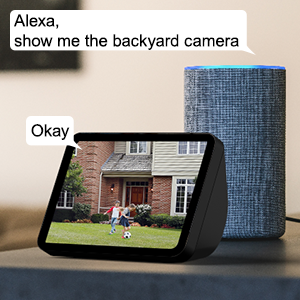
Figure 11: Alexa Integration.
This image shows an Amazon Echo Show displaying a live video feed from a wansview camera, with speech bubbles indicating a user's voice command ("Alexa, show me the backyard camera") and Alexa's response ("Okay"), demonstrating seamless integration with Alexa for voice control.
7. Multiple Family Members Sharing
Share access to your camera's live feed with up to 4 users simultaneously.
- Generate an invitation link within the Wansview የደመና መተግበሪያ።
- Share the link with family members to grant them access.
ጥገና
- ማጽዳት፡ የካሜራውን ሌንሶች እና ገላውን ለስላሳ እና ደረቅ ጨርቅ በጥንቃቄ ያጽዱ። ኃይለኛ ኬሚካሎችን ወይም ሻካራ ማጽጃዎችን አይጠቀሙ.
- የጽኑዌር ዝማኔዎች ፦ Regularly check for and install firmware updates via the Wansview Cloud app to ensure optimal performance and security.
- የኃይል አቅርቦት; Ensure the power supply is securely connected and free from damage.
- የአውታረ መረብ ግንኙነት፡- Verify a stable Wi-Fi or Ethernet connection for uninterrupted monitoring.
መላ መፈለግ
| ችግር | ሊሆን የሚችል ምክንያት | መፍትሄ |
|---|---|---|
| ካሜራ ከመስመር ውጭ | No power; Wi-Fi signal weak/disconnected; Router issue. | Check power connection; Move camera closer to router or use Ethernet; Restart router. |
| ከWi-Fi ጋር መገናኘት አልተቻለም | Incorrect Wi-Fi password; Connecting to 5GHz network; Too far from router. | Double-check password; Ensure connection to 2.4GHz Wi-Fi; Relocate camera or router. |
| የእንቅስቃሴ ማንቂያዎች አልተቀበሉም | Motion detection disabled; App notifications off; Sensitivity too low. | Enable motion detection in app; Check phone notification settings; Adjust sensitivity. |
| ደካማ የምሽት እይታ ጥራት | Obstruction in front of lens; Infrared LEDs blocked. | Clear any obstructions; Ensure lens is clean. |
| የሁለት መንገድ የድምጽ ችግሮች | Microphone/speaker blocked; App permissions. | Ensure clear path for audio; Check app permissions for microphone. |
ዝርዝሮች
| የሞዴል ቁጥር | ደብሊው9-ደብሊው |
| የቪዲዮ ቀረጻ ጥራት | 1080p (2K HD) |
| የፓን/የማጋደል ክልል | 350° ፓን፣ 90° ዘንበል |
| የግንኙነት ቴክኖሎጂ | Wireless (Wi-Fi 2.4GHz), Ethernet |
| ገመድ አልባ የመገናኛ ቴክኖሎጂ | ዋይ ፋይ |
| የኃይል ምንጭ | ባለገመድ ኤሌክትሪክ |
| የምሽት ራዕይ ክልል | 50 ጫማ |
| የአለም አቀፍ ጥበቃ ደረጃ | IP65 (ውሃ መከላከያ) |
| የማከማቻ አማራጮች | ኤስዲ ካርድ (እስከ 128 ጊባ)፣ የደመና ማከማቻ |
| ኦዲዮ | 2-Way Audio (Built-in Microphone & Speaker) |
| ተስማሚ መሣሪያዎች | Smartphone (iOS, Android), Alexa Echo Show |
| የመጫኛ አይነት | የግድግዳ ተራራ |
| ልኬቶች (L x W x H) | 6.3 x 6.1 x 3.94 ኢንች |
| የእቃው ክብደት | 1.6 ፓውንድ £ |
ዋስትና እና ድጋፍ
For warranty information and technical support, please refer to the wansview ኦፊሴላዊ website or contact their customer service directly. Details are typically available on the product packaging or the wansview brand store on Amazon.
ን ይጎብኙ ዋንስview ማከማቻ ለበለጠ መረጃ።


