1. መግቢያ
Thank you for choosing the boAt Airdopes 641 Truly Wireless Earbuds. This manual provides essential information for setting up, operating, and maintaining your earbuds to ensure optimal performance and longevity. Please read this guide carefully before using the product.
2. ምርት አብቅቷልview
The boAt Airdopes 641 are designed for a seamless audio experience, featuring advanced connectivity and intuitive controls.

ምስል፡ Key features of the Airdopes 641, highlighting RGB LEDs, Instant Wake N' Pair (IWP) technology, Bluetooth 5.0 connectivity, 6mm Dual Drivers for audio, and a Capacitive Touch Panel for controls.
2.1 ክፍሎች
- የጆሮ ማዳመጫዎች Left and Right truly wireless earbuds with in-ear design.
- የመሙያ መያዣ፡ የጆሮ ማዳመጫዎችን ለመሙላት እና ለማከማቸት ተንቀሳቃሽ መያዣ።
- የዩኤስቢ ዓይነት-ሲ ገመድ፡- ጉዳዩን ለማስከፈል።
- የተጠቃሚ መመሪያ፡ ይህ ሰነድ.
2.2 ባህሪያት
- ብሉቱዝ 5.0: ለተረጋጋ እና ቀልጣፋ ገመድ አልባ ግንኙነት።
- IWP (Instant Wake N' Pair): Enables quick pairing with your device once the case lid is opened.
- Capacitive Touch Panel: For easy control of music, calls, and voice assistant.
- 6mm Dual Drivers: Delivers immersive audio experience.
- አርጂቢ LEDs Indicator lights for status.
- BEAST ሁነታ፡ Low latency mode for gaming.
- IPX5 Water & Sweat Shield: ከብልጭታ እና ላብ መከላከያ ይሰጣል።
- Up to 30 Hours Total Playback: Combined battery life of earbuds and charging case.
- የዩኤስቢ ዓይነት-ሲ ኃይል መሙላት; ዘመናዊ እና ምቹ የኃይል መሙያ ወደብ.
3. ማዋቀር
3.1 የጆሮ ማዳመጫውን እና መያዣውን መሙላት
ለመጀመሪያ ጊዜ ከመጠቀምዎ በፊት ሁለቱም የጆሮ ማዳመጫዎች እና የኃይል መሙያ መያዣው ሙሉ በሙሉ መሙላታቸውን ያረጋግጡ።
- Place both earbuds into the charging case, ensuring they are correctly seated. The earbuds will automatically begin charging.
- Connect the USB Type-C charging cable to the charging port on the case and plug the other end into a compatible USB power adapter (not included).
- The LED indicators on the case will show the charging status. Once fully charged, the indicators may change or turn off.
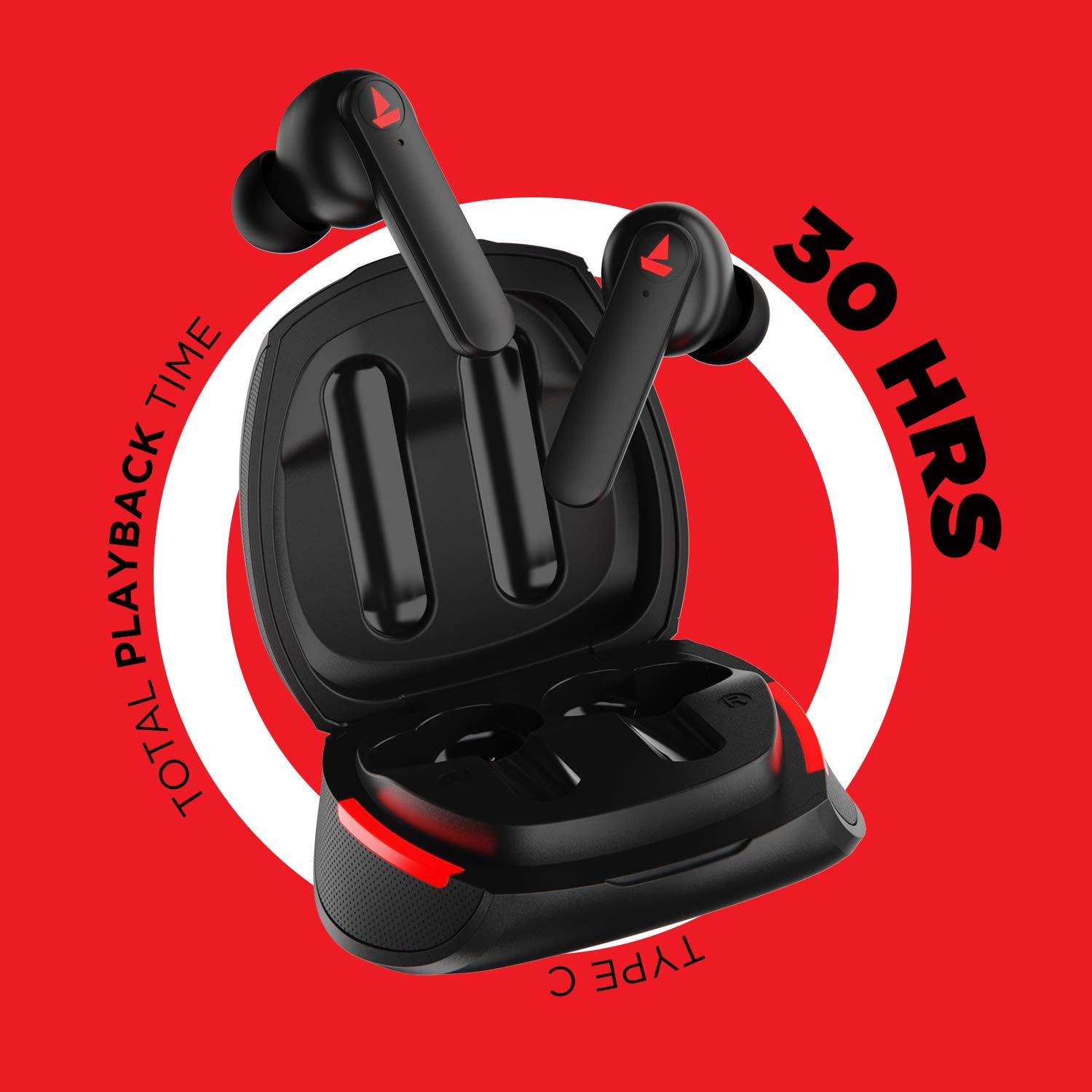
ምስል፡ The Airdopes 641 earbuds resting in their charging case, illustrating the Type-C charging capability and the impressive 30 hours of total playback time.
3.2 Initial Pairing (IWP Technology)
The Airdopes 641 feature Instant Wake N' Pair (IWP) technology for quick and effortless connection.
- የኃይል መሙያ መያዣውን ክዳን ይክፈቱ. የጆሮ ማዳመጫው በራስ-ሰር ይበራል እና የማጣመሪያ ሁነታን ያስገባል።
- በስማርትፎንዎ ወይም በብሉቱዝ በነቃ መሳሪያዎ ላይ ብሉቱዝን ያንቁ።
- ፈልግ "Airdopes 641" in the list of available devices and select it to pair.
- አንዴ ከተጣመሩ የድምጽ መጠየቂያ ይሰማሉ፣ እና የጆሮ ማዳመጫው ለአገልግሎት ዝግጁ ይሆናል።
- The earbuds will automatically connect to the last paired device when the case lid is opened, provided Bluetooth is enabled on the device.
4. የአሠራር መመሪያዎች
4.1 ማብራት / ማጥፋት
- አብራ፡ Open the charging case lid. The earbuds will power on automatically. Alternatively, long-press the Capacitive Touch Control (CTC) on both earbuds for 3 seconds.
- ኃይል ዝጋ: Place the earbuds back into the charging case and close the lid. They will power off automatically. Alternatively, long-press the CTC on both earbuds for 5 seconds.
4.2 Capacitive Touch Controls (CTC)
The Airdopes 641 feature intuitive touch controls on each earbud.
- አጫውት/ ለአፍታ አቁም፡ Single tap on either earbud's CTC.
- ቀጣይ ትራክ፡ Double tap on the right earbud's CTC.
- ቀዳሚ ትራክ Double tap on the left earbud's CTC.
- መልስ/ጥሪ ጨርስ፡ Single tap on either earbud's CTC.
- ጥሪን ውድቅ አድርግ፡ Long press on either earbud's CTC for 2 seconds.
- የድምፅ ረዳት አግብር Triple tap on either earbud's CTC.
- ድምጽ ጨምር Long press the right earbud's CTC.
- ጥራዝ ታች Long press the left earbud's CTC.
4.3 የቢኤስት ሁነታ (ዝቅተኛ የዘገየ ጨዋታ)
Activate BEAST Mode for a low-latency audio experience, ideal for gaming.

ምስል፡ The Airdopes 641 earbuds and their sleek charging case, emphasizing the "BEAST Mode" feature designed to provide a low-latency audio experience for gamers.
- Activate BEAST Mode: Triple tap on the right earbud's CTC.
- Deactivate BEAST Mode: Triple tap on the right earbud's CTC again.
5. ጥገና
Proper care ensures the longevity and performance of your Airdopes 641.
5.1 ጽዳት
- የጆሮ ማዳመጫውን እና ቻርጅ መሙያውን ለስላሳ፣ ደረቅ እና ከተሸፈነ ጨርቅ በጸዳ ጨርቅ በቀስታ ያጽዱ።
- ሻካራ ማጽጃዎችን፣ አልኮልን ወይም ኬሚካዊ ፈሳሾችን አይጠቀሙ።
- Regularly clean the ear tips and mesh to prevent wax buildup, which can affect sound quality.
5.2 የውሃ እና የላብ መቋቋም (IPX5)

ምስል፡ The Airdopes 641 earbuds and their charging case surrounded by water splashes, illustrating their IPX5 rating for water and sweat resistance.
The Airdopes 641 are rated IPX5, meaning they are protected against low-pressure water jets from any direction. This makes them suitable for workouts and light rain.
- የጆሮ ማዳመጫውን በውሃ ውስጥ አታስገቡ።
- Do not expose them to high-pressure water or steam.
- ጉዳት እንዳይደርስባቸው ወደ ቻርጅ መሙያው ከመመለስዎ በፊት የጆሮ ማዳመጫዎቹ ደረቅ መሆናቸውን ያረጋግጡ።
5.3 ማከማቻ
የጆሮ ማዳመጫዎቹን ለመጠበቅ እና እንዲከፍሉ ለማድረግ ጥቅም ላይ በማይውሉበት ጊዜ በሚሞሉበት መያዣቸው ውስጥ ያከማቹ።
6. መላ መፈለግ
If you encounter issues with your Airdopes 641, try the following solutions.
6.1 የጆሮ ማዳመጫዎች አይጣመሩም / አይገናኙም
- ሁለቱም የጆሮ ማዳመጫዎች መሞላታቸውን ያረጋግጡ።
- Make sure Bluetooth is enabled on your device and the earbuds are within range.
- Try forgetting "Airdopes 641" from your device's Bluetooth list and re-pairing.
- ከታች እንደተገለጸው የፋብሪካ ዳግም ማስጀመር ያከናውኑ።
6.2 የፋብሪካ ዳግም ማስጀመር
A factory reset can resolve many common issues by restoring the earbuds to their original settings.

ምስል፡ A visual guide detailing the steps for a factory reset of the Airdopes 641. It emphasizes clearing the device from pairing history first, then long-pressing the Capacitive Touch Control (CTC) on both earbuds inside the case for 10 seconds until a green LED flashes three times, followed by closing and reopening the case.
- ደረጃ 1፡ Before performing the reset, clear "Airdopes 641" from your pairing device history by forgetting the device on your phone/tablet.
- ደረጃ 2፡ Place both earbuds back inside the charging case in the correct orientation.
- ደረጃ 3፡ Long press the Capacitive Touch Control (CTC) on both earbuds inside the case for up to 10 seconds. The successful reset will be indicated by the flashing of a green LED three times.
- ደረጃ 4፡ የኃይል መሙያ መያዣውን ክዳን ይዝጉ እና ከዚያ እንደገና ይክፈቱት።
- ደረጃ 5፡ Once you take the earbuds out from the charging case, they automatically restart and are ready for a new pairing.
Note: Please make sure the case is charged before performing a factory reset.
6.3 No Sound/Low Volume
- በሁለቱም በመሳሪያዎ እና በጆሮ ማዳመጫዎች ላይ ያለውን የድምጽ መጠን ያረጋግጡ።
- የጆሮ ማዳመጫው በትክክል በጆሮዎ ውስጥ መቀመጡን ያረጋግጡ።
- ማንኛውንም ቆሻሻ ከጆሮ ማዳመጫ መረብ ያፅዱ።
- የጆሮ ማዳመጫውን እንደገና ለማጣመር ይሞክሩ።
7. ዝርዝሮች
| የሞዴል ስም | ኤርዶፕስ 641 |
| የግንኙነት ቴክኖሎጂ | ገመድ አልባ (ብሉቱዝ) |
| ገመድ አልባ የመገናኛ ቴክኖሎጂ | ብሉቱዝ 5.0 |
| የመቆጣጠሪያ ዓይነት | ንካ፣ የድምጽ መቆጣጠሪያ |
| የድምጽ ሾፌር ዓይነት | ተለዋዋጭ ሾፌር (6 ሚሜ) |
| የጆሮ አቀማመጥ | በጆሮ ውስጥ |
| የቅጽ ምክንያት | በጆሮ ውስጥ |
| ቁሳቁስ | ፕላስቲክ |
| የውሃ መቋቋም ደረጃ | IPX5 |
| የኃይል መሙያ ወደብ | የዩኤስቢ ዓይነት-ሲ |
| ተስማሚ መሣሪያዎች | Tablets, Cellphones, Laptops, Desktops, Smart Speaker, Television |
8. ዋስትና እና ድጋፍ
For warranty information and customer support, please refer to the warranty card included with your product or visit the official boAt webጣቢያ. ለዋስትና ጥያቄዎች የግዢ ደረሰኝዎን ያስቀምጡ።
አምራች፡ Imagine Marketing Pvt Ltd


