1. መግቢያ
This manual provides detailed instructions for the installation, operation, and maintenance of your Jennov PTZ Outdoor Wi-Fi Security Camera. Please read this manual thoroughly before using the product to ensure correct usage and optimal performance. This camera is designed for outdoor surveillance, offering 1080p HD video, pan/tilt/zoom capabilities, night vision, two-way audio, and motion detection.
2. የደህንነት ጥንቃቄዎች
- This camera operates exclusively with 2.4 GHz የ Wi-Fi አውታረ መረቦች. It is not compatible with 5 GHz Wi-Fi.
- Ensure the camera is connected to a stable power source using the provided power cable. Wireless connectivity refers to data transmission, not power supply.
- Avoid using special characters in your Wi-Fi password, as this may cause connection issues.
- ካሜራውን ከኦፕሬቲንግ ክልሉ ውጭ ለከፍተኛ የሙቀት መጠን (-40°ሴ እስከ 50°ሴ) አያጋልጡት።
- አካላዊ ጉዳት እንዳይደርስ ካሜራውን በጥንቃቄ ይያዙት።
3. የጥቅል ይዘቶች
ሁሉም እቃዎች በጥቅሉ ውስጥ መኖራቸውን ያረጋግጡ፡-
- 1 x Jennov 1080p HD Wi-Fi IP Camera
- 1 x Screw Pack for installation
- 1 x የተጠቃሚ መመሪያ
- 1 x Cat5 Cable
- 1 x የኃይል አስማሚ
- 1 x 32GB Micro SD Card (pre-installed)
4. ምርት አብቅቷልview
The Jennov PTZ Outdoor Wi-Fi Security Camera is a robust surveillance solution featuring 1080p resolution, pan/tilt/zoom functionality, and advanced night vision modes. It includes a pre-installed 32GB SD card for local storage and supports cloud storage options.

ምስል 4.1፡ Jennov PTZ Outdoor Wi-Fi Security Camera with included 32GB Micro SD card. This image displays the camera's main body, dual antennas, and the Micro SD card.
5. ማዋቀር
5.1 የአውታረ መረብ ግንኙነት
The camera supports both 2.4 GHz Wi-Fi and RJ45 wired connections.
- የWi-Fi ግንኙነት፡- የWi-Fi አውታረ መረብዎ 2.4 ጊኸ መሆኑን ያረጋግጡ። ካሜራው 5 GHz ዋይ ፋይን አይደግፍም።
- ባለገመድ ግንኙነት፡ Connect the camera to your router using the provided Cat5 cable for a stable network connection.
5.2 የመተግበሪያ ጭነት
አውርድ CamHipro application on your mobile device (iOS or Android) or use compatible software for Windows (e.g., Blue Iris, iSpy).
5.3 Initial Configuration (AP Mode)
The camera supports AP (Access Point) mode for initial setup without scanning a QR code:
- በካሜራው ላይ ኃይል.
- On your mobile phone, connect to the camera's Wi-Fi hotspot (usually named something like 'IPCAM-XXXXXX').
- Open the CamHipro app.
- Add the IP security camera via the "LAN search" function within the app.
- Follow the on-screen prompts to connect the camera to your home Wi-Fi network.
6. የአሠራር መመሪያዎች
6.1 የፓን፣ የዘንበል እና የማጉላት (PTZ) መቆጣጠሪያ
The camera offers a 355° horizontal pan and 90° vertical tilt, along with 4X digital zoom, allowing you to adjust the viewing angle remotely via the app.

ምስል 6.1፡ Illustration of the camera's 355° pan and 90° tilt capabilities, along with 4X digital zoom. The image shows a wide outdoor scene with children playing, demonstrating the camera's field of view and zoom function.
6.2 የምሽት እይታ ሁነታዎች
The camera features 8 built-in white LEDs and 8 infrared LEDs, supporting three night vision modes:
- የኢንፍራሬድ ሞድ በዝቅተኛ ብርሃን ውስጥ ግልጽ የሆኑ ጥቁር እና ነጭ ምስሎችን ያቀርባል።
- ባለሙሉ ቀለም ሁነታ፡ Utilizes white LEDs to capture full-color images at night.
- ብልጥ ሁነታ: በተገኘው እንቅስቃሴ ላይ በመመስረት በኢንፍራሬድ እና ሙሉ ቀለም መካከል በራስ-ሰር ይቀያይራል።

ምስል 6.2፡ Comparison of FHD-Color Mode and FHD-Infrared Mode for night vision. The left side shows a clear, colored night view, while the right side shows a black and white infrared view.
6.3 Motion Detection & Humanoid Detection
The camera can automatically track and detect suspicious objects. It features a humanoid sensor to distinguish human movement from other objects, reducing false alarms.

ምስል 6.3፡ Demonstration of Humanoid Detection. The camera accurately identifies a person (left) while ignoring a pet (right), minimizing irrelevant alerts.
When motion is detected, the camera can trigger various alerts:
- የግፋ ማስታወቂያዎች፡- በሞባይል መሳሪያዎ ላይ ፈጣን ማንቂያዎችን ይቀበሉ።
- የኢሜይል ማንቂያዎች፡- Configure email notifications with snapshots.
- የኤፍቲፒ ጭነት፡ Automatically upload alarm videos to an FTP server.
- አኮስቲክ ማንቂያ፦ Activate an audible alarm from the camera to deter intruders.
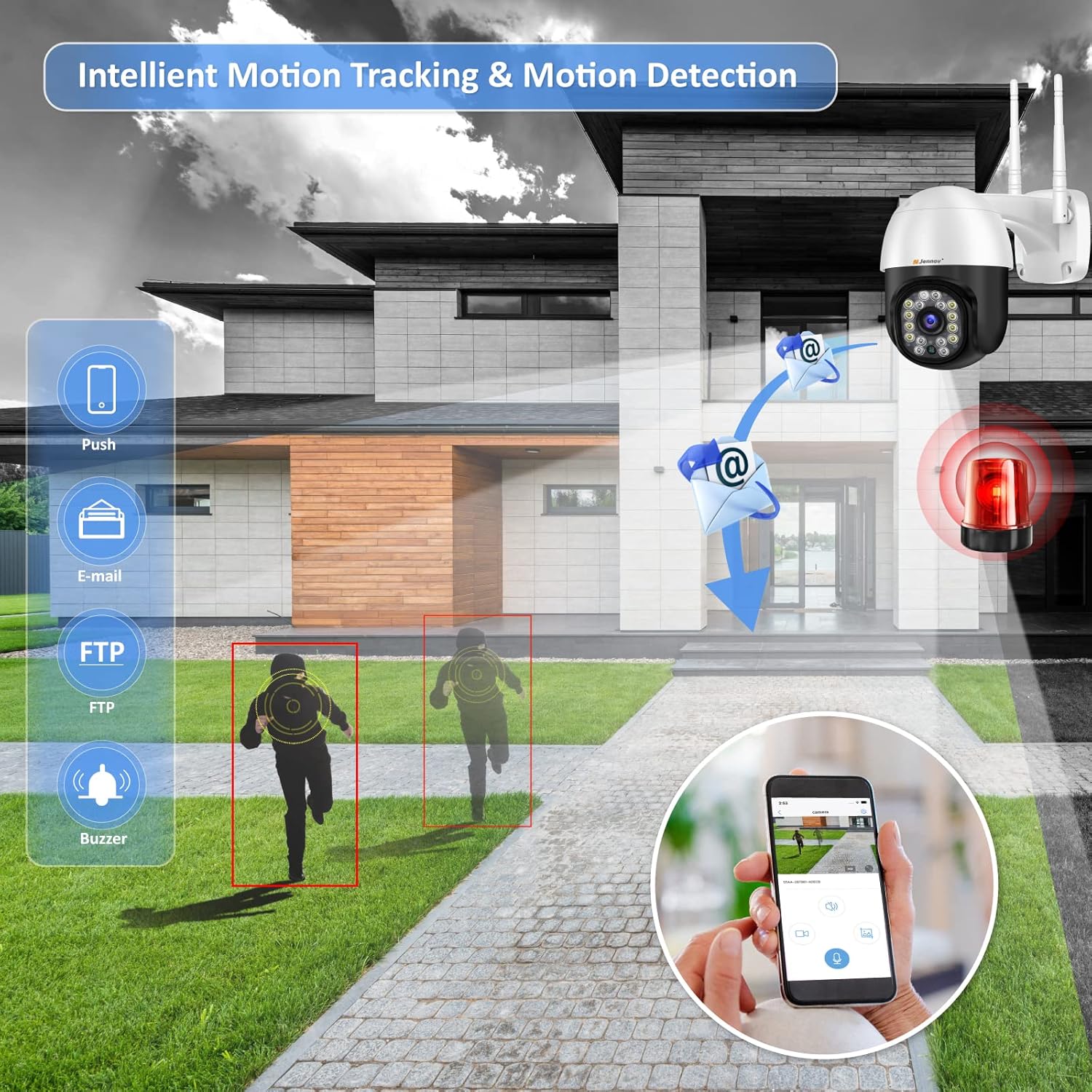
ምስል 6.4፡ Intelligent Motion Tracking and Detection features. The image shows the camera detecting movement and sending various alerts such as push notifications, email, FTP, and triggering a buzzer.
6.4 ባለ ሁለት መንገድ ኦዲዮ
Equipped with high-quality speakers and noise-resistant microphones, the camera enables clear two-way communication through the app. You can speak to visitors or deter unwanted individuals.

ምስል 6.5፡ Multi-User Live View and Two-Way Audio functionality. The image depicts multiple users accessing the live feed and a scenario where a user communicates with a delivery person via the camera's two-way audio.
6.5 መቅዳት እና ማከማቻ
The camera comes with a pre-installed 32GB Micro SD card for continuous 24-hour recording. It supports up to a 64GB Micro SD card. Older videos are automatically overwritten when the storage is full. The camera uses H.264+ compression for efficient storage.

ምስል 6.6፡ Built-in 32GB SD Card and Cloud Storage support. The image shows the camera with icons representing local SD card storage and cloud storage options, along with a mobile app interface displaying recorded footage.
6.6 ባለብዙ ተጠቃሚ መዳረሻ
The Jennov camera supports simultaneous viewing and control by multiple users across various devices, including mobile phones, tablets, and computers.
7. ጥገና
- የካሜራ ሌንስን ለስላሳና ደረቅ ጨርቅ አዘውትረው ያጽዱ፤ ይህም የምስል ጥራት ግልጽ እንዲሆን ያደርጋል።
- የኃይል ግንኙነቱ ደህንነቱ የተጠበቀ እና ከጉዳት የጸዳ መሆኑን ያረጋግጡ።
- Check for firmware updates through the CamHipro app to ensure optimal performance and security.
- The camera is IP66 waterproof, dustproof, and resistant to heat and cold, making it suitable for various outdoor environments.

ምስል 7.1፡ IP66 Waterproof rating and suitability for diverse environments. The image shows the camera installed outdoors, highlighting its resistance to heat, dust, water, and cold, and its applicability in various settings like shops, parking lots, courtyards, and homes.
8. መላ መፈለግ
- ኃይል የለም፡ Check the power adapter and cable connections. Ensure the power outlet is functional.
- የWi-Fi ግንኙነት ችግሮች፡- Verify your Wi-Fi network is 2.4 GHz. Ensure the Wi-Fi password does not contain special characters. Move the camera closer to the router if the signal is weak.
- ደካማ የምስል ጥራት፡ In the CamHipro app, click the "HD" symbol in the lower right corner of the real-time screen for higher image quality. Clean the camera lens.
- የኤስዲ ካርድ አልተመዘገበም፦ Ensure the SD card is properly inserted. Check if the card is full; older videos are overwritten automatically. Format the SD card via the app if issues persist.
- PTZ Control Malfunction: Ensure a stable network connection. If issues persist, restart the camera.
9. ዝርዝሮች
| ባህሪ | ዝርዝር መግለጫ |
|---|---|
| ጥራት | HD 1920 x 1080p |
| የቪዲዮ ቅርጸት | H.264 + |
| መስክ የ View | 355° ፓን፣ 90° ዘንበል |
| ዲጂታል ማጉላት | 4X |
| የምሽት ራዕይ ክልል | 20 ሜትር |
| የአውታረ መረብ ግንኙነቶች | 2.4 GHz Wi-Fi, RJ45 Ethernet Port |
| ማከማቻ | Built-in 32GB Micro SD Card (supports up to 64GB), Cloud Storage |
| የአሠራር ሙቀት | -40 ° ሴ ~ 50 ° ሴ |
| የኃይል አቅርቦት | ዲሲ 12V, 2A |
| መጠኖች | 20 x 18 x 12 ሴ.ሜ |
| ክብደት | 710 ግ |
| ተኳኋኝነት | Windows, iOS, Android (CamHipro app), Blue Iris, iSpy |
| ደህንነት | AES 128-ቢት ምስጠራ |
| የአየር ሁኔታ መቋቋም | IP66 የውሃ መከላከያ |
10. ዋስትና እና ድጋፍ
Jennov offers a 12-month quality guarantee and customer support from the date of purchase. You may return or exchange the product within 30 days without stating reasons.
For technical assistance or warranty claims, please contact Jennov customer support through the official channels provided at the point of purchase or on the Jennov webጣቢያ.


