1. ምርት አብቅቷልview
The Lexmark MX611DHE is a monochrome laser multifunction device designed for office environments, offering comprehensive capabilities including printing, copying, scanning, and faxing. This robust unit is engineered for high-volume output and efficient document handling.
- ባለብዙ ተግባር፡ Integrates print, copy, fax, and scan functions into a single device.
- የከፍተኛ ፍጥነት አፈጻጸም፡ Capable of printing and copying at speeds up to 50 pages per minute (ppm).
- ባለ ሁለትዮሽ ህትመት; Supports automatic two-sided printing to conserve paper.
- የግቤት አቅም፡- Features a standard input capacity of 650 sheets, expandable for larger tasks.
- ግንኙነት፡ Equipped with USB and Ethernet interfaces for versatile network integration.
- ሊታወቅ የሚችል ቁጥጥር; Features a touchscreen display for easy navigation and operation.
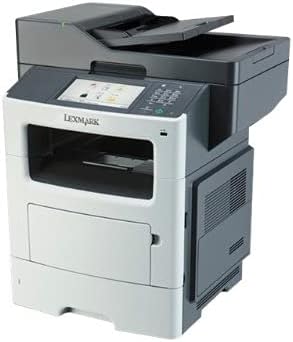
ምስል 1: የፊት view of the Lexmark MX611DHE multifunction printer, showcasing its compact design and front-facing paper tray.
2. የማዋቀር መመሪያ
Follow these steps to set up your Lexmark MX611DHE printer for initial use.
- ማሸግ፡ ማተሚያውን ከማሸጊያው በጥንቃቄ ያስወግዱት. ሁሉንም የመከላከያ ካሴቶች እና የማሸጊያ ቁሳቁሶችን ከመሳሪያው ውጫዊ እና ውስጣዊ ያስወግዱ.
- አቀማመጥ፡- Place the printer on a stable, level surface with adequate ventilation. Ensure there is enough space around the printer for proper operation and maintenance.
- የኃይል ግንኙነት; Connect the power cord to the printer's power input and then to a grounded electrical outlet. Do not connect to a surge protector or extension cord initially.
- የወረቀት ጭነት; Open the paper tray and load the appropriate paper size (up to 8.5 x 14 inches). Adjust the paper guides to fit the paper stack snugly.
- Network/USB Connection:
- For Network (Ethernet): የኤተርኔት ገመድ ከአታሚው የኤተርኔት ወደብ ወደ አውታረ መረብዎ ራውተር ወይም መቀየሪያ ያገናኙ።
- ለዩኤስቢ፡- የዩኤስቢ ገመድ ከአታሚው የዩኤስቢ ወደብ ወደ ኮምፒውተርዎ ያገናኙ።
- የመጀመሪያ ኃይል በርቷል፡ Press the power button to turn on the printer. Follow the on-screen prompts on the touchscreen display to select language, region, and perform initial setup configurations.
- የአሽከርካሪ ጭነት; Install the necessary printer drivers on your computer. Drivers can typically be found on the Lexmark support website or on an included installation CD (if applicable).
3. የአሠራር መመሪያዎች
This section provides basic instructions for using the Lexmark MX611DHE's primary functions.
3.1. ማተም
- አታሚው መብራቱን እና ከኮምፒዩተርዎ ወይም አውታረ መረብዎ ጋር መገናኘቱን ያረጋግጡ።
- በኮምፒተርዎ ላይ ለማተም የሚፈልጉትን ሰነድ ይክፈቱ።
- ይምረጡ File > አትም (ወይም በመተግበሪያዎ ውስጥ ያለው ተመጣጣኝ ትዕዛዝ)።
- Choose "Lexmark MX611DHE" from the list of available printers.
- Adjust print settings such as number of copies, paper size, and duplex options as needed.
- ጠቅ ያድርጉ አትም.
3.2. መቅዳት
- ሰነዱን ፊት ለፊት ወደ ስካነር መስታወት ወይም ፊት ለፊት በአውቶማቲክ የሰነድ መጋቢ (ADF) ላይ ያስቀምጡት።
- በአታሚው የንክኪ ማያ ገጽ ላይ፣ ይምረጡ ቅዳ ተግባር.
- እንደ የቅጂዎች ብዛት፣ የብርሃን/ጨለማ እና የወረቀት መጠን ያሉ ቅንብሮችን ያስተካክሉ።
- የሚለውን ይጫኑ ጀምር መቅዳት ለመጀመር አዝራር።
3.3. መቃኘት

Figure 2: The Lexmark MX611DHE with its scanner lid open, revealing the flatbed scanner glass and the automatic document feeder mechanism.
- ሰነዱን በስካነር መስታወት ላይ ወይም በኤዲኤፍ ውስጥ ያስቀምጡ.
- በአታሚው የንክኪ ማያ ገጽ ላይ፣ ይምረጡ ቅኝት ተግባር.
- Choose your desired scan destination (e.g., Scan to Computer, Scan to Email, Scan to Network Folder).
- እንደ ጥራት፣ የቀለም ሁነታ እና የመሳሰሉትን የቃኝ ቅንብሮችን ያዋቅሩ file ቅርጸት.
- የሚለውን ይጫኑ ጀምር ቅኝቱን ለመጀመር አዝራር።
3.4. ፋክስ ማድረግ
- Ensure the printer is connected to a telephone line.
- ሰነዱን በስካነር መስታወት ላይ ወይም በኤዲኤፍ ውስጥ ያስቀምጡ.
- በአታሚው የንክኪ ማያ ገጽ ላይ፣ ይምረጡ ፋክስ ተግባር.
- የተቀባዩን የፋክስ ቁጥር በመቆጣጠሪያ ፓነል ላይ ያለውን የቁልፍ ሰሌዳ በመጠቀም ያስገቡ።
- ማንኛውንም አስፈላጊ የፋክስ ቅንብሮችን ያስተካክሉ።
- የሚለውን ይጫኑ ጀምር ፋክስ ለመላክ አዝራር.
4. ጥገና
Regular maintenance ensures optimal performance and extends the lifespan of your Lexmark MX611DHE.
- ውጫዊውን ማጽዳት; ለስላሳ ይጠቀሙ, መamp, lint-free cloth to wipe the exterior surfaces of the printer. Avoid abrasive cleaners.
- የስካነር ብርጭቆን ማጽዳት; For clear scans, regularly clean the scanner glass with a soft, lint-free cloth and a mild glass cleaner.
- የቶነር ካርትሪጅ መተካት; When the toner low message appears, order a new Lexmark toner cartridge. Follow the instructions provided with the new cartridge for proper installation.
- የወረቀት መንገድ ጽዳት፡ If paper jams become frequent, consult the printer's internal guides or the Lexmark support website for instructions on cleaning the paper path rollers.
5. መላ መፈለግ
This section addresses common issues you might encounter with your Lexmark MX611DHE.
| ችግር | ሊሆን የሚችል ምክንያት | መፍትሄ |
|---|---|---|
| አታሚ ምላሽ እየሰጠ አይደለም። | የኃይል ገመድ ተለያይቷል፣ የአውታረ መረብ ችግር፣ የአሽከርካሪ ችግር። | Check power connections. Verify network cable or USB connection. Reinstall printer drivers. |
| የወረቀት መጨናነቅ | በወረቀት መንገድ ላይ የተሳሳተ የተጫነ ወረቀት፣ የውጭ ነገር። | Open access covers and carefully remove jammed paper. Ensure paper is loaded correctly. |
| ደካማ የህትመት ጥራት | Low toner, dirty print head/rollers, incorrect print settings. | Replace toner cartridge. Clean internal components as per maintenance guide. Adjust print quality settings in driver. |
| ስካነር አይሰራም | Scanner glass dirty, software issue, connectivity problem. | Clean scanner glass. Restart computer and printer. Check USB/network connection. |
6. ዝርዝሮች
Detailed technical specifications for the Lexmark MX611DHE.
| ባህሪ | ዝርዝር |
|---|---|
| የምርት ስም | ሌክስማርክ |
| የሞዴል ስም | MX611DHE |
| የማሳያ ዓይነት | LCD (Touchscreen) |
| የህትመት ቴክኖሎጂ | ሌዘር (ሞኖክሮም) |
| ከፍተኛ የህትመት ፍጥነት (ሞኖክሮም) | 50 ፒፒኤም |
| ከፍተኛው የቅጂ ፍጥነት (ጥቁር እና ነጭ) | 50 ፒፒኤም |
| ጥራት | 1200 x 1200 ዲፒአይ |
| የማህደረ ትውስታ ማከማቻ አቅም | 1024 ሜባ |
| የሉህ መጠን ድጋፍ | Up to 8.5 x 14 Inches |
| የሃርድዌር በይነገጽ | ዩኤስቢ, ኤተርኔት |
| የምርት ልኬቶች | 22.6 x 23.5 x 26.5 ኢንች |
| ቀለም | ግራጫ/ነጭ |
| ዩፒሲ | 656942073611 |
7. ዋስትና እና ድጋፍ
Your Lexmark MX611DHE (Renewed) product is covered by a limited warranty and support resources.
- ዋስትና፡- ይህ ምርት ከ ሀ 90 ቀናት የተወሰነ ዋስትና. Please refer to your purchase documentation for specific terms and conditions of the Amazon Renewed Guarantee.
- የቴክኒክ ድጋፍ; For technical assistance, driver downloads, or further troubleshooting, please visit the official Lexmark support webጣቢያ ወይም የደንበኛ አገልግሎታቸውን ያነጋግሩ።
- የመስመር ላይ መርጃዎች፡- Additional user guides, FAQs, and firmware updates may be available on the Lexmark support portal.


