1. መግቢያ
Thank you for choosing the AUKEY Sprint Wireless Power Bank PB-Y32. This device is designed to provide portable power for your mobile devices, featuring both wired and wireless fast charging capabilities. Please read this manual carefully before use to ensure optimal performance and safety.
2. የምርት ባህሪዎች
- 10000 ሚአሰ አቅም; High-capacity battery to charge your devices multiple times.
- ፈጣን የኃይል መሙያ ድጋፍ; Supports Quick Charge 3.0 and Power Delivery for rapid charging of compatible devices.
- ገመድ አልባ ባትሪ መሙላት; Conveniently charge Qi-compatible devices at up to 10W.
- በርካታ የውጤት ወደቦች፡ Equipped with USB-C and USB-A ports for versatile charging.
- የታመቀ እና ተንቀሳቃሽ ንድፍ; በጉዞ ላይ እያሉ ለኃይል መሸከም ቀላል።
- የደህንነት ባህሪያት: Built-in protections against overcharge, over-discharge, overcurrent, and short circuits.
3. የጥቅል ይዘቶች
- AUKEY Sprint Wireless Power Bank PB-Y32
- የዩኤስቢ-ኤ ወደ ሲ ገመድ
- የተጠቃሚ መመሪያ
4. ማዋቀር እና የመጀመሪያ አጠቃቀም
4.1 የኃይል ባንክን መሙላት
Before first use, fully charge the power bank. It takes approximately 7 hours to fully charge the power bank using a compatible USB-C power adapter.
- Connect the included USB-A to C cable to the power bank's USB-C input port.
- Connect the other end of the cable to a USB wall charger (not included).
- The LED indicators will light up to show the charging status. All four LEDs will be solid when fully charged.
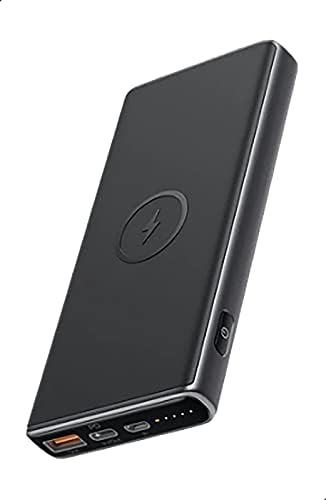
Image: The AUKEY Sprint Wireless Power Bank PB-Y32, showcasing its sleek black design and port layout.
5. የአሠራር መመሪያዎች
5.1 ባለገመድ ባትሪ መሙላት
To charge your device using a cable:
- የመሳሪያዎን የኃይል መሙያ ገመድ ከዩኤስቢ-ኤ የውጤት ወደብ ወይም በኃይል ባንኩ ላይ ካለው የዩኤስቢ-ሲ የውጤት ወደብ ጋር ያገናኙ።
- የኬብሉን ሌላኛው ጫፍ ከመሣሪያዎ ጋር ያገናኙ።
- የኃይል ባንኩ ወዲያውኑ መሣሪያዎን መሙላት ይጀምራል።
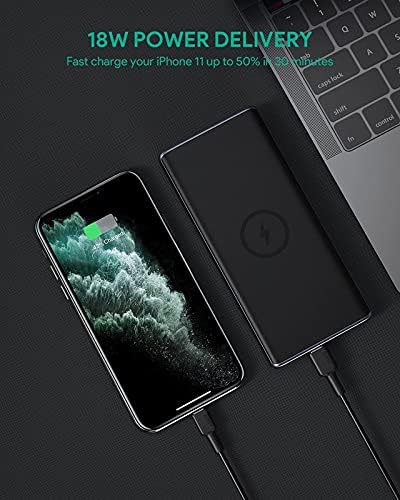
Image: The power bank connected via cable to a smartphone, demonstrating 18W Power Delivery fast charging.

Image: A smartphone connected to the power bank, illustrating Qualcomm Quick Charge 3.0 capabilities for rapid charging.
5.2 ገመድ አልባ ባትሪ መሙላት
To charge your Qi-compatible device wirelessly:
- Place your Qi-compatible device directly onto the wireless charging pad located on the top surface of the power bank. Ensure the device is centered on the charging symbol.
- የኃይል ባንኩ መሳሪያዎን በራስ-ሰር ይያውቅና ገመድ አልባ ባትሪ መሙላት ይጀምራል።

Image: A smartphone placed on the power bank's surface, demonstrating the wireless charging feature.

ምስል፡ መቀራረብ view of the power bank showing the silicone ring designed to keep the phone stable during wireless charging.
5.3 ዝቅተኛ-የአሁኑ የኃይል መሙያ ሁነታ
This mode is ideal for charging low-power devices like wireless earbuds or smartwatches.
- Press and hold the power button for 2 seconds to enter low-current charging mode. The first LED indicator will blink green.
- Connect your low-power device or place it on the wireless charging pad.
- To exit low-current charging mode, press the power button once, or it will automatically exit after 2 hours.
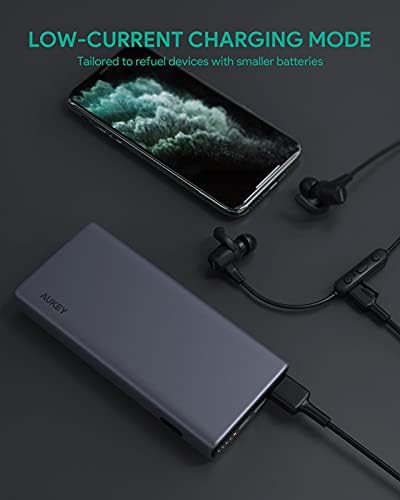
Image: The power bank connected to a smartphone and wireless earbuds, demonstrating its low-current charging mode for smaller devices.

Image: An illustration showing the power bank's broad compatibility with various devices, including smartphones, tablets, and gaming consoles.
6. ጥገና
- Keep the power bank away from liquids, extreme heat, and strong magnetic fields.
- የኃይል ባንኩን ለጠንካራ ተጽእኖዎች አይጣሉት ወይም አያስገድዱ.
- Clean the power bank with a dry, soft cloth. Do not use corrosive cleaners.
- ጥቅም ላይ በማይውልበት ጊዜ የኃይል ባንኩን በቀዝቃዛና ደረቅ ቦታ ያከማቹ።
- Recharge the power bank at least once every 3 months to maintain battery health.
7. መላ መፈለግ
7.1 የኃይል ባንክ እየሞላ አይደለም
- የኃይል መሙያ ገመዱ ከኃይል ባንኩ እና ከግድግዳው ባትሪ መሙያ ጋር ደህንነቱ በተጠበቀ ሁኔታ መገናኘቱን ያረጋግጡ።
- የተለየ የዩኤስቢ-ሲ ገመድ ወይም የግድግዳ ቻርጀር ይሞክሩ።
- Verify the wall charger's output meets the power bank's input requirements (DC 5V-3A / 9V-2A).
7.2 መሳሪያ ከፓወር ባንክ የማይሞላ
- የኃይል ባንኩ በቂ ክፍያ መኖሩን ያረጋግጡ.
- ለመሳሪያዎ የተለየ የኃይል መሙያ ገመድ ይሞክሩ።
- For wireless charging, ensure your device is Qi-compatible and properly aligned on the charging pad. Remove any thick cases that might interfere.
- If charging a low-power device, ensure low-current charging mode is activated.
7.3 Power Bank Overheating
- የኃይል ባንኩ በሚሞላበት ወይም በሚለቀቅበት ጊዜ ትንሽ መሞቅ የተለመደ ነው።
- If it becomes excessively hot, disconnect all devices and the charging cable immediately. Allow it to cool down before resuming use.
- Ensure proper ventilation and avoid covering the power bank during use.
8. ዝርዝሮች
| ባህሪ | ዝርዝር |
|---|---|
| የሞዴል ስም | Sprint |
| የሞዴል ቁጥር | ፒቢ-Y32 |
| የባትሪ አቅም | 10000 ሚአሰ |
| የዩኤስቢ ዓይነት-ሲ ግቤት | ዲሲ 5V-3A / 9V-2A |
| የዩኤስቢ ዓይነት-C ውፅዓት | ዲሲ 5V-3A / 9V-2A / 12V-1.5A |
| የዩኤስቢ አይነት-A ውፅዓት | 18 ዋ |
| ከፍተኛ የውጤት ኃይል | 18 ዋ |
| ገመድ አልባ የኃይል መሙያ ውጤት | 5 ዋ፣ 7.5 ዋ፣ 10 ዋ |
| መጠኖች | 144 x 67 x 17 ሚ.ሜ |
| ክብደት | 210 ግራም |
| የባትሪ ሕዋስ ቅንብር | ሊቲየም ፖሊመር |
| ልዩ ባህሪያት | Short Circuit Protection, Wireless Charging |
| ቀለም | ጥቁር |
| የባትሪ መሙያ ጊዜ | 7 ሰዓታት |
9. ዋስትና እና ድጋፍ
According to the product specifications, this product comes with ዋስትና የለም።. For any product-related inquiries or support, please refer to the retailer or manufacturer's official webየእውቂያ መረጃ ለማግኘት ጣቢያ.


