1. መግቢያ
The BirdDog PF120 is a high-performance Full HD NDI box camera designed for professional video production environments. It features an Exmor R back-illuminated sensor, 20x optical zoom, and a full color matrix, all housed within a durable all-metal chassis. This manual provides essential information for the proper setup, operation, and maintenance of your PF120 camera.
2. የጥቅል ይዘቶች
ከታች የተዘረዘሩት እቃዎች በሙሉ በጥቅልዎ ውስጥ መካተቱን ያረጋግጡ። ማንኛውም እቃ ከጎደለ ወይም ከተበላሸ፣ ወዲያውኑ አቅራቢዎን ያነጋግሩ።
- BirdDog PF120 Full HD NDI 20x Box Camera
- የኃይል አስማሚ (ዲሲ 12 ቪ)
- የምስሪት ካፕ
- ሰነድ (ፈጣን ጅምር መመሪያ፣ የደህንነት መረጃ)
3. ምርት አብቅቷልview
The BirdDog PF120 is engineered for versatility and robust performance. Key features include:
- Full NDI support for seamless integration into IP workflows.
- 20x optical zoom for detailed close-ups.
- Exmor R back-illuminated sensor for superior low-light performance.
- Durable all-metal housing.
- Multiple connectivity options including HDMI, NDI/PoE, RS-232, and USB2.0.
3.1 ካሜራ Viewዎች እና ክፍሎች

ምስል 3.1፡ የፊት-ጎን view of the BirdDog PF120 camera, showcasing the lens and the BirdDog logo on the side panel.
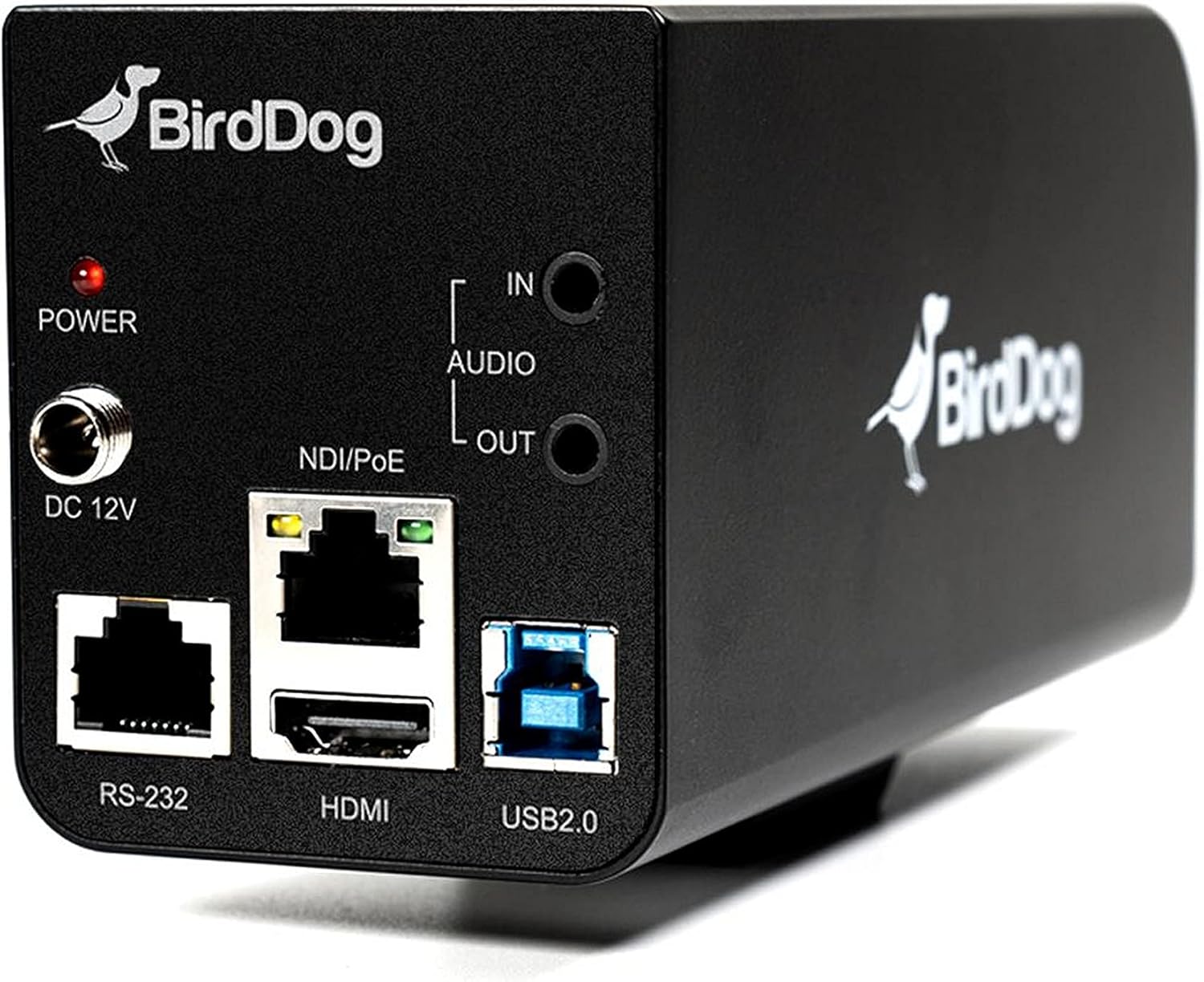
ምስል 3.2፡ Rear panel of the BirdDog PF120, displaying the power input (DC 12V), audio input/output, NDI/PoE port, HDMI output, RS-232 port, and USB2.0 port.
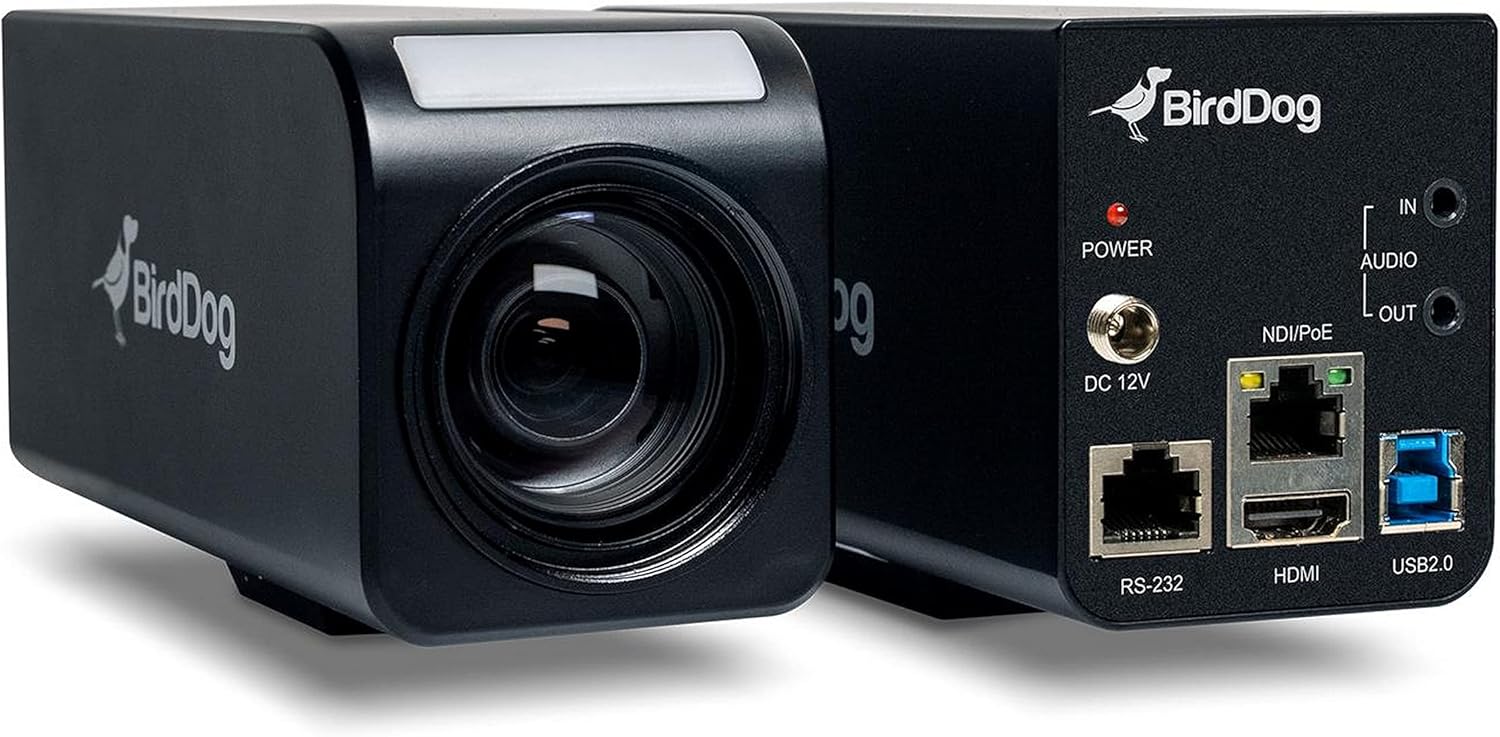
ምስል 3.3፡ የተዋሃደ view of the BirdDog PF120, showing both the front lens assembly and the rear connectivity panel.

ምስል 3.4፡ ከፍተኛ view of the BirdDog PF120 camera, highlighting the sleek design and BirdDog branding.
4. ማዋቀር
4.1 በማብራት ላይ
- Connect the supplied DC 12V power adapter to the "DC 12V" port on the rear of the camera.
- የኃይል አስማሚውን ወደ ተስማሚ የኃይል ምንጭ ይሰኩት.
- Alternatively, if using a PoE-enabled network switch, connect an Ethernet cable to the "NDI/PoE" port. The camera will power on via Power over Ethernet.
4.2 Network Connection (NDI)
- Connect an Ethernet cable from the "NDI/PoE" port on the camera to your network switch or router.
- Ensure your network is configured to support NDI protocols.
- The camera will obtain an IP address automatically via DHCP. For static IP configuration, refer to the BirdDog Central application or web በይነገጽ.
4.3 የቪዲዮ ውፅዓት
- NDI Output: The primary video output is via NDI over the Ethernet connection.
- የኤችዲኤምአይ ውፅዓት Connect an HDMI cable from the "HDMI" port on the camera to a monitor or video switcher for direct video monitoring.
5. ካሜራውን መስራት
5.1 መድረስ Web በይነገጽ
- Once connected to the network, use the BirdDog Central application or an IP scanner to discover the camera's IP address.
- ክፈት ሀ web አሳሽዎን ያስገቡ እና የካሜራውን የአይፒ አድራሻ ያስገቡ እና ለመድረስ web በይነገጽ.
- ከ web interface, you can configure video settings, network parameters, and control camera functions.
5.2 የካሜራ ቁጥጥር
The PF120 can be controlled via:
- NDI Tools: Utilize NewTek NDI Tools (e.g., NDI Studio Monitor) for basic control.
- BirdDog Central / Cam Control: BirdDog's dedicated software provides comprehensive control over camera settings, including zoom, focus, iris, and color matrix.
- RS-232 Connect a compatible serial controller to the RS-232 port for hardware control.
- የርቀት መቆጣጠሪያ፡- The camera supports remote control methods as specified in the product documentation.
5.3 አጉላ እና ትኩረት
The PF120 features a 20x optical zoom lens. Zoom and focus adjustments are typically made through the web interface or compatible control software.
6. ጥገና
- ማጽዳት፡ Use a soft, dry cloth to clean the camera body. For the lens, use a specialized lens cleaning solution and microfiber cloth. Avoid abrasive cleaners.
- የጽኑዌር ዝማኔዎች ፦ Periodically check the BirdDog website for firmware updates. Keeping the firmware updated ensures optimal performance and access to new features.
- ማከማቻ፡ ለረጅም ጊዜ ጥቅም ላይ በማይውልበት ጊዜ ካሜራውን ቀዝቃዛና ደረቅ ቦታ፣ ከፀሐይ ብርሃን እና ከፍተኛ የሙቀት መጠን ራቅ አድርገው ያስቀምጡት።
7. መላ መፈለግ
7.1 ምንም ኃይል የለም
- የኃይል አስማሚው ደህንነቱ በተጠበቀ ሁኔታ ከካሜራው እና ከሚሰራው የኃይል ሶኬት ጋር መገናኘቱን ያረጋግጡ።
- If using PoE, verify that the Ethernet cable is connected to a PoE-enabled port on your switch and that the switch is providing power.
7.2 No NDI Signal
- የኢተርኔት ገመድ ግንኙነትን ያረጋግጡ።
- Verify that the camera has obtained an IP address (check your router's DHCP client list or use BirdDog Central).
- Ensure your network firewall is not blocking NDI traffic.
- Confirm that NDI tools or software on your receiving device are correctly configured to discover NDI sources.
7.3 የምስል ጥራት ጉዳዮች
- Check lens for smudges or dust and clean if necessary.
- Adjust focus settings via the web interface or control software.
- Review exposure, white balance, and color matrix settings in the camera's web በይነገጽ.
8. ዝርዝሮች
| ባህሪ | ዝርዝር |
|---|---|
| የሞዴል ቁጥር | BD-BDPF120 |
| የቪዲዮ ቀረጻ ጥራት | 1080 ፒ |
| ውጤታማ የቪዲዮ ጥራት | 720 ፒክስል |
| የጨረር ማጉላት | 20x |
| የማጉላት ዓይነት | Digital Zoom, Optical Zoom |
| የግንኙነት ቴክኖሎጂ | ባለገመድ |
| የግንኙነት ፕሮቶኮል | Wi-Fi (for control/management, NDI is primary video) |
| የመቆጣጠሪያ ዘዴ | Remote, Iris, RS-232 |
| የኃይል ምንጭ | AC/DC, PoE |
| ዋትtage | 5 ዋት |
| ቁሳቁስ | ብረት |
| የንጥል መጠኖች (L x W x H) | 9.9 x 9 x 3.6 ኢንች |
| የእቃው ክብደት | 2.94 ፓውንድ |
| የመጫኛ አይነት | Wall Mount (as per spec, but typically box cameras are versatile) |
| የአለም አቀፍ ጥበቃ ደረጃ | IP65 |
| ዝቅተኛ ብርሃን ቴክኖሎጂ | የምሽት ቀለም |
9. ዋስትና እና ድጋፍ
For warranty information and technical support, please refer to the official BirdDog website or contact your authorized BirdDog reseller. Keep your proof of purchase for warranty claims.
BirdDog Official Webጣቢያ፡ www.bird-dog.tv