መግቢያ
This manual provides comprehensive instructions for the assembly, operation, and maintenance of your Razer Iskur XL Gaming Chair. Designed for posture-perfect hardcore gaming, the Razer Iskur XL features an adjustable, ergonomic lumbar support system to ensure optimal comfort during extended sessions.
የደህንነት መረጃ
Ensure proper assembly by following all steps in this User Guide. The Razer Iskur XL Gaming Chair is recommended for users between 6' to 6'10" in height and supports a maximum weight of up to 400 pounds.
ማዋቀር እና መሰብሰብ
For detailed assembly instructions, please refer to the User Guide provided with your product. It is crucial to follow all steps to ensure correct and safe assembly of your gaming chair.

Image: The Razer Iskur XL Gaming Chair positioned in a modern workspace, illustrating its design and presence.
የአሠራር መመሪያዎች
Ergonomic Lumbar ድጋፍ ስርዓት
The chair features a built-in, fully adjustable lumbar curve designed to align closely with your spine. This system provides total lower back support, promoting ideal posture for maximum comfort during long gaming sessions. Adjust the lumbar support using the control located on the side of the chair to find your preferred setting.

ምስል: ዝርዝር view of the chair's ergonomic lumbar support system, highlighting its contoured design for back comfort.
4D ክንዶች
The 4D armrests allow for comprehensive customization. You can adjust their height, angle, and move them forwards or backwards to achieve a position that perfectly suits your sitting style and desk setup.

Image: A close-up of the 4D armrests, demonstrating their multi-directional adjustability for personalized comfort.
Reclining and Height Adjustment
The chair offers 3 reclining positions, allowing you to lean back and relax or maintain an upright posture. Use the recline lever to adjust the backrest angle. The chair's height can also be easily adjusted using the dedicated lever, ensuring your feet are comfortably placed on the floor or a footrest.
የማዞሪያ ተግባር
The chair features a smooth swivel mechanism, allowing for easy rotation and access to different areas of your workspace without needing to stand up.
ቪዲዮ፡ ይፋዊ የምርት ቪዲዮ ማሳያasing the Razer Iskur XL Gaming Chair's features and adjustments.
ቪዲዮ: አጭር ማጠቃለያview of the Razer Iskur Gaming Chair, highlighting its design and functionality.
Video: The 'Science of Comfort' video for Razer Iskur and Enki lines, detailing ergonomic design principles.
ጥገና
የምርት እንክብካቤ መመሪያዎች
To maintain the quality and appearance of your Razer Iskur XL Gaming Chair, wipe it clean regularly with a damp cloth. Avoid using harsh chemicals or abrasive cleaners that may damage the multi-layered synthetic leather.

Image: A close-up of the multi-layered synthetic leather, showcasing its texture and durability.
መላ መፈለግ
No specific troubleshooting information is provided in this manual. For any issues encountered, please refer to the official Razer support webጣቢያ ወይም የደንበኛ አገልግሎትን ያነጋግሩ።
ዝርዝሮች
| የምርት ስም | ራዘር |
| የሞዴል ስም | Iskur XL |
| የንጥል ሞዴል ቁጥር | RZ38-03950200-R3U1 |
| ቀለም | ጥቁር |
| መጠን | ኤክስ-ትልቅ |
| የምርት ልኬቶች | 29.55" ዲ x 30.54" ዋ x 57.1" ኤች |
| የእቃው ክብደት | 75 ፓውንድ |
| ቁሳቁስ | Faux Leather, Polyvinyl Chloride, Memory Foam |
| ከፍተኛው የክብደት ምክር | 400 ፓውንድ £ |
| ልዩ ባህሪ | Adjustable Height, Adjustable Lumbar, Arm Rest, Ergonomic |
| የተደላደለ አቀማመጥ ብዛት | 3 |
| የቤት ዕቃዎች መሠረት እንቅስቃሴ | ጠመዝማዛ |
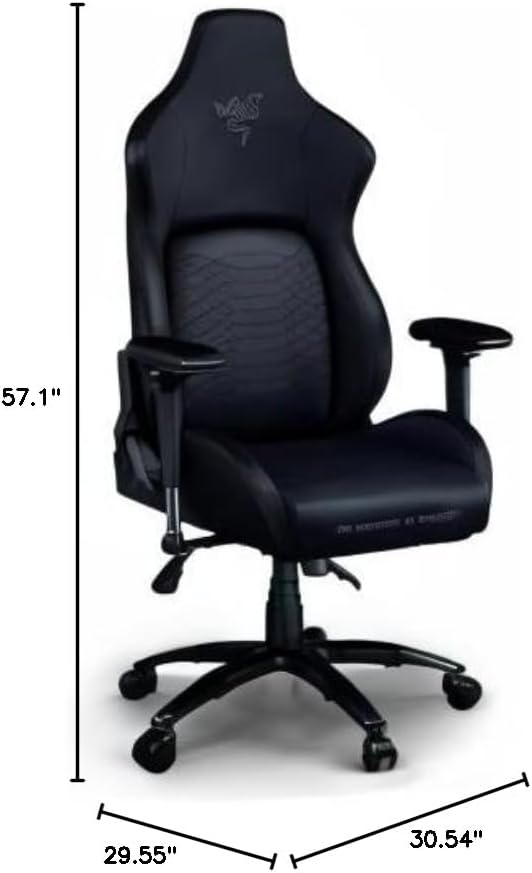
Image: Diagram illustrating the key dimensions of the Razer Iskur XL Gaming Chair.
ዋስትና
For specific warranty details and coverage information, please refer to the official Razer website or the warranty card included with your product. Warranty terms may vary by region and product.
ድጋፍ
For further assistance, technical support, or customer service inquiries, please visit the official Razer support website or contact their customer support team directly. You can find contact information on the Razer webጣቢያ ወይም በምርት ማሸጊያዎ ውስጥ።


