1. መግቢያ
This manual provides essential information for the safe and effective use of your Amazon Echo Dot (5th Gen) smart speaker. Please read these instructions thoroughly before operating the device and retain them for future reference.

Image: Amazon Echo Dot (5th Gen) in Glacier White on a wooden surface, highlighting its compact size and capabilities.
2. በሳጥኑ ውስጥ ያለው
ሁሉም እቃዎች በማሸጊያው ውስጥ መኖራቸውን ያረጋግጡ፡-
- Echo Dot (5th Gen) Device
- የግላሲየር ዋይት ፓወር አዳፕተር (15 ዋ)
- ፈጣን ጅምር መመሪያ
3. ምርት አብቅቷልview
The Amazon Echo Dot (5th Gen) is a compact smart speaker designed to deliver an enhanced audio experience and integrate seamlessly with your smart home ecosystem. It features a spherical design with a fabric finish and an LED light ring at the base.

Image: Amazon Echo Dot (5th Gen) in Glacier White, front view with glowing light ring.
ቁልፍ ባህሪዎች
- Improved Audio: Features a 1.73” (44 mm) front-firing speaker for clearer vocals, deeper bass, and vibrant sound.
- የአሌክሳ የድምፅ ረዳት፡ Provides hands-free control for music, information, timers, and smart home devices.
- የግላዊነት መቆጣጠሪያዎች፡- Includes a microphone off button and the ability to view እና የድምጽ ቅጂዎችን ሰርዝ።
- ስማርት ሆም ሃብ፡ Supports WiFi, Bluetooth Low Energy Mesh, and Matter for compatible smart home device control.
- የሙቀት ዳሳሽ፡- Built-in sensor for triggering smart home routines.
- የመታ መቆጣጠሪያዎች፡ Tap the top of the device to snooze alarms or pause music.
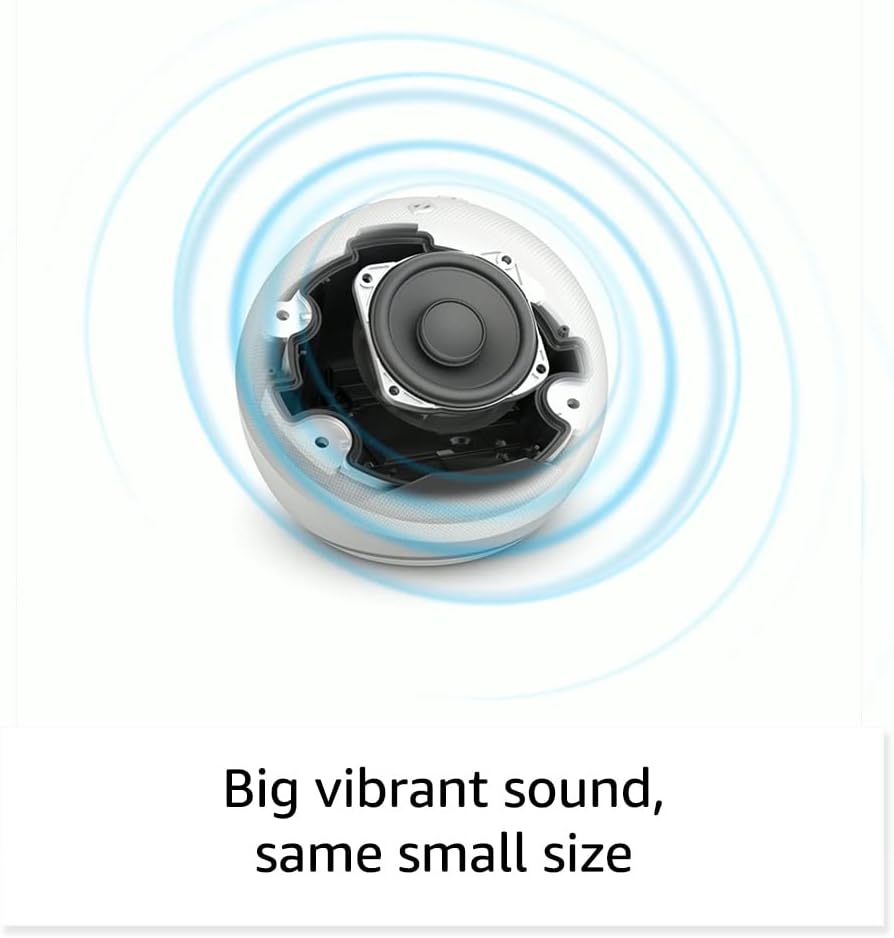
ምስል: ውስጣዊ view of the Amazon Echo Dot (5th Gen) speaker components, illustrating its audio design.
4. ማዋቀር
Follow these steps to set up your Echo Dot (5th Gen):
- Plug In Your Echo Dot: Connect the included power adapter to your Echo Dot and then to a power outlet. The light ring will turn blue, then orange, indicating it's ready for setup.
- የ Alexa መተግበሪያ አውርድ: On your mobile device, download and install the Amazon Alexa app from your device's app store (compatible with Fire OS, Android, and iOS devices).
- መሣሪያዎን ያክሉ፡- Open the Alexa app. If prompted, sign in with your Amazon account. Tap the 'Devices' icon at the bottom, then the '+' icon in the top right corner. Select 'Add Device', then 'Amazon Echo', and choose 'Echo Dot'.
- የማያ ገጽ ላይ መመሪያዎችን ይከተሉ፡- The app will guide you through connecting your Echo Dot to your Wi-Fi network. Ensure your Wi-Fi network supports 802.11a/b/g/n/ac (2.4 and 5 GHz). Ad-hoc networks are not supported.
- አቀማመጥ፡- Place your Echo Dot in a central location within your room, away from walls or other objects that might obstruct sound.
5. Operating Your Echo Dot
Voice Commands with Alexa:
To interact with your Echo Dot, simply say the wake word "Alexa," followed by your command or question. The light ring will turn blue to indicate Alexa is listening.
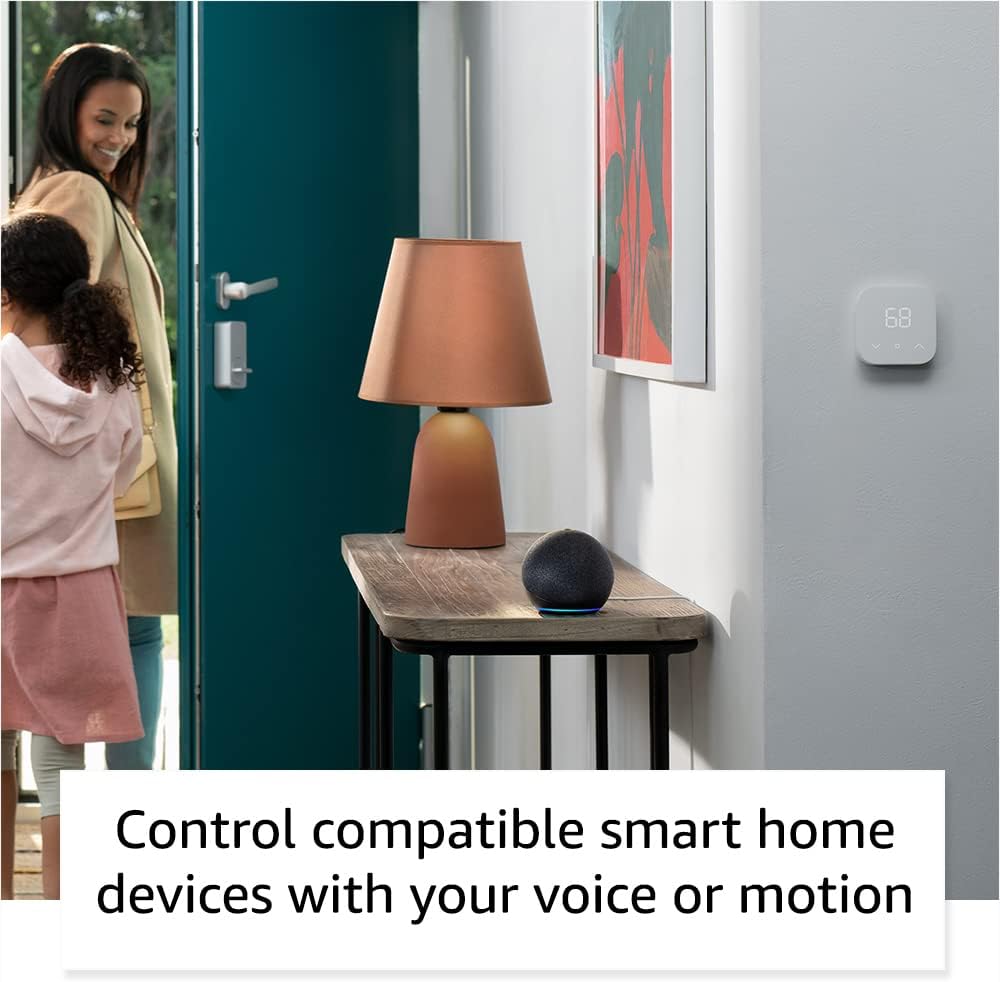
Image: Amazon Echo Dot (5th Gen) in Deep Sea Blue on a kitchen counter, demonstrating a user asking Alexa for the weather.
የተለመዱ ትዕዛዞች
- "አሌክሳ፣ ሙዚቃ ተጫወት።"
- "አሌክሳ, የአየር ሁኔታ ምንድን ነው?"
- " አሌክሳ፣ ሰዓት ቆጣሪ ለ 10 ደቂቃዎች ያዘጋጁ።"
- " አሌክሳ አንድ ቀልድ ንገረኝ."
- "አሌክሳ፣ ድምጹን ከፍ አድርግ።"
የመታ መቆጣጠሪያዎች፡
The top surface of your Echo Dot is touch-sensitive for quick actions:
- Tap to Snooze: When an alarm sounds, tap the top of the device to snooze it.
- Tap to Pause/Resume: Tap to pause or resume music playback.

Image: A hand tapping the top of the Amazon Echo Dot (5th Gen) in Glacier White, demonstrating the tap-to-snooze or pause music function.
6. ስማርት ቤት ውህደት
Your Echo Dot can control compatible smart home devices using voice commands or routines. It supports WiFi, Bluetooth Low Energy Mesh, and Matter protocols.
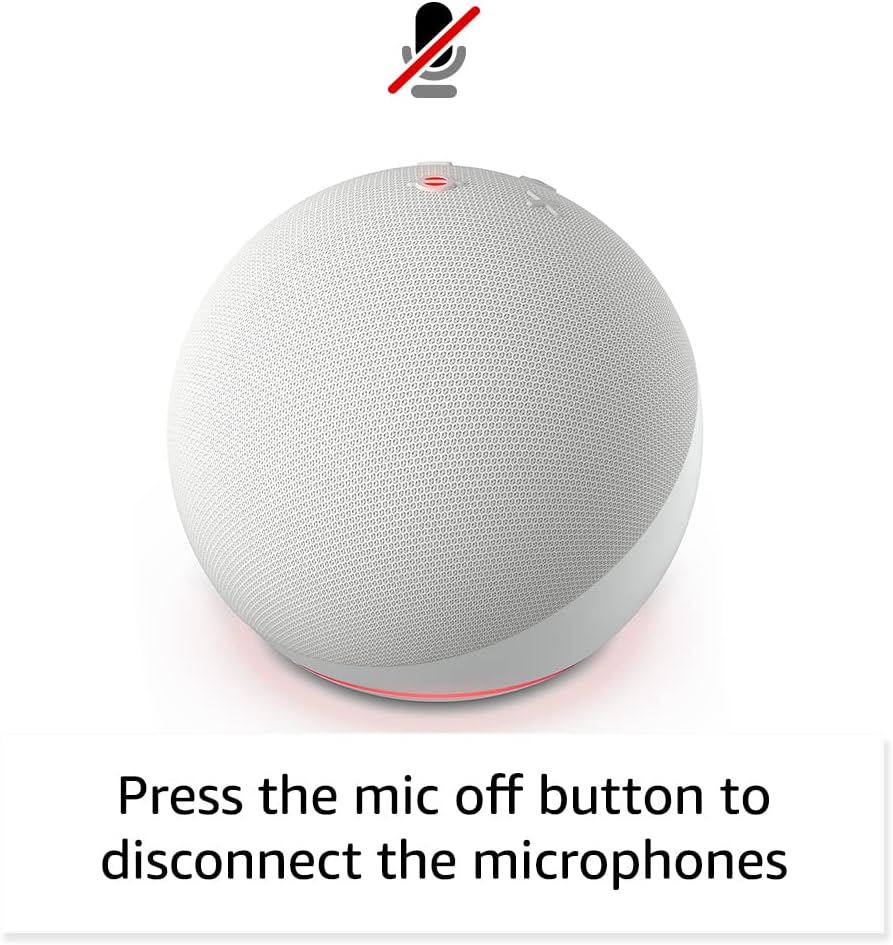
Image: Amazon Echo Dot (5th Gen) in a living space, illustrating its use for controlling compatible smart home devices.
Using the Temperature Sensor:
The built-in temperature sensor allows you to create routines in the Alexa app. For example, you can set a routine to automatically turn on a fan if the room temperature exceeds a specified comfort zone.
የአማዞን የእግረኛ መንገድ
Amazon Sidewalk uses Echo and Ring devices to securely keep other devices connected and help find lost items. It can enable supported devices to remain connected even when Wi-Fi is lost or they are outside the range of their home Wi-Fi. Sidewalk uses a small portion of your internet bandwidth. You can manage Sidewalk settings in the Alexa app.
eero አብሮ የተሰራ:
If you have a compatible eero router, your Echo Dot can extend Wi-Fi coverage. This feature requires linking your eero and Amazon accounts and managing it through the eero mobile application. eero Built-in compatible Echo devices support up to 1,000 sq. ft. of additional coverage, speeds up to 100 Mbps, and 10 or fewer connected devices in the 5 GHz band.
7. የግላዊነት ባህሪያት
Amazon Echo መሳሪያዎች በበርካታ የግላዊነት መቆጣጠሪያዎች የተነደፉ ናቸው፡
- ማይክሮፎን ጠፍቷል አዝራር፡- Press the microphone off button on the top of your Echo Dot to electronically disconnect the microphones. The light ring will turn red to indicate the microphones are off.
- የድምጽ ቅጂዎች፡ አቅም አለህ view, listen to, and delete your voice recordings through the Alexa app or your Amazon account settings.
- ዋክ ቃል ቴክኖሎጂ፡- The device only begins recording and sending audio to the cloud after it detects the wake word (e.g., "Alexa").
Image: Amazon Echo Dot (5th Gen) with a red light indicating the microphone is off, showing the privacy control feature.
8. የተደራሽነት ባህሪያት
The Alexa app provides various accessibility features to personalize your experience. Access these settings by navigating to 'Settings' → 'Accessibility' in the Alexa App.
- የሚለምደዉ ማዳመጥ፡ አሌክሳ ከመመለሱ በፊት ለመናገር ለመጨረስ ተጨማሪ ጊዜ ይሰጣል።
- ተመራጭ የንግግር መጠን፡- "Alexa, speak slower" ወይም "Alexa, በፍጥነት ተናገር" በማለት Alexa ምን ያህል ፈጣን ወይም ቀርፋፋ እንደሚናገር ይቆጣጠሩ።
- ድምጽ ጠይቅ፡ አሌክሳን ሲያናግሩ ከእይታ አመልካች በተጨማሪ የሚሰማ ድምጽ ይጫወታል። "አሌክሳ፣ የጥያቄ ድምጽ ጀምርን አብራ" በማለት አንቃ።
- Kindle ጮክ ብሎ አንብብ፡- አሌክሳ የእርስዎን Kindle መጽሐፍት ጮክ ብሎ ማንበብ ይችላል።
- አቅራቢያ ሲሆን አሳውቅ፡- ከEcho መሣሪያዎ አጠገብ ሲገኙ የማሳወቂያ ድምጾችን ያጫውታል።
9. ጥገና
To ensure the longevity and optimal performance of your Echo Dot:
- ማጽዳት፡ Use a soft, dry, lint-free cloth to clean the device. Do not use abrasive cleaners or sprays.
- አቀማመጥ፡- መሳሪያውን በቀጥታ በፀሀይ ብርሀን, በሙቀት ምንጮች አጠገብ, ወይም ከመጠን በላይ እርጥበት ባለባቸው አካባቢዎች ውስጥ ከማስቀመጥ ይቆጠቡ.
- የሶፍትዌር ማሻሻያ Your Echo Dot automatically receives software security updates. Ensure it remains connected to Wi-Fi for these updates.
10. መላ መፈለግ
የተለመዱ ጉዳዮች እና መፍትሄዎች:
- መሳሪያ ምላሽ የማይሰጥ፡
- ማይክሮፎኑ ድምጸ-ከል አለመደረጉን ያረጋግጡ (ቀይ የብርሃን ቀለበት ድምጸ-ከል መሆኑን ያመለክታል)።
- Check if the device is plugged in and powered on.
- Restart the device by unplugging it from the power outlet for 30 seconds and then plugging it back in.
- ከWi-Fi ጋር መገናኘት አልተቻለም፡-
- የWi-Fi ይለፍ ቃልዎ ትክክል መሆኑን ያረጋግጡ።
- Ensure your router is working and other devices can connect.
- የኢኮ ነጥቡን ወደ ዋይፋይ ራውተርዎ ቅርብ ያድርጉት።
- የእርስዎን ራውተር እና ሞደም እንደገና ያስጀምሩ።
- ደካማ የድምጽ ጥራት፡
- የድምጽ ትዕዛዞችን ወይም የ Alexa መተግበሪያን በመጠቀም ድምጹን ያስተካክሉ.
- መሳሪያው ድምፁን ሊያደበዝዝ በሚችል በተዘጋ ቦታ ላይ አለመቀመጡን ያረጋግጡ።
- በድምጽ ማጉያው ዙሪያ ማንኛውንም አካላዊ እንቅፋት ይፈትሹ።
- አሌክሳ ትዕዛዞችን አለመረዳት፡-
- Speak clearly and at a normal pace.
- የበስተጀርባ ድምጽን ይቀንሱ.
- Ensure you are within hearing range of the device.
11. ዝርዝሮች
| ባህሪ | ዝርዝር |
|---|---|
| መጠን | 3.9” x 3.9” x 3.5” (100ሚሜ x 100ሚሜ x 89ሚሜ) |
| ክብደት | 10.7 አውንስ (304 ግ) |
| ኦዲዮ | 1.73 ኢንች (44 ሚሜ) የፊት-ተኩስ ድምጽ ማጉያ፣ የማይጠፋ ከፍተኛ ጥራት |
| የ Wi-Fi ግንኙነት | ባለሁለት ባንድ Wi-Fi 802.11a/b/g/n/ac (2.4 እና 5 GHz) አውታረ መረቦችን ይደግፋል። የአድሆክ አውታረ መረቦችን አይደግፍም። |
| የብሉቱዝ ግንኙነት | የA2DP ድጋፍ ለድምጽ ዥረት፣ AVRCP ለተገናኙ ተንቀሳቃሽ መሳሪያዎች የድምጽ ቁጥጥር። ፒን ኮድ የሚያስፈልጋቸው የብሉቱዝ ድምጽ ማጉያዎች አይደገፉም። |
| Smart Home Device Compatibility | WiFi, Bluetooth Low Energy Mesh, and Matter |
| የስርዓት መስፈርቶች | Alexa app compatible with Fire OS, Android, and iOS devices. Web browser access also available. |
| ትውልድ | Echo Dot (5th Gen) - 2022 release |
| ቋንቋ | አሌክሳ እንግሊዝኛ እና ስፓኒሽ ይናገራል |
12. ዋስትና እና ድጋፍ
የዋስትና መረጃ፡-
Your Echo Dot (5th Gen) comes with a 90-day limited warranty and service. Optional 1-year, 2-year, and 3-year extended warranties are available for U.S. customers and are sold separately. Use of the Echo Dot is subject to specific terms and conditions.
የሶፍትዌር ደህንነት ዝማኔዎች፡-
ይህ መሳሪያ በአማዞን ላይ እንደ አዲስ አሃድ ለመጨረሻ ጊዜ ለግዢ ከቀረበ በኋላ የሶፍትዌር ደህንነት ዝመናዎችን ቢያንስ ለአራት አመታት እንደሚቀበል ዋስትና ተሰጥቶታል። websites. For more information on software security updates or to manage your device, visit the Amazon webጣቢያ.
የደንበኛ ድጋፍ፡
For further assistance, please refer to the Amazon Alexa app or visit the Amazon support website. You can also find information specific to your device by visiting 'Manage Your Content and Devices' on Amazon.