1. መግቢያ
ስለገዙ እናመሰግናለንasing the BYTECH BYMCLB116BK Projector Decor Light-Rainbow. This device is designed to project vibrant rainbow light effects, enhancing room ambiance and providing unique lighting for creative photography. Please read this manual thoroughly before use to ensure proper operation and maintenance.

Image 1.1: The BYTECH BYMCLB116BK Projector Decor Light-Rainbow packaging, highlighting its key features including rainbow glow, secure stabilization, 360-degree rotation and tilt, and USB connectivity.
2. የደህንነት መረጃ
- መሳሪያውን ከውሃ እና እርጥበት ያርቁ.
- መሳሪያውን ለከፍተኛ ሙቀት ወይም ቀጥተኛ የፀሐይ ብርሃን አያጋልጡ.
- መሳሪያውን ለጠንካራ ተጽእኖዎች ከመጣል ወይም ከማስገዛት ተቆጠብ።
- መሳሪያውን እራስዎ ለመበተን ወይም ለመጠገን አይሞክሩ. ሁሉንም አገልግሎቶች ብቁ ለሆኑ ባለሙያዎች ያመልክቱ።
- Use only the provided USB cable or a certified equivalent for power.
- መሳሪያው እንዳይወድቅ ለመከላከል በተረጋጋና ጠፍጣፋ መሬት ላይ መቀመጡን ያረጋግጡ።
- ልጆች እና የቤት እንስሳት በማይደርሱበት ቦታ ያስቀምጡ.
3. የጥቅል ይዘቶች
እባክዎ የጥቅል ይዘቱን በጥንቃቄ ያረጋግጡ። ማንኛቸውም ነገሮች ከጠፉ ወይም ከተበላሹ፣ ቸርቻሪዎን ያነጋግሩ።
- 1 x BYTECH BYMCLB116BK Projector Decor Light-Rainbow
- 1 x USB Power Cable (with wired remote control)
- 1 x የተጠቃሚ መመሪያ
4. ማዋቀር
- ማሸግ ፦ Carefully remove the Projector Decor Light from its packaging.
- አቀማመጥ፡- Place the projector on a stable, flat surface. Consider the desired projection area and distance from the wall or ceiling for optimal effect. The device features 360-degree rotation and tilt for flexible positioning.
- የግንኙነት ኃይል; Insert the small end of the USB power cable into the USB port on the projector. Connect the larger end of the USB cable to a standard USB power adapter (not included) or a powered USB port (e.g., on a computer or power bank).
- Secure Stabilization: Ensure the base is firmly placed to prevent accidental movement, utilizing its secure stabilization feature.
5. የአሠራር መመሪያዎች
The BYTECH Projector Decor Light is designed for simple operation.
- ማብራት/ማጥፋት፡ Once connected to a power source, locate the wired remote control on the USB cable. Press the power button on the remote to turn the light on or off.
- Adjust Brightness/Mode: Use the other buttons on the wired remote control to cycle through different brightness levels or projection modes, if available. Refer to the remote's markings for specific functions.
- የፕሮጀክሽን አንግልን አስተካክል፡ በእጅ ማስተካከል lamp head to rotate and tilt 360 degrees to direct the rainbow light projection to your desired area.
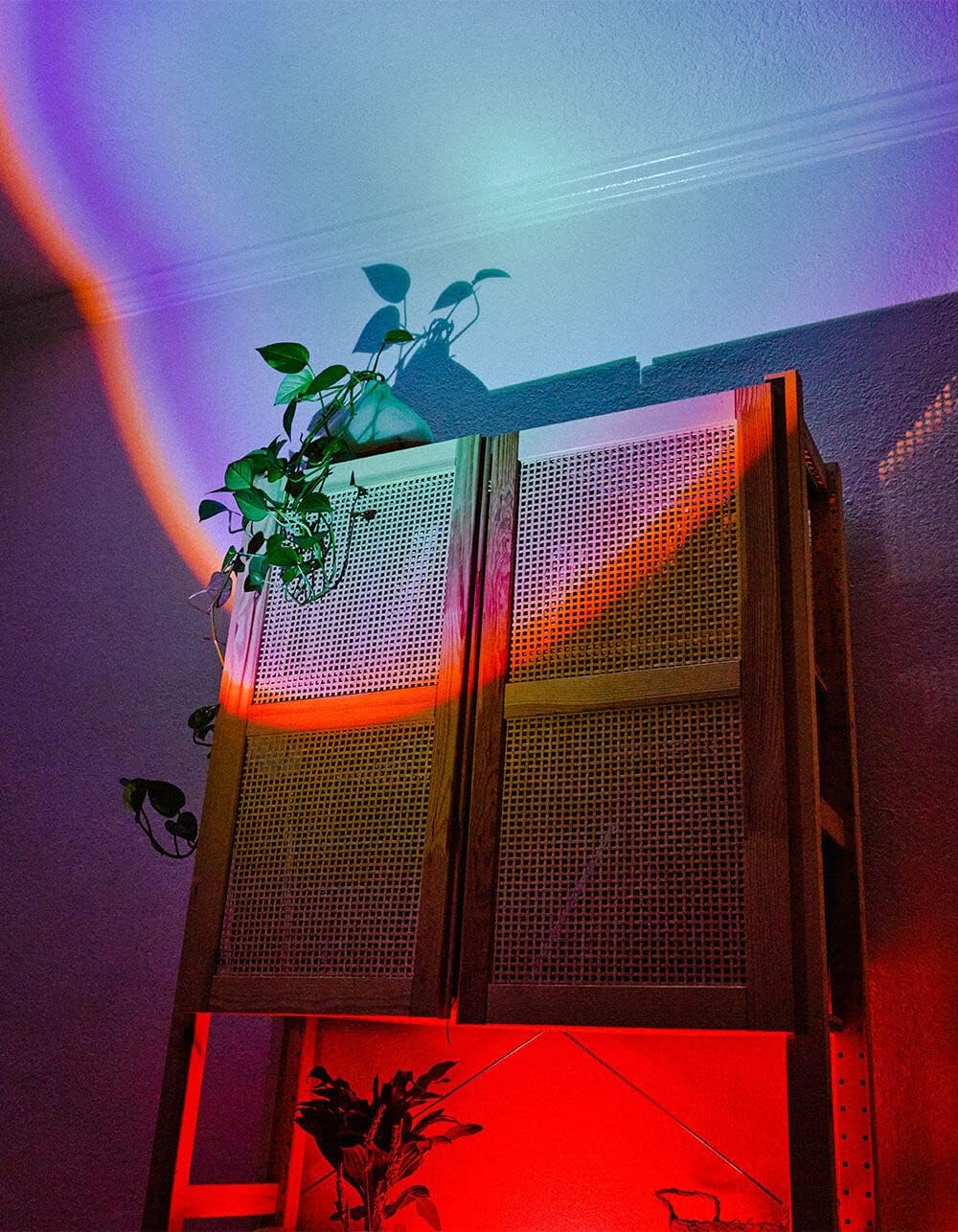
Image 5.1: The BYTECH Projector Decor Light-Rainbow in operation, casting vibrant rainbow light patterns onto a room's wall and furniture, demonstrating its ambient effect.
6. ጥገና
- ማጽዳት፡ Disconnect the power before cleaning. Use a soft, dry cloth to wipe the surface of the projector. Do not use abrasive cleaners or solvents.
- ማከማቻ፡ When not in use for extended periods, store the device in a cool, dry place, away from direct sunlight and moisture.
- አያያዝ፡ Handle the device with care to avoid damage to the lens or internal components.
7. መላ መፈለግ
| ችግር | ሊሆን የሚችል ምክንያት | መፍትሄ |
|---|---|---|
| መሣሪያ አይበራም | የኃይል ግንኙነት ወይም የተበላሸ ገመድ የለም። | Ensure the USB cable is securely connected to both the projector and a powered USB port/adapter. Try a different USB port or adapter. |
| ብርሃን ደብዛዛ ወይም ብልጭ ድርግም የሚል ነው። | Insufficient power supply or dirty lens. | Ensure the power source provides adequate power. Clean the projector lens gently with a soft, dry cloth. |
| ትንበያ ደብዛዛ ነው። | ሌንስ ቆሽ isል ፡፡ | Gently clean the projector lens with a soft, dry cloth. |
8. ዝርዝሮች
- ሞዴል፡ BYMCLB116BK
- የምርት ስም፡ ባይቴክ
- የኃይል ግቤት፡ USB Powered (5V DC, current not specified, typical for USB)
- የብርሃን ምንጭ፡- LED
- የፕሮጀክት አይነት፡ Rainbow Glow
- ማስተካከል: - 360° Rotation & Tilt
- የጥቅል መጠኖች: 5 x 5 x 5 ኢንች
- የእቃው ክብደት፡ 1 ፓውንድ
- አምራች፡ ባይቴክ
9. ዋስትና እና ድጋፍ
This product is covered by a limited warranty provided by BYTECH. For specific warranty terms and conditions, please refer to the warranty card included with your purchase or visit the official BYTECH website. For technical support, troubleshooting assistance, or to inquire about replacement parts, please contact BYTECH customer service through their official channels.
ለዋስትና ጥያቄዎች እባክዎ የግዢ ማረጋገጫዎን ያቆዩ።


