1. መግቢያ
This manual provides detailed instructions for the setup, operation, and maintenance of your CHERRY DW 9100 Slim Wireless Keyboard and Mouse Set. This rechargeable desktop set offers both 2.4 GHz wireless and Bluetooth connectivity, featuring a slim design and silent keystroke SX Scissor Mechanism for comfortable and efficient use in various environments.

Image 1.1: The CHERRY DW 9100 Slim Wireless Keyboard and Mouse Set, including the USB nano receiver.
2. የጥቅል ይዘቶች
ሁሉም ክፍሎች መኖራቸውን ለማረጋገጥ የጥቅሉን ይዘቶች ከሳጥኑ ውስጥ ሲያስወጡ እባክዎ ያረጋግጡ፡
- CHERRY DW 9100 Slim Wireless Keyboard
- CHERRY DW 9100 Slim Wireless Mouse
- የዩኤስቢ ናኖ ተቀባይ
- የዩኤስቢ-ሲ ኃይል መሙያ ገመድ
- የተጠቃሚ መመሪያ (ይህ ሰነድ)
3. ማዋቀር
3.1 መሳሪያዎቹን መሙላት
ሁለቱም የቁልፍ ሰሌዳ እና መዳፊት ሊሞሉ የሚችሉ የሊቲየም ባትሪዎች የተገጠሙ ናቸው።
- Connect the supplied USB-C charging cable to the USB-C port on the keyboard and mouse.
- Connect the other end of the cable to a powered USB port (e.g., computer, USB wall adapter).
- The status LED on each device will indicate the charging status. A full charge is indicated when the LED changes color or turns off (refer to Section 4.3 for LED indicators).
3.2 በ 2.4 GHz ገመድ አልባ በኩል መገናኘት
For a stable and fast wireless connection, use the included USB nano receiver.
- Locate the USB nano receiver.
- የዩኤስቢ ናኖ ተቀባይን በኮምፒውተርዎ ላይ ወዳለው የዩኤስቢ ወደብ ይሰኩ።
- On both the keyboard and mouse, locate the connectivity switch. Set the switch to the 2.4 ጊኸ position (often indicated by a receiver icon or "RF").
- መሳሪያዎቹ በራስ-ሰር ከኮምፒዩተርዎ ጋር መገናኘት አለባቸው።
3.3 በብሉቱዝ መገናኘት
The set supports Bluetooth connectivity for devices that have Bluetooth capabilities.
- On both the keyboard and mouse, locate the connectivity switch. Set the switch to the ብሉቱዝ position (often indicated by a Bluetooth icon).
- On your computer or device, open the Bluetooth settings.
- Initiate the pairing process on your device. The keyboard and mouse should appear in the list of discoverable devices (e.g., "CHERRY DW 9100 Keyboard", "CHERRY DW 9100 Mouse").
- Select each device to pair them. Follow any on-screen prompts, such as entering a pairing code for the keyboard.
ማስታወሻ፡- The keyboard and mouse can be paired with multiple Bluetooth devices. Use the connectivity switch to toggle between paired devices or 2.4 GHz mode.
4. የአሠራር መመሪያዎች
4.1 የቁልፍ ሰሌዳ ተግባራት
The CHERRY DW 9100 Slim Keyboard features a full-size layout with an SX Scissor Mechanism for silent and precise keystrokes.
- መደበኛ ቁልፎች፡- All standard alphanumeric and symbol keys function as expected.
- የተግባር ቁልፎች (F1-F12)፦ These keys may have secondary functions (e.g., media control, volume, brightness) accessible by pressing the Fn key simultaneously. Refer to your operating system's settings for specific function key behavior.
- የቁጥር ቁልፍ ሰሌዳ፡ Provides dedicated number entry.

ምስል 4.1፡ የጎን ፕሮfile of the CHERRY DW 9100 Slim Keyboard, highlighting its thin design.

Image 4.2: Visual representation of the CHERRY SX Scissor Mechanism, responsible for silent and precise keystrokes.
4.2 የመዳፊት ተግባራት
The CHERRY DW 9100 Slim Mouse features 6 buttons and a scroll wheel for versatile navigation.
- ግራ/ቀኝ ጠቅ አድርግ፡- መደበኛ የመዳፊት አዝራሮች።
- የማሽከርከር ጎማ፡ For vertical scrolling and as a middle click button.
- የጎን ቁልፎች; በተለምዶ ለወደፊት/ወደኋላ አሰሳ ጥቅም ላይ የሚውለው በ ውስጥ web አሳሾች.
- ዲፒአይ መቀየሪያ፡- A button, usually near the scroll wheel, allows adjustment of the mouse's sensitivity (DPI - Dots Per Inch). Pressing this button cycles through different DPI settings, indicated by the mouse's status LED.

ምስል 4.3: ከፍተኛ view of the CHERRY DW 9100 Slim Mouse, showing the left/right click buttons, scroll wheel, and DPI switch.
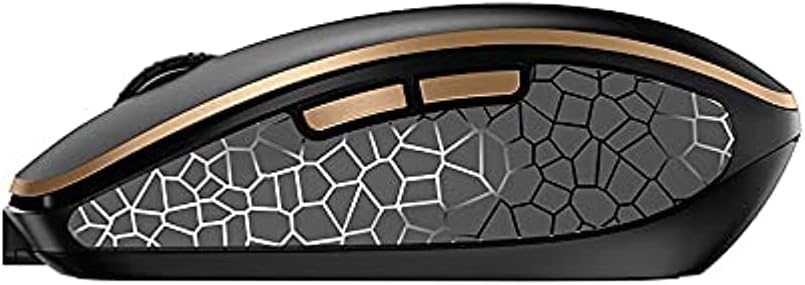
ምስል 4.4፡ ጎን view of the CHERRY DW 9100 Slim Mouse, illustrating the ergonomic design and side buttons.
4.3 የሁኔታ LEDs
Both the keyboard and mouse feature status LEDs to provide information on battery level, charging status, and mouse resolution.
- ዝቅተኛ ባትሪ፡ The LED will flash or illuminate in a specific color (e.g., red) when the battery level is low, indicating that charging is required.
- በመሙላት ላይ፡ The LED will illuminate while charging and typically change color or turn off when fully charged.
- Mouse Resolution (DPI): When adjusting the DPI, the mouse LED may briefly flash to indicate the current setting.
5. ጥገና
5.1 ጽዳት
To maintain the performance and appearance of your devices:
- ከማጽዳትዎ በፊት መሳሪያዎቹን ከኮምፒዩተርዎ ያላቅቁ።
- ለስላሳ፣ ከቆሸሸ ነፃ የሆነ ጨርቅ በትንሹ ተጠቀምampበውሃ ወይም ለስላሳ የጽዳት መፍትሄ.
- Avoid using harsh chemicals, abrasive cleaners, or solvents, as these can damage the surfaces.
- ለቁልፍ ሰሌዳው፣ ከቁልፎቹ መካከል አቧራ እና ቆሻሻ ለማስወገድ የታመቀ አየር ይጠቀሙ።
5.2 የባትሪ እንክብካቤ
The integrated lithium batteries are designed for long-term use.
- Recharge the devices when the low battery indicator appears.
- Avoid fully discharging the batteries frequently to prolong their lifespan.
- If storing the devices for an extended period, charge them to approximately 50% before storage.
6. መላ መፈለግ
If you encounter issues with your CHERRY DW 9100 Slim set, refer to the following common solutions:
6.1 የግንኙነት ጉዳዮች
- No Connection (2.4 GHz):
- የዩኤስቢ ናኖ ተቀባይ ደህንነቱ በተጠበቀ ሁኔታ ከሚሰራ የዩኤስቢ ወደብ ጋር መሰካቱን ያረጋግጡ።
- Verify the keyboard and mouse connectivity switches are set to the 2.4 ጊኸ አቀማመጥ.
- መቀበያውን ወደ ሌላ የዩኤስቢ ወደብ ለመሰካት ይሞክሩ።
- መሳሪያዎቹ በቂ ኃይል መሞላታቸውን ያረጋግጡ።
- ግንኙነት የለም (ብሉቱዝ):
- Ensure the keyboard and mouse connectivity switches are set to the ብሉቱዝ አቀማመጥ.
- Confirm Bluetooth is enabled on your computer/device.
- ቀዳሚ ማጣመሪያዎችን ከመሳሪያዎ የብሉቱዝ ቅንብሮች ያስወግዱ እና እንደገና ለማጣመር ይሞክሩ።
- መሳሪያዎቹ በቂ ኃይል መሞላታቸውን ያረጋግጡ።
6.2 የኃይል እና የኃይል መሙያ ጉዳዮች
- የማይሞሉ መሳሪያዎች፡-
- Check that the USB-C charging cable is properly connected to both the device and the power source.
- Try a different USB-C cable or a different USB power source.
- የኃይል ምንጭ ንቁ መሆኑን ያረጋግጡ።
- አጭር የባትሪ ህይወት;
- ከመጠቀምዎ በፊት መሳሪያዎቹ ሙሉ በሙሉ መሞላቸውን ያረጋግጡ።
- Battery life can vary based on usage patterns.
6.3 Mouse Tracking Issues
- Inaccurate or No Tracking:
- የመዳፊት ዳሳሹ ንፁህ እና ከቆሻሻ የጸዳ መሆኑን ያረጋግጡ።
- Use the mouse on a suitable surface (e.g., mouse pad). Highly reflective or transparent surfaces may cause issues.
- በመዳፊት ላይ ያለውን የዲፒአይ ማብሪያ / ማጥፊያ በመጠቀም የዲፒአይ ቅንብርን ያስተካክሉ።
7. ዝርዝሮች
| ባህሪ | ዝርዝር |
|---|---|
| የሞዴል ቁጥር | JD-9100US-2 |
| የምርት ልኬቶች | 17.32 x 5.12 x 0.59 ኢንች |
| የእቃው ክብደት | 2.35 ፓውንድ |
| ባትሪዎች | Rechargeable Lithium (USB-C) |
| የግንኙነት ቴክኖሎጂ | Bluetooth, 2.4 GHz Radio Frequency (USB) |
| ልዩ ባህሪ | Rechargeable, Silent Keystroke (SX Scissor Mechanism) |
| ተስማሚ መሣሪያዎች | የግል ኮምፒተር |
| አምራች | ቼሪ |
Note on Batteries: The product description indicates USB-C rechargeable lithium batteries. The specification "1 AA batteries required. (included)" in the source data appears to be a discrepancy. Please rely on the USB-C rechargeable feature for this model.
8. ዋስትና እና ድጋፍ
CHERRY products are manufactured to high-quality standards. For detailed warranty information, including terms and conditions, please refer to the official CHERRY webከምርትዎ ጋር የተካተተው ጣቢያ ወይም የዋስትና ካርድ።
For technical support, troubleshooting assistance beyond this manual, or to inquire about replacement parts, please visit the official CHERRY support portal or contact their customer service directly.
- Official CHERRY Webጣቢያ፡ www.cherry.de/en/ (or regional equivalent)
- የደንበኛ ድጋፍ፡ የሚለውን ተመልከት webየእውቂያ ዝርዝሮች ጣቢያ።


