StarTech.com 2 Port Dual Monitor HDMI KVM Switch
Model: SV231DHU34K6
1. መግቢያ
This instruction manual provides detailed information on the installation, operation, and maintenance of your StarTech.com 2 Port Dual Monitor HDMI KVM Switch. This device allows you to control two computers from a single set of peripherals, including two HDMI monitors, a keyboard, a mouse, and other USB devices, supporting resolutions up to 4K at 60Hz.
2. የደህንነት መረጃ
ይህንን ምርት ከመጠቀምዎ በፊት እባክዎ ሁሉንም መመሪያዎች ያንብቡ እና ይረዱ። እነዚህን መመሪያዎች አለመከተል የኤሌክትሪክ ንዝረት፣ እሳት ወይም ከባድ ጉዳት ሊያስከትል ይችላል።
- የኤሌክትሪክ አደጋዎች; Do not use damaged or frayed cables. Exposed wires can lead to electric shocks. Ensure all cables are properly connected and secured to prevent accidental disconnection.
- የሙቀት ክምችት፡ Overloaded or tightly bundled cables can overheat and pose a fire hazard. Ensure adequate ventilation and avoid bundling power cables.
- ጉዳት፡ Always unplug adapters by holding the plug, not the cable. Pulling by the cable can expose live wires, which could lead to electrical shocks or burns.
3. ምርት አብቅቷልview
The StarTech.com SV231DHU34K6 KVM switch is designed to streamline your workspace by enabling control of two computers with dual 4K HDMI displays and shared USB peripherals. Its robust steel housing ensures durability.
3.1. ቁልፍ ባህሪያት
- Supports dual 4K (3840 x 2160) resolution at 60Hz per monitor.
- HDMI 2.0, HDCP 2.2, and HDR10 support.
- Integrated 2-port USB 3.0 Hub (5Gbps) for sharing peripherals.
- Four USB 2.0 HID ports for keyboard and mouse.
- Hotkey and front-panel push-button switching.
- EDID and HDCP signal emulation for fast, seamless switching.
- Supports stereo analog and 7.1 digital audio.
- OS Independent compatibility (Windows, Mac, Linux).
3.2. የፊት ፓነል

ምስል 1 የፊት ፓነል አቀማመጥ
- HID USB Port: For connecting a keyboard or mouse.
- 5G USB Port: ከፍተኛ ፍጥነት ያላቸውን የዩኤስቢ 3.0 መሳሪያዎችን ለማገናኘት።
- Computer Selection Buttons (1, 2): Press to switch to the corresponding computer.
- አዝራር ምረጥ ፦ Used for various functions, including auto-scan activation.
3.3. የኋላ ፓነል
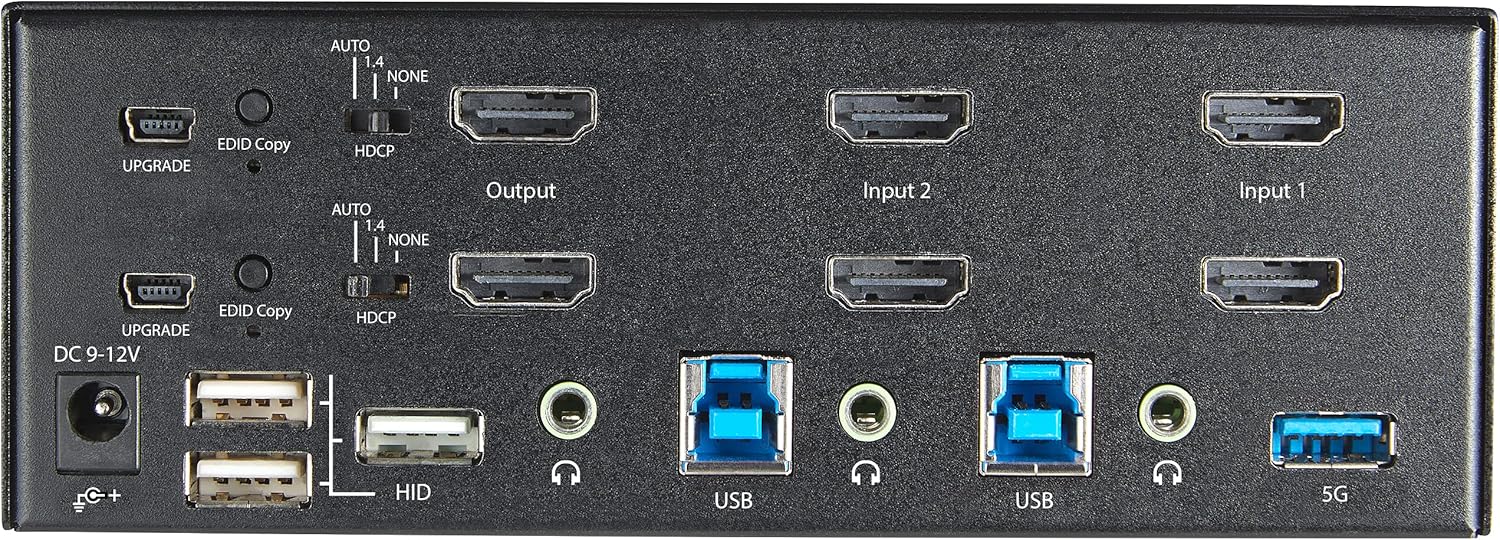
ምስል 2 - የኋላ ፓነል አቀማመጥ
- የዲሲ 9-12V የኃይል ግብዓት፡ የተካተተውን የኃይል አስማሚ ያገናኙ.
- UPGRADE Port: ለ firmware ዝመናዎች።
- EDID Copy Button/Switch: Manages Extended Display Identification Data.
- HDCP መቀየሪያ፡- Manages High-bandwidth Digital Content Protection.
- Output (HDMI): Connect to your monitors.
- Input 1/Input 2 (HDMI): Connect to the HDMI outputs of your computers.
- ዩኤስቢ (አይነት-ቢ)፦ Connect to the USB 3.0 ports of your computers.
- HID USB Ports (Type-A): For additional keyboard/mouse connections or other low-power USB devices.
- Audio Jacks (3.5mm): For connecting speakers/headphones and microphones.
- 5G USB Port (Type-A): ከፍተኛ ፍጥነት ያላቸውን የዩኤስቢ 3.0 መሳሪያዎችን ለማገናኘት።
4. ማዋቀር
4.1. በሳጥኑ ውስጥ ያለው
- 1 x KVM Switch (SV231DHU34K6)
- 1 x ሁለንተናዊ የኃይል አስማሚ (NA / JP, EU, UK, ANZ)
- 4 x የጎማ እግር
- 1 x ፈጣን ጅምር መመሪያ
Note: HDMI cables, USB 3.0 Type-A to Type-B cables, and audio cables are not included and must be purchased separately.
4.2. የግንኙነት መመሪያዎች
የKVM ማብሪያ / ማጥፊያዎን ለማገናኘት የሚከተሉትን ደረጃዎች ይከተሉ
- ማገናኛዎችን ማገናኘት; Connect your two HDMI monitors to the 'Output' HDMI ports on the rear panel of the KVM switch.
- ኮምፒውተሮችን ያገናኙ (ኤችዲኤምአይ): Connect the HDMI outputs from Computer 1 to the 'Input 1' HDMI ports on the KVM switch. Repeat for Computer 2 and 'Input 2'. Ensure both HDMI outputs from each computer are connected for dual monitor support.
- ኮምፒውተሮችን ያገናኙ (ዩኤስቢ): Connect the USB 3.0 Type-B ports on the KVM switch to the USB 3.0 Type-A ports on Computer 1 and Computer 2 using appropriate USB 3.0 cables. These connections enable keyboard, mouse, and USB hub functionality.
- ተያያዥ ነገሮች፡-
- Connect your keyboard and mouse to the 'HID' USB ports on the front or rear panel.
- Connect other USB devices (e.g., printer, scanner, webcam) to the '5G' USB 3.0 ports on the front or rear panel.
- ኦዲዮን ያገናኙ (ከተፈለገ) If desired, connect your speakers/headphones and microphone to the 3.5mm audio jacks on the rear panel.
- የግንኙነት ኃይል; Connect the included universal power adapter to the 'DC 9-12V' power input on the rear panel, then plug it into a power outlet. The KVM switch will power on automatically.

Figure 3: KVM Switch with Ports for Connection
5. የKVM ማብሪያ / ማጥፊያውን በማስኬድ ላይ
5.1. በኮምፒተሮች መካከል መቀያየር
You can switch between connected computers using either the front-panel push buttons or hotkey commands.
- Front-Panel Buttons: Press the '1' or '2' button on the front panel to directly switch to Computer 1 or Computer 2, respectively.
- የሆትኪ መቀያየር፦ Use keyboard hotkey combinations to switch computers. The default hotkey sequence is typically Scroll Lock, Scroll Lock, [1 or 2]. Refer to the Quick-Start Guide for a complete list of hotkey commands and customization options. A buzzer sound confirms the switch.
5.2. EDID and HDCP Emulation
The KVM switch includes EDID (Extended Display Identification Data) and HDCP (High-bandwidth Digital Content Protection) signal emulation. This feature ensures that your monitors remain synced and desktop settings are maintained when switching between computers, preventing display resolution changes or window rearrangement.
5.3. የዩኤስቢ ማዕከል ተግባር
The integrated USB 3.0 hub allows you to share two USB 3.0 peripherals (connected to the 5G ports) and four USB 2.0 HID peripherals (connected to the HID ports) between the connected computers. Devices connected to these ports will function as if directly connected to the currently selected host computer.
5.4. የድምጽ ድጋፍ
The KVM switch supports both digital audio (via HDMI, 7.1 Channel Audio) and separate 3.5mm stereo analog audio (2 Channel Audio). Ensure your displays and sources support the desired audio format for full compatibility.
6. ጥገና
የKVM መቀየሪያዎን ረጅም ዕድሜ እና ጥሩ አፈጻጸም ለማረጋገጥ እነዚህን የጥገና መመሪያዎች ይከተሉ፡
- ማጽዳት፡ የመሳሪያውን ውጫዊ ክፍል ለማጽዳት ለስላሳ እና ደረቅ ጨርቅ ይጠቀሙ. ፈሳሽ ወይም ኤሮሶል ማጽጃዎችን አይጠቀሙ.
- የአየር ማናፈሻ; Ensure the KVM switch is placed in a well-ventilated area. Do not block any ventilation openings.
- የኬብል አስተዳደር Keep cables organized and untangled to prevent damage and ensure proper airflow. Avoid excessive bending or crimping of cables.
- ማከማቻ፡ ለረጅም ጊዜ አገልግሎት በማይሰጥበት ጊዜ መሳሪያውን በቀጥታ ከፀሀይ ብርሀን እና ከከፍተኛ ሙቀት ርቆ በቀዝቃዛና ደረቅ ቦታ ያከማቹ።
7. መላ መፈለግ
በKVM ማብሪያዎ ላይ ችግሮች ካጋጠሙዎት የሚከተሉትን የተለመዱ ችግሮች እና መፍትሄዎች ይመልከቱ፡
- ምንም ማሳያ ወይም የተሳሳተ ጥራት የለም፦
- Ensure all HDMI cables are securely connected to both the KVM switch and your computers/monitors.
- Verify that your HDMI cables are rated for 4K 60Hz if you are using 4K displays. Longer cables (e.g., over 3m/10ft) may require higher quality or active cables.
- Check the display settings on your computers to ensure they are configured for the correct resolution and refresh rate.
- Try power cycling the KVM switch and monitors.
- የቁልፍ ሰሌዳ/አይጥ ምላሽ የማይሰጥ፡
- Ensure the USB Type-B cables are securely connected from the KVM switch to your computers.
- Verify that your keyboard and mouse are connected to the designated HID USB ports.
- የቁልፍ ሰሌዳውን/ማውዙን በቀጥታ ከኮምፒዩተሩ ጋር ለማገናኘት ይሞክሩ፤ ተግባራዊ መሆናቸውን ያረጋግጡ።
- Some specialized keyboards/mice with advanced features may require direct connection or specific drivers.
- የዩኤስቢ መሳሪያዎች አልተገኙም፦
- Ensure the USB Type-B cables are connected from the KVM switch to your computers.
- Verify that the USB device is connected to the appropriate 5G USB 3.0 port.
- Some high-power USB devices may require an external power source or a powered USB hub connected to the KVM's 5G port.
- የድምጽ ጉዳዮች፡-
- Check all 3.5mm audio cable connections.
- Verify audio output settings on your computers.
- Ensure your monitors or audio devices support the HDMI audio format being sent.
- Slow Switching Time:
- The KVM switch is designed for fast switching. If experiencing delays, ensure EDID and HDCP emulation are functioning correctly.
- ሁሉም ኬብሎች ጥሩ ጥራት ያላቸው እና በአግባቡ የተቀመጡ መሆናቸውን ያረጋግጡ።
If the problem persists after attempting these solutions, please contact StarTech.com technical support.
8. ዝርዝሮች
| ምድብ | ዝርዝር መግለጫ |
|---|---|
| የሞዴል ቁጥር | SV231DHU34K6 |
| KVM ወደቦች | 2 |
| Monitors Supported | 2 |
| የቪዲዮ ዓይነት | HDMI 2.0 |
| የሚደገፉ መፍትሄዎች | እስከ 3840 x 2160 @ 60Hz |
| HDCP ድጋፍ | HDCP 2.2 |
| የኤችዲአር ድጋፍ | HDR10 |
| የዩኤስቢ መገናኛ | 2-ወደብ USB 3.0 (5Gbps) |
| የዩኤስቢ HID ወደቦች | 4 x ዩኤስቢ 2.0 |
| የድምጽ ድጋፍ | HDMI (7.1 Channel), Analog Stereo (3.5mm) |
| ወደብ ምርጫ | Push Button, Hotkeys |
| ቁሳቁስ | ብረት |
| ቀለም | ጥቁር |
| የምርት ልኬቶች (L x W x H) | 6.3 x 3.9 x 2.3 ኢንች (16.0 x 10.0 x 5.8 ሴሜ) |
| የምርት ክብደት | 1.8 ፓውንድ (0.8 ኪግ) |
| የኃይል ምንጭ | የኤሲ አስማሚ (ተካቷል) |
| ግብዓት Voltage | 100 - 240 AC |
| የኃይል ፍጆታ | 36 ዋ |
| የአሠራር ሙቀት | 0℃ እስከ 40℃ (32℉ እስከ 104℉) |
| የማከማቻ ሙቀት | -10℃ እስከ 60℃ (14℉ እስከ 140℉) |
| እርጥበት | ከ 0% እስከ 80% RH (የማይከማች) |
9. ዋስትና እና ድጋፍ
This StarTech.com KVM Switch (Model: SV231DHU34K6) is backed by a የ 2 ዓመት ዋስትና. StarTech.com also provides የዕድሜ ልክ ነፃ የቴክኒክ ድጋፍ. For technical assistance or warranty claims, please visit the official StarTech.com webጣቢያ ወይም የደንበኛ ድጋፍ ቡድናቸውን ያነጋግሩ።
ለበለጠ መረጃ፡ ይጎብኙ፡- www.startech.com


