1. መግቢያ
The VTech RM5752 Wi-Fi 1080p HD Video Monitor provides a secure and reliable way to monitor your baby. This system includes a 5-inch color screen parent unit and a 1080p HD camera unit, offering both local and remote viewing capabilities. Utilizing your home's wireless network, the monitor streams live video and audio, allowing you to stay connected whether you are at home or away via the MyVTech Baby 1080p app.
ቁልፍ ባህሪያት የሚከተሉትን ያካትታሉ:
- 5-inch full color HD parent unit with 1080p HD camera.
- ራስ-ሰር የሌሊት እይታ ለንፁህ እይታ viewበዝቅተኛ የብርሃን ሁኔታዎች ውስጥ መግባት።
- 2x local digital zoom and 10x remote digital zoom for detailed viewing
- የርቀት viewing access and control via the free VTech app.
- Motion alerts and temperature sensor with alerts on both parent unit and app.
- 9 soothing sounds and lullabies to assist with sleep.
- Local and remote two-way talk functionality.
2. የጥቅል ይዘቶች
Ensure all items are present in your package. If any items are missing or damaged, contact your retailer.
- Parent Unit (with rechargeable battery)
- የካሜራ ክፍል
- የወላጅ ክፍል የኃይል አስማሚ
- Camera Unit Power Adapter
- Wall Mount Bracket (for camera)
- ፈጣን ጅምር መመሪያ

Image: The VTech RM5752 Wi-Fi 1080p HD Video Monitor package contents, including the parent unit, camera unit, and power adapters.
3. መጀመር
3.1 በማብራት ላይ
- Connect the small plug of the parent unit power adapter to the parent unit's power jack.
- የወላጅ አሃድ የኃይል አስማሚውን ትልቅ መሰኪያ ከግድግዳ ሶኬት ጋር ያገናኙ።
- ተጭነው ይያዙት። ኃይል ማያ ገጹ እስኪበራ ድረስ በወላጅ አሃዱ ላይ ያለውን ቁልፍ ይጫኑ።
- Connect the small plug of the camera unit power adapter to the camera unit's power jack.
- Connect the large plug of the camera unit power adapter to a wall outlet. The camera unit will power on automatically.
3.2 የካሜራ አቀማመጥ
Place the camera unit on a flat surface, such as a dresser or shelf, or mount it on a wall. Ensure the camera is positioned to provide a clear view of the desired area. The camera features an adjustable angle for optimal positioning.

Image: The camera unit of the VTech RM5752, illustrating its adjustable angle for flexible placement.
4. ሞኒተሩን መስራት
4.1 Parent Unit Functions
The 5-inch color LCD screen on the parent unit displays the live video feed from the camera. Use the control buttons to navigate menus and adjust settings.

Image: The VTech RM5752 parent unit, showcasing its 5-inch color LCD screen with a live video feed.
- የድምጽ መቆጣጠሪያ፡- የማዳመጥ ድምጽን በመጠቀም ያስተካክሉ ጥራዝ - እና ቮልት + አዝራሮች.
- ዲጂታል ማጉላት፡ የሚለውን ይጫኑ አጉላ button to activate 2x local digital zoom.
- የሁለት መንገድ ንግግር፡- ተጭነው ይያዙት። ተናገር button to speak through the camera unit. Release to listen.
- ዋልታዎች Access and play 9 pre-set lullabies and 4 natural sounds through the menu.
- የምሽት እይታ; The camera automatically activates infrared night vision in low light conditions.
- የሙቀት ዳሳሽ፡- The parent unit displays the room temperature detected by the camera. Alerts can be set for temperature fluctuations.

Image: A composite image highlighting the VTech RM5752's features: temperature sensor, automatic infrared night vision, two-way talk, and soothing sounds/lullabies.
4.2 Mobile App Integration (MyVTech Baby 1080p App)
For remote access and additional features, download the free MyVTech Baby 1080p app on your smartphone or tablet. This app allows you to:
- View live video and audio from anywhere with an internet connection.
- Control the camera's digital zoom (10x remote digital zoom).
- Receive motion alerts directly on your device.
- Engage in two-way talk with the camera unit.
- Monitor room temperature and receive alerts.
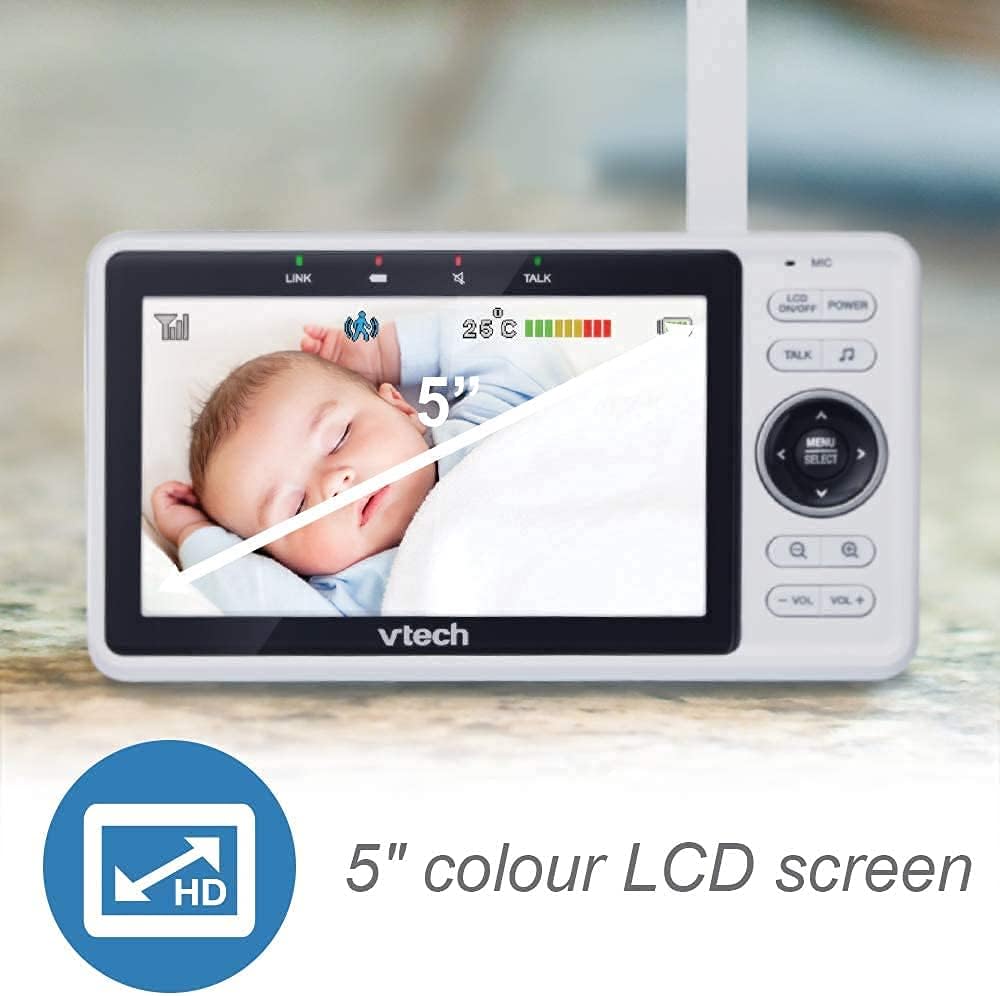
Image: A smartphone screen showing an instant motion alert notification from the VTech baby monitor app.
5. እንክብካቤ እና ጥገና
5.1 መቆጣጠሪያውን ማጽዳት
To keep your VTech RM5752 monitor clean, wipe the surfaces of the parent unit and camera unit with a soft, damp ጨርቅ። የጽዳት ስፕሬይ ወይም ፈሳሽ ማጽጃዎችን አይጠቀሙ። ከማጽዳትዎ በፊት ክፍሎቹ መሰኪያ አለመያዛቸውን ያረጋግጡ።
5.2 የባትሪ እንክብካቤ (የወላጅ ክፍል)
The parent unit contains a rechargeable battery. To maximize battery life:
- ከመጀመሪያው ጥቅም በፊት ባትሪውን ሙሉ በሙሉ ይሙሉ.
- ባትሪውን ለከፍተኛ ሙቀት ከማጋለጥ ይቆጠቡ።
- ክፍሉ ረዘም ላለ ጊዜ ጥቅም ላይ የማይውል ከሆነ ባትሪውን ያስወግዱት።
6. መላ መፈለግ
If you experience issues with your VTech RM5752 monitor, refer to the following common problems and solutions:
| ችግር | መፍትሄ |
|---|---|
| No link to camera / Disconnects frequently | Ensure both parent and camera units are within range of your Wi-Fi router. Check for obstructions. Restart both units and your Wi-Fi router. Verify your Wi-Fi network is stable. |
| No picture on parent unit | Check if the camera unit is powered on. Ensure the parent unit is charged and powered on. Re-pair the camera if necessary (refer to the full user manual for pairing instructions). |
| ምንም ድምፅ ወይም ዝቅተኛ ድምጽ የለም | Increase the volume on the parent unit. Ensure the camera's microphone is not obstructed. |
| App not connecting or working | Ensure your smartphone/tablet has a stable internet connection. Verify the MyVTech Baby 1080p app is updated to the latest version. Restart the app and your device. Check your home Wi-Fi network settings. |
| Poor picture quality / Blurry image | Clean the camera lens. Ensure adequate lighting (night vision will activate in low light). Check for strong Wi-Fi signal strength. |
7. ቴክኒካዊ ዝርዝሮች
Below are the technical specifications for the VTech RM5752 Wi-Fi 1080p HD Video Monitor:
- የሞዴል ስም፡- RM5752
- የቪዲዮ ቀረጻ ጥራት፡ 1080 ፒ
- የግንኙነት ቴክኖሎጂ; ገመድ አልባ፣ ዋይ ፋይ
- የኃይል ምንጭ፡- ባለገመድ ኤሌክትሪክ (5 ቮልት)
- ተስማሚ መሣሪያዎች ስማርትፎን ፣ ታብሌት
- የመጫኛ አይነት፡ የግድግዳ ተራራ
- ልዩ ባህሪያት፡ የእንቅስቃሴ ዳሳሽ፣ የምሽት እይታ
- ቀለም፡ ነጭ
- የምርት መጠኖች: 3 x 10 x 9 ኢንች
- የእቃው ክብደት፡ 1.7 ፓውንድ
- የአለም አቀፍ ጥበቃ ደረጃ IP54
- የትኩረት አይነት፡ ራስ-ሰር ትኩረት
- የማጉላት አይነት፡ ዲጂታል ማጉላት
- የማንቂያ አይነት፡ እንቅስቃሴ ብቻ
- የቪዲዮ ቀረጻ ቅርጸት፡- MPEG-4
8. ዋስትና እና ድጋፍ
For detailed warranty information and technical support, please refer to the warranty card included with your product or visit the official VTech webጣቢያ ዘ website provides comprehensive support resources, including FAQs, product registration, and contact information for customer service.


