መግቢያ
This manual provides detailed instructions for the setup, operation, and maintenance of your Moultrie W800 All-Purpose Series A Trail Camera. Please read this guide thoroughly to ensure proper use and optimal performance of your device.
ምርት አልቋልview
The Moultrie W800 is a high-performance trail camera designed for capturing images and videos of wildlife. It features an Illumi-Night Sensor for clear nighttime captures and a robust design for outdoor use.
ቁልፍ ባህሪዎች
- Captures 26 Megapixel images for high clarity.
- 70-foot flash and detection range.
- Fast 0.5 second trigger speed.
- Moultrie Smokescreen Camo Pattern for discreet placement.
በሣጥኑ ውስጥ ያለው ነገር፡-
- Moultrie W800 Trail Camera
- 8 AA ባትሪዎች
- የመጫኛ ማሰሪያ

Image: Moultrie W800 Trail Camera in its retail packaging, showing the camera, batteries, and key features on the box.
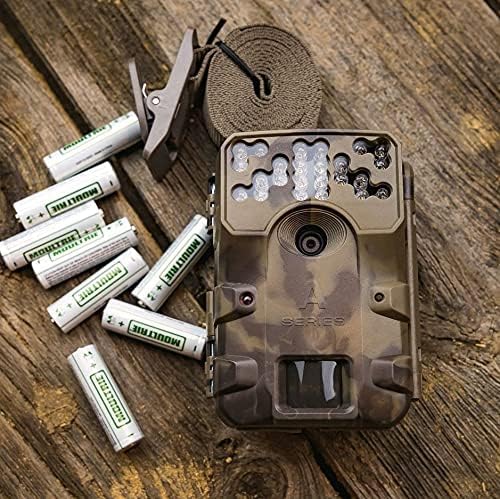
Image: The Moultrie W800 trail camera displayed with the included 8 AA batteries and a mounting strap, ready for setup.
ማዋቀር
1. የባትሪ ጭነት
- የካሜራውን መያዣ ይክፈቱ።
- Insert 8 AA batteries into the battery compartment, ensuring correct polarity (+/-).
- Close the camera housing latch securely.
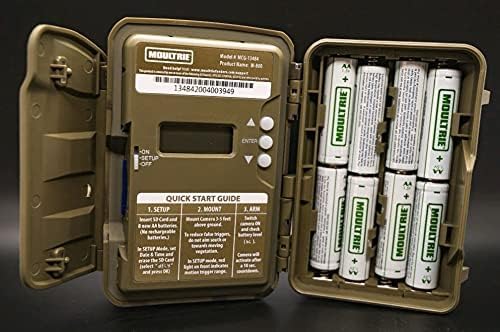
Image: An open Moultrie W800 camera, revealing the battery compartment on the right, the control panel with a small screen, and buttons on the left. This view is essential for battery and SD card installation.
2. የ SD ካርድ ጭነት
- የካሜራው መያዣ ክፍት ሲሆን፣ የኤስዲ ካርድ ማስገቢያውን ያግኙ።
- Insert a standard SD card (up to 32GB) into the slot until it clicks into place. Ensure the card is inserted in the correct orientation.
- It is recommended to format the SD card using the camera's menu settings before first use.
3. ካሜራውን መትከል
- Select a suitable location, typically a tree or post, where the camera can capture the desired area.
- Mount the camera approximately 3-5 feet above the ground.
- Use the provided mounting strap to secure the camera firmly. Thread the strap through the camera's mounting slots and tighten it around the object.
- Angle the camera to avoid direct sunlight and to minimize false triggers from swaying branches.

Image: A Moultrie W800 trail camera, in its camouflage casing, securely mounted to a tree trunk using a strap, demonstrating a typical field setup.
የአሠራር መመሪያዎች
መሰረታዊ ኦፕሬሽን
- ማብራት/ማጥፋት፡ Locate the power switch inside the camera housing. Slide it to the 'ON' position to power on the camera. Slide to 'OFF' to power off.
- የማዋቀር ሁነታ፡ After powering on, the camera will typically enter 'SETUP' mode. In this mode, you can adjust settings such as date, time, photo/video mode, resolution, and trigger delay using the control buttons and display.
- Arming the Camera: Once settings are configured, slide the power switch to the 'ARM' position. The camera will initiate a countdown (e.g., 10 seconds) to allow you to leave the area without triggering a capture. After the countdown, the camera will be active and ready to detect motion.
- የመፈተሽ ሁኔታ፡ The small display inside the camera housing provides status information, including battery level, SD card status, and current mode.
ጥገና
- ማጽዳት፡ የካሜራውን ሌንስ እና የዳሳሽ መስኮቱን በየጊዜው ለስላሳ፣ ከላጣ አልባ ጨርቅ ያጽዱ። ሻካራ ቁሳቁሶችን ወይም ጠጣር ኬሚካሎችን ያስወግዱ።
- የባትሪ ፍተሻ፡- Regularly check battery levels, especially before extended deployment. Replace all batteries simultaneously to ensure consistent power.
- ኤስዲ ካርድ አስተዳደር Format the SD card regularly to prevent data corruption and ensure optimal performance. Back up important images/videos before formatting.
- የቤቶች ታማኝነት፡ Ensure the camera housing latch is always securely closed to protect against moisture and dust.
መላ መፈለግ
- Camera not taking pictures:
- Check if the camera is in 'ARM' mode.
- Ensure the SD card is properly inserted and has sufficient free space.
- Verify that batteries have adequate charge.
- Check camera settings for trigger delay or sensitivity.
- የ SD ካርዱን ቅርጸት ይስሩ።
- ደካማ የምስል ጥራት;
- የካሜራ ሌንስን እና የዳሳሽ መስኮቱን ያጽዱ።
- Ensure the camera is mounted at the recommended height and angle.
- ከካሜራ ፊት ለፊት ያሉ እንቅፋቶችን ያረጋግጡ።
- አጭር የባትሪ ዕድሜ;
- Use fresh, high-quality alkaline or lithium AA batteries.
- በጣም ከፍተኛ ሙቀት የባትሪውን አፈጻጸም ሊጎዳ ይችላል።
- Frequent video recording or high trigger frequency can consume more power.
ዝርዝሮች
Detailed technical specifications for the Moultrie W800 Trail Camera:
| ባህሪ | ዝርዝር መግለጫ |
|---|---|
| ውጤታማ አሁንም ጥራት | 26 ሜፒ |
| ትሪገር ፍጥነት | 0.5 ሰከንድ |
| የፍላሽ ክልል | 70 ጫማ |
| የማወቂያ ክልል | 70 ጫማ |
| ዝቅተኛ ብርሃን ቴክኖሎጂ | Illumi-Night Sensor (Night Color) |
| የቪዲዮ ቀረጻ ጥራት | 720 ፒ |
| የቪዲዮ ቀረጻ ቅርጸት | MPEG-4 |
| የፍላሽ ማህደረ ትውስታ አይነት | ኤስዲ (እስከ 32 ጊባ) |
| የኃይል ምንጭ | 8 AA ባትሪዎች |
| የግንኙነት ቴክኖሎጂ | ገመድ አልባ (ዋይ ፋይ) |
| የመቆጣጠሪያ ዘዴ | መተግበሪያ |
| ልዩ ባህሪያት | የእንቅስቃሴ ዳሳሽ፣ የምሽት እይታ |
| የአለም አቀፍ ጥበቃ ደረጃ | IP54 |
| የእቃው ክብደት | 1.12 ፓውንድ |
| የጥቅል ልኬቶች | 8.62 x 5.39 x 3.43 ኢንች |
| ዩፒሲ | 053695134840 |

Image: The back of the Moultrie W800 retail box, detailing performance specifications such as trigger speed, detection range, flash range, battery life, and SD card compatibility.
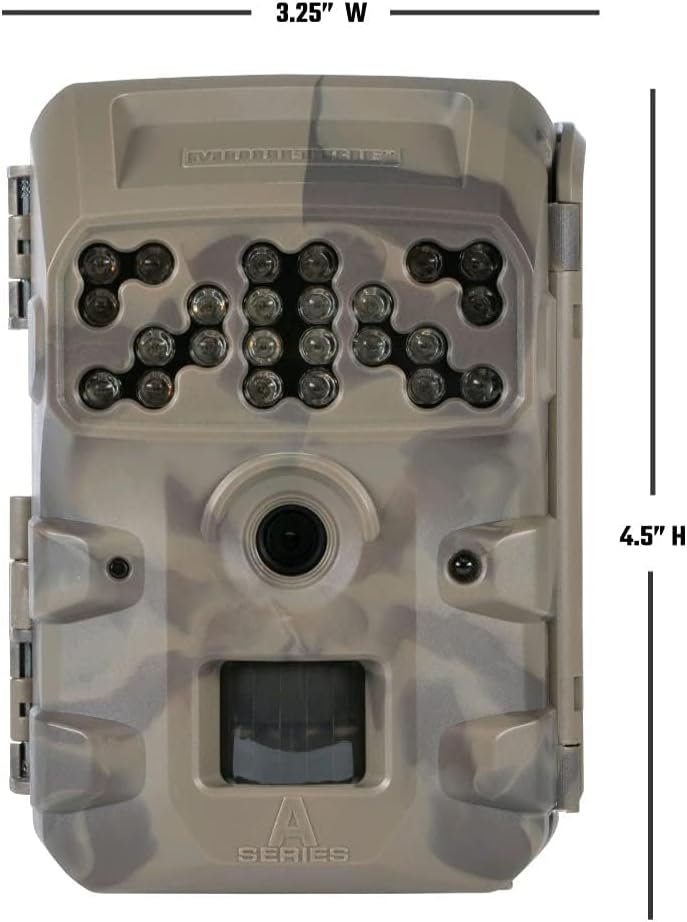
ምስል፡ ፊት ለፊት view of the Moultrie W800 trail camera with its dimensions clearly labeled: 3.25 inches wide and 4.5 inches high.
ዋስትና እና ድጋፍ
የዋስትና መረጃ፡-
The Moultrie W800 Trail Camera comes with a የ 2 ዓመት ዋስትና ከተገዛበት ቀን ጀምሮ የማምረቻ ጉድለቶችን ይሸፍናል. ለዋስትና ጥያቄዎች እባክዎ የግዢ ማረጋገጫዎን ያቆዩ።
የደንበኛ ድጋፍ፡
For technical assistance, troubleshooting, or warranty inquiries, please visit the official Moultrie support webጣቢያ፡


