1. ምርት አብቅቷልview
The Anderic OEM NSRCFNA21 Smart Remote is an original equipment manufacturer (OEM) replacement remote control specifically designed for various Insignia TV models. This remote provides seamless functionality and user-friendly operation, ensuring reliable control over your television.
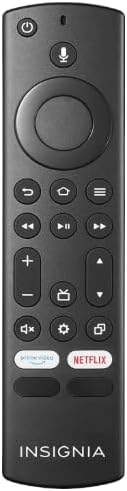
ምስል 1.1፡ The Anderic OEM NSRCFNA21 Smart Remote. This image displays the front view of the black remote control, featuring various buttons for power, voice control, navigation, volume, channel, and dedicated streaming service buttons.
ቁልፍ ባህሪያት የሚከተሉትን ያካትታሉ:
- Original Quality: An authentic OEM product, ensuring performance and reliability comparable to the remote originally supplied with your TV.
- ለተጠቃሚ ምቹ ንድፍ፡ Intuitive buttons and controls for easy navigation, volume adjustment, channel changes, and access to various TV functions.
- አስተማማኝ አፈጻጸም፡ Provides a stable and responsive connection for accurate command execution.
2. የማዋቀር እና የማጣመር መመሪያዎች
To ensure proper functionality, the remote control must be paired with your Insignia TV. Follow these steps carefully:
- ቲቪ ዳግም አስጀምር፡ Unplug your Insignia TV from its power source. Wait for approximately 30 seconds.
- የኃይል በርቷል ቲቪ፡ Plug the TV back into the power source and turn it on. Allow the TV to fully boot up.
- ማጣመርን ጀምር፡ Once the TV has completely booted up and is displaying content, press and hold the ቤት button on the Anderic NSRCFNA21 remote control for up to 30 seconds.
- Remote Update (if prompted): Your TV may display a message indicating that the remote needs an update. If prompted, allow the TV to proceed with the update. This process may take 1 to 3 minutes to complete.
- ማረጋገጫ፡- After the update (if any) and pairing process, test the remote's functions (e.g., volume, channel, navigation) to confirm successful pairing.
If the remote does not pair after following these steps, repeat the process or refer to the troubleshooting section.
3. የርቀት መቆጣጠሪያውን መስራት
The Anderic NSRCFNA21 remote control features an intuitive layout for easy operation of your Insignia TV. Below are the general functions of the primary buttons:
- የኃይል ቁልፍ፡- ቴሌቪዥኑን ያበራል ወይም ያጠፋል።
- የድምጽ መቆጣጠሪያ አዝራር፡- Activates voice commands for searching content or controlling the TV.
- Navigation Pad (Directional Buttons and Select): በምናሌዎች ውስጥ ለማንቀሳቀስ እና እቃዎችን ለመምረጥ የሚያገለግል።
- መነሻ አዝራር፡- ወደ ቴሌቪዥኑ ዋና መነሻ ማያ ገጽ ይመለሳል።
- ተመለስ አዝራር፡- ወደ ቀዳሚው ማያ ገጽ ወይም ምናሌ ይመለሳል።
- የምናሌ/አማራጮች አዝራር፡ Accesses additional menu options or settings.
- ድምጽ ወደ ላይ/ወደታች፡ የቴሌቪዥኑን የድምጽ መጠን ያስተካክላል።
- ቻናል ወደ ላይ/ታች፡ የቲቪ ጣቢያዎችን ይለውጣል።
- ድምጸ-ከል ያድርጉ- የቴሌቪዥኑን ድምጽ ድምጸ-ከል ያደርጋል ወይም ያስወግዳል።
- የቅንብሮች አዝራር ፦ የቴሌቪዥኑን የቅንብሮች ምናሌ ይከፍታል።
- የግቤት/ምንጭ አዝራር፡ Changes the TV's input source (e.g., HDMI 1, HDMI 2).
- Dedicated Streaming Service Buttons: Provides quick access to popular streaming applications (e.g., Amazon Prime Video, Netflix).
4. ተኳሃኝነት
The Anderic OEM NSRCFNA21 Smart Remote is compatible with the following Insignia TV models:
- NS24DF310NA21
- NS39DF310NA21
- NS50DF710NA21
- NS55DF710NA21
This remote also replaces the following models:
- NSRCFNA19 Rev B Fire
- NSRCFNA19revB
- NSRCFNA21 Fire
- NSRCFNA21 Rev E
- NSRCFNA21-Rev-E
Ensure your TV model is listed above for optimal performance.
5. ጥገና
Proper maintenance can extend the life and functionality of your remote control.
- የባትሪ መተካት፡ The remote requires two AAA batteries. Replace batteries when the remote's responsiveness decreases or it stops functioning. Ensure correct polarity when inserting new batteries.
- ማጽዳት፡ Use a soft, dry cloth to clean the remote's surface. Avoid using liquid cleaners or abrasive materials, as these can damage the remote.
- ማከማቻ፡ የርቀት መቆጣጠሪያውን በደረቅ ቦታ፣ ከከፍተኛ የሙቀት መጠን እና ከፀሐይ ብርሃን ርቆ ያስቀምጡ።
6. መላ መፈለግ
If you encounter issues with your Anderic NSRCFNA21 Smart Remote, try the following troubleshooting steps:
- የርቀት ምላሽ የማይሰጥ፡
- Check the batteries. Replace them with fresh AAA batteries, ensuring correct polarity.
- በርቀት መቆጣጠሪያው እና በቴሌቪዥኑ ዳሳሽ መካከል ምንም እንቅፋቶች አለመኖራቸውን ያረጋግጡ።
- በክፍል 2 ላይ እንደተገለጸው የማጣመር ሂደቱን እንደገና ይሞክሩ።
- የሚቆራረጥ ተግባር፡
- ይህ ዝቅተኛ የባትሪ ኃይልን ሊያመለክት ይችላል. ባትሪዎቹን ይተኩ.
- በቴሌቪዥኑ ዳሳሽ ውስጥ ውጤታማ በሆነ ክልል ውስጥ መሆንዎን ያረጋግጡ።
- Pairing Fails:
- Confirm your TV model is listed in the compatibility section (Section 4).
- Ensure the TV is fully booted up before attempting to hold the Home button.
- Try unplugging the TV for a longer period (e.g., 1-2 minutes) before plugging it back in and re-attempting pairing.
እነዚህን እርምጃዎች ከሞከሩ በኋላ ችግሮች ከቀጠሉ፣ ለተጨማሪ እርዳታ የደንበኛ ድጋፍን ያነጋግሩ።
7. ዝርዝሮች
| የምርት ስም | አንድሪክ |
| የሞዴል ቁጥር | NSRCFNA21 Rev B |
| ተስማሚ መሣሪያዎች | Insignia Televisions |
| የኃይል ምንጭ | 2 AAA ባትሪዎች (አስፈላጊ) |
| የእቃው ክብደት | 1.76 አውንስ |
| የጥቅል ልኬቶች | 6.3 x 2.95 x 0.67 ኢንች |
| ቀለም | ጥቁር |
| አምራች | የዳን ኤሌክትሮኒክስ ወዘተ.፣ ኢንክ. |
8. ዋስትና እና ድጋፍ
For warranty information or technical support, please contact the manufacturer, Anderic (Dan's Electronics Etc., Inc.). Refer to the product packaging or the official Anderic webለተወሰኑ የእውቂያ ዝርዝሮች እና የዋስትና ውሎች ጣቢያ።
ን መጎብኘት ይችላሉ። የአንደርሪክ መደብር በአማዞን ላይ ለበለጠ መረጃ።


