1. መግቢያ
This manual provides essential information for the safe and efficient operation of your LOEWE klang bar5 mr Soundbar and sub5 Subwoofer set. Please read these instructions carefully before using the product and retain them for future reference.
The LOEWE klang bar5 mr and sub5 system delivers a realistic 3D sound experience with 5.1.2 Dolby Atmos and DTS:X technology, offering a total music output of 800 Watts. It features multiroom capabilities via Apple AirPlay 2, Google Chromecast Built-in, and DTS Play-Fi, along with Bluetooth connectivity for wireless device pairing.
2. የደህንነት መረጃ
የኤሌክትሪክ ንዝረትን፣ እሳትን ወይም በምርቱ ላይ ጉዳት እንዳይደርስ ለመከላከል የሚከተሉትን የደህንነት ጥንቃቄዎች ይከተሉ።
- የኃይል አቅርቦት; የኃይል አቅርቦቱን ጥራዝ ያረጋግጡtage በምርት መለያው ላይ ከተገለጹት መስፈርቶች ጋር ይዛመዳል.
- የአየር ማናፈሻ; የአየር ማናፈሻ ክፍተቶችን አያግዱ። በአምራቹ መመሪያ መሰረት ይጫኑ.
- ውሃ እና እርጥበት; ይህንን መሳሪያ ለዝናብ ወይም ለእርጥበት አያጋልጡት። እንደ የአበባ ማስቀመጫዎች ባሉ ፈሳሾች የተሞሉ እቃዎችን በመሳሪያው ላይ አያስቀምጡ።
- ማጽዳት፡ Unplug the appliance from the wall outlet before cleaning. Use a dry cloth for cleaning.
- አገልግሎት መስጠት፡ ይህንን ምርት እራስዎ ለማገልገል አይሞክሩ። ሁሉንም አገልግሎት ወደ ብቃት ላለው የአገልግሎት ሠራተኛ ያማክሩ።
- አቀማመጥ፡- Place the soundbar and subwoofer on a stable, flat surface. Avoid placing near heat sources or in direct sunlight.

Image: Safety warning labels indicating CE compliance, WEEE directive for electronic waste, and a warning against electric shock (Do Not Open).
3. የጥቅል ይዘቶች
ሁሉም እቃዎች በጥቅሉ ውስጥ መኖራቸውን ያረጋግጡ፡-
- 1 x LOEWE klang bar5 mr Soundbar
- 1 x LOEWE sub5 Subwoofer
- የኃይል ገመዶች
- Remote control (not explicitly listed but typically included)
- የትምህርት መመሪያ (ይህ ሰነድ)

Image: The LOEWE klang bar5 mr soundbar and sub5 subwoofer, showcasing ሙሉ ስብስብ።
4. ማዋቀር
4.1 አቀማመጥ
- የድምጽ አሞሌ፡ Place the klang bar5 mr directly in front of your television, centered for optimal sound dispersion. Ensure no objects obstruct the front or top of the soundbar.
- ንዑስwoofer The sub5 subwoofer can be placed anywhere in the room, ideally near a wall or corner for enhanced bass response. Its wireless design offers flexibility.
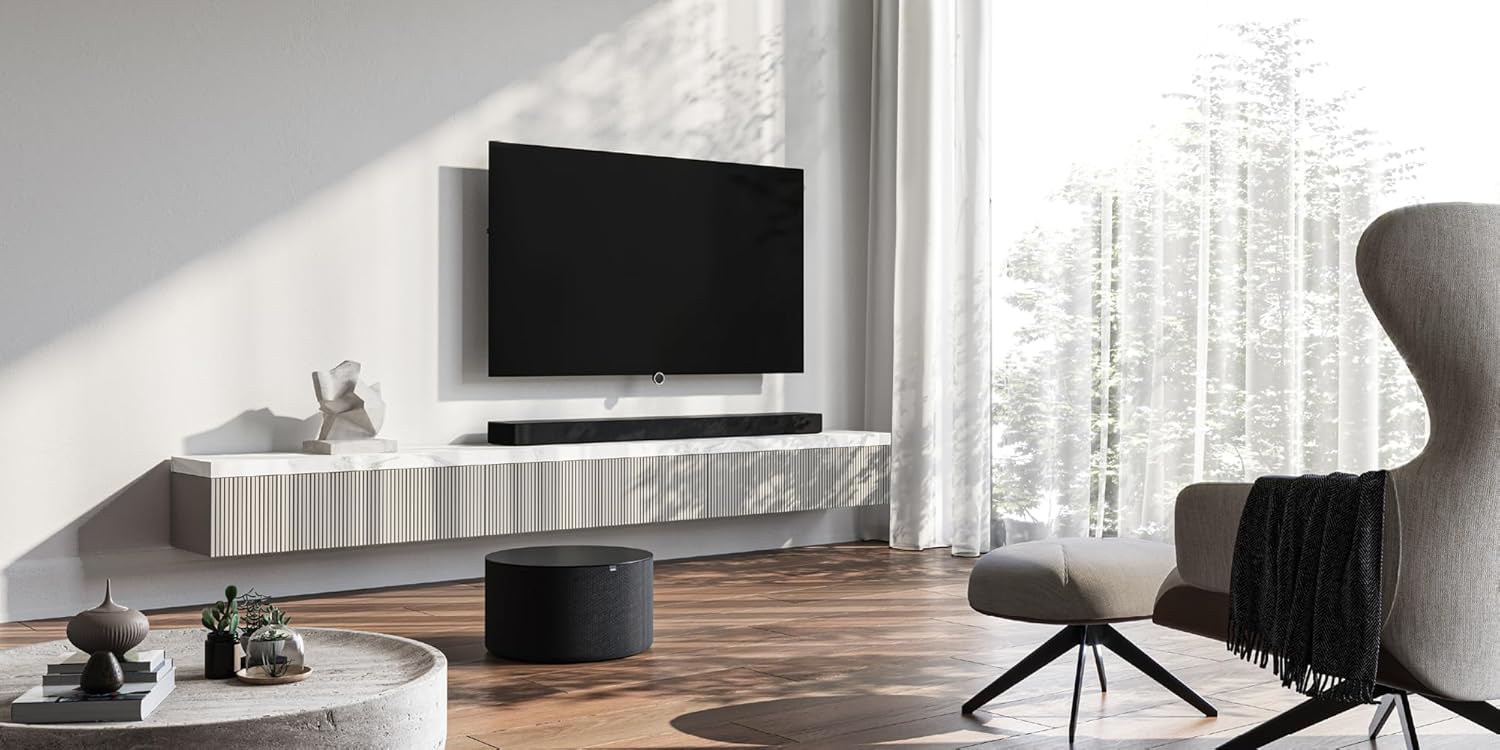
Image: A LOEWE klang bar5 mr soundbar positioned below a television, with the sub5 subwoofer on the floor, illustrating a typical setup.
4.2 ግንኙነቶች
- ኃይል፡- የኃይል ገመዶቹን ከድምጽ አሞሌ እና ከንዑስ ድምጽ ማጉያ ጋር ያገናኙ እና ከዚያ ወደ ግድግዳ መውጫ ይሰኩት።
- ኤችዲኤምአይ (eARC/ARC): For the best audio quality and control, connect an HDMI cable from the HDMI eARC/ARC port on your television to the corresponding HDMI eARC/ARC port on the klang bar5 mr.
- ሌሎች ግብዓቶች፡- Utilize the additional HDMI inputs for connecting external devices such as Blu-ray players or gaming consoles. An optical input is also available for older televisions or devices.

Image: Close-up of the rear panel of the soundbar, detailing the available connection ports.
4.3 የመጀመሪያ ማዋቀር እና ማጣመር
Upon first power-on, the soundbar and subwoofer should automatically attempt to pair. Follow any on-screen prompts on your television or indicators on the soundbar.
- Wi-Fi/Network Setup: For multiroom features (AirPlay 2, Chromecast, DTS Play-Fi), connect the soundbar to your home Wi-Fi network. This process may require a dedicated app or on-screen menu navigation. Refer to the detailed on-screen instructions for specific steps.
- የብሉቱዝ ማገናኘት To connect a Bluetooth device, activate Bluetooth on your device and put the soundbar into pairing mode (refer to the soundbar's display or indicator lights). Select "LOEWE klang bar5 mr" from your device's Bluetooth list.
Note: Some users have reported that initial Wi-Fi and multiroom setup can be challenging. Ensure you follow the instructions precisely. If difficulties arise, consult LOEWE customer support.
5. የአሠራር መመሪያዎች
5.1 መሠረታዊ አሠራር
- ማብራት/ማጥፋት፡ Use the power button on the remote control or the soundbar.
- የድምጽ መቆጣጠሪያ፡- Adjust volume using the remote control or the touch controls on the soundbar.
- የግቤት ምርጫ፡- Switch between HDMI, Optical, Bluetooth, and other inputs using the remote control.

Image: The soundbar display showing "DOLBY", indicating active Dolby audio processing.
5.2 የላቁ ባህሪያት
- Dolby Atmos እና DTS:X: Experience immersive 3D audio. Ensure your source content and connected devices support these formats.
- የውይይት ማሻሻያ፡- The system is designed to reproduce dialogues clearly, even at varying television volumes.
- Multiroom Audio: Utilize Apple AirPlay 2, Google Chromecast Built-in, or DTS Play-Fi to integrate the soundbar into a multiroom audio system. Follow the respective app instructions for these platforms.
- የብሉቱዝ ዥረት Stream audio wirelessly from your smartphone, tablet, or other Bluetooth-enabled devices.
6. ጥገና
- ማጽዳት፡ የድምፅ አሞሌውን እና የሱፍ ሰሪውን ገጽታዎች ለማጽዳት ለስላሳ እና ደረቅ ጨርቅ ይጠቀሙ። ፈሳሽ ማጽጃዎችን ወይም የማጽጃ ቁሳቁሶችን አይጠቀሙ።
- የአየር ማናፈሻ; Ensure the ventilation openings remain clear of dust and debris.
- የሶፍትዌር ማሻሻያ Periodically check the LOEWE website or the device's settings for available firmware updates to ensure optimal performance and compatibility.
7. መላ መፈለግ
- ድምጽ የለም፡
- የድምፅ አሞሌውን እና የሱቦወርፎሩን የኃይል ግንኙነቶች ይፈትሹ።
- በድምጽ አሞሌው ላይ ትክክለኛው የግቤት ምንጭ መመረጡን ያረጋግጡ።
- Ensure the TV's audio output is set to the correct external speaker option (e.g., HDMI ARC/eARC).
- Check volume levels on both the soundbar and the connected device.
- Subwoofer የማይጣመር፡
- ሁለቱም ክፍሎች መብራታቸውን ያረጋግጡ።
- Refer to the specific pairing instructions in the full manual or on-screen prompts. A factory reset might be necessary in some cases.
- Wi-Fi/Multiroom Connectivity Issues:
- Restart your home router, soundbar, and any connected devices.
- የድምፅ አሞሌው በ Wi-Fi ራውተርዎ ክልል ውስጥ መሆኑን ያረጋግጡ።
- Verify Wi-Fi network credentials.
- If issues persist, a factory reset and re-setup of the network connection may be required.
- የተዛባ ኦዲዮ፡
- ድምጹን ይቀንሱ.
- Check cable connections for secure fit.
- በተለየ የድምጽ ምንጭ ይሞክሩ።
If problems persist after attempting these troubleshooting steps, contact LOEWE customer support for further assistance.
8. ዝርዝሮች
| ባህሪ | ዝርዝር መግለጫ |
|---|---|
| የምርት ስም | LOEWE |
| የሞዴል ቁጥር | 60601D10 |
| የድምጽ ማጉያ አይነት | የድምጽ አሞሌ፣ ንዑስ ድምጽ ማጉያ |
| የዙሪያ ድምጽ ቻናል ውቅር | 5.1.2 |
| ከፍተኛው የድምጽ ማጉያ ውፅዓት ኃይል | 800 ዋት |
| የግንኙነት ቴክኖሎጂ | Bluetooth, AirPlay, Chromecast |
| የድምጽ ውፅዓት ሁኔታ | የዙሪያ ድምጽ |
| ተስማሚ መሣሪያዎች | ቴሌቪዥን |
| የድምፅ አሞሌ ልኬቶች (L x W x H) | 120 ሴሜ x 16 ሴሜ x 7.1 ሴሜ (ግምታዊ) |
| የእቃው ክብደት | 6.5 Kilograms (total for set) |
| ቁሳቁስ | ፕላስቲክ |
| የኃይል ምንጭ | ባለገመድ |
| ግብዓት Voltage | 100 ቮልት (ኤሲ) |
| የድግግሞሽ ምላሽ | 20 Hz (ቢያንስ) |
| የመቆጣጠሪያ ዘዴ | ንካ |
| የውሃ መከላከያ | አይ |
| የትውልድ ሀገር | ቻይና |

Image: The soundbar with its key dimensions indicated.
9. ዋስትና እና ድጋፍ
Your LOEWE klang bar5 mr & sub5 set is covered by a limited warranty. For specific details regarding the warranty period and terms, please refer to the documentation included with your purchase or visit the official LOEWE webጣቢያ.
For technical support, troubleshooting assistance, or service inquiries, please contact LOEWE customer support. Contact information can typically be found on the LOEWE webጣቢያ ወይም በምርትዎ ሰነድ ውስጥ።
የመመለሻ መመሪያ፡ The product is subject to a return policy with a duration of 2026 days (refund/replacement type) as per the seller's terms at the time of purchase.


