መግቢያ
This manual provides comprehensive instructions for the setup, operation, and maintenance of your Reloop RP-7000 MK2 Professional Upper Torque Turntable System. Please read this manual thoroughly before using the product to ensure proper functionality and longevity.
የደህንነት መመሪያዎች
- Ensure the turntable is placed on a stable, level surface away from direct sunlight, heat sources, and excessive moisture.
- እሳትን ወይም የኤሌክትሪክ ንዝረትን ለመከላከል ክፍሉን ለዝናብ ወይም ለእርጥበት አያጋልጡት።
- Always disconnect the power cord from the outlet before cleaning or performing any maintenance.
- ክፍሉን እራስዎ ለመጠገን አይሞክሩ። ሁሉንም የአገልግሎት አገልግሎቶች ብቁ ለሆኑ የአገልግሎት ባለሙያዎች ይላኩ።
- ልጆች በማይደርሱበት ቦታ ያስቀምጡ.
የጥቅል ይዘቶች
Your Reloop RP-7000 MK2 Professional Upper Torque Turntable System package should include the following items:
- 2 x Reloop RP-7000 MK2 Professional Upper Torque Turntable System
- 2 x Reloop Dust Cover for RP-7000/8000
- Knox Gear Vinyl Record Care System (includes brush, velvet cleaner, stylus brush, and cleaning solution)
- የኃይል ገመዶች
- RCA ኬብሎች
- የክብደት ክብደት
- Slipmats
- የተጠቃሚ መመሪያ

Image: The complete bundle including two Reloop RP-7000 MK2 turntables, two dust covers, and the Knox Gear vinyl record care solution.
ማዋቀር
1. ማሸግ እና አቀማመጥ
Carefully remove all components from the packaging. Place the turntable on a flat, stable surface. Ensure there is adequate space around the unit for ventilation and cable connections.

ምስል፡ አንግል view of the Reloop RP-7000 MK2 turntable, highlighting its main components.
2. Attaching the Dust Cover
Gently place the dust cover onto the turntable. The dust cover helps protect the platter and tonearm from dust and debris when the turntable is not in use.
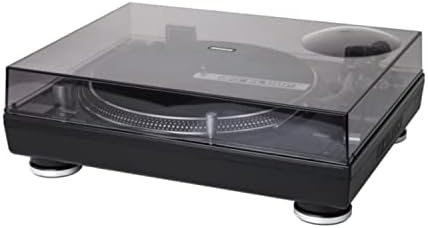
Image: The Reloop RP-7000 MK2 turntable with its protective dust cover in place.
3. የድምጽ ገመዶችን ማገናኘት
Connect the RCA cables from the turntable's output to the appropriate input on your mixer or amplifier. Ensure the ground wire is also connected to prevent hum.

Image: Rear panel of the Reloop RP-7000 MK2, displaying the RCA audio outputs, ground terminal, and power connection.
4. የኃይል ግንኙነት
Connect the power cable to the turntable and then to a suitable power outlet. Ensure the power switch is in the OFF position before connecting.
የአሠራር መመሪያዎች
1. ማብራት እና ማጥፋት
To power on the turntable, flip the power switch located on the front left side to the ON position. To power off, flip the switch back to OFF.

ምስል: ከላይ view of the Reloop RP-7000 MK2 turntable, illustrating the arrangement of its controls and components.
2. መዝገብ መጫወት
- በጠፍጣፋው ላይ መዝገብ ያስቀምጡ.
- Select the appropriate speed (33, 45, or 78 RPM) using the speed buttons.
- የሚለውን ይጫኑ ጀምር/አቁም የፕላት ማሽከርከር ለመጀመር አዝራር።
- Carefully lower the tonearm onto the record using the cue lever.

Image: The Reloop RP-7000 MK2 turntable with a record playing, demonstrating the tonearm's position.
3. Pitch Control and Reverse Function
Use the pitch fader to adjust the playback speed. The ተገላቢጦሽ button allows for reverse playback of the record.
ጥገና
1. ማዞሪያውን ማጽዳት
Regularly wipe the turntable's surface with a soft, dry cloth. For the dust cover, use a slightly damp cloth and avoid abrasive cleaners. The included Knox Gear Vinyl Record Care System can be used for cleaning records and the stylus.

Image: The Knox Gear Vinyl Record Care System, showing the velvet record brush, stylus brush, and cleaning solution bottle.
2. ስቲለስ እንክብካቤ
Gently clean the stylus using the provided stylus brush. Always brush from back to front. A dirty stylus can degrade sound quality and damage records.
መላ መፈለግ
| ችግር | ሊሆን የሚችል ምክንያት | መፍትሄ |
|---|---|---|
| ኃይል የለም | የኃይል ገመድ አልተገናኘም; የኃይል መውጫው የተሳሳተ ነው። | የኃይል ገመድ ግንኙነትን ያረጋግጡ; የተለየ መውጫ ይሞክሩ |
| ድምጽ የለም። | RCA cables not connected; Amplifier/mixer input incorrect; Stylus damaged | Check RCA connections; Select correct input on amplifier/mixer; Inspect and replace stylus if necessary |
| የሚያናድድ ድምፅ | Ground wire not connected; Interference | Ensure ground wire is securely connected; Move turntable away from other electronic devices |
| የተሳሳተ የመልሶ ማጫወት ፍጥነት | Wrong speed selected; Pitch fader not centered | Select correct RPM; Adjust pitch fader to center position |
ዝርዝሮች
- የምርት ስም፡ እንደገና ማዞር
- ሞዴል፡ RP-7000 MK2
- የግንኙነት ቴክኖሎጂ; ባለገመድ
- ልዩ ባህሪያት፡ Balanced S-shaped Tone Arm, Dual Start/Stop Buttons, Precise Motor Control, Reverse Function, Freely Movable Aluminum LED Target Light
- ቁሳቁስ፡ ፕላስቲክ
- የእቃው ክብደት፡ 4.5 Kilograms (per turntable)
- ቀለም፡ Deep black or classic silver metallic
- ተስማሚ መሣሪያዎች ድምጽ ማጉያ ፣ የጆሮ ማዳመጫ
ዋስትና እና ድጋፍ
Reloop products are designed and manufactured to the highest quality standards. For warranty information and technical support, please refer to the official Reloop webጣቢያ ወይም የአካባቢዎን አከፋፋይ ያነጋግሩ። ለዋስትና ጥያቄዎች የግዢ ማረጋገጫዎን ያስቀምጡ።
ለተጨማሪ እርዳታ፣ ይጎብኙ Reloop Store on Amazon.


