መግቢያ
The TOUCARE T9S is a high-performance Bluetooth intercom system designed for motorcycle riders. It enables clear communication between up to four riders, offers music sharing, and integrates with your mobile phone for calls and GPS navigation. With advanced noise cancellation and a robust waterproof design, the T9S ensures a reliable and enjoyable riding experience in various conditions.
ቁልፍ ባህሪያት
- 1200M Maximum Distance: Equipped with Bluetooth 5.0 for high compatibility and stability, allowing group communication within a 1200m intercom range.
- Support 4-Riders Intercom: Full-duplex communication for up to 4 riders simultaneously. Universal pairing function ensures compatibility with most Bluetooth headsets and mobile phones.
- ሙዚቃ መጋራት፡- Share music with another rider, enjoy Hi-Fi stereo music, FM radio, or GPS voice guidance.
- Noise Reduction and IP67 Waterproof: DSP and CVC advanced noise reduction technology for clear communication up to 120km/h. IP67 waterproof rating for all-weather use.
- Ultra-Long Standby Battery: 800mAh rechargeable battery provides up to a week of standby time and 15 hours of working time.

Image: The T9S system supports communication for up to four riders over a distance of 1200 meters.

Image: CVC & DSP Noise Cancellation Technology ensures clear and smooth communication even at high speeds.

Image: The IP67 waterproof rating makes the T9S suitable for use in all weather conditions, including water sports.

Image: The T9S offers extended endurance times for talking, music playback, and standby, supporting long-distance travel.
የጥቅል ይዘቶች
Each TOUCARE T9S package includes the following components:
- 1 x የብሉቱዝ ኢንተርኮም ዩኒት
- 1 x Hi-Fi Speaker Set
- 1 x Boom Microphone
- 1 x Button Microphone
- 1 x የዩኤስቢ ገመድ
- 1 x ማያያዣ ቅንፍ
- 1 x ክሊamp ሳህን
- 1 x Allen Wrench

Image: All components included in the TOUCARE T9S package, ensuring you have everything needed for installation and use.
ምርት አልቋልview እና የአዝራር ተግባራት
Familiarize yourself with the buttons and indicators on your T9S intercom unit:
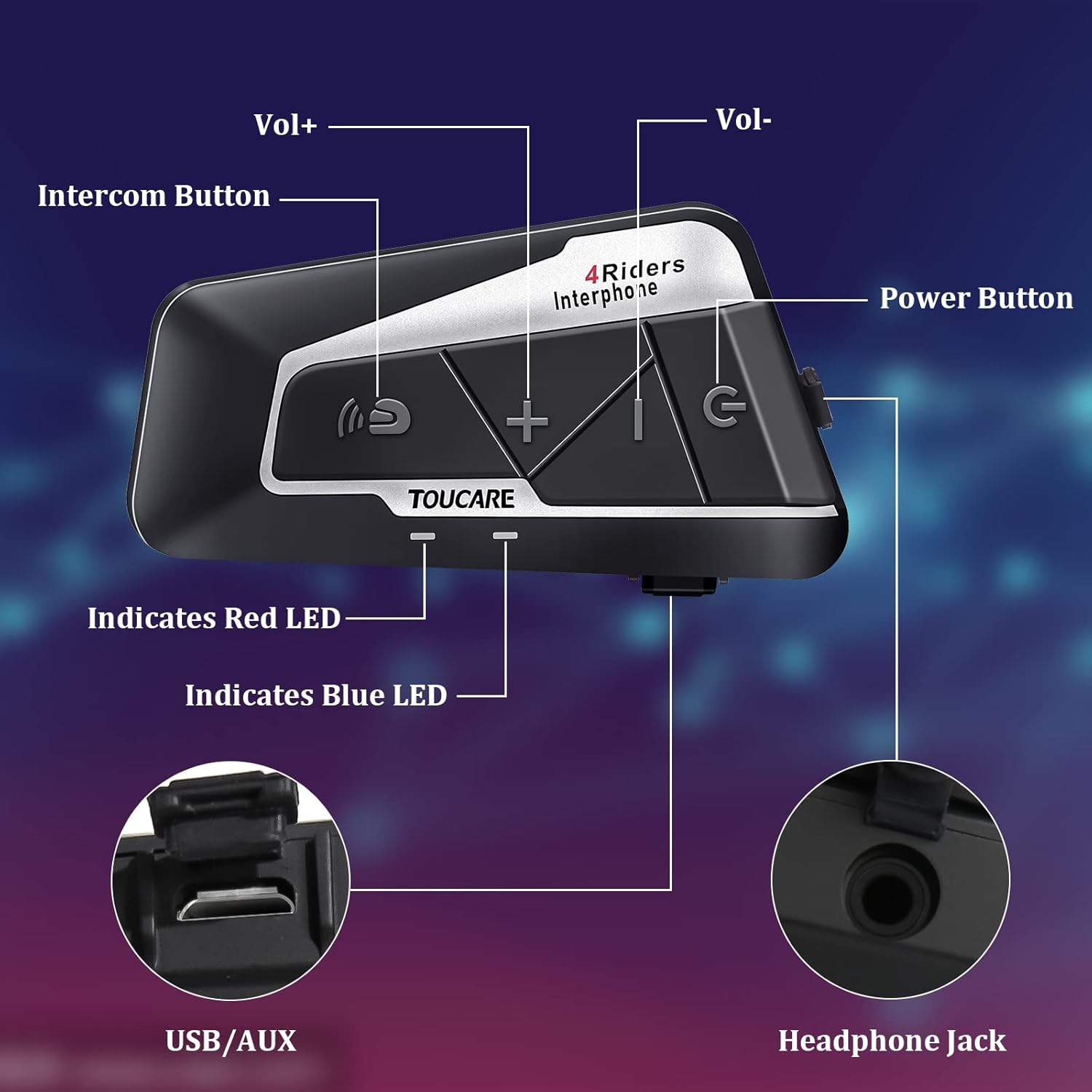
Image: Detailed diagram of the T9S unit, highlighting the location and labels of each button and port.
Power On/Off Button (G)
- ማብራት/ማጥፋት፡ መሳሪያውን ለማብራት ወይም ለማጥፋት ተጭነው ይያዙ።
- Paired Mobile Phone: Short press to connect/disconnect with a paired mobile phone.
- የኃይል ማጓጓዣ; Short press to hear battery level prompt.
- Hang up Bluetooth Intercom: Short press during an intercom call to end it.
- ሙዚቃ ማጫወት/ለአፍታ ማቆም; ሙዚቃን ለማጫወት ወይም ለአፍታ ለማቆም አጭር ይጫኑ።
- Call Answering/Third Party Answer/End/Reject: Manage phone calls.
Bluetooth Intercom Button (Intercom Icon)
- ጥራዝ +: ድምጽን ለመጨመር አጭር ተጫን።
- የመጨረሻ ዘፈን፡- ወደ ቀዳሚው ዘፈን ለመሄድ በረጅሙ ተጫን።
- FM Turn Up: Short press during FM mode to tune up.
- FM Turn On/Off: Long press to turn FM radio on or off.
- የመጨረሻ ቁጥር ድጋሚ፦ Double press to redial the last dialed number.
Volume - Button (-)
- ጥራዝ -: ድምጽን ለመቀነስ አጭር ይጫኑ።
- ቀጣይ ዘፈን፡- ወደ ቀጣዩ ዘፈን ለመሄድ በረጅሙ ተጫን።
- FM Turn Down: Short press during FM mode to tune down.
- FM Turn On/Off: Long press to turn FM radio on or off.
- የድምፅ መደወል Double press to activate voice dialing (if supported by your phone).

Image: The T9S features ultra-large buttons, designed for easy operation even while wearing gloves.
የመጫኛ መመሪያ
ቋሚ የመጫኛ ዘዴ
Follow these steps to securely install the T9S intercom unit on your helmet:
- Locate and Clean: Identify a suitable flat area on the left side of your helmet for mounting. Ensure the surface is clean and dry.
- ማጣበቂያ ያዘጋጁ; Peel off the protective film from the 3M adhesive on the back of the mounting bracket.
- ግፊትን ተግብር፡ Firmly press the mounting bracket onto the chosen location on your helmet. Apply consistent pressure for several seconds to ensure a strong bond.
- ደህንነቱ የተጠበቀ ክፍል Slide the T9S intercom unit onto the mounted bracket until it clicks securely into place.
- ድምጽ ማጉያዎችን እና ማይክሮፎን ይጫኑ፡ Route the speaker and microphone wires inside the helmet lining. Position the speakers inside the ear pockets and the microphone near your mouth for optimal audio.
የአሠራር መመሪያዎች
ከሞባይል ስልክ ጋር ማጣመር
- Ensure the T9S is powered off.
- Press and hold the Power On/Off button until the LED indicator flashes red and blue alternately, indicating pairing mode.
- On your mobile phone, enable Bluetooth and search for new devices. Select "TOUCARE T9S" from the list.
- Once paired, the LED will flash blue slowly.
Initiating Intercom Communication
- Ensure all T9S units are powered on and within range.
- To initiate a group intercom, short press the Bluetooth Intercom Button on your unit. The units will attempt to connect.
- To end an intercom call, short press the Power On/Off button.
የሙዚቃ መልሶ ማጫወት
- አጫውት/ ለአፍታ አቁም፡ የማብራት / ማጥፊያ ቁልፍን በአጭሩ ይጫኑ።
- ቀጣይ ዘፈን፡- የድምጽ መጠን - አዝራሩን በረጅሙ ተጫን።
- ቀዳሚ ዘፈን፡- Long press the Bluetooth Intercom button.
- የድምጽ ማስተካከያ; የድምጽ + ወይም የድምጽ - አዝራሮችን በአጭሩ ይጫኑ።
ኤፍኤም ሬዲዮ
- አብራ/አጥፋ፡ Long press either the Bluetooth Intercom button or the Volume - button.
- አስተካክል፡ Short press the Bluetooth Intercom button.
- ተቃኙ፡ የድምጽ መጠን - ቁልፍን በአጭሩ ይጫኑ።
ጥሪዎችን መመለስ/ማቆም
- ጥሪ መልስ፡- Short press the Power On/Off button when a call comes in.
- ጥሪን ጨርስ፡ Short press the Power On/Off button during a call.
- ጥሪን ውድቅ አድርግ፡ Long press the Power On/Off button when a call comes in.
- የድምፅ መደወል Double press the Volume - button (requires phone support).
- የመጨረሻ ቁጥር ድጋሚ፦ Double press the Bluetooth Intercom button.
ቴክኒካዊ ዝርዝሮች
| ባህሪ | ዝርዝር መግለጫ |
|---|---|
| የብሉቱዝ ስሪት | 5.0 |
| ብሉቱዝ ፕሮfiles ይደገፋል | HSP፣ HFP፣ A2DP፣ AVRCP፣ AGHSP |
| የስራ ሰዓታት | 15 ሰዓታት |
| የመጠባበቂያ ጊዜ | 350 ሰዓታት |
| የኃይል መሙያ ጊዜ | 3 ሰዓታት |
| የባትሪ ዓይነት | Rechargeable Lithium Battery, 800mAh, 3.7V |
| መጠኖች | 89 x 46 x 30 ሚ.ሜ |
| ክብደት | 85 ግ |
| የድምጽ መቆጣጠሪያ | አክቲቭ ኖዝ ሰርዘሬሽን (DSP እና CVC) |
| የውሃ መቋቋም ደረጃ | IP67 |
| የግንኙነት ቴክኖሎጂ | ገመድ አልባ |
| ቁሳቁስ | ላስቲክ |
| የመቆጣጠሪያ ዓይነት | Voice Control (via phone), Button Control |
ጥገና
To ensure the longevity and optimal performance of your TOUCARE T9S intercom, follow these maintenance guidelines:
- ማጽዳት፡ ክፍሉን ለስላሳ ፣ መamp ጨርቅ. ኃይለኛ ኬሚካሎችን፣ ማጽጃ ፈሳሾችን ወይም ጠንካራ ሳሙናዎችን አይጠቀሙ።
- ማከማቻ፡ መሳሪያውን በማይጠቀሙበት ጊዜ ከፀሀይ ብርሀን እና ከከፍተኛ ሙቀት ርቆ በቀዝቃዛና ደረቅ ቦታ ያከማቹ።
- የባትሪ እንክብካቤ For long-term storage, charge the battery to about 50% every three months to prevent deep discharge and extend battery life.
- የውሃ መጋለጥ; Although IP67 rated, avoid prolonged submersion. Ensure charging port is dry before charging.
- የኬብል አስተዳደር ጉዳት እንዳይደርስ ለመከላከል ገመዶችን እና ማገናኛዎችን በጥንቃቄ ይያዙ.
መላ መፈለግ
If you encounter issues with your T9S intercom, try the following solutions:
ኃይል የለም
- ባትሪ ይፈትሹ፡ Ensure the unit is fully charged. Connect it to a power source and check if the charging indicator lights up.
- ዳግም ማስጀመር If unresponsive, try holding the Power On/Off button for an extended period (e.g., 10-15 seconds) to force a reset.
Cannot Pair with Mobile Phone/Other Intercoms
- የማጣመር ሁኔታ Ensure the T9S is in pairing mode (LED flashing red and blue alternately).
- የመሣሪያ ታይነት፡ Make sure Bluetooth is enabled on your phone/other intercoms and they are discoverable.
- የማጣመሪያ ታሪክን አጽዳ፡ On your phone, forget the T9S device and try pairing again. For intercoms, consult the manual for clearing pairing history if available.
- ርቀት፡ Ensure devices are within close proximity (e.g., 1 meter) during pairing.
Poor Audio Quality/No Sound
- መጠን፡- Check if the volume is turned up on both the T9S and the connected device (phone/intercom).
- የማይክሮፎን አቀማመጥ፡- Ensure the microphone is correctly positioned near your mouth and not obstructed.
- የድምጽ ማጉያ ግንኙነት፡- Verify that the speakers are securely plugged into the headphone jack.
- ጣልቃ ገብነት፡- ከጠንካራ የኤሌክትሮማግኔቲክ ጣልቃገብነት ምንጮች ራቁ።
- Firmware፡ የአምራቹን ያረጋግጡ website for any available firmware updates that might improve audio performance.
ዋስትና እና ድጋፍ
For warranty information, technical support, or service inquiries, please refer to the warranty card included with your product or visit the official TOUCARE webጣቢያ. ለዋስትና ጥያቄዎች የግዢ ደረሰኝዎን እንደ ግዢ ማረጋገጫ ያቆዩት።
For further assistance, you may also contact TOUCARE customer service through the contact information provided on their official channels.


