መግቢያ
This manual provides essential information for setting up, operating, maintaining, and troubleshooting your Xiaomi Redmi Note 11S smartphone. Please read this guide thoroughly to ensure optimal performance and longevity of your device.
አበቃview of the Redmi Note 11S, highlighting its 108MP pro-grade main camera, 90Hz FHD+ AMOLED DotDisplay, and 33W Pro fast charging capabilities.
ማዋቀር
1. Unboxing እና የመጀመሪያ ምርመራ
Carefully unpack your Redmi Note 11S. Ensure all items are present:
- Xiaomi Redmi Note 11S ስማርትፎን
- ፈጣን የመኪና ባትሪ መሙያ
- የሲም ትሪ ኤጀክተር
- የግድግዳ መሙያ
2. የሲም ካርድ ጭነት
The Redmi Note 11S supports dual nano SIM cards. To install:
- የሲም ካርዱን ትሪ ከመሳሪያው ጎን ያግኙት።
- የሲም ትሪ ማስወጫ መሳሪያውን ከትሪው ቀጥሎ ባለው ትንሽ ቀዳዳ ውስጥ ያስገቡ እና ትሪው ብቅ እስኪል ድረስ በቀስታ ይጫኑ።
- የናኖ ሲም ካርድዎን(ዎች) በትሪው ላይ በተቀመጡት ቦታዎች ውስጥ ያስቀምጡ። የወርቅ ንክኪዎቹ ወደ ታች መመልከታቸውን ያረጋግጡ።
- ትሪውን በጥንቃቄ ወደ ስልኩ አስገባ።
3. የመጀመሪያ ደረጃ መሙላት እና ማብራት
Before first use, it is recommended to fully charge your device. Connect the wall charger to the phone and a power outlet. The Redmi Note 11S supports 33W Pro fast charging for quick recharging of its 5000mAh battery.

Illustration of the 33W Pro fast charging feature for the 5000mAh battery, showing charging efficiency and estimated usage times for video, calling, and music.
To power on, press and hold the power button located on the side of the device until the Xiaomi logo appears.
የአሠራር መመሪያዎች
1. መሰረታዊ ዳሰሳ
The Redmi Note 11S features a responsive touchscreen. Use gestures such as tap, swipe, pinch, and spread to navigate the MIUI 12 operating system. The power button controls screen on/off and device power, while the volume buttons adjust audio levels.
2. የማሳያ ባህሪያት
Your device is equipped with a 6.43-inch FHD+ AMOLED DotDisplay with a 90Hz high refresh rate for smooth visuals. It also includes Sunlight Display for readability in bright conditions and Reading Mode 3.0 to reduce eye strain.

The 6.43-inch FHD+ AMOLED DotDisplay of the Redmi Note 11S, emphasizing its 90Hz high refresh rate for a responsive touchscreen experience.
3. የካሜራ ስርዓት
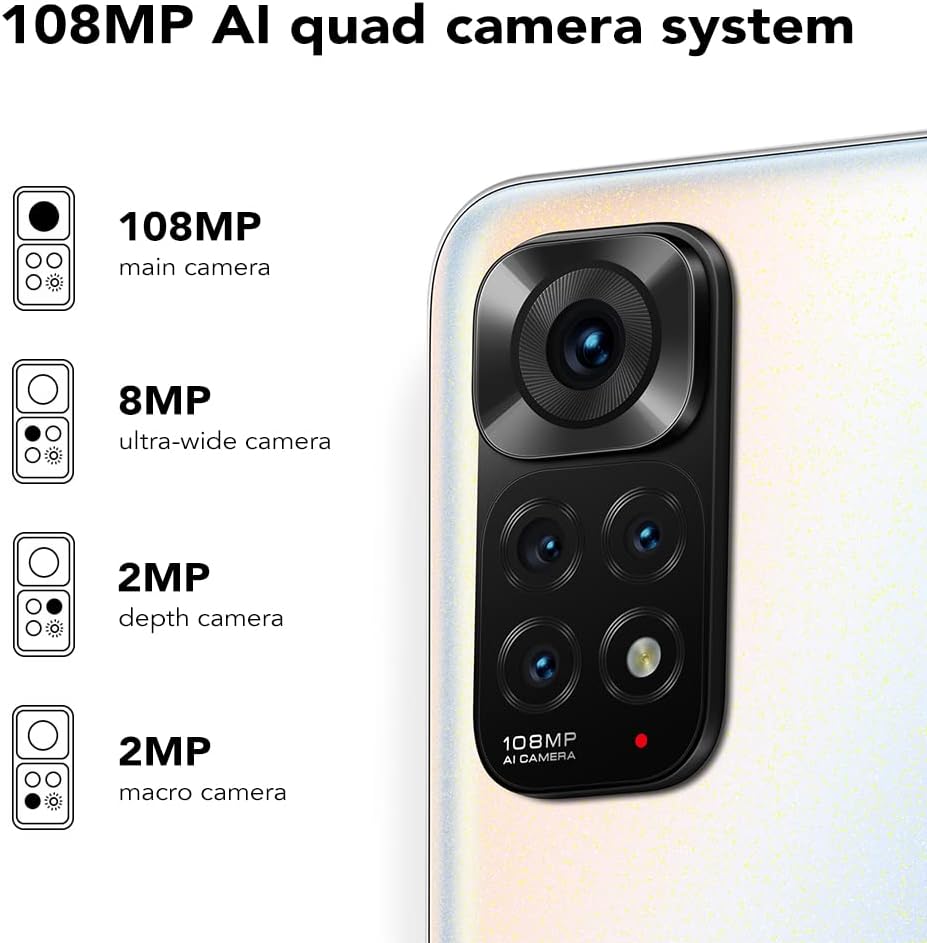
The Redmi Note 11S features a 108MP AI quad camera system on the rear and a 16MP selfie camera. The rear camera setup includes:
- 108 ሜፒ ዋና ካሜራ
- 8 ሜፒ እጅግ በጣም ሰፊ ካሜራ
- 2 ሜፒ ማክሮ ካሜራ
- 2 ሜፒ ጥልቀት ካሜራ
Open the Camera application to access various modes such as Photo, Video, Portrait, Night Mode, and more.

ዝርዝር view of the 108MP AI quad camera system on the Redmi Note 11S, featuring a 108MP main camera, 8MP ultra-wide camera, 2MP depth camera, and 2MP macro camera.
4. ማከማቻ እና አፈጻጸም
The device comes with 128GB of internal storage, expandable up to 1TB via a microSD card (sold separately). It is powered by the MediaTek Helio G96 processor, ensuring smooth performance for daily tasks and gaming.
5. ግንኙነት
The Redmi Note 11S supports 4G cellular networks, Wi-Fi, and GPS for navigation and location services.
ጥገና
1. መሳሪያዎን ማጽዳት
የስልክዎን ስክሪን እና አካል ለማፅዳት ለስላሳ፣ ከጥጥ ነጻ የሆነ ጨርቅ ይጠቀሙ። ኃይለኛ ኬሚካሎችን ወይም ሻካራ ቁሳቁሶችን ከመጠቀም ይቆጠቡ. መሳሪያውን ከመጠን በላይ እርጥበት እንዳይጋለጥ ያድርጉ.
2. የሶፍትዌር ዝመናዎች
መሣሪያዎ የቅርብ ጊዜ ባህሪያት፣ የደህንነት መጠገኛዎች እና የአፈጻጸም ማሻሻያዎች እንዳሉት ለማረጋገጥ በየጊዜው የሶፍትዌር ማሻሻያዎችን ይፈልጉ እና ይጫኑ። ሂድ ወደ ቅንብሮች > ስለ ስልክ > MIUI ስሪት ዝማኔዎችን ለመፈተሽ.
3. የባትሪ እንክብካቤ
የባትሪ ዕድሜን ለማራዘም;
- ከፍተኛ የሙቀት መጠንን ያስወግዱ.
- ባትሪው በተደጋጋሚ እንዲፈስ አይፍቀዱ.
- Use the original charger provided with the device.
4. የሙቀት መበታተን
The Redmi Note 11S incorporates LiquidCool technology with multiple layers of graphite and copper foil for efficient heat dissipation. Ensure proper airflow around the device during heavy usage to prevent overheating.

ውስጣዊ view illustrating the multi-dimensional heat dissipation system using LiquidCool technology, which incorporates multiple layers of graphite and copper foil for efficient cooling.
መላ መፈለግ
This section addresses common issues you might encounter with your Redmi Note 11S.
መሳሪያ አይበራም።
- Ensure the battery is charged. Connect the device to the charger for at least 30 minutes.
- የግዳጅ ድጋሚ ለመጀመር የኃይል አዝራሩን ለ10-15 ሰከንድ ተጭነው ይቆዩ።
Apps Freezing or Crashing
- ችግር ያለበትን መተግበሪያ ዝጋ እና እንደገና ይክፈቱት።
- የመተግበሪያውን መሸጎጫ እና ውሂብ በ በኩል ያጽዱ መቼቶች > መተግበሪያዎች > መተግበሪያዎችን አስተዳድር > [የመተግበሪያ ስም] > ውሂብ አጽዳ.
- Ensure your apps and operating system are up to date.
ደካማ የባትሪ ህይወት
- Adjust screen brightness and reduce screen timeout.
- እንደ Wi-Fi፣ ብሉቱዝ ወይም ጂፒኤስ ያሉ ጥቅም ላይ ያልዋሉ ባህሪያትን ሳያስፈልግ ያሰናክሉ።
- ከበስተጀርባ የሚሰሩ ሃይል የሚወስዱ መተግበሪያዎችን ይለዩ እና ይዝጉ።
የአውታረ መረብ ግንኙነት ጉዳዮች
- መሣሪያዎን እንደገና ያስጀምሩ።
- ሲም ካርድዎ በትክክል እንደገባ ያረጋግጡ።
- Reset network settings via ቅንብሮች > ግንኙነት እና ማጋራት > Wi-Fi፣ የሞባይል አውታረ መረቦችን እና ብሉቱዝን ዳግም ያስጀምሩ.
ዝርዝሮች
The following table outlines the key specifications for the Xiaomi Redmi Note 11S (Model: 2201117SY).
| ባህሪ | ዝርዝር መግለጫ |
|---|---|
| የሞዴል ስም | NOTE 11s |
| የንጥል ሞዴል ቁጥር | 2201117 እ.ኤ.አ. |
| የምርት ስም | XIAOMI |
| ስርዓተ ክወና | MIUI 12 |
| የስክሪን መጠን | 6.43 ኢንች |
| የማሳያ ዓይነት | FHD+ AMOLED DotDisplay, 90Hz Refresh Rate |
| የኋላ ካሜራ | 108MP Main, 8MP Ultra-wide, 2MP Macro, 2MP Depth |
| የፊት ካሜራ | 16 ሜፒ |
| ራም | 6 ጊባ |
| የማህደረ ትውስታ ማከማቻ አቅም | 128 ጊባ (እስከ 1 ቴባ ሊሰፋ የሚችል) |
| የባትሪ አቅም | 5000 ሚሊampኢሬ ሰዓት (mAh) |
| በመሙላት ላይ | 33W Pro Fast Charging (58 minutes for full charge) |
| ሴሉላር ቴክኖሎጂ | 4G |
| የገመድ አልባ አገልግሎት አቅራቢ | ለሁሉም አጓጓriersች ተከፍቷል |
| የግንኙነት ቴክኖሎጂዎች | ዋይፋይ፣ ሴሉላር |
| ልዩ ባህሪያት | Dual SIM, GPS, Smartphone |
| የምርት ልኬቶች | 2.9 x 0.32 x 6.29 ኢንች |
| የእቃው ክብደት | 6.3 አውንስ (179 ግራም) |
| ቀለም | ፐርል ነጭ |

The aesthetic flat-frame design of the Redmi Note 11S, highlighting its slim profile (8.09mm thickness) and light weight (179g) for a comfortable grip.
የዋስትና መረጃ
Specific warranty terms and conditions for the Xiaomi Redmi Note 11S may vary by region and retailer. Please refer to the warranty card included with your product packaging or visit the official Xiaomi website for detailed warranty information applicable to your purchase. Retain your proof of purchase for warranty claims.
ድጋፍ
For further assistance, technical support, or service inquiries regarding your Xiaomi Redmi Note 11S, please visit the official Xiaomi support website or contact their customer service. You can typically find contact information and FAQs on the manufacturer's official webጣቢያ.


