1. መግቢያ
This manual provides comprehensive instructions for the safe and efficient operation of your CLABEL 220B Thermal Bluetooth Label Printer. This portable, inkless label maker is designed for various applications in small businesses, offices, and homes, supporting label widths from 20mm to 50mm.
2. የጥቅል ይዘቶች
እባክህ ከዚህ በታች የተዘረዘሩት ሁሉም እቃዎች በጥቅልህ ውስጥ መካተታቸውን አረጋግጥ፡
- CLABEL 220B Thermal Bluetooth Label Printer
- 1 Roll of Thermal Labels
- የዩኤስቢ ባትሪ መሙያ ገመድ
- የተጠቃሚ መመሪያ (ይህ ሰነድ)
3. ምርት አብቅቷልview
Familiarize yourself with the components of your CLABEL 220B printer.
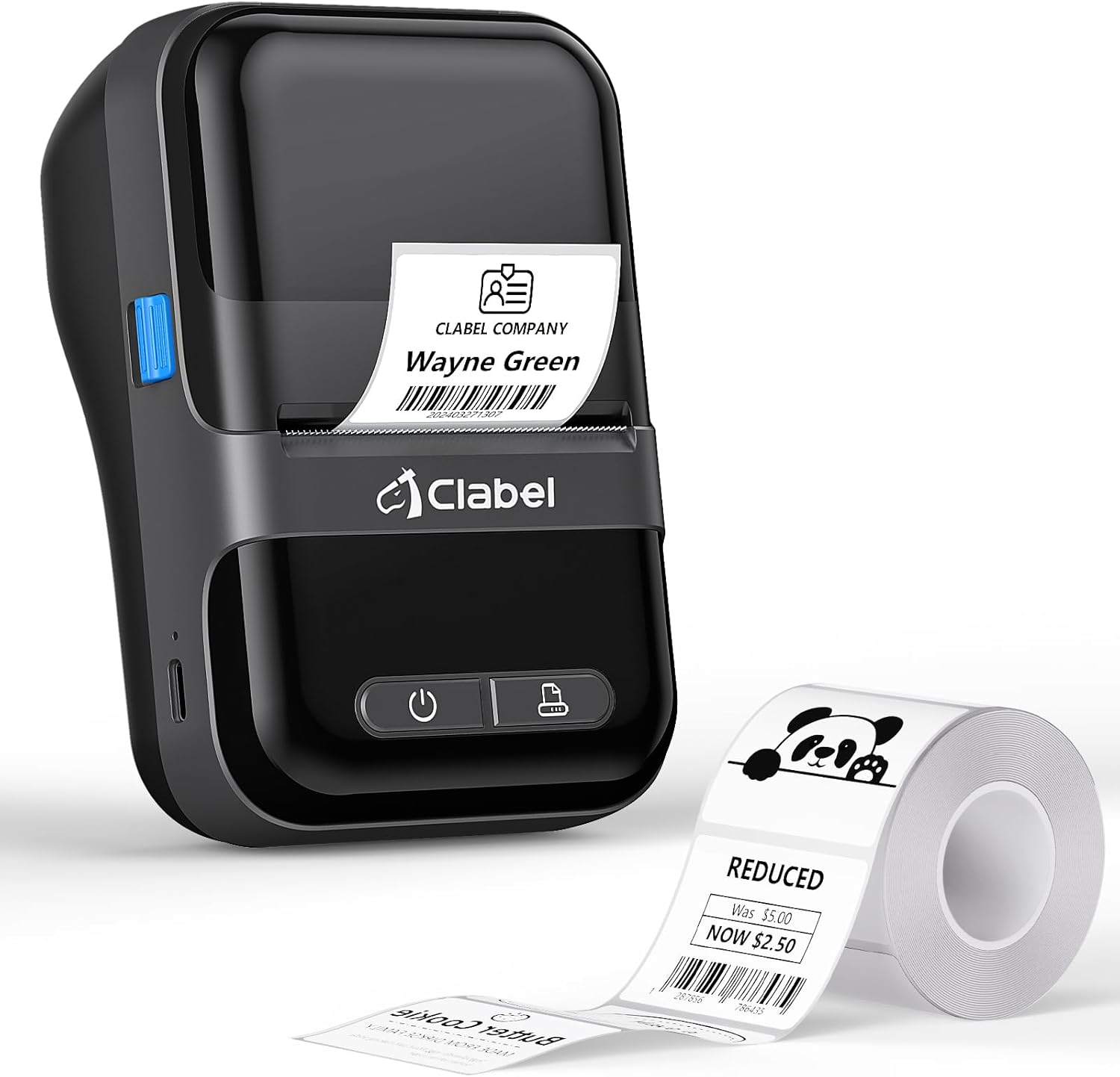
Image: The CLABEL 220B printer, showcasing its compact design, a printed label emerging from the output slot, and a roll of blank labels.
The printer features a power button, a feed button, and a label compartment. The charging port is typically located on the side or back.
4. ማዋቀር
4.1. ማተሚያውን መሙላት
Before initial use, fully charge the printer. Connect the provided USB cable to the printer's charging port and to a 5V-2A power adapter (not included) or a computer's USB port. The charging indicator light will show the charging status.
4.2. መለያዎችን በመጫን ላይ
Follow these steps to correctly load the thermal labels:

Image: Step-by-step guide for label installation, showing opening the cover, setting jam protection, inserting labels, and closing the cover.
- የአታሚውን ሽፋን ይክፈቱ.
- Set the jam protection to "OPEN" if applicable.
- Insert the label roll into the compartment, ensuring the printable side faces up and the labels are aligned on the left.
- Pull out a small length of labels and close the cover securely.
5. ግንኙነት
5.1. Mobile Phone Connection (Bluetooth)
The CLABEL 220B supports connection with iOS and Android devices via Bluetooth.

Image: Mobile phone connection steps, illustrating downloading the 'Clabel trade' app, enabling Bluetooth, and connecting to the printer within the app.
- Download the "CLABEL trade" app from your device's app store (iOS App Store or Android Google Play Store).
- በሞባይል ስልክዎ ላይ ብሉቱዝ መንቃቱን ያረጋግጡ።
- Open the "CLABEL trade" app and connect to your printer from the device list.
5.2. PC Connection (USB)
For Windows PCs, connect the printer using the provided USB cable.

Image: Computer connection steps, detailing turning on the printer, connecting via USB, downloading the driver/app, and printing.
- አታሚውን ያብሩ።
- አታሚውን በዩኤስቢ ገመድ በኩል ከኮምፒዩተርዎ ጋር ያገናኙ።
- Download the necessary driver or application from the official CLABEL brand webጣቢያ.
- Open the application, create or select a label, and initiate printing.
6. የአሠራር መመሪያዎች
6.1. Using the CLABEL Trade App
The "CLABEL trade" app offers extensive features for label creation and management:
- Access over 30 business label templates.
- Utilize more than 450 common symbols for various applications.
- Create and customize your own label templates.
- Edit and typeset labels with text, barcodes, QR codes, images, and more.
6.2. Batch Printing
The printer supports batch printing, allowing you to import data from Excel tables to print multiple labels efficiently. This feature helps improve printing efficiency by setting the printing quantity without repetitive operations.
6.3. Recommended Label Sizes and Uses
The CLABEL 220B printer supports labels with a width of 20-50mm and a length of 15-100mm, accommodating various styles and applications.

Image: Recommended label sizes for business applications, including price tags, barcodes, logos, and product information (e.g., 40x40mm, 50x50mm).

Image: Recommended label sizes for food applications, such as bakery items, ingredient lists, and price & date labels (e.g., 40x30mm, 50x40mm).

Image: Recommended label sizes for office organization, including labels for letters, addresses, folders, and cables (e.g., 25x78mm, 50x30mm).
7. ጥገና
To ensure optimal performance and longevity of your CLABEL 220B printer, follow these maintenance guidelines:
- የህትመት ጭንቅላትን ማጽዳት; Regularly clean the thermal print head with an alcohol swab to remove dust or adhesive residue. Ensure the printer is off and cooled down before cleaning.
- የውጭ ጽዳት; የአታሚውን ውጫዊ ክፍል ለስላሳና ደረቅ ጨርቅ ይጥረጉ። ጠጣር ኬሚካሎችን ወይም ሻካራ ቁሳቁሶችን ከመጠቀም ይቆጠቡ።
- ማከማቻ፡ ማተሚያውን በቀጥታ ከፀሀይ ብርሀን እና ከከፍተኛ ሙቀት ርቆ በቀዝቃዛና ደረቅ ቦታ ያከማቹ።
- የባትሪ እንክብካቤ ለረጅም ጊዜ ማከማቻ፣ ጥልቅ ፈሳሽ እንዳይፈስ ለመከላከል ባትሪውን በየሶስት ወሩ ወደ 50% ያህል ይሙሉ።
8. መላ መፈለግ
If you encounter issues with your CLABEL 220B printer, refer to the following common problems and solutions:
| ችግር | ሊሆን የሚችል ምክንያት | መፍትሄ |
|---|---|---|
| አታሚ አይበራም። | ዝቅተኛ የባትሪ ወይም የኃይል ችግር | Charge the printer fully. Ensure the power button is pressed correctly. |
| Poor print quality (light or spotty) | Dirty print head, incorrect label type, or low battery | Clean the print head. Ensure you are using thermal labels. Charge the printer. Adjust print density in the app if available. |
| Labels are misaligned or jammed | Labels not loaded correctly | Open the cover, re-align the label roll, and ensure it's properly seated. Refer to Section 4.2. |
| በብሉቱዝ መገናኘት አልተቻለም | Bluetooth off, app issue, or printer not discoverable | Ensure Bluetooth is enabled on your phone and the printer is on. Restart the app and printer. Try re-pairing the device. |
| PC connection issues | Driver not installed, incorrect cable, or software issue | Install the correct driver from the CLABEL website. Ensure the USB cable is functional. Restart PC and printer. |
If the problem persists, please contact CLABEL customer support for further assistance.
9. ዝርዝሮች
Key technical specifications for the CLABEL 220B Thermal Bluetooth Label Printer:
- ሞዴል፡ 220 ቢ
- የህትመት ቴክኖሎጂ፡- ሙቀት
- ግንኙነት፡ ብሉቱዝ ፣ ዩኤስቢ
- የአታሚ ውፅዓት፡- ሞኖክሮም
- ከፍተኛው የህትመት ጥራት፡ 203 ዲፒአይ
- ከፍተኛው የሚዲያ መጠን፡ 25-50ሚሜ (ስፋት)
- ተስማሚ መሣሪያዎች Smartphones (iOS, Android), Windows XP or above
- የባትሪ አቅም፡- 2200mAh
- የኃይል ፍጆታ; 2.2 ዋት (በሞድ ላይ)
- የምርት መጠኖች: 4.65" ዲ x 4.6" ዋ x 2.88" ኤች
- የእቃው ክብደት፡ 14.1 አውንስ (400 ግራም)
10. ዋስትና እና ድጋፍ
The CLABEL 220B Thermal Bluetooth Label Printer comes with a limited warranty. For specific warranty terms and conditions, please refer to the documentation included with your purchase or visit the official CLABEL webጣቢያ.
For additional support, including detailed user guides and installation manuals, please refer to the following resources:
- Official CLABEL Webጣቢያ፡ CLABEL Store
- የተጠቃሚ መመሪያ (ፒዲኤፍ)፡- አውርድ የተጠቃሚ መመሪያ
- የመጫኛ መመሪያ (ፒዲኤፍ)፦ የመጫኛ መመሪያን አውርድ
For technical assistance or customer service inquiries, please contact CLABEL support through their official channels.


