1. መግቢያ
The Amazon Echo Show 5 (3rd Gen) is a smart display designed to integrate seamlessly into your daily life. It features a 5.5-inch screen and enhanced audio capabilities, providing visual and auditory interactions with Alexa. This device is refurbished, tested, and certified to function like a new unit, and comes with the same limited warranty.
The device is constructed with sustainability in mind, utilizing 100% post-consumer recycled polyester yarn for its fabric and 100% recycled aluminum. Its packaging is also 100% recyclable.
2. በሳጥኑ ውስጥ ያለው
Upon unboxing your Amazon Echo Show 5 (3rd Gen), you should find the following items:
- Echo Show 5 (3rd Gen) device
- Power adapter (22W) and cable (4.9ft)
- ፈጣን ጅምር መመሪያ
3. የማዋቀር መመሪያ
የኢኮ ሾው 5ዎን ለማዋቀር እነዚህን ደረጃዎች ይከተሉ፡
- አብራ፡ Connect the included power adapter to your Echo Show 5 and plug it into a wall outlet. The device will automatically power on.
- የማያ ገጽ ላይ መመሪያዎችን ይከተሉ፡- The device will guide you through the initial setup process on its 5.5-inch touch screen.
- ከWi-Fi ጋር ይገናኙ፡ Select your Wi-Fi network from the list and enter the password. The Echo Show 5 supports dual-band Wi-Fi (802.11a/b/g/n/ac). It does not support ad-hoc (peer-to-peer) networks.
- Log in to Amazon Account: Enter your Amazon account credentials when prompted.
- ቅንብሮችን ለግል ያብጁ፡ Configure your time zone, location, and other preferences.
- ባህሪያትን ያስሱ፡ Once setup is complete, you can begin interacting with Alexa and exploring the device's capabilities.
The device utilizes Amazon Wi-Fi Simple Setup technology for an easier connection process to your Wi-Fi network.
4. የእርስዎን ኢኮ ሾው መስራት 5
The Echo Show 5 allows for various interactions through voice commands and its touch screen.
4.1. የማሳያ ባህሪያት
The 5.5-inch touch screen provides visual information and controls:
- መረጃ በጨረፍታ፡- View news headlines, weather forecasts, and calendar events.
- የፎቶ ማሳያ፡ Set the background to a rotating slideshow of your favorite photos. You can invite family and friends to share photos.
- ይዘት Viewing: Stream shows, view song titles, and follow along with recipes.

4.2. የድምጽ ባህሪያት
The device features a full-range 1.75-inch built-in speaker, offering enhanced bass and clearer vocals for audio playback.
- ሙዚቃ እና ፖድካስቶች፡- Stream audio content from services like Amazon Music and Spotify.
- የብሉቱዝ ግንኙነት; የላቀ የድምጽ ስርጭት Proን ይደግፋልfile (A2DP) ከሞባይል መሳሪያዎ ወደ Echo Show 5 ወይም ከEcho Show 5 ወደ ብሉቱዝ ድምጽ ማጉያ ለማሰራጨት። የድምጽ/ቪዲዮ የርቀት መቆጣጠሪያ ፕሮfile (AVRCP) የተገናኙ የሞባይል መሳሪያዎችን የድምጽ ቁጥጥር ይፈቅዳል። የፒን ኮዶችን የሚጠይቁ የብሉቱዝ ድምጽ ማጉያዎች አይደገፉም።


4.3. የካሜራ ባህሪያት
The Echo Show 5 includes a 2 MP camera with a built-in shutter.
- የቪዲዮ ጥሪ፡ Use the camera to make video calls to friends and family who have the Alexa app or another Echo device with a screen.
- የቤት ክትትል; Check in on your home, family, or pets using the built-in camera. You can also view compatible video doorbells.


4.4. ዘመናዊ የቤት መቆጣጠሪያ
Control compatible smart devices such as lights and thermostats using voice commands or the touch screen, even when you are away from home. The device supports Wi-Fi, Bluetooth Low Energy Mesh, and Matter for smart home compatibility.
4.5. የግላዊነት ባህሪያት
The Echo Show 5 incorporates multiple layers of privacy controls:
- ማይክ/ካሜራ ጠፍቷል አዝራር፡- ማይክሮፎኑን እና ካሜራውን በኤሌክትሮኒክ መንገድ ለማቋረጥ አካላዊ ቁልፍ።
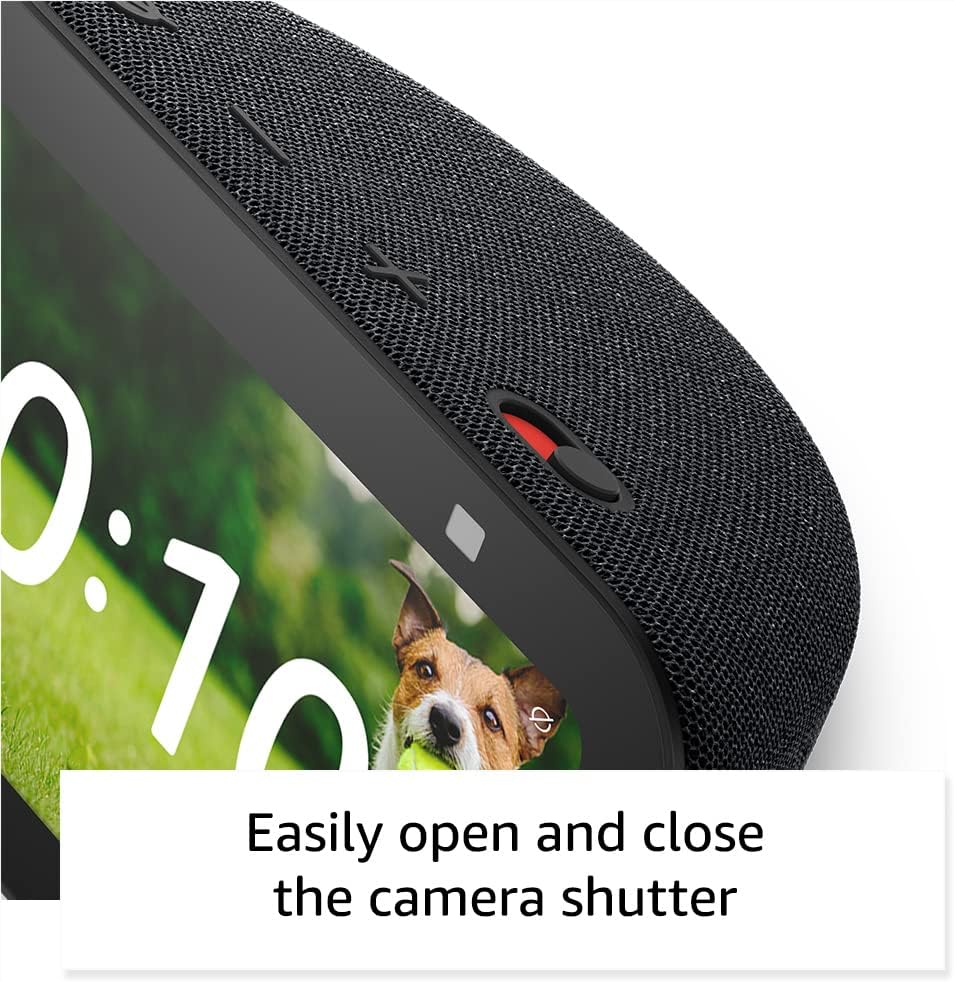
- አብሮ የተሰራ የካሜራ መከለያ; የካሜራውን ሌንስን ለመሸፈን አካላዊ ተንሸራታች።
- ዋክ ቃል ቴክኖሎጂ፡- The device only begins recording and sending audio to the cloud after detecting the wake word (e.g., "Alexa").
- የዥረት አመላካቾች፡- Visual indicators show when the device is actively streaming to the cloud.
- የድምጽ ቀረጻ አስተዳደር፡- ችሎታ view እና የድምጽ ቅጂዎችዎን ይሰርዙ።
- Ring Video Encryption: ይደግፋል viewing end-to-end encrypted Ring video.
4.6. የተደራሽነት ባህሪያት
የ Echo Show 5 አሌክሳን በችሎታዎ ለማበጀት የተለያዩ የተደራሽነት ባህሪያትን ያካትታል። እነዚህ በኩል ሊደረስባቸው ይችላሉ ቅንብሮች → ተደራሽነት.
- ወደ Alexa ንካ፡ በማያ ገጽ ላይ ሰቆች ወይም በቁልፍ ሰሌዳ በኩል በመንካት አሌክሳን ይድረሱ።
- የሚለምደዉ ማዳመጥ፡ አሌክሳ ከመመለሱ በፊት ለመናገር ለመጨረስ ተጨማሪ ጊዜ ይሰጣል።
- ተመራጭ የንግግር መጠን፡- አሌክሳ ምን ያህል ፈጣን ወይም ቀርፋፋ እንደሚናገር ይቆጣጠሩ።
- መግለጫ ጽሑፍ Alexa Captioning, Call Captioning, and Closed Captioning provide text captions for supported content.
- አሳይ እና ይንገሩ፡- Helps users who are blind or visually impaired identify products by saying "Alexa, what am I holding."
- ድምጽView ስክሪን አንባቢ፡- ማየት የተሳናቸው ወይም ማየት ለተሳናቸው ተጠቃሚዎች መዳረሻን ያስችላል።
- ስክሪን ማጉያ፡ በማያ ገጹ ዙሪያ ማጉላት/ማውጣት እና ማንፏቀቅ ያስችላል።
- አቅራቢያ ሲሆን አሳውቅ፡- ከመሳሪያው አጠገብ ሲገኝ የማሳወቂያ ድምጾችን ያጫውታል።
- Kindle ጮክ ብሎ አንብብ፡- አሌክሳ የ Kindle መጽሐፍትን ጮክ ብሎ ማንበብ ይችላል።
- የእውነተኛ ጊዜ ጽሑፍ፡- Enables typing live text in a video call.
- Additional features include Color Inversion, Color Correction, and Request Sound.
5. ጥገና
የእርስዎን Echo Show 5 ረጅም ዕድሜ እና ጥሩ አፈጻጸም ለማረጋገጥ እነዚህን የጥገና መመሪያዎች ይከተሉ፡
- ማጽዳት፡ Use a soft, lint-free cloth to gently wipe the screen and exterior. Avoid abrasive cleaners, solvents, or aerosol sprays.
- አቀማመጥ፡- መሳሪያውን በቀጥታ ከፀሀይ ብርሀን, ከሙቀት ምንጮች እና ከመጠን በላይ እርጥበት በማይኖርበት ቋሚ እና ጠፍጣፋ መሬት ላይ ያስቀምጡት. በመሳሪያው ዙሪያ በቂ የአየር ዝውውርን ያረጋግጡ.
- የሶፍትዌር ማሻሻያ The device receives guaranteed software security updates for at least four years after its last availability for purchase as a new unit. Ensure your device is connected to Wi-Fi to receive these updates automatically.
- የኃይል ዑደት፡- If the device becomes unresponsive, unplug it from the power outlet, wait for 10 seconds, and then plug it back in.
6. መላ መፈለግ
If you encounter issues with your Echo Show 5, try the following solutions:
- ኃይል የለም፡ የኃይል አስማሚው ከመሣሪያው እና ከሚሠራው ግድግዳ መውጫ ጋር ደህንነቱ በተጠበቀ ሁኔታ መገናኘቱን ያረጋግጡ። የተለየ መውጫ ይሞክሩ።
- የWi-Fi ግንኙነት ችግሮች፡-
- የእርስዎ ዋይ ፋይ ራውተር በትክክል እየሰራ መሆኑን ያረጋግጡ።
- የእርስዎን ራውተር እና ሞደም እንደገና ያስጀምሩ።
- On the Echo Show 5, go to Settings → Network and try reconnecting to your Wi-Fi network.
- መሣሪያው በእርስዎ የWi-Fi ራውተር ክልል ውስጥ መሆኑን ያረጋግጡ።
- አሌክሳ ምላሽ አይሰጥም
- Ensure the microphone is not muted (the light ring will be red). Press the mic/camera off button if it is.
- ለመሣሪያው በግልፅ እና በቀጥታ ይናገሩ።
- መሳሪያውን በማላቀቅ እና እንደገና በማገናኘት እንደገና ለማስጀመር ይሞክሩ።
- የማሳያ ጉዳዮች፡- If the screen is unresponsive or frozen, try restarting the device.
- የድምፅ ችግሮች;
- Check the volume level on the device.
- Ensure no external Bluetooth speakers are connected if you intend to use the internal speaker.
- ካሜራ አይሰራም; Ensure the camera shutter is open and the camera is not disabled via the mic/camera off button.
ለተጨማሪ እርዳታ፣ የአማዞን ድጋፍን ይመልከቱ webጣቢያ ወይም የደንበኛ አገልግሎትን ያነጋግሩ።
7. ዝርዝሮች
| ባህሪ | ዝርዝር |
|---|---|
| ሞዴል | Echo Show 5 (3ኛ ዘፍ) - 2023 ልቀት |
| መጠኖች (ወ x D x H) | 5.8" x 3.6" x 3.2" (147 ሚሜ x 91 ሚሜ x 82 ሚሜ) |
| ክብደት | 16.1 አውንስ (456 ግራም) |
| ማሳያ | 5.5 ”ንክኪ ማያ ገጽ |
| ካሜራ | 2 MP with built-in shutter |
| ፕሮሰሰር | MediaTek MT 8169 B |
| የ Wi-Fi ግንኙነት | Dual-band 802.11a/b/g/n/ac (does not support ad-hoc networks) |
| የብሉቱዝ ግንኙነት | A2DP support for audio streaming, AVRCP for voice control (Bluetooth speakers requiring PIN codes not supported) |
| ኦዲዮ | ሙሉ ክልል 1.75 ኢንች አብሮ የተሰራ ድምጽ ማጉያ |
| የስማርት ቤት ተኳኋኝነት | ዋይ ፋይ፣ ብሉቱዝ ዝቅተኛ የኃይል መረብ፣ ጉዳይ |
| የቋንቋ ድጋፍ | እንግሊዝኛ እና ስፓኒሽ |
8. ዋስትና እና ድጋፍ
Your Amazon Echo Show 5 (3rd Gen) comes with a 1-year limited warranty and service. As a refurbished device, it receives the same limited warranty as a new device.
For detailed warranty information and terms of service, please refer to the documentation provided with your device or visit the official Amazon support website. Information regarding software security updates is also available through Amazon's official channels.


