1. መግቢያ
Thank you for choosing the Pantum BP5100DN Monochrome Laser Printer. This manual provides essential information for the safe and efficient use of your printer. Please read it thoroughly before operating the device and keep it for future reference.
The Pantum BP5100DN is designed for high-speed, high-quality monochrome printing, featuring automatic two-sided printing and versatile connectivity options including USB and Ethernet.
2. የደህንነት መረጃ
- አታሚውን ሁልጊዜ በተረጋጋና ደረጃ ባለው ቦታ ላይ ያድርጉት።
- Ensure proper ventilation around the printer to prevent overheating.
- አታሚውን ለውሃ ወይም ከመጠን በላይ እርጥበት አያጋልጡት።
- Use only the specified power supply and connect to a grounded outlet.
- በሚሠራበት ጊዜ እጅን እና አልባሳትን ከሚንቀሳቀሱ ክፍሎች ያርቁ።
- የፊውዘር ክፍሉን ከመንካት ይቆጠቡ፣ ምክንያቱም በጣም ሊሞቅ ይችላል።
- Do not attempt to service the printer yourself. Refer to qualified service personnel.
3. በሳጥኑ ውስጥ ያለው
ከዚህ በታች የተዘረዘሩት ሁሉም እቃዎች በጥቅልዎ ውስጥ መካተታቸውን ያረጋግጡ፡-
- Pantum BP5100DN Monochrome Laser Printer
- የኃይል ገመድ
- የዩኤስቢ በይነገጽ ገመድ
- ፈጣን የማዋቀር መመሪያ
- Starter cartridge (3000 pages)
- Starter drum (30000 pages)

Figure 3.1: Package Contents. This image displays the Pantum BP5100DN printer along with its accessories: power cord, USB interface cable, quick setup guide, starter toner cartridge, and starter drum unit.
4. ምርት አብቅቷልview
4.1. የአታሚ ክፍሎች
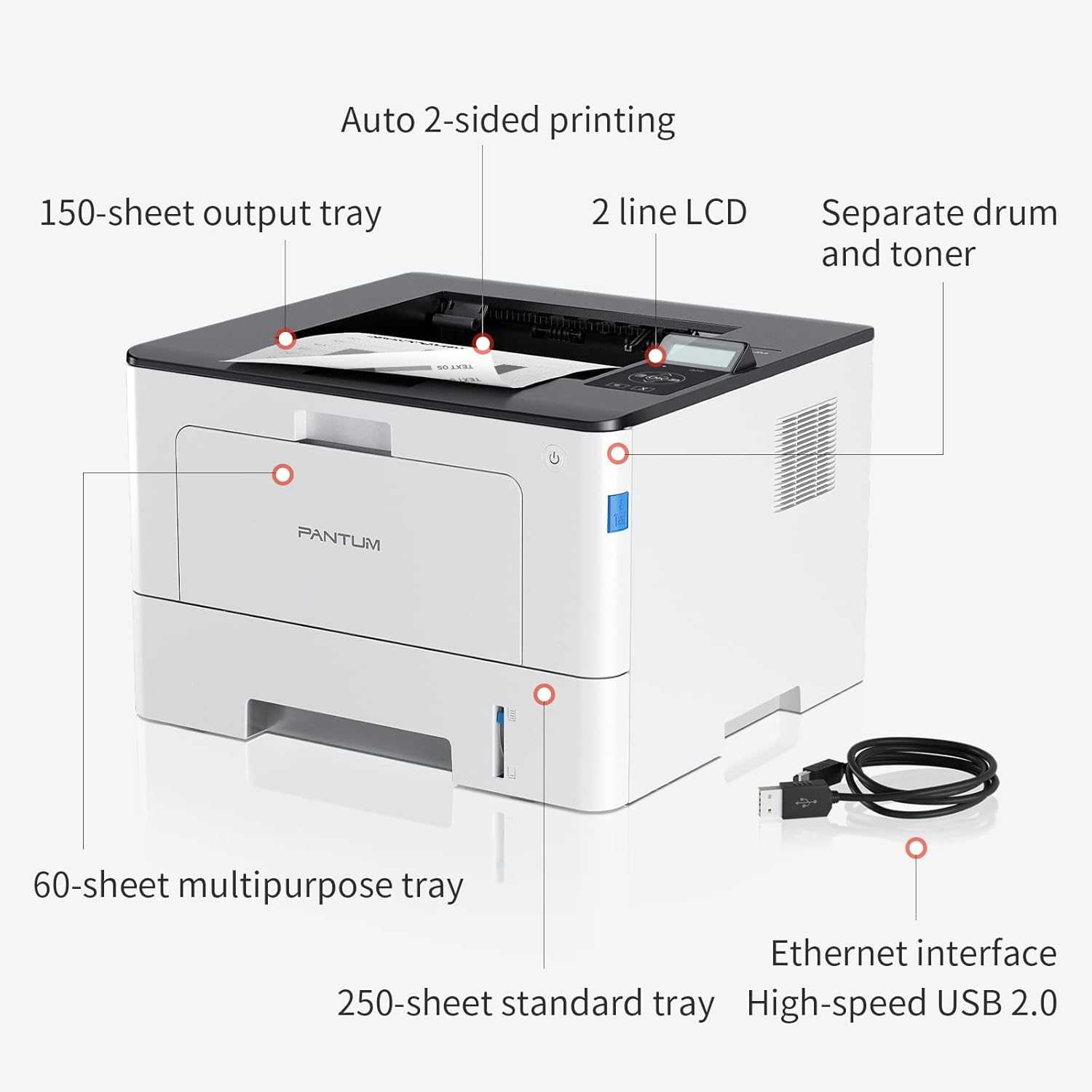
Figure 4.1: Printer Components. Key features include a 150-sheet output tray, a 2-line LCD display, separate drum and toner units, a 60-sheet multipurpose tray, a 250-sheet standard tray, an Ethernet interface, and a High-speed USB 2.0 port.
4.2. ልኬቶች

Figure 4.2: Printer Dimensions. The printer measures approximately 14.33 inches (W) x 10.12 inches (H) x 13.54 inches (D).
4.3. የቁጥጥር ፓነል

Figure 4.3: Control Panel. The control panel includes a 2-line LCD display for status messages and menu navigation, along with buttons for OK, arrow controls, and cancel functions.
5. ማዋቀር
5.1. ማሸግ እና አቀማመጥ
- ማተሚያውን ከማሸጊያው በጥንቃቄ ያስወግዱት.
- ሁሉንም የመከላከያ ካሴቶች እና የማሸጊያ ቁሳቁሶችን ከአታሚው ያስወግዱ.
- Place the printer on a firm, level surface with adequate space for ventilation.
5.2. Toner and Drum Installation
- የአታሚውን የፊት ሽፋን ይክፈቱ.
- Unpack the drum unit and toner cartridge.
- Insert the toner cartridge into the drum unit until it clicks into place.
- Insert the combined drum and toner unit into the printer.
- የፊት ሽፋኑን ይዝጉ.
5.3. የወረቀት ጭነት
- Pull out the standard paper tray or open the multipurpose tray.
- የወረቀት መመሪያዎችን ወደ ወረቀትዎ መጠን ያስተካክሉ.
- Load paper into the tray, ensuring it is flat and not exceeding the maximum capacity (250 sheets for standard tray, 60 sheets for multipurpose tray).
- የወረቀት ማስቀመጫውን ዝጋ.
5.4. Power and Connectivity
- የኃይል ገመዱን ከአታሚው ጋር ያገናኙ እና ከዚያ ወደ መሬት ወደ ኤሌክትሪክ ሶኬት ያገናኙ።
- For USB connection: Connect the provided USB 2.0 cable from the printer to your computer.
- For Ethernet connection: Connect an Ethernet cable from the printer to your network router or switch.
- አታሚውን ለማብራት የኃይል አዝራሩን ይጫኑ.
6. የአሠራር መመሪያዎች
6.1. የአሽከርካሪዎች መጫኛ
For optimal performance, install the printer drivers from the official Pantum website or the provided installation media. The printer supports easy one-step installation for quick setup.
6.2. ሰነድ ማተም
- በኮምፒተርዎ ወይም በሞባይል መሳሪያዎ ላይ ለማተም የሚፈልጉትን ሰነድ ይክፈቱ።
- ከማመልከቻዎ ውስጥ የህትመት አማራጩን ይምረጡ።
- Choose the Pantum BP5100DN from the list of available printers.
- እንደ አስፈላጊነቱ የህትመት ቅንብሮችን ያስተካክሉ (ለምሳሌ፣ የቅጂዎች ብዛት፣ የወረቀት መጠን፣ ባለ ሁለትዮሽ ህትመት)።
- 'አትም' ን ጠቅ ያድርጉ።
The printer offers fast printing speeds of up to 40 pages per minute (A4) / 42 pages per minute (Letter) in black and white. It also supports automatic two-sided printing to save paper.
6.3. የሞባይል ህትመት
The Pantum BP5100DN supports direct printing of office documents from mobile devices. Ensure your mobile device and printer are connected to the same network or via USB OTG (if supported by your device and printer).
7. ጥገና
7.1. Replacing Toner Cartridge and Drum Unit
When the toner is low or the drum unit reaches its end of life, the printer's display will show a message. Refer to the instructions provided with the replacement consumables for proper installation. The starter toner cartridge yields approximately 3000 pages, and the starter drum unit yields approximately 30000 pages.
7.2. ማተሚያውን ማጽዳት
- Turn off the printer and unplug the power cord before cleaning.
- የማተሚያውን ውጫዊ ክፍል ለስላሳ እና ከተሸፈነ ጨርቅ ይጥረጉ.
- Use a dry cloth to clean the paper path and rollers if paper jams occur frequently.
- ገላጭ ማጽጃዎችን ወይም ፈሳሾችን አይጠቀሙ.
8. መላ መፈለግ
If you encounter issues with your printer, refer to the following common solutions:
- አታሚ ምላሽ አይሰጥም፡- የኃይል ግንኙነቶችን፣ የዩኤስቢ/ኤተርኔት ገመድ ግንኙነቶችን ይፈትሹ እና አታሚው መብራቱን ያረጋግጡ። አታሚውንም ሆነ ኮምፒውተርዎን እንደገና ያስጀምሩ።
- የወረቀት መጨናነቅ; Open all covers and carefully remove any jammed paper. Ensure paper is loaded correctly and not creased or damaged.
- ደካማ የህትመት ጥራት፡- Check toner levels. If print quality is faded, especially with cut and paste text, ensure you are using the correct print settings and consider replacing the toner cartridge or drum unit if they are near end-of-life.
- የግንኙነት ጉዳዮች፡- For Ethernet, verify network cable connection and IP address settings. For USB, try a different USB port or cable.
- የስህተት መልዕክቶች፡- Consult the printer's display for specific error codes and refer to the quick setup guide or online support for detailed solutions.
For persistent issues, please contact customer service for support.
9. ዝርዝሮች
| ባህሪ | ዝርዝር መግለጫ |
|---|---|
| የሞዴል ስም | BP5100DN |
| የህትመት ቴክኖሎጂ | ሌዘር |
| የአታሚ ውፅዓት | ሞኖክሮም |
| ከፍተኛ የህትመት ፍጥነት (ሞኖክሮም) | 40 ppm (A4) / 42 ppm (Letter) |
| ከፍተኛው የህትመት ጥራት | 1200 x 1200 ዲፒአይ |
| ባለሁለት ጎን ማተም | አዎ (ራስ-ሰር) |
| የግንኙነት ቴክኖሎጂ | ኢተርኔት፣ ዩኤስቢ 2.0 |
| ከፍተኛው የግቤት ሉህ አቅም | 250 sheets (Standard Tray), 60 sheets (Multipurpose Tray) |
| የህትመት ሚዲያ | ወረቀት (ቀላል) |
| የሉህ መጠን | A4, Letter, etc. |
| ተስማሚ መሣሪያዎች | ስማርትፎኖች፣ ፒሲዎች |
| ዋትtage | 650 ዋት |
| የእቃው ክብደት | 9.07 ኪ.ግ (በግምት 9 ኪ.ግ 70 ግ) |
| አምራች | ፓንቱም |
10. ዋስትና እና ድጋፍ
The Pantum BP5100DN Monochrome Laser Printer comes with a 1-year warranty from the date of purchase. For warranty claims, technical support, or any inquiries, please refer to the contact information provided in your quick setup guide or visit the official Pantum webጣቢያ.
For a better experience, please kindly refer to the user manual or contact customer service for support.


