1. መግቢያ
Thank you for choosing the ICON Morpheus GX 66 Wired Gaming Mouse. This manual provides essential information for setting up, operating, and maintaining your new gaming mouse. Please read this guide thoroughly to ensure optimal performance and longevity of your device.
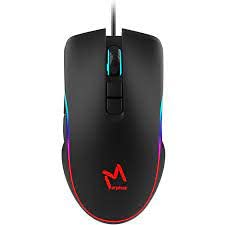
The ICON Morpheus GX 66 is a high-performance wired gaming mouse featuring customizable LED lighting and a precise 7200 DPI optical sensor, designed for an optimal gaming experience. It offers a modern style and ambidextrous design, compatible with Windows 7, Windows XP, and Linux operating systems.
2. የምርት ባህሪዎች
- ከፍተኛ ትክክለኛነት ዳሳሽ; Equipped with a 7200 DPI optical sensor for accurate tracking and responsiveness.
- ሊበጅ የሚችል የ LED መብራት; Dynamic LED illumination enhances your gaming setup.
- 7 በፕሮግራም ሊዘጋጁ የሚችሉ አዝራሮች፡- Offers extensive customization for various gaming commands.
- የገመድ ግንኙነት; Ensures a stable and lag-free connection.
- አሻሚ ንድፍ; Comfortable for both left and right-handed users.
- ዘላቂ ግንባታ; Designed for long-lasting use in intense gaming sessions.
- ሰፊ ተኳኋኝነት Supports Windows 7, Windows XP, and Linux operating systems.

3. ማዋቀር
- ማውዙን ይንቀሉት፡- Carefully remove the ICON Morpheus GX 66 mouse from its packaging.
- ከኮምፒዩተር ጋር ይገናኙ; Locate an available USB port on your computer. Plug the USB connector of the mouse firmly into the USB port.
- የአሽከርካሪ ጭነት; The mouse is plug-and-play. Your operating system (Windows 7, Windows XP, or Linux) should automatically detect and install the necessary drivers. This process may take a few moments.
- የሙከራ ተግባር Once installed, move the mouse and click the buttons to ensure it is working correctly.
4. የአሠራር መመሪያዎች
4.1 መሰረታዊ ተግባራት
- የግራ ጠቅታ፡- ዋና እርምጃ፣ ምርጫ፣ ማግበር።
- በቀኝ ጠቅታ: Context menu, secondary actions.
- የማሽከርከር ጎማ፡ Scroll up/down, middle click for specific functions.
4.2 የዲፒአይ ማስተካከያ
The mouse features a dedicated DPI button (often located behind the scroll wheel) to cycle through different sensitivity levels. Press this button to adjust the DPI (Dots Per Inch) to your preferred setting for various tasks or games. The LED lighting may change color to indicate the current DPI level.
4.3 የ LED መብራት
The ICON Morpheus GX 66 features dynamic LED lighting. The lighting patterns and colors are typically pre-programmed and may change based on the selected DPI setting or cycle automatically. There are no user-configurable software controls for the LED lighting on this model.

5. ጥገና
- ማጽዳት፡ የመዳፊቱን ገጽታ ለማጽዳት ለስላሳ እና ደረቅ ጨርቅ ይጠቀሙ. ለግትር ቆሻሻ፣ በትንሹ መampጨርቁን በውሃ. ኃይለኛ ኬሚካሎችን ወይም ሻካራ ቁሳቁሶችን ከመጠቀም ይቆጠቡ.
- የአነፍናፊ ጽዳት; Occasionally, dust or debris may accumulate around the optical sensor. Use a cotton swab or compressed air to gently clean the sensor area on the underside of the mouse.
- የኬብል እንክብካቤ; Avoid sharp bends or excessive pulling on the mouse cable to prevent damage. Store the cable neatly when not in use.
- ማከማቻ፡ ለረጅም ጊዜ ጥቅም ላይ በማይውልበት ጊዜ፣ አይጡን ከፀሐይ ብርሃን እና ከፍተኛ የሙቀት መጠን ርቆ ንጹህና ደረቅ ቦታ ላይ ያስቀምጡት።

6. መላ መፈለግ
- አይጥ ምላሽ የማይሰጥ፡
- የዩኤስቢ ገመዱ ደህንነቱ በተጠበቀ ሁኔታ ከኮምፒዩተሩ የዩኤስቢ ወደብ ጋር መገናኘቱን ያረጋግጡ።
- መዳፊቱን ወደ ሌላ የዩኤስቢ ወደብ ለመሰካት ይሞክሩ።
- ኮምፒተርዎን እንደገና ያስጀምሩ.
- የተሳሳተ የጠቋሚ እንቅስቃሴ፡-
- በመዳፊት ስር ያለውን የኦፕቲካል ዳሳሽ ያፅዱ።
- አይጤውን ንጹህ፣ የማያንጸባርቅ እና ወጥ በሆነ ገጽ ላይ እየተጠቀሙ መሆንዎን ያረጋግጡ። መስታወት ወይም በጣም የሚያንፀባርቁ ቦታዎችን ያስወግዱ.
- LED Lighting Not Working:
- የዩኤስቢ ግንኙነትን ያረጋግጡ።
- The LED lighting is typically powered directly via USB. If the mouse functions but LEDs do not, contact support.
- የማይሰሩ አዝራሮች፡-
- አይጤው በትክክል መገናኘቱን ያረጋግጡ።
- የሶፍትዌር ችግሮችን ለማስወገድ መዳፊቱን በሌላ ኮምፒውተር ላይ ይሞክሩ።
7. ዝርዝሮች
| አምራች | አይኮን |
| ሞዴል | Morpheus GX 66 |
| ASIN | B0B5PLWQXC |
| ልዩ ባህሪያት | የ LED መብራት |
| የእንቅስቃሴ ማወቂያ ቴክኖሎጂ | ኦፕቲካል |
| ዲፒአይ | 7200 |
| የእጅ አቀማመጥ | አሻሚ |
| የሚመከር አጠቃቀሞች | ጨዋታ |
| የስርዓተ ክወና ተኳኋኝነት | ሊኑክስ፣ ዊንዶውስ 7፣ ዊንዶውስ ኤክስፒ |
| ቅጥ | ዘመናዊ |
| የማጠናቀቂያ ዓይነት | ማት |
| የኃይል ምንጭ | ባለገመድ ኤሌክትሪክ (ዩኤስቢ) |
| ቀለም | ባለብዙ ቀለም |
8. ዋስትና እና ድጋፍ
The ICON Morpheus GX 66 Wired Gaming Mouse comes with a standard manufacturer's warranty. For specific warranty terms and conditions, please refer to the warranty card included with your product or visit the official ICON webጣቢያ.
For technical support, troubleshooting assistance, or to inquire about replacement parts, please contact ICON customer service through their official support channels. Keep your purchase receipt and product model information (GX 66) handy when contacting support.


