1. ምርት አብቅቷልview
The Sinotimer TM618N-2 is a versatile 7-day weekly digital programmable timer designed for automated control of electrical equipment. It allows users to set specific daily or weekly schedules for turning devices on and off, ensuring efficient energy management and convenience. This timer is suitable for a wide range of applications, including controlling lighting, heating, ventilation, and other electrical appliances.

ምስል 1: የፊት view of the Sinotimer TM618N-2 Digital Timer, showing the display and control buttons.
2. ቁልፍ ባህሪያት
- ሳምንታዊ ፕሮግራም ሊደረግ የሚችል፦ Allows up to 16 ON/OFF programs per day or week.
- ባለብዙ-ተግባር; Includes Clock display, Timer, Countdown, Automatic weekly time deviation correction, and Sleep mode.
- ከፍተኛ አቅም፡ ይደግፋል 16 Amp / 220 Volt AC loads.
- ሰፊ ጥራዝtage ተኳኋኝነት Operates with 220V, 230V, 240V AC.
- አብሮ የተሰራ ባትሪ; በኃይልዎ ጊዜ ቅንብሮችን ያቆያልtages (Lithium battery type).
- ሁለገብ አፕሊኬሽኖች Ideal for controlling dryers, defrosting equipment, swimming pool pumps, gates, lighting, and more.
3. ዝርዝሮች
| ባህሪ | ዝርዝር |
|---|---|
| ሞዴል | TM618N-2 |
| የምርት ስም | Sinotimer |
| ጥራዝtage | 220V/230V/240V AC |
| የአሁኑ ደረጃ አሰጣጥ | 16 Amp |
| የፕሮግራሞች ብዛት | 16 የማብራት/የማጥፋት ፕሮግራሞች |
| ቁሳቁስ | ፕላስቲክ |
| የባትሪ ዓይነት | Lithium (internal, non-replaceable by user) |
| ቀለም | Multi-color (typically white/grey) |
4. መጫን
ጠቃሚ የደህንነት ማስታወቂያ፡- Installation should only be performed by a qualified electrician. Ensure power is disconnected before attempting any wiring.
- መጫን፡ The TM618N-2 is designed for DIN rail mounting or screw mounting. Secure the timer in a suitable electrical enclosure.
- ሽቦ ማድረግ፡ Refer to the wiring diagram on the back of the unit.
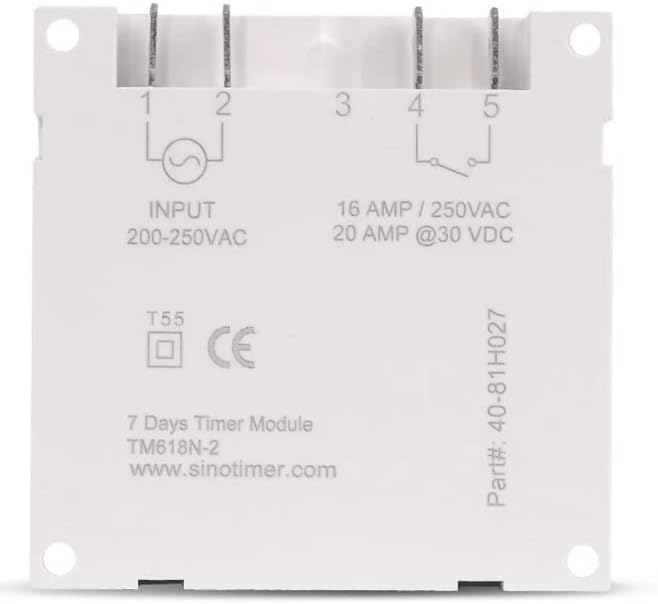
ምስል 2፡ ተመለስ view of the Sinotimer TM618N-2, showing input/output terminals and wiring diagram.
- Input (Terminals 1 & 2): Connect your 200-250VAC power supply to these terminals.
- Output (Terminals 3, 4, & 5):
- Terminal 3: Common (COM)
- Terminal 4: Normally Open (NO) - Connect your load here for switched power.
- Terminal 5: Normally Closed (NC) - (Less commonly used for timer applications, but available).
- አብራ፡ Once wiring is complete and secure, restore power to the circuit. The timer display should illuminate.

Figure 3: Technical drawing showing the dimensions of the Sinotimer TM618N-2 timer.
5. የአሠራር መመሪያዎች
5.1. የአዝራር ተግባራት
- ሰዓት፡- የአሁኑን ሰዓት እና ቀን ለማዘጋጀት ጥቅም ላይ ውሏል።
- ፕሮግ Enters/exits programming mode for ON/OFF schedules.
- ሳምንት: Selects the day(s) of the week during time or program setting.
- ሰአት፥ Adjusts the hour during time or program setting.
- ደቂቃ፡- Adjusts the minute during time or program setting.
- አስታውስ፡ Recalls or cancels a program setting.
- መመሪያ፡ Manually overrides the timer's current state (ON/AUTO/OFF).
- R (ዳግም አስጀምር): Small button (requires a pointed object) to reset the timer to factory defaults.
5.2. የአሁኑን ሰዓት እና ቀን ማቀናበር
- ተጭነው ይያዙት። ሰዓት አዝራር።
- በመያዝ ላይ እያለ ሰዓት, ይጫኑ ሳምንት to set the current day (MO, TU, WE, TH, FR, SA, SU).
- በመያዝ ላይ እያለ ሰዓት, ይጫኑ ሰአት የአሁኑን ሰዓት ለማዘጋጀት.
- በመያዝ ላይ እያለ ሰዓት, ይጫኑ MIN የአሁኑን ደቂቃ ለማዘጋጀት.
- ይልቀቁት ሰዓት ቅንብሮችን ለማስቀመጥ አዝራር።
5.3. የማብራት/የማጥፋት መርሃ ግብሮችን ፕሮግራም ማድረግ
The timer supports up to 16 ON and 16 OFF programs. Each program can be set for a specific day or group of days.
- የሚለውን ይጫኑ ፕሮግ button once. The display will show "1 ON".
- ተጫን ሳምንት repeatedly to select the desired day(s) for this program (e.g., MO, TU, WE, TH, FR, SA, SU; MO-FR; SA-SU; MO-SA; etc.).
- ተጫን ሰአት የሚፈለገውን ሰዓት ላይ ለማዘጋጀት።
- ተጫን MIN የተፈለገውን ON ደቂቃ ለማዘጋጀት.
- ተጫን ፕሮግ እንደገና። ማሳያው "1 ጠፍቷል" ያሳያል.
- Repeat steps 2-4 to set the desired OFF time for the first program.
- ተጫን ፕሮግ to move to the next program ("2 ON", "2 OFF", etc.) and repeat the process for up to 16 programs.
- To exit programming mode and save settings, press the ሰዓት አዝራር።
5.4. በእጅ መሻር
የሚለውን ይጫኑ ማንዋል button to cycle through the output modes:
- በርቷል Output is continuously ON, ignoring programs.
- ራስ-ሰር Output follows the programmed schedules.
- ጠፍቷል Output is continuously OFF, ignoring programs.
ሰዓት ቆጣሪው መብራቱን ያረጋግጡ አውቶማቲክ mode for programmed operation.
5.5. Resetting the Timer
To clear all settings and return the timer to its factory default state, insert a pointed object (like a paperclip) into the small R (Reset) hole and press gently.
6. ጥገና
The Sinotimer TM618N-2 requires minimal maintenance.
- መሳሪያውን ንጹህ እና ከአቧራ ነጻ ያድርጉት. ለማጽዳት ለስላሳ እና ደረቅ ጨርቅ ይጠቀሙ.
- ገላጭ ማጽጃዎችን ወይም ፈሳሾችን አይጠቀሙ.
- Ensure the timer is installed in a dry environment, away from direct moisture or extreme temperatures.
- The internal battery is designed for long life and is not user-replaceable. If the display goes blank or settings are not retained after a power outage, the battery may need professional service.
7. መላ መፈለግ
| ችግር | ሊሆን የሚችል ምክንያት | መፍትሄ |
|---|---|---|
| ማሳያው ባዶ ነው። | No power supply; internal battery depleted. | Check power connections. If power is present, the internal battery may need charging (leave connected to power for several hours) or replacement (professional service required). |
| Timer not switching ON/OFF as programmed. | Timer is not in AUTO mode; incorrect program settings; wiring issue. | ተጫን ማንዋል "AUTO" እስኪታይ ድረስ።view and correct program settings. Verify wiring connections. |
| ከኃይል ou በኋላ ቅንብሮች ጠፍተዋልtage. | Internal battery is depleted or faulty. | Leave the timer connected to power for at least 4 hours to charge the internal battery. If the problem persists, the battery may need replacement (professional service recommended). |
| አዝራሮች ምላሽ የማይሰጡ ናቸው። | Temporary software glitch; unit needs reset. | ሙሉ ዳግም ማስጀመርን በመጠቀም ያከናውኑ R button. If the issue continues, contact support. |
8. ዋስትና እና ድጋፍ
የዋስትና መረጃ እና የቴክኒክ ድጋፍ ለማግኘት፣ ከግዢዎ ጋር የቀረቡትን ሰነዶች ይመልከቱ ወይም ቸርቻሪዎን ያነጋግሩ። የግዢ ማረጋገጫዎን ለዋስትና ጥያቄዎች ያስቀምጡ።
Manufacturer: Sinotimer


