መግቢያ
This manual provides essential instructions for the installation, operation, and maintenance of your VANBAR 2.5K Rear Camera, designed for use with VANBAR DC209 and DC209pro dash cam models. Please read this manual thoroughly before use to ensure proper functionality and longevity of the product.
ምርት አልቋልview
The VANBAR 2.5K Rear Camera is an accessory designed to extend the recording capabilities of compatible VANBAR dash cam systems. It captures high-resolution video from the rear of your vehicle, providing comprehensive coverage. The camera comes with a 5.5-meter cable for flexible installation.
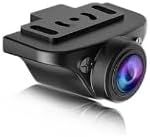
ምስል 1፡ The VANBAR 2.5K Rear Camera unit. This compact camera is designed to be mounted at the rear of a vehicle to record footage, connecting to a compatible main dash camera unit via its cable.
ማዋቀር እና መጫን
- አዘገጃጀት፥ Ensure your vehicle's engine is off and the main dash cam unit (DC209 or DC209pro) is powered down.
- የኋላ ካሜራ መጫን;
- በኋለኛው የፊት መስተዋትዎ ላይ ግልጽ የሆነ ቦታ የሚይዝ ተስማሚ ቦታ ይለዩ view and does not obstruct the driver's vision.
- Clean the mounting surface thoroughly to ensure optimal adhesion for the adhesive mount.
- Attach the rear camera to the chosen location using the adhesive mount. Adjust the camera angle for the desired field of view.
- የኬብል መስመር፡
- Carefully route the 5.5-meter camera cable from the rear camera to the location of your main dash cam unit.
- Tuck the cable neatly along the vehicle's headliner, A-pillars, or under floor mats to keep it out of sight and prevent interference with vehicle operation.
- Use cable clips or ties if necessary to secure the cable.
- ከዋናው ክፍል ጋር መገናኘት;
- Locate the dedicated rear camera input port on your VANBAR DC209 or DC209pro dash cam.
- Connect the rear camera cable securely into this port.
- በመሞከር ላይ፡ Power on your main dash cam unit. The rear camera feed should appear on the dash cam's display. Adjust the camera angle if needed.
የአሠራር መመሪያዎች
The VANBAR 2.5K Rear Camera operates in conjunction with your main VANBAR DC209 or DC209pro dash cam unit. Once properly installed and connected, it will automatically begin recording when the main unit is powered on and recording. Refer to your main dash cam's instruction manual for specific settings related to dual-channel recording, viewing rear camera footage, and playback options.
- አውቶማቲክ ቀረጻ፡ The rear camera records simultaneously with the front camera of your main dash cam.
- የማሳያ ሁነታዎች፡ Your main dash cam may offer various display modes, such as front-only, rear-only, or picture-in-picture views. Consult your main unit's manual to switch between these modes.
- File ማከማቻ፡ የኋላ ካሜራ footage is typically stored on the same memory card as the front camera footage, often in separate folders or as combined files.
ጥገና
- ሌንስን ማጽዳት; Regularly clean the camera lens with a soft, lint-free cloth to ensure clear video quality. Avoid abrasive materials or harsh chemicals.
- የኬብል ምርመራ; Periodically check the camera cable for any signs of wear, damage, or loose connections. Ensure it remains securely tucked away.
- የመጫኛ ደህንነት; Verify that the camera remains firmly attached to its mounting surface. Re-secure if necessary.
- የሙቀት ግምት; Avoid exposing the camera to extreme temperatures for prolonged periods, as this can affect its performance and lifespan.
መላ መፈለግ
| ችግር | ሊሆን የሚችል ምክንያት | መፍትሄ |
|---|---|---|
| No rear camera display/recording. |
|
|
| Poor video quality from rear camera. |
|
|
| ገመድ የተጎዳ ይመስላል። |
|
|
ዝርዝሮች
| ባህሪ | ዝርዝር |
|---|---|
| የምርት ስም | ቫንባር |
| የሞዴል ቁጥር | dc2k |
| ተኳኋኝነት | VANBAR DC209, DC209pro Dash Cams |
| ጥራት | 2.5K (as per product description) |
| የኬብል ርዝመት | 5.5 ሜትር |
| የመጫኛ አይነት | የማጣበቅ ተራራ |
| Screen Size (Main Unit) | 5.5 inches (referring to compatible main unit display) |
| የባትሪ አጠቃቀም | No (powered by main dash cam) |
የዋስትና መረጃ
VANBAR products are manufactured to high-quality standards. For specific warranty terms and conditions, please refer to the warranty card included with your main VANBAR dash cam unit or visit the official VANBAR webጣቢያ. ለዋስትና ጥያቄዎች የግዢ ማረጋገጫዎን ያስቀምጡ።
የደንበኛ ድጋፍ
If you encounter any issues or have questions regarding your VANBAR 2.5K Rear Camera, please contact VANBAR customer support through the following channels:
- Webጣቢያ፡ Visit the official VANBAR webለተደጋጋሚ ጥያቄዎች፣ የድጋፍ ምንጮች እና የእውቂያ ቅጾች ጣቢያ።
- ኢሜይል፡- Refer to your product packaging or main dash cam manual for the customer support email address.
- የመስመር ላይ ቸርቻሪ፡ For purchase-related inquiries, you may contact the retailer where the product was purchased.