1. ምርት አብቅቷልview
The Point Wired Mini Keyboard Pt-350 is a compact and versatile keyboard designed for both gaming and general typing. It features a high-quality build and a modern design, adhering to industry standards for reliable performance. This keyboard is an ideal choice for users seeking a durable and efficient input device.
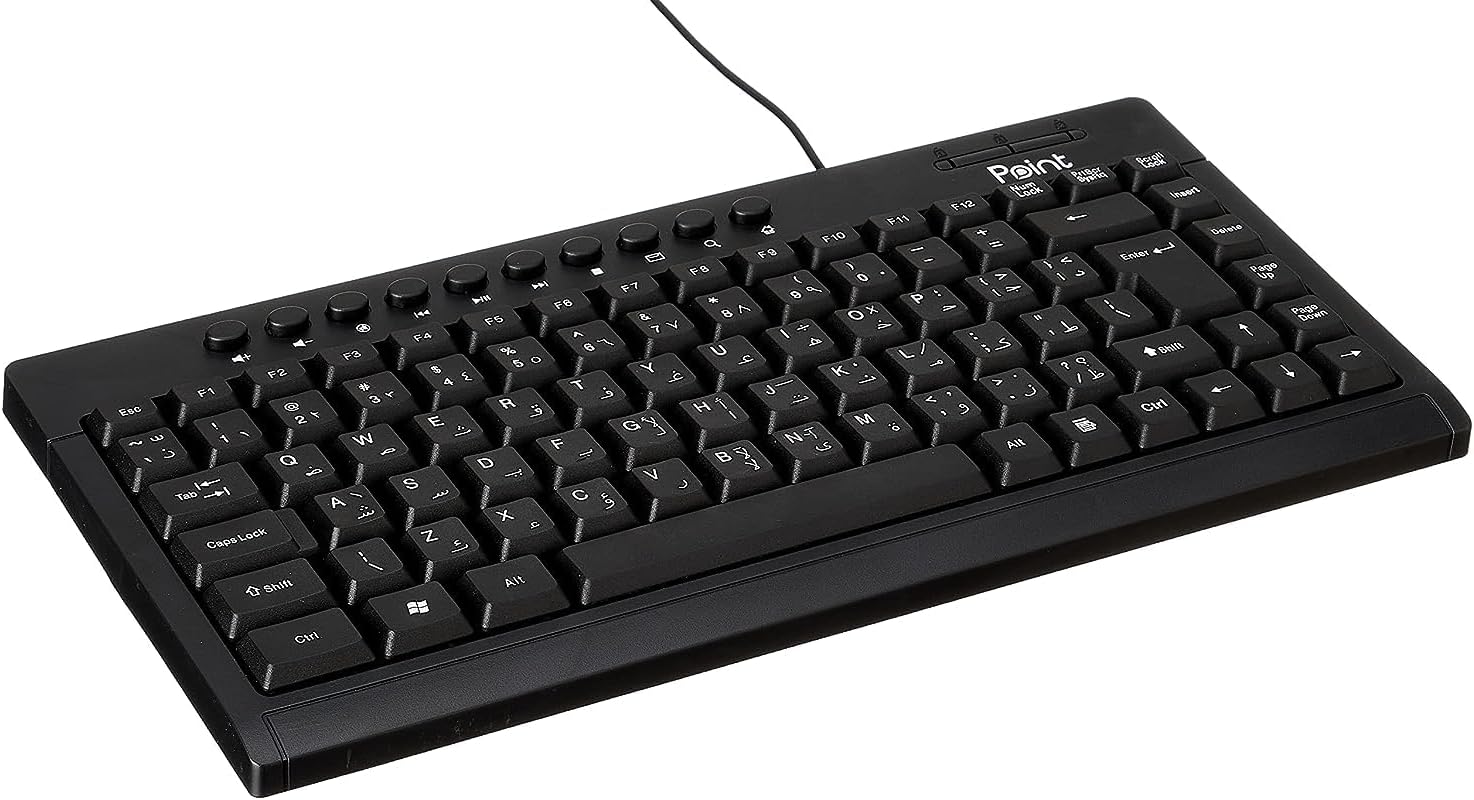
ምስል 1.1: ማዕዘን view of the Point Wired Mini Keyboard Pt-350, showcasinግ የእሱ ውሱን ዲዛይን እና የቁልፍ አቀማመጥ።
ቁልፍ ባህሪዎች
- Wired connectivity for stable performance.
- Compact design suitable for various setups.
- Durable construction from high-quality plastic materials.
- Designed for both gaming and typing applications.
2. የጥቅል ይዘቶች
ሁሉም እቃዎች መኖራቸውን ለማረጋገጥ እባክዎ ጥቅሉን በጥንቃቄ ያረጋግጡ፡
- Point Wired Mini Keyboard Pt-350
- የተጠቃሚ መመሪያ (ይህ ሰነድ)
3. ማዋቀር
Follow these steps to set up your Point Wired Mini Keyboard Pt-350:
- የቁልፍ ሰሌዳውን ይንቀሉት፡- የቁልፍ ሰሌዳውን ከማሸጊያው በጥንቃቄ ያስወግዱት።
- የዩኤስቢ አያያዥን ይለዩ፦ The keyboard comes with an integrated USB cable.
- ከኮምፒዩተርዎ ጋር ይገናኙ; Locate an available USB port on your computer (desktop PC, laptop, etc.). Insert the keyboard's USB connector firmly into the USB port.
- የአሽከርካሪ መጫኛ (ፕለጊን እና ፕሌይ)፦ The keyboard is plug-and-play compatible. Your operating system (Windows, macOS, Linux) should automatically detect and install the necessary drivers. This process usually takes a few seconds.
- ተግባራዊነትን አረጋግጥ፡ Once connected, open a text editor or any application that accepts text input and test the keys to ensure proper operation.

ምስል 3.1፡ ከላይ ወደ ታች view of the keyboard, illustrating the key layout and integrated cable for connection.
4. የአሠራር መመሪያዎች
The Point Wired Mini Keyboard Pt-350 operates like a standard computer keyboard. Below are general instructions and tips for use:
መሰረታዊ የፊደል አጻጻፍ፡
- Simply press the desired keys to input characters, numbers, and symbols into your active application.
- የሚለውን ተጠቀም ፈረቃ key for uppercase letters and alternative symbols on keys.
- የ የበላይ ቁልፍ key toggles permanent uppercase typing.
- የ የኋላ ቦታ key deletes characters to the left of the cursor.
- የ አስገባ key confirms input or moves to the next line.
የተግባር ቁልፎች (F1-F12)፦
The function keys (F1 through F12) perform various tasks depending on the active program or operating system. Some common uses include:
- F1፡ Often opens help for the active program.
- F2፡ Renames a selected item.
- F5፡ ያድሳል ሀ web page or document.
- F11፡ Toggles full-screen mode in many browsers.
የመልቲሚዲያ ቁልፎች
The keyboard may include dedicated multimedia keys or secondary functions on the F-keys (accessed via the Fn key, if present). These typically control:
- Volume control (Mute, Volume Up, Volume Down)
- Media playback (Play/Pause, Stop, Previous Track, Next Track)
5. ጥገና
ትክክለኛ ጥገና የቁልፍ ሰሌዳዎን ረጅም ጊዜ እና ጥሩ አፈፃፀም ያረጋግጣል፡
- ማጽዳት፡ Regularly clean the keyboard to prevent dust and debris buildup. Use a soft, lint-free cloth slightly dampበውሃ ወይም ለስላሳ የጽዳት መፍትሄ. ኃይለኛ ኬሚካሎችን ወይም ገላጭ ቁሳቁሶችን ያስወግዱ.
- አቧራ ማስወገድ; Use compressed air to blow out dust and crumbs from between the keys.
- መፍሰስን ያስወግዱ፡ Keep liquids away from the keyboard to prevent damage to internal components. In case of a spill, immediately disconnect the keyboard and allow it to dry completely before reconnecting.
- ማከማቻ፡ ጥቅም ላይ በማይውሉበት ጊዜ፣ ኪቦርዱን ከከፍተኛ የሙቀት መጠን ራቅ ባለ ንጹህና ደረቅ ቦታ ያስቀምጡ።
6. መላ መፈለግ
If you encounter issues with your Point Wired Mini Keyboard Pt-350, refer to the following common problems and solutions:
የቁልፍ ሰሌዳ ምላሽ አይሰጥም፡
- የዩኤስቢ ግንኙነትን ያረጋግጡ፡- የዩ ኤስ ቢ ገመዱ ደህንነቱ በተጠበቀ ሁኔታ በኮምፒዩተርዎ ላይ በሚሰራ የዩኤስቢ ወደብ ላይ መሰካቱን ያረጋግጡ። የተለየ የዩኤስቢ ወደብ ይሞክሩ።
- ኮምፒተርን እንደገና ያስጀምሩ; ቀላል ዳግም ማስጀመር ብዙውን ጊዜ የግንኙነት ችግሮችን ሊፈታ ይችላል።
- በሌላ ኮምፒውተር ላይ ሞክር፡- Connect the keyboard to another computer to determine if the issue is with the keyboard or your computer's setup.
- የመሣሪያ አስተዳዳሪን ያረጋግጡ (ዊንዶውስ) In Windows, go to Device Manager and check if the keyboard is listed under 'Keyboards' and if there are any error symbols. You might need to update or reinstall the driver.
ቁልፎች የማይሰሩ ወይም የማይጣበቁ ናቸው፤
- አጽዳ ቁልፎች፡- Dust, crumbs, or liquid residue can cause keys to stick or malfunction. Refer to the Maintenance section for cleaning instructions.
- አካላዊ ጉዳት; Inspect the keys for any visible physical damage.
የተሳሳተ የቁምፊ ውጤት፦
- የቋንቋ ቅንብሮችን ያረጋግጡ፦ Ensure your operating system's keyboard language settings match the physical layout of your keyboard.
- Driver Issue: Reinstalling the keyboard driver might resolve this.
እነዚህን እርምጃዎች ከሞከሩ በኋላ ችግሩ ከቀጠለ፣ እባክዎ የደንበኛ ድጋፍ ሰጪን ያነጋግሩ።
7. ዝርዝሮች
Technical specifications for the Point Wired Mini Keyboard Pt-350:

ምስል 7.1: ጎን view of the keyboard, highlighting its profile and compact form factor.
| ባህሪ | ዝርዝር |
|---|---|
| የምርት ስም | ነጥብ |
| ሞዴል | ፕት-350 |
| የግንኙነት ቴክኖሎጂ | ባለገመድ |
| ተስማሚ መሣሪያዎች | ኮምፒውተር |
| የቁልፍ ሰሌዳ መግለጫ | ሁለገብ ተግባር |
| የሚመከር አጠቃቀሞች | ፒሲ ጨዋታ |
| ልዩ ባህሪያት | ጨዋታ |
| ቀለም | ጥቁር |
| ቅጥ | ዘመናዊ |
| ቁሳቁስ | ፕላስቲክ |
| የመላኪያ ልኬቶች | 34.5 x 26.4 x 3 ሴ.ሜ |
| ክብደት | 800 ግራም |
| መጀመሪያ የሚገኝ ቀን | ሴፕቴምበር 4፣ 2022 |
| ASIN | B0BD2DM9ZJ |
8. ዋስትና እና ድጋፍ
This product is covered by a standard manufacturer's warranty. Please refer to the warranty card included with your purchase for specific terms and conditions, including the warranty period and coverage details.
For technical support, troubleshooting assistance, or warranty claims, please contact Point customer service through the contact information provided on the product packaging or the official Point website. When contacting support, please have your product model (Pt-350) and purchase details ready.


