1. መግቢያ
This manual provides essential information for the proper setup, operation, and maintenance of your Sharp 32FG6EA 32-inch HD Android TV. The Sharp 32FG6EA offers a wide range of connection options and features the Android TV operating system, providing a modern and intuitive television experience. It functions as an all-in-one entertainment hub, integrating Google Assistant for a smarter viewing experience. Users can quickly access entertainment, control smart devices, and obtain on-screen information using voice commands.
2. የደህንነት መረጃ
ቴሌቪዥኑን ከመጠቀምዎ በፊት ሁሉንም የደህንነት መመሪያዎች በጥንቃቄ ያንብቡ። ይህንን መመሪያ ለወደፊት ጥቅም ላይ እንዲውል ያስቀምጡት።
- የኃይል አቅርቦት; ቴሌቪዥኑ ከትክክለኛው ቮልት ጋር ከኃይል ምንጭ ጋር መገናኘቱን ያረጋግጡtagሠ. የኃይል ማሰራጫዎችን ከመጠን በላይ አይጫኑ.
- የአየር ማናፈሻ; የአየር ማናፈሻ ክፍተቶችን አያግዱ. ከመጠን በላይ ሙቀትን ለመከላከል ለትክክለኛው የአየር ፍሰት በቴሌቪዥኑ ዙሪያ በቂ ቦታ ይፍቀዱ.
- ውሃ እና እርጥበት; Do not expose the TV to rain, moisture, or excessive humidity. Avoid placing objects filled with liquids on or near the TV.
- ማጽዳት፡ ከማጽዳትዎ በፊት ቴሌቪዥኑን ይንቀሉ. ለስላሳ እና ደረቅ ጨርቅ ይጠቀሙ. ፈሳሽ ማጽጃዎችን ወይም የአየር ማጽጃዎችን አይጠቀሙ.
- አቀማመጥ፡- ቴሌቪዥኑን በተረጋጋና ደረጃ ላይ ያድርጉት። ግድግዳ ላይ ከተገጠመ፣ ተራራው ደህንነቱ በተጠበቀ ሁኔታ መጫኑን ያረጋግጡ እና የቴሌቪዥኑን ክብደት መደገፍ ይችላሉ።
- አገልግሎት መስጠት፡ ቴሌቪዥኑን እራስዎ ለማገልገል አይሞክሩ. ሁሉንም አገልግሎቶች ብቁ ለሆኑ የአገልግሎት ሰራተኞች ያመልክቱ።
3. የጥቅል ይዘቶች
ሁሉም እቃዎች በማሸጊያው ውስጥ መኖራቸውን ያረጋግጡ፡-
- Sharp 32FG6EA 32-inch HD Android TV
- የርቀት መቆጣጠሪያ (ከ2 AAA ባትሪዎች ጋር)
- Stand Type Base
- መመሪያ መመሪያ
- የኃይል ገመድ
4. ማዋቀር
4.1 ማሸግ
Carefully remove the TV and all accessories from the packaging. Retain the packaging materials for future transport or servicing.
4.2 መቆሚያውን ማያያዝ
If you are not wall-mounting the TV, attach the included stand base:
- ጉዳት እንዳይደርስ ለመከላከል የቴሌቪዥኑን ማያ ገጽ ለስላሳ እና ጠፍጣፋ መሬት ላይ ያድርጉት።
- የቆመውን መሠረት በቴሌቪዥኑ ግርጌ ላይ ከሚገኙት መጫኛ ቀዳዳዎች ጋር ያስተካክሉት.
- የተቀመጡትን ብሎኖች በመጠቀም መቆሚያውን ያስጠብቁ። መቆሚያው በጥብቅ መያዙን ያረጋግጡ።
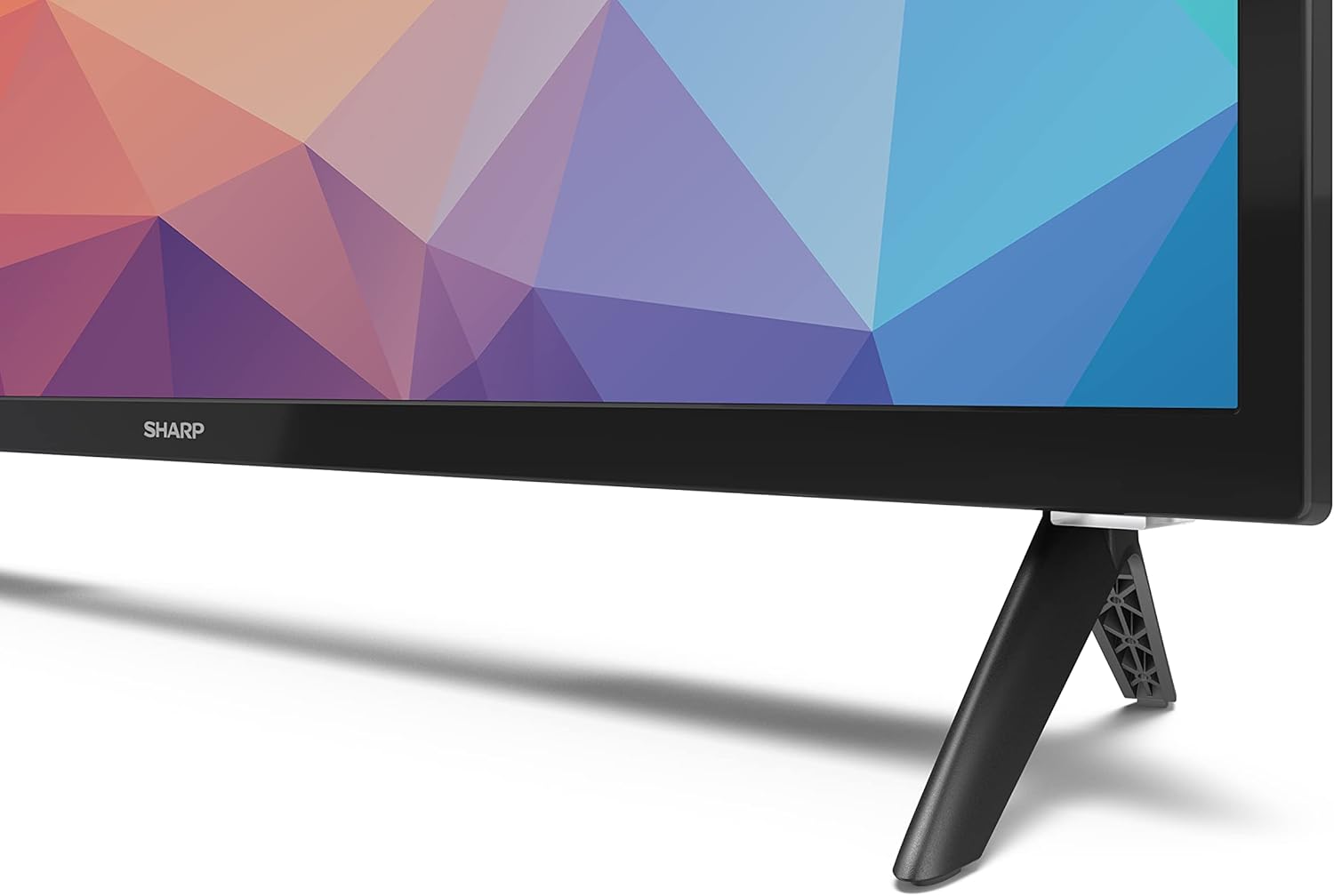
Image: Close-up of the TV stand attachment.
4.3 ግድግዳ መትከል
The Sharp 32FG6EA supports VESA wall mounts with dimensions of 75 x 75 mm. Wall mount hardware is not included. Follow the instructions provided with your wall mount kit.
4.4 የውጭ መሳሪያዎችን ማገናኘት
ቴሌቪዥንዎ የተለያዩ መሳሪያዎችን ለማገናኘት በርካታ ወደቦችን ያቀርባል፦
- ኤችዲኤምአይ: Connect Blu-ray players, game consoles, or set-top boxes to the 2 HDMI ports.
- ዩኤስቢ፡ Connect USB storage devices for media playback to the 2 USB ports.
- አንቴና/ገመድ፡ Connect an antenna or cable TV source for broadcast channels.
- ኢተርኔት፡ ለገመድ የበይነመረብ ግንኙነት።
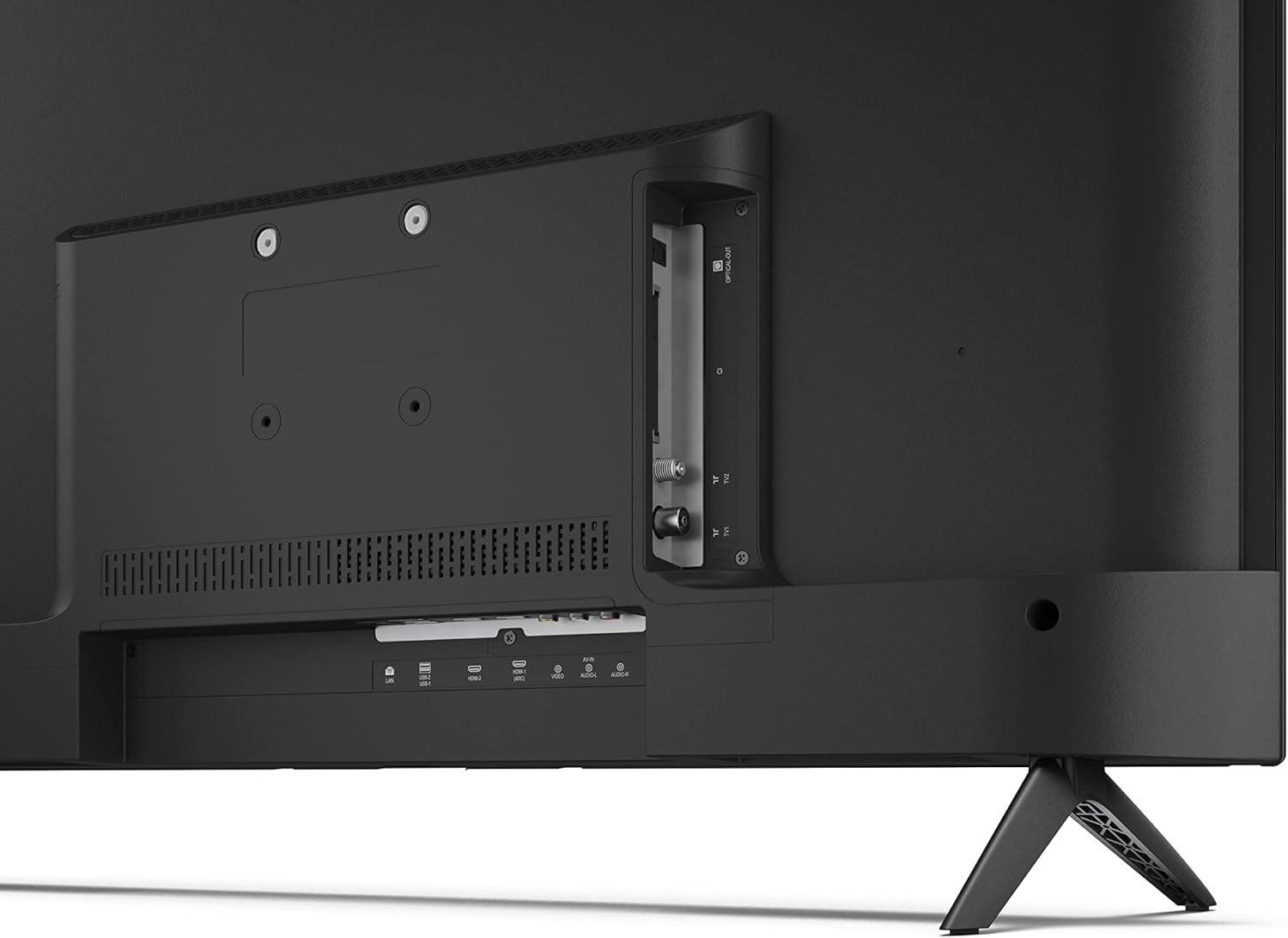
ምስል: የኋላ view የቴሌቪዥኑ ከግንኙነት ወደቦች ጋር።
4.5 የኃይል ግንኙነት
After connecting all necessary devices, plug the power cable into the TV and then into a wall outlet.
4.6 የመነሻ ማዋቀር አዋቂ
ለመጀመሪያ ጊዜ ሲበራ፣ ቴሌቪዥኑ በመጀመሪያው የማዋቀር ሂደት ውስጥ ይመራዎታል። ይህ የሚከተሉትን ያካትታል፦
- የቋንቋ ምርጫ።
- የአውታረ መረብ ግንኙነት (Wi-Fi ወይም ኤተርኔት)።
- Google account sign-in (required for full Android TV features).
- የሰርጥ ቅኝት.
5. አሠራር
5.1 የርቀት መቆጣጠሪያ በላይview
The included remote control allows you to navigate the TV's features. Insert the 2 AAA batteries into the remote control before use.
- የኃይል ቁልፍ፡- ቴሌቪዥኑን ያበራል ወይም ያጠፋል።
- Directional Pad (D-Pad) & OK Button: ምናሌዎቹን ያስሱ እና ምርጫዎችን ያረጋግጡ።
- ተመለስ አዝራር፡- ወደ ቀዳሚው ማያ ገጽ ይመለሳል።
- መነሻ አዝራር፡- የአንድሮይድ ቲቪ መነሻ ስክሪን ይደርሳል።
- ድምጽ ወደ ላይ/ወደታች፡ የድምጽ መጠኑን ያስተካክላል።
- ቻናል ወደ ላይ/ታች፡ የቲቪ ጣቢያዎችን ይለውጣል።
- ጎግል ረዳት ቁልፍ፡- የድምፅ ቁጥጥርን ያነቃል።
- የመተግበሪያ አቋራጭ አዝራሮች፡- እንደ Netflix፣ Prime Video እና YouTube ላሉ ታዋቂ የዥረት አገልግሎቶች የተወሰኑ አዝራሮች።
5.2 Android TV Interface Navigation
The Android TV home screen provides access to your installed apps, recommended content, and settings. Use the directional pad on your remote to navigate through the interface.
5.3 የጉግል ረዳት
በርቀት መቆጣጠሪያዎ ላይ ያለውን የGoogle Assistant አዝራር ይጫኑ እና ወደ ማይክሮፎኑ ይናገሩ፦
- ፈልግ ፊልሞች፣ ትርኢቶች ወይም መረጃዎች።
- ዘመናዊ የቤት መሣሪያዎችን ይቆጣጠሩ።
- መተግበሪያዎችን ይክፈቱ።
- የቲቪ ቅንብሮችን ያስተካክሉ።
5.4 Chromecast አብሮ የተሰራ
The TV includes Chromecast built-in, allowing you to cast content from compatible apps on your smartphone, tablet, or computer directly to the TV screen.
5.5 የብሉቱዝ ግንኙነት
Connect Bluetooth devices such as headphones or speakers to your TV for a personalized audio experience. Navigate to the TV's settings menu to pair new Bluetooth devices.
5.6 የድምጽ ቅንብሮች
The TV supports Dolby Audio with 2 x 6 W RMS speakers. You can adjust audio settings, including sound modes and equalizer, through the TV's settings menu.
6. ጥገና
6.1 ቴሌቪዥኑን ማጽዳት
የቴሌቪዥን ማያ ገጹን እና ካቢኔቱን ለማጽዳት፦
- የኃይል ገመዱን ከግድግዳው መውጫ ይንቀሉት.
- Use a soft, lint-free cloth to gently wipe the screen and surfaces.
- ለግትር ምልክቶች፣ በትንሹ መampጨርቁን በውሃ ወይም በልዩ ስክሪን ማጽጃ (በቀጥታ ማያ ገጽ ላይ ሳይሆን በጨርቅ ላይ ያመልክቱ)።
- ሻካራ ማጽጃዎችን፣ ሰምዎችን ወይም ፈሳሾችን አይጠቀሙ።
6.2 የሶፍትዌር ዝመናዎች
Your Android TV may receive periodic software updates to improve performance and add new features. Ensure your TV is connected to the internet to receive these updates. You can check for updates manually in the TV's settings menu.
7. መላ መፈለግ
በቲቪዎ ላይ ችግሮች ካጋጠሙዎት የሚከተሉትን የተለመዱ ችግሮች እና መፍትሄዎች ይመልከቱ፡
- ኃይል የለም፡ የኃይል ገመዱ ከቴሌቪዥኑም ሆነ ከሚሰራው የግድግዳ መውጫ ጋር ደህንነቱ በተጠበቀ ሁኔታ መሰካቱን ያረጋግጡ። ሌላ መውጫ ይሞክሩ።
- ምንም ምስል/ድምጽ የለም፡ ትክክለኛው የግቤት ምንጭ መመረጡን ያረጋግጡ። ሁሉም ገመዶች (HDMI፣ አንቴና) በትክክል መገናኘታቸውን ያረጋግጡ።
- የርቀት መቆጣጠሪያ አይሰራም; Check the batteries and ensure they are inserted correctly. Point the remote directly at the TV's IR sensor.
- ደካማ የምስል ጥራት፡ Check antenna/cable connections. Adjust picture settings in the TV menu. For streaming content, ensure a stable internet connection.
- የበይነመረብ ግንኙነት የለም፡ Verify Wi-Fi password or Ethernet cable connection. Restart your router and the TV.
- የማይሰሩ መተግበሪያዎች፦ Ensure the TV's software is up to date. Try clearing the app's cache or reinstalling the app.
If problems persist, consult the Sharp support webጣቢያ ወይም የደንበኛ አገልግሎትን ያነጋግሩ።
8. ዝርዝሮች
| ባህሪ | ዝርዝር መግለጫ |
|---|---|
| የሞዴል ቁጥር | 32FG6EA |
| የምርት ስም | ስለታም |
| የስክሪን መጠን | 32 ኢንች (81 ሴሜ ሰያፍ) |
| የማሳያ ቴክኖሎጂ | LED |
| ጥራት | 720 ፒ (1366 x 768 ፒክስል) |
| ምጥጥነ ገጽታ | 16፡9 |
| የማደስ ደረጃ | 50 Hz |
| ስርዓተ ክወና | አንድሮይድ ቲቪ 11 |
| ልዩ ባህሪያት | Android TV, Google Assistant, Chromecast built-in |
| የድምጽ ውፅዓት | 2 x 6 W RMS, Dolby Audio |
| HDMI ወደቦች | 2 |
| የዩኤስቢ ወደቦች | 2 |
| ግንኙነት | ዋይ ፋይ፣ ብሉቱዝ፣ ኢተርኔት |
| VESA ግድግዳ ተራራ | 75 x 75 ሚ.ሜ |
| ከቆመበት ጋር ያሉ መጠኖች (W x H x D) | 731 x 486 x 177 ሚ.ሜ |
| መቆሚያ የሌላቸው መጠኖች (W x H x D) | 731 x 433 x 68 ሚ.ሜ |
| የምርት ልኬቶች (D x W x H) | 16 x 73 x 46.4 ሴ.ሜ (በግምት፣ ከቆመ ጋር) |
| ክብደት | 3.9 ኪ.ግ |
| የኢነርጂ ውጤታማነት ክፍል | E |

Image: TV dimensions diagram.

Image: Energy Label. For more details, visit EPREL ዳታቤዝ.
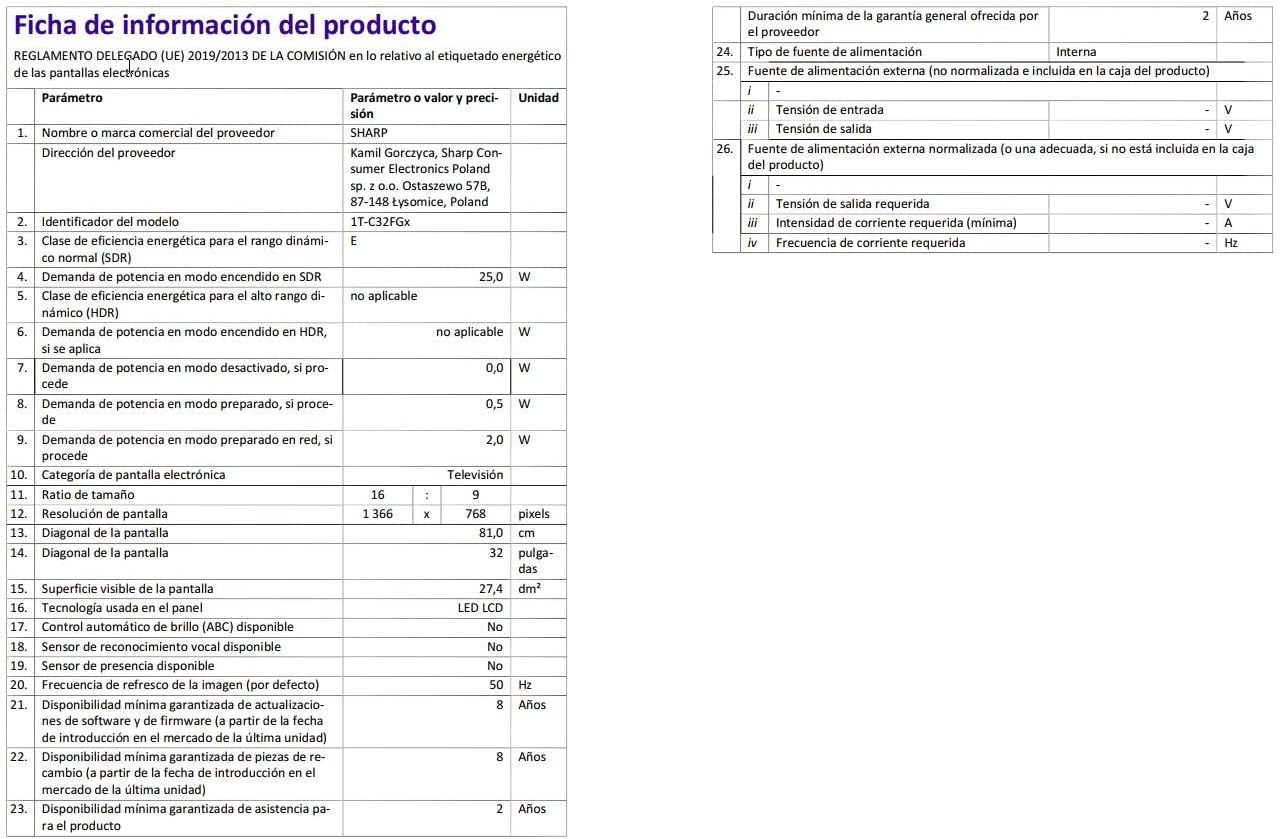
Image: Detailed product information sheet.
9. ዋስትና እና ድጋፍ
The Sharp 32FG6EA television comes with a minimum general warranty duration of 2 years from the provider.
For technical support, warranty claims, or further assistance, please refer to the contact information provided with your purchase documentation or visit the official Sharp support webለክልልዎ ጣቢያ.


