መግቢያ
This manual provides essential information for the safe and effective use of your Insta360 X3 Action Camera. Please read this manual thoroughly before operating the device and retain it for future reference.
በሣጥኑ ውስጥ ያለው
- 1x Insta360 X3 ካሜራ
- 1x የኃይል መሙያ ገመድ
- 1 x የመከላከያ ከረጢት
- 1x ሌንዝል ጨርቅ
- 1x የተጠቃሚ መመሪያ
- 1x Bullet Time Handle
- 1x የሌንስ መከላከያ
- 1 x 256GB ኤስዲ ካርድ
- 1x EVO Gimbals ሌንስ ጨርቅ
ማዋቀር
የመነሻ ኃይል መሙላት
Before first use, fully charge the Insta360 X3 camera using the provided charge cable. Connect the cable to the camera's charging port and a USB power source. The battery indicator will show charging status.
ኤስዲ ካርዱን በማስገባት ላይ
Locate the SD card slot on the camera. Insert the 256GB SD card (included) into the slot until it clicks into place. Ensure the camera is powered off before inserting or removing the SD card.
መለዋወጫዎችን በማያያዝ ላይ
Attach the lens guard to protect the camera lenses. The bullet time handle can be screwed into the camera's tripod mount for extended reach and unique shooting angles.

Image: Insta360 X3 camera with a protective lens guard.
የአሠራር መመሪያዎች
በማብራት / በማጥፋት ላይ
Press and hold the power button to turn the camera on or off. The 2.29'' touchscreen will illuminate upon startup.
የንክኪ ማያ ገጽን በመጠቀም
Navigate through menus, change settings, and preview footage using the intuitive 2.29'' touchscreen. Swipe and tap gestures are supported.

Image: Insta360 X3 camera with its touchscreen displaying a live view.
360 Capture & Reframing
The X3 captures 5.7K 360 Active HDR video. This allows you to record everything around the camera and choose your preferred angle during post-production using the Insta360 app.

Image: A 360-degree capture showing a person on a sailboat with a wide, spherical view.
4K Single-Lens Mode
For traditional wide-angle footage, select a single lens to shoot in 4K30fps or 2.7K MaxView for an ultra-wide 170° field of view.
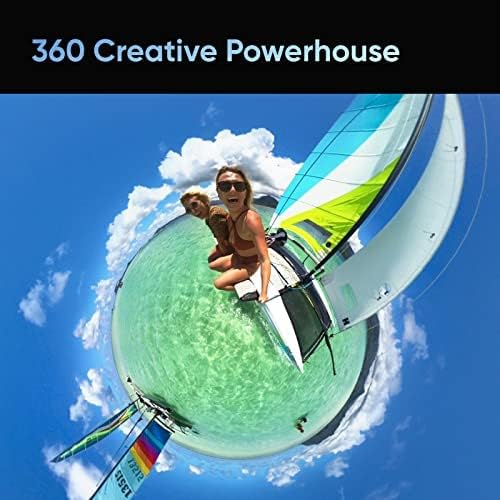
Image: A person on a bicycle on a bridge, demonstrating the 4K Single-Lens Mode.
የፍሎውስቴት ማረጋጊያ እና 360 ሆሪዞን መቆለፊያ
The camera features FlowState Stabilization and horizon leveling algorithms to ensure smooth and stable video footage, even during dynamic activities.
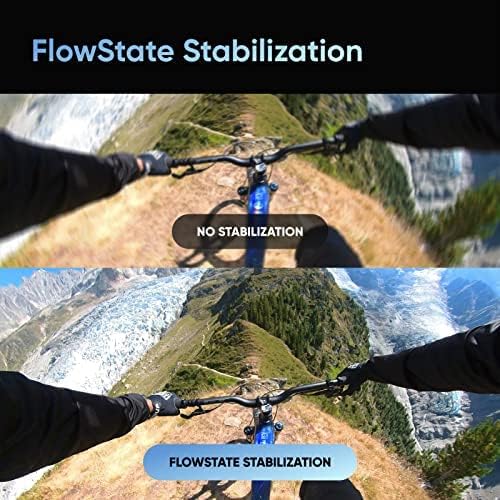
Image: A visual comparison of video footage, illustrating the effectiveness of FlowState Stabilization.
የማይታይ የራስ ፎቶ ዱላ
When using the 360 Lens with a compatible selfie stick, the stick is automatically removed from the footage, creating a third-person perspective or drone-like shots.
Video: An official product video demonstrating the Insta360 X3's features, including the invisible selfie stick effect and 360 capture capabilities.
ጥገና
ሌንሶችን ማጽዳት
Use the provided lens cloth to gently clean the camera lenses. Avoid using abrasive materials or harsh chemicals that could damage the lens coating.
የውሃ መከላከያ
The Insta360 X3 is IPX8 waterproof. Ensure all port covers are securely closed before exposing the camera to water. After use in saltwater, rinse the camera with fresh water and dry thoroughly.

Image: Insta360 X3 cameras submerged in water, highlighting its waterproof design.
የባትሪ እንክብካቤ
The camera uses a 1800 mAh Lithium Ion battery. For optimal battery life, avoid extreme temperatures and store the camera with a partial charge if not used for extended periods.

Image: Insta360 X3 camera alongside its 1800 mAh battery.
መላ መፈለግ
የተለመዱ ጉዳዮች
- ካሜራ አይበራም ባትሪው መሙላቱን ያረጋግጡ። ካሜራውን ከኃይል ምንጭ ጋር ያገናኙትና እንደገና ይሞክሩ።
- የኤስዲ ካርድ ስህተት፡ Reinsert the SD card. If the issue persists, try formatting the card (this will erase all data) or use a different compatible SD card.
- ያልተረጋጋ ፉtage: የFlowState ማረጋጊያ በካሜራ ቅንብሮች ውስጥ መንቃቱን ያረጋግጡ።
- የግንኙነት ችግሮች (ብሉቱዝ/ዋይፋይ)፦ Restart the camera and your connected device. Ensure both are within range and Bluetooth/Wi-Fi is enabled.
For more detailed troubleshooting, refer to the official Insta360 support webጣቢያ ወይም ሙሉ የተጠቃሚ መመሪያ.
ዝርዝሮች
| ባህሪ | ዝርዝር |
|---|---|
| የምርት ስም | ኢንስታ360 |
| የሞዴል ቁጥር | X3 |
| የፎቶ ዳሳሽ ቴክኖሎጂ | CMOS |
| የቪዲዮ ቀረጻ ጥራት | 5.7K (360), 4K (Single-Lens) |
| ከፍተኛ የትኩረት ርዝመት | 6.7 ሚሊሜትር |
| ከፍተኛው Aperture | ረ/2 |
| የፍላሽ ማህደረ ትውስታ አይነት | SD |
| የስክሪን መጠን | 2.29 ኢንች |
| የግንኙነት ቴክኖሎጂ | ብሉቱዝ ፣ Wi-Fi |
| የባትሪ ዓይነት | ሊቲየም አዮን (1800 ሚአሰ) |
| የእቃው ክብደት | 1.1 ፓውንድ |
| ልዩ ባህሪያት | 360 action camera, AI editing, live stream, 5.7K Active HDR 360 Video, 72MP Photo, 4K Single-Lens Mode, 8K Timelapse, FlowState Stabilization |
ዋስትና እና ድጋፍ
The Insta360 X3 camera may be eligible for extended protection plans, such as a 3-Year Protection Plan or a Complete Protect monthly plan, offered by third-party providers. Please refer to your purchase documentation for specific warranty details and coverage.
For product support, technical assistance, or to access the full digital manual, visit the official Insta360 webጣቢያ.


