መግቢያ
This manual provides comprehensive instructions for the IWEUKJLO 4K Digital Camera (Model DC101). Please read this guide carefully before use to ensure proper operation and to maximize your camera's potential. Keep this manual for future reference.

Figure 1: IWEUKJLO 4K Digital Camera and included accessories.
በሣጥኑ ውስጥ ያለው
ከዚህ በታች የተዘረዘሩት ሁሉም እቃዎች በጥቅልዎ ውስጥ መካተታቸውን ያረጋግጡ፡-
- 1 x 4K Digital Camera
- 1 x 32GB ኤስዲ ካርድ
- 1 x የኃይል መሙያ ማቆሚያ
- 1 x የተጠቃሚ መመሪያ
- 1 x ኃይል መሙያ
- 1 x አነስተኛ የዩኤስቢ ገመድ
- 1 x HDMI ገመድ
- 1 x ሌንስ
- 1 x የሌንስ ካፕ
- 2 x ዳግም ሊሞሉ የሚችሉ ባትሪዎች
- 1 x የካሜራ ቦርሳ
- 1 x በእጅ ክር
- 1 x የጽዳት ጨርቅ

Figure 2: Contents of the camera package.
ማዋቀር
1. ባትሪውን በመሙላት ላይ
Insert the rechargeable battery into the charging stand. Connect the charger to the charging stand and plug it into a power outlet. The indicator light on the charging stand will show the charging status. Ensure batteries are fully charged before first use.
2. ባትሪውን እና የኤስዲ ካርዱን ማስገባት
Open the battery compartment cover on the bottom of the camera. Insert the charged battery, ensuring correct polarity. Close the battery compartment. Insert the provided 32GB SD card into the SD card slot until it clicks into place. Ensure the card is inserted correctly to avoid damage.
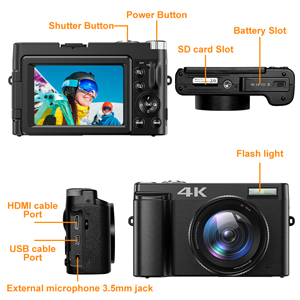
Figure 3: Location of battery and SD card slots.
የአሠራር መመሪያዎች
በማብራት / በማጥፋት ላይ
Press and hold the Power button located on the top of the camera to turn it on or off.
መሰረታዊ ፎቶግራፍ
In photo mode, lightly press the capture button to allow the camera to autofocus. The focus frame on the screen will change from yellow to green when focus is complete. Press the capture button firmly to take the photo.

Figure 4: Autofocus in action. Half-press the shutter button to focus.
ቪዲዮ መቅዳት
Switch the camera to video mode. Press the record button to start recording 4K video at 30fps. Press again to stop. The camera supports video pause, allowing you to pause and resume recording to save editing time.

Figure 5: UHD 4K and 16X Digital Zoom capabilities.
180° Flip Screen
The 3-inch touchscreen can be rotated 180 degrees, making it ideal for vlogging and self-portraits, allowing you to see yourself while recording or framing shots.
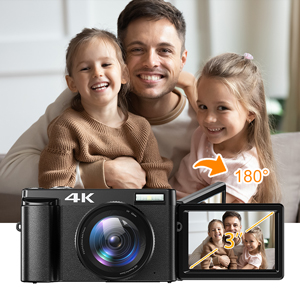
Figure 6: The 180° flip screen for easy self-recording.
Webካሜራ እና HDMI ውፅዓት
Connect the camera to your computer using the USB cable and switch to "webcam" mode to use it for live streaming, video calls, or online teaching. For larger displays, connect the camera to a TV or projector via the HDMI cable.

ምስል 7፡ Webcam functionality and HDMI output.
Additional Shooting Modes
The camera supports various modes including time-lapse, looping video, slow-motion video, anti-shake shooting, and continuous shooting. Explore these options through the camera's menu settings.

Figure 8: Diverse shooting functions for various scenarios.
ጥገና
ካሜራውን ማጽዳት
Use the provided cleaning cloth to gently wipe the camera body and lens. For stubborn smudges on the lens, use a specialized lens cleaning solution applied to the cloth, not directly to the lens. Avoid using abrasive materials or harsh chemicals.
ማከማቻ
When not in use, store the camera in its protective bag in a cool, dry place away from direct sunlight and extreme temperatures. Remove batteries if storing for extended periods to prevent leakage.
መላ መፈለግ
| ችግር | ሊሆን የሚችል ምክንያት | መፍትሄ |
|---|---|---|
| ካሜራ አይበራም። | ባትሪው ሞቷል ወይም በስህተት ገብቷል። | ባትሪውን ሙሉ በሙሉ ይሙሉት። ባትሪውን በትክክል ያስገቡት። |
| ምስሎች ደብዛዛ ናቸው። | Autofocus failed or subject is too close/far. | Ensure autofocus engages (green frame). Maintain appropriate distance from subject. Clean the lens. |
| የኤስዲ ካርድ ስህተት። | SD card is full, corrupted, or incorrectly inserted. | አላስፈላጊ ሰርዝ files or use a new SD card. Reinsert the SD card. Format the SD card (this will erase all data). |
| የቪዲዮ ጥራት ደካማ ነው። | Low light conditions or incorrect settings. | Ensure adequate lighting. Adjust video resolution settings. |
ችግሮች ከቀጠሉ፣ እባክዎ የደንበኞች ድጋፍን ያነጋግሩ።
ዝርዝሮች
- የሞዴል ስም፡- DC101
- የፎቶ ዳሳሽ ጥራት፡ 48 ሜፒ
- የቪዲዮ ጥራት፡ 4K (2160p), 4320p
- ዲጂታል ማጉላት፡ 16x
- የስክሪን መጠን፡ 3 inches (180° Flip Screen)
- የማሳያ አይነት፡ LCD, Capacitive Touch Screen
- ራስ-ማተኮር Yes (Contrast/Face/Smile Detection)
- ምስል ማረጋጊያ፡ ዲጂታል
- የሚደገፍ File ቅርጸት፡- JPEG (Image), AVI (Audio)
- ግንኙነት፡ ማይክሮ ዩኤስቢ፣ ኤችዲኤምአይ
- ማህደረ ትውስታ፡ እስከ 32GB የኤስዲ ካርድ ይደግፋል (32GB ተካትቷል)
- የባትሪ ዓይነት፡ Rechargeable Lithium Polymer (2 included)
- የእቃው ክብደት፡ 239 ግራም
- መጠኖች (በግምት): 11.5 x 7 x 4 cm (from image 71QwshWWUqL)
- ልዩ ባህሪያት፡ Webcam function, Time-lapse, Looping video, Slow-motion video, Video Pause, Anti-shake, Continuous Shooting, Self Timer (2s, 5s, 10s)
ዋስትና እና ድጋፍ
የዋስትና መረጃ
ይህ ምርት የ2 ዓመት የአምራች ዋስትና አለው። እባክዎ የግዢ ማረጋገጫዎን ለዋስትና ጥያቄዎች ያስቀምጡ።
የደንበኛ ድጋፍ
If you encounter any issues or have questions regarding your IWEUKJLO 4K Digital Camera, please feel free to contact us. We aim to reply within 24 hours.
For additional resources, you may refer to the official User Manual (PDF) available online: የተጠቃሚ መመሪያ (ፒዲኤፍ)


