መግቢያ
Thank you for choosing the Platinum Karaoke DK-88 Duo Speaker System. This manual provides essential information for the safe and efficient operation of your new device. Please read it thoroughly before use and retain it for future reference.
The DK-88 Duo is an all-in-one karaoke solution, featuring a built-in song library, wireless microphones, and various connectivity options. Its robust design and versatile features make it ideal for home parties, family gatherings, and outdoor events.
የደህንነት መረጃ
- እሳትን ወይም የኤሌክትሪክ ንዝረትን ለመከላከል ክፍሉን ለዝናብ ወይም ለእርጥበት አያጋልጡት።
- ሐ አይክፈቱasinሰ. ሁሉንም አገልግሎቶች ብቁ ለሆኑ ባለሙያዎች ያመልክቱ።
- በመሳሪያው ዙሪያ በቂ የአየር ዝውውር እንዲኖር ያድርጉ። የአየር ማናፈሻ ክፍተቶችን አይዝጉ።
- Use only the provided charging adapter.
- ክፍሉን በቀጥታ ከፀሀይ ብርሀን ፣ ከሙቀት ምንጮች እና ከመጠን በላይ አቧራ ያርቁ።
- ከባድ ዕቃዎችን በክፍሉ አናት ላይ ከማስቀመጥ ተቆጠብ።
- ልጆች በማይደርሱበት ቦታ ያስቀምጡ.
የጥቅል ይዘቶች
እባኮትን ከታች የተዘረዘሩት ሁሉም እቃዎች በጥቅልዎ ውስጥ መካተታቸውን ያረጋግጡ፡
- Main Unit (DK-88 Duo Speaker)
- የኃይል መሙያ አስማሚ
- 2 x ገመድ አልባ ማይክሮፎኖች
- የርቀት መቆጣጠሪያ
- Batteries (for remote control and microphones)
- ኤቪ ገመድ
- የተጠቃሚ መመሪያ
- የዋስትና ካርድ

ምስል 1፡ የተካተቱ መለዋወጫዎች እና ክፍሎች
ምርት አልቋልview
ፊት ለፊት View

ምስል 2: የፊት View of the DK-88 Duo with LED Lighting
ከፍተኛ የፓነል መቆጣጠሪያዎች

ምስል 3፡ የላይኛው ፓነል መቆጣጠሪያዎች እና ግብዓቶች
የኋላ ፓነል

ምስል 4፡ የኋላ ፓነል ከግንኙነት ወደቦች ጋር
ማዋቀር
1. Powering On/Charging
- የኤሲ ኃይል Connect the charging adapter to the 'DC IN 20V/4A' port on the top panel and plug it into a wall outlet. The unit can be used while charging.
- የባትሪ ሃይል፡- The unit has a built-in rechargeable battery providing up to 6 hours of playback. Ensure the unit is charged before portable use. The battery indicator on the display will show the current charge level.
2. ማይክሮፎን ማዋቀር
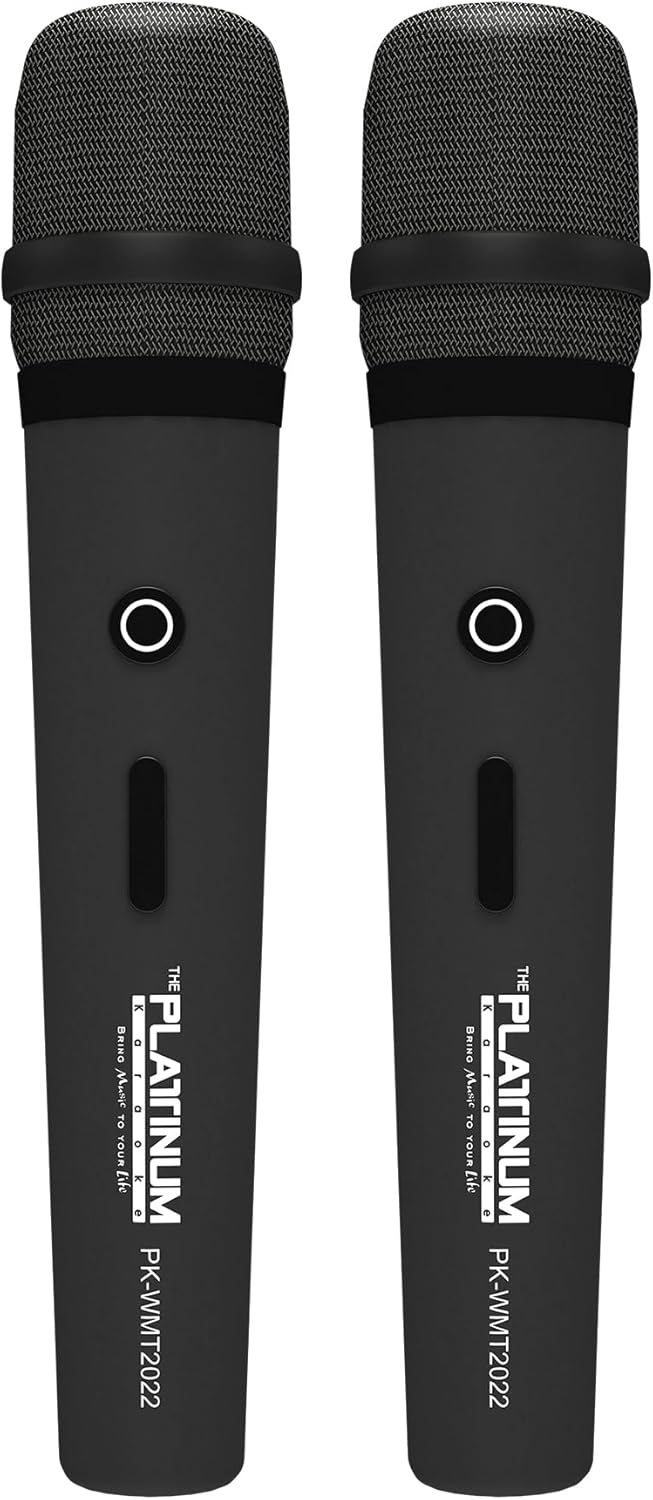
ምስል 5፡ ገመድ አልባ ማይክሮፎኖች
- Insert the provided batteries into each wireless microphone.
- Turn on the microphones using their power switches. They will automatically connect to the DK-88 Duo unit.
- Adjust the 'MIC VOLUME' knob on the top panel to control the microphone output level.
3. የድምጽ ምንጮችን በማገናኘት ላይ
- ብሉቱዝ፡ Turn on the unit. The Bluetooth indicator will flash. Enable Bluetooth on your mobile device and select 'DK-88 Duo' from the list of available devices to pair.
- የዩኤስቢ ድራይቭ፡ MP3 ሙዚቃ የያዘ የዩኤስቢ ፍላሽ አንፃፊ አስገባ files into the 'USB' port on the top panel. The system will automatically detect and play the files.
- የማይክሮ ኤስዲ ካርድ Insert a Micro SD card (up to 32GB, pre-loaded with songs) into the 'MICRO SD' slot on the top panel. The system will automatically detect and play the songs.
- AUX ግቤት፡ Use the provided AV cable to connect external audio devices (e.g., DVD player, TV) to the 'AUX' input on the top panel.
- ጊታር ግቤት፡- Connect a guitar to the 'GUITAR IN' port on the top panel. Adjust the dedicated 'GUITAR' volume knob.
የአሠራር መመሪያዎች
1. መሰረታዊ ኦፕሬሽን
- ማብራት/ማጥፋት፡ Use the 'POWER' switch on the top panel to turn the unit on or off.
- የድምጽ መቆጣጠሪያ፡- Rotate the 'VOLUME' knob to adjust the overall sound output.
- ሁነታ ምርጫ፡- Press the 'MODE' button to switch between input sources (Bluetooth, USB, Micro SD, AUX).
2. Karaoke Features
- የዘፈን ምርጫ፡- Use the 'SKIP' buttons (|< / >> |) to navigate through songs.
- የኢኮ ውጤት፡ Adjust the 'ECHO' knob to add or reduce echo to your vocals. This helps blend your voice with the music.
- የዘፈን ቀረጻ፡ Press the 'REC' button to start recording your performance. The system will save the music and your vocals to the inserted Micro SD card or USB drive. To share, simply copy the recorded file ወደ ኮምፒውተር.
- Vocal Assist (Training Songs): For training songs, the main vocals will automatically fade out when you sing into the microphone and reappear when you stop.
3. የድምጽ ማስተካከያ
- ትሬብል ቁጥጥር፡- Use the 'TREBLE' knob to adjust the high-frequency sounds of the music.
- የባስ ቁጥጥር፡- Use the 'BASS' knob to adjust the low-frequency sounds of the music.
4. የመብራት ውጤቶች
- Press the 'LIGHT' button on the top panel to cycle through different colorful fire lighting modes. The lights glow and dance with the music, enhancing the party atmosphere.
5. Platinum Link App
- Download the 'Platinum Link' app from your mobile device's app store (available on Android and iOS).
- Connect your mobile phone to the DK-88 Duo via Bluetooth.
- Use the app to control song selection, browse the song library, reserve songs, and display karaoke lyrics directly on your phone screen.
- The app also features a karaoke recording function to measure your vocal performance and improve your singing skills.
ጥገና
- መሳሪያውን ለስላሳና ደረቅ ጨርቅ ያጽዱ። ፈሳሽ ማጽጃዎችን ወይም ኤሮሶሎችን አይጠቀሙ።
- ጥቅም ላይ በማይውልበት ጊዜ ክፍሉን በቀዝቃዛና ደረቅ ቦታ ያከማቹ.
- Remove batteries from the remote control and microphones if storing for extended periods to prevent leakage.
መላ መፈለግ
| ችግር | ሊሆን የሚችል ምክንያት | መፍትሄ |
|---|---|---|
| ኃይል የለም | Unit is not charged or not connected to AC power. | Connect the charging adapter and ensure it's plugged into a working outlet. Check battery level. |
| ከማይክሮፎን ድምፅ የለም | Microphones are off, batteries are low, or volume is too low. | Turn on microphones, replace batteries, increase 'MIC VOLUME' knob. |
| ብሉቱዝ አይገናኝም። | Bluetooth is not enabled on the unit or mobile device, or device is too far. | Ensure unit is in Bluetooth mode, enable Bluetooth on your device, move closer to the unit. |
| Cannot play songs from USB/SD | ትክክል አይደለም። file ቅርጸት፣ ተበላሽቷል files, or card/drive not inserted properly. | ያረጋግጡ files are MP3 format. Reinsert the USB drive/SD card. Try a different drive/card. |
| መብራቶች አይሰሩም | የብርሃን ባህሪው ጠፍቷል። | Press the 'LIGHT' button to activate the lighting effects. |
ዝርዝሮች
| ባህሪ | ዝርዝር |
|---|---|
| የሞዴል ቁጥር | DK-88 |
| ልኬቶች (L x W x H) | 35 x 38 x 78 ሴ.ሜ |
| ክብደት | 13 ኪ.ግ |
| የኃይል ምንጭ | Battery Powered (1 x 12V battery included), AC Powered |
| የባትሪ ጨዋታ ጊዜ | እስከ 6 ሰዓታት ድረስ |
| የግንኙነት ቴክኖሎጂ | ዩኤስቢ፣ ብሉቱዝ |
| የዩኤስቢ ወደቦች | 1 |
| የተናጋሪዎች ቁጥር | 2 |
| ልዩ ባህሪ | Built-in Song Track |
| ቀለም | ጥቁር |
| የሚመከር አጠቃቀሞች | Home parties, family gatherings, karaoke bars, outdoor events, musical performances |
ዋስትና እና ድጋፍ
Your Platinum Karaoke DK-88 Duo comes with a warranty. Please refer to the included Warranty Card for detailed terms and conditions, including warranty period and coverage.
For technical support, service, or inquiries not covered in this manual, please contact Platinum Karaoke customer service. Contact information can typically be found on the Warranty Card or the official Platinum Karaoke webጣቢያ.


