መግቢያ
Thank you for choosing the Varmilo Minilo VXB67 65% Bluetooth Mechanical Keyboard. This manual provides detailed instructions for setting up, operating, and maintaining your new keyboard. The VXB67 offers a compact 65% layout, dual-mode connectivity (wired USB-C and Bluetooth), and a comfortable typing experience with Varmilo EC Daisy V2 switches and durable ABS double-shot keycaps. It also features a Type-Cool sound dampening structure for a clear typing sound.

Image: The Varmilo Minilo VXB67 keyboard, showcasing its compact design and color scheme.
የጥቅል ይዘቶች
ሁሉም እቃዎች መኖራቸውን ለማረጋገጥ እባክዎ የጥቅል ይዘቱን ያረጋግጡ፡-
- Varmilo Minilo VXB67 Mechanical Keyboard
- የ USB-C ገመድ
- የቁልፍ ማስገቢያ
- ፑለር ይቀይሩ
- የአቧራ ሽፋን
- የተጠቃሚ መመሪያ (ይህ ሰነድ)

Image: The Varmilo Minilo VXB67 keyboard alongside its USB-C cable, keycap puller, switch puller, and a clear dust cover.
ማዋቀር
1. ባለገመድ ግንኙነት
- በቁልፍ ሰሌዳው ላይ የዩኤስቢ-ሲ ወደብ ያግኙ።
- የቀረበውን የዩኤስቢ-ሲ ገመድ አንዱን ጫፍ ከቁልፍ ሰሌዳው ጋር ያገናኙ።
- የዩኤስቢ-ሲ ገመድ ሌላኛውን ጫፍ በኮምፒተርዎ ላይ ካለው የዩኤስቢ ወደብ ጋር ያገናኙ።
- የቁልፍ ሰሌዳው በራስ-ሰር በእርስዎ ስርዓተ ክወና ይታወቃል።
2. የብሉቱዝ ግንኙነት
The VXB67 keyboard can connect to up to 3 devices via Bluetooth.
- የቁልፍ ሰሌዳው መሙላቱን ወይም በUSB-C መገናኘቱን ያረጋግጡ።
- Turn on Bluetooth on your device (computer, tablet, or smartphone).
- በቁልፍ ሰሌዳው ላይ, ተጭነው ይያዙት Fn key and one of the Bluetooth keys (Q, W, ወይም E) for 3-5 seconds to enter pairing mode. The indicator light will flash.
- On your device, search for Bluetooth devices and select "Varmilo VXB67" (or similar) from the list.
- ከተጣመረ በኋላ በቁልፍ ሰሌዳው ላይ ያለው አመላካች መብራት ብልጭ ድርግም ይላል እና ጠንካራ ሆኖ ይቆያል።
- Repeat for up to two additional devices using the other Bluetooth keys.
3. የቁልፍ ሰሌዳ አንግል ማስተካከል
The keyboard features 3-level adjustable kickstands on the bottom to customize your typing angle for comfort.

Image: The underside of the keyboard, highlighting the foldable kickstands for ergonomic adjustment.
Video: Demonstrates the features of the Varmilo Minilo Eucalyptus keyboard, including the adjustable kickstands and multi-device connectivity.
የአሠራር መመሪያዎች
1. የቁልፍ ክዳን እና የመቀየሪያ መተካት
The VXB67 features hot-swappable switches, allowing you to change switches without soldering. Use the provided keycap and switch pullers for this process.
- የቁልፍ መያዣዎችን ማስወገድ; Use the keycap puller to gently grip the keycap and pull upwards.
- መቀየሪያዎችን ማስወገድ; Use the switch puller to carefully grip the top and bottom clips of the switch and pull upwards.
- መቀየሪያዎችን መጫን; የአዲሱን ማብሪያ / ማጥፊያ ፒኖች በፒሲቢ (PCB) ላይ ካሉት ቀዳዳዎች ጋር ያስተካክሉ። ማብሪያ / ማጥፊያው (ማብሪያ / ማጥፊያው) ወደ ቦታው እስኪገባ ድረስ በጥብቅ ይጫኑ። ፒኖቹ እንዳልታጠፉ ያረጋግጡ።
- የቁልፍ መያዣዎችን መጫን; የቁልፍ ክዳኑን በማብሪያ / ማጥፊያ ግንድ ላይ ያስቀምጡ እና ደህንነቱ የተጠበቀ እስኪሆን ድረስ በቀስታ ወደ ታች ይጫኑ።
Video: Demonstrates the process of changing switches and keycaps on the Varmilo Minilo 67 keyboard.
2. የጀርባ ብርሃን መቆጣጠሪያ
The keyboard features white LED backlighting. Use the following key combinations to control the backlight:
- Fn + \ |፦ የጀርባ ብርሃን ተፅእኖዎችን በዑደት ያሳልፉ።
- Fn + ↑፦ የጀርባ ብርሃን ብሩህነት ይጨምሩ።
- Fn + ↓፦ የጀርባ ብርሃን ብሩህነት ይቀንሱ።
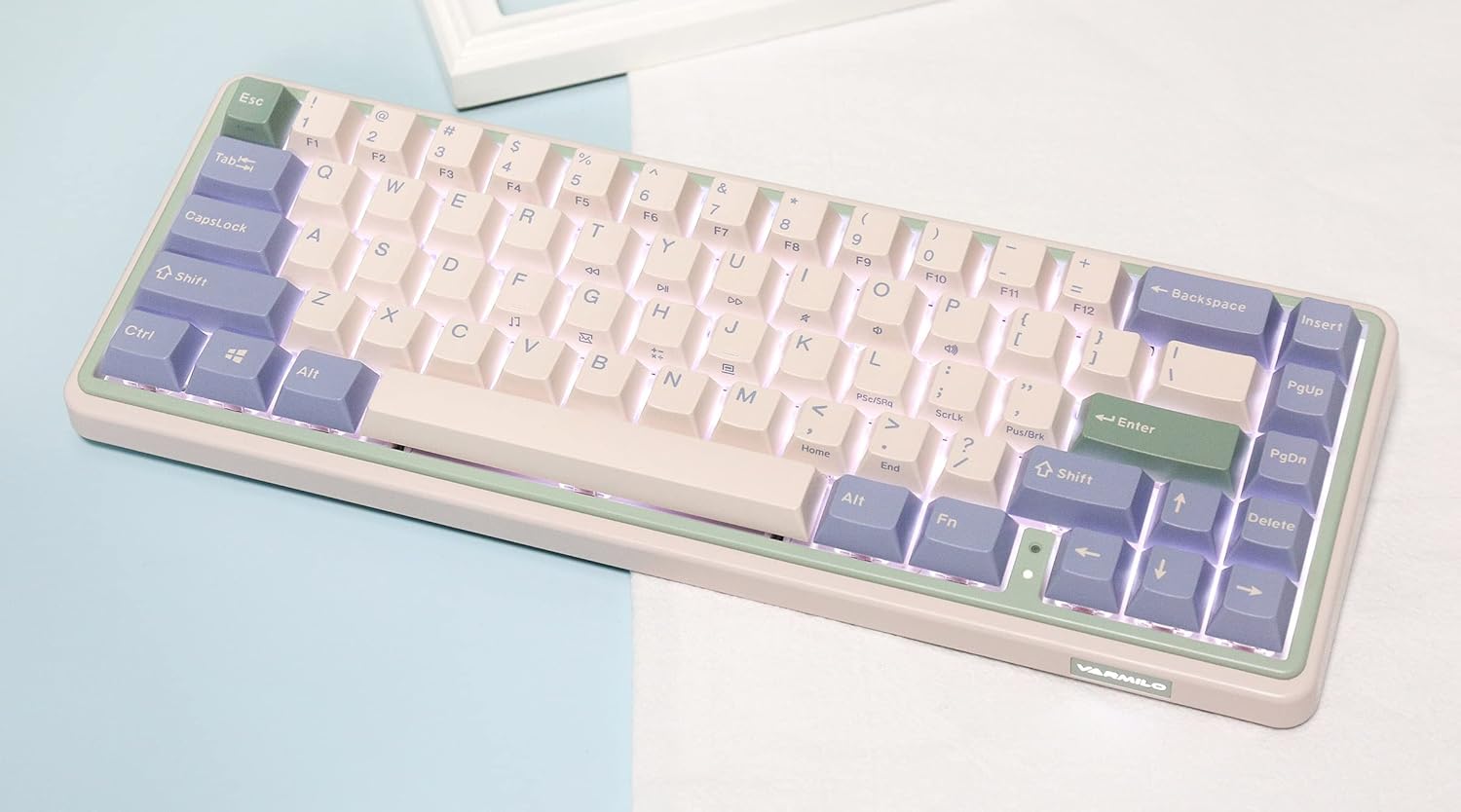
Image: The Varmilo Minilo VXB67 keyboard illuminated by its white LED backlighting.
3. ባለብዙ መሣሪያ መቀያየር
To switch between paired Bluetooth devices:
- ተጫን Fn + ጥ ወደ ብሉቱዝ መሳሪያ 1 ለመቀየር።
- ተጫን Fn + W ወደ ብሉቱዝ መሳሪያ 2 ለመቀየር።
- ተጫን Fn + ኢ ወደ ብሉቱዝ መሳሪያ 3 ለመቀየር።
The keyboard will quickly connect to the selected device.
ጥገና
- ማጽዳት፡ የቁልፍ ሰሌዳውን ወለል ለመጥረግ ለስላሳ እና ደረቅ ጨርቅ ይጠቀሙ። የበለጠ ለማጽዳት፣ የተሰጠውን የቁልፍ ክዳን መጎተቻ በመጠቀም የቁልፍ ክዳኖቹን ያስወግዱ እና ፍርስራሹን ለማጽዳት የተጨመቀ አየር ይጠቀሙ።
- ባትሪ መሙላት፡ Connect the keyboard via the USB-C cable to a power source (computer USB port or USB wall adapter). The Escape key will light up while charging and flash when the battery is low.
- ማከማቻ፡ When not in use, store the keyboard in a cool, dry place. Use the provided dust cover to protect it from dust and spills.
መላ መፈለግ
- የቁልፍ ሰሌዳ ምላሽ አይሰጥም (ሽቦ)
- የዩኤስቢ-ሲ ገመድ ከቁልፍ ሰሌዳው እና ከኮምፒዩተር ጋር ደህንነቱ በተጠበቀ ሁኔታ መገናኘቱን ያረጋግጡ።
- በኮምፒተርዎ ላይ የተለየ የዩኤስቢ ወደብ ይሞክሩ።
- የተለየ የዩኤስቢ-ሲ ገመድ ይሞክሩ።
- የቁልፍ ሰሌዳ ምላሽ እየሰጠ አይደለም (ብሉቱዝ):
- በመሳሪያዎ ላይ ብሉቱዝ መንቃቱን ያረጋግጡ።
- የቁልፍ ሰሌዳው መሙላቱን ያረጋግጡ።
- የማጣመሪያ ሁነታን እንደገና ያስገቡ (Fn + ጥ/ወ/ኢ) እና ከመሳሪያዎ ጋር እንደገና ለማጣመር ይሞክሩ።
- Forget the device on your computer/tablet/phone and try pairing again.
- የማይመዘገቡ ቁልፎች፡-
- Ensure the keycap and switch are properly seated. Remove and re-install if necessary.
- If using hot-swappable switches, ensure the switch pins are not bent.
- የጀርባ ብርሃን አይሰራም;
- Check backlight brightness settings (Fn + ↑/↓).
- የቁልፍ ሰሌዳው ዝቅተኛ የኃይል ሁኔታ ውስጥ አለመሆኑን ያረጋግጡ።
ዝርዝሮች
| ሞዴል | VXB67 |
| አቀማመጥ | 65% (67 ቁልፎች) |
| ግንኙነት | ብሉቱዝ 5.0፣ ዩኤስቢ-ሲ ሽቦ |
| መቀየሪያዎች | Varmilo EC Daisy V2 (Hot-swappable) |
| የቁልፍ ሰሌዳዎች | 1.5mm thick ABS Double Shot |
| የጀርባ ብርሃን | ነጭ LED |
| የባትሪ አቅም | 3400mAh |
| ተስማሚ መሣሪያዎች | PC (and other Bluetooth-enabled devices) |
| ቁሳቁስ | አሲሪሎኒትሪል ቡታዲየን ስቲሪን (ኤቢኤስ) |
| መጠኖች | በግምት 15 x 7 x 2.5 ኢንች (በጥቅሉ ልኬቶች ላይ በመመስረት) |
| ክብደት | 3.21 ፓውንድ |
ዋስትና እና ድጋፍ
የዋስትና መረጃ እና የቴክኒክ ድጋፍ ለማግኘት፣ እባክዎን ኦፊሴላዊውን ቫርሚሎ ይመልከቱ። webጣቢያ ወይም ቸርቻሪዎን ያነጋግሩ። ለዋስትና ጥያቄዎች የግዢ ማረጋገጫዎን ያስቀምጡ።
Varmilo ኦፊሴላዊ Webጣቢያ፡ www.varmilo.com


