1. መግቢያ
The Maxcom MM724 is a simple mobile phone designed for ease of use, featuring straightforward software and practical functions. It is particularly suitable for users who prefer a device without complicated menus. Key features include an emergency SOS button, a built-in flashlight, and Bluetooth connectivity for hearing aid compatibility.
2. የጥቅል ይዘቶች
እባክዎ ለሚከተሉት ዕቃዎች ሳጥኑ ላይ ምልክት ያድርጉ።
- 1 Maxcom MM724 Mobile Phone
- 1 Desktop Charger
- 1 Matching Cords (for charger)
- 1 የተጠቃሚ መመሪያ (ይህ ሰነድ)
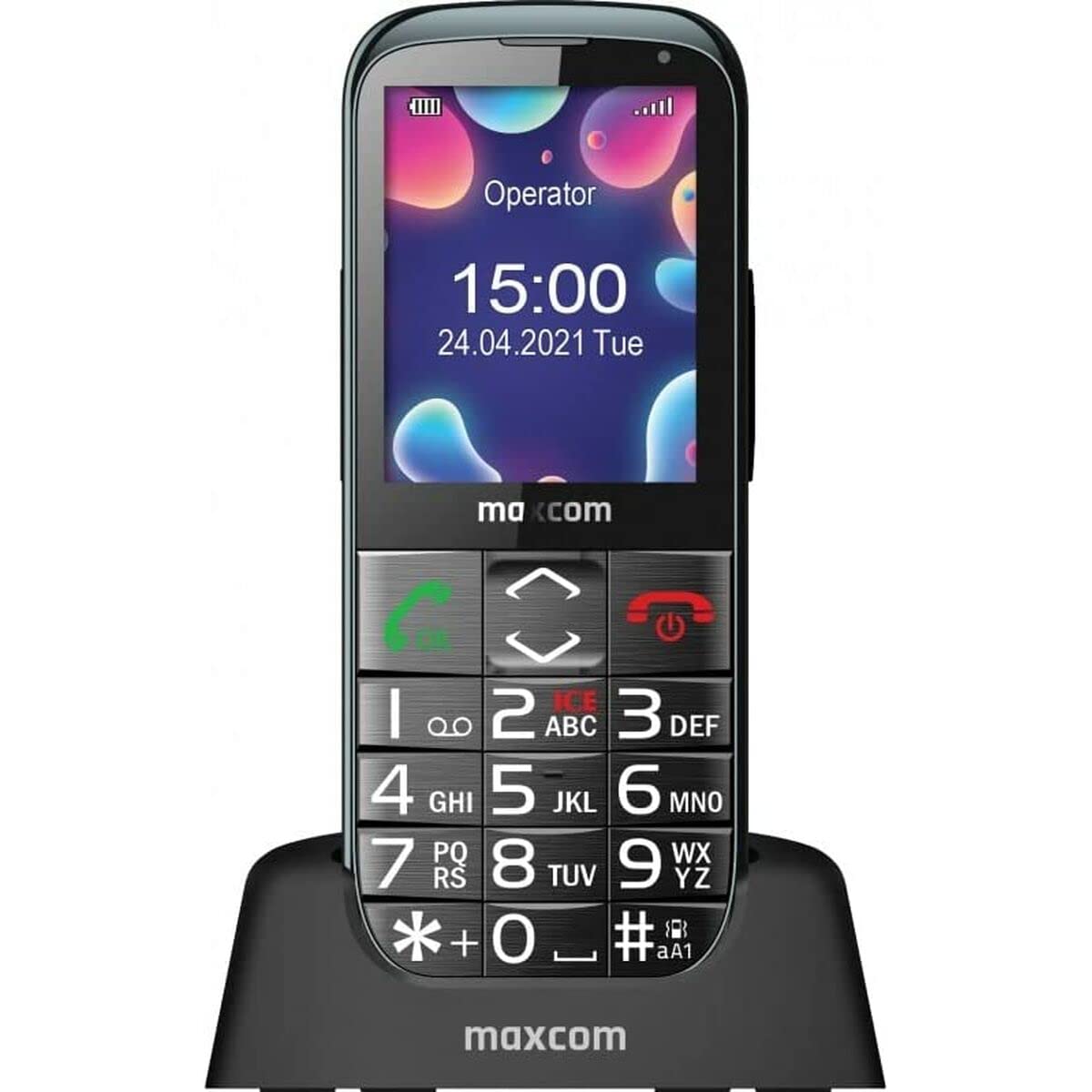
Image: The Maxcom MM724 simple mobile phone, typically black, with a clear display and large buttons.
3. ማዋቀር
3.1. ሲም ካርዱን እና ባትሪውን ማስገባት
- የስልኩን የኋላ ሽፋን በጥንቃቄ ያስወግዱት።
- የወርቅ እውቂያዎችን ወደ ታች በማየት ሲም ካርድዎን (ዎች) ወደተዘጋጀው ማስገቢያ(ዎች) ያስገቡ።
- ባትሪውን ያስገቡ፣ እውቂያዎቹ በትክክል እንዲስተካከሉ ያድርጉ።
- ደህንነቱ በተጠበቀ ሁኔታ ወደ ቦታው ጠቅ እስኪያደርግ ድረስ የኋላ ሽፋኑን ይተኩ።
3.2. መሣሪያውን በመሙላት ላይ
The Maxcom MM724 uses a convenient desktop charger. To charge your phone:
- Connect the charger cord to a power outlet.
- Place the phone upright into the desktop charging cradle.
- Ensure the charging indicator on the phone or cradle illuminates, indicating that charging has begun.
- For optimal battery life, keep the phone in the cradle when not in use to ensure it is always charged.
4. የአሠራር መመሪያዎች
4.1. ማብራት / ማጥፋት
- ለማብራት፡- ስክሪኑ እስኪበራ ድረስ የኃይል/ማብቂያ ጥሪ አዝራሩን ተጭነው ይቆዩ (ብዙውን ጊዜ ቀይ)።
- ለማጥፋት፡- የኃይል/ማብቂያ ጥሪ አማራጮቹ እስኪታዩ ድረስ አዝራሩን ተጭነው ይያዙት፣ ከዚያ ያረጋግጡ።
4.2. ጥሪዎችን ማድረግ እና መቀበል
- ጥሪ ለማድረግ፡- Dial the number using the keypad and press the Call button (usually green).
- ጥሪ ለመቀበል፡- Press the Call button when the phone rings. The phone is designed to ring very loudly to ensure calls are not missed.
- ጥሪን ለማቆም፡- የኃይል/መጨረሻ ጥሪ አዝራሩን ይጫኑ።
4.3. መልዕክቶችን መላክ እና መቀበል
Navigate to the 'Messages' menu to compose new SMS messages or read incoming ones. Use the keypad to type your message.
4.4. Using the SOS Button
The SOS button is located on the back of the phone and is designed for emergencies.
- ማዋቀር፡ Access the phone's settings to pre-define a list of emergency contacts.
- ማግበር፡- In an emergency, press and hold the SOS button. The phone will automatically call the pre-defined contacts in sequence until one answers.
4.5. Activating the Flashlight
The phone features a dedicated button for the flashlight, making it easy to activate when needed. Refer to your phone's specific button layout for its location.
4.6. Bluetooth and Hearing Aid Compatibility
The Maxcom MM724 supports Bluetooth connectivity, allowing it to pair with compatible devices, including certain hearing aids. This enables hands-free calling.
- ማጣመር፡ Go to the Bluetooth settings on your phone and enable Bluetooth. Put your hearing aid into pairing mode (consult your hearing aid's manual). Select your hearing aid from the list of available devices on the phone to pair.
- ማስታወሻ፡- Compatibility with hearing aids depends on the hearing aid's features. Consult your audiologist for specific compatibility information. The phone also features a ring line and additional gain for improved audio performance with or without hearing aids.
5. ጥገና
- ማጽዳት፡ የስልኩን ስክሪን እና አካል ለማፅዳት ለስላሳ እና ደረቅ ጨርቅ ይጠቀሙ። ፈሳሽ ማጽጃዎችን ወይም ገላጭ ቁሳቁሶችን ከመጠቀም ይቆጠቡ.
- የባትሪ እንክብካቤ Keep the battery charged regularly. Avoid extreme temperatures, which can affect battery performance and lifespan.
- ማከማቻ፡ ስልኩን ለረጅም ጊዜ ጥቅም ላይ በማይውልበት ጊዜ ቀዝቃዛና ደረቅ ቦታ ያስቀምጡት።
6. መላ መፈለግ
- ስልክ አይበራም፦ Ensure the battery is correctly inserted and charged. Connect the phone to the charger and try again.
- ምንም የአውታረ መረብ ምልክት የለም፡ ሲም ካርዱ በትክክል መጫኑን ያረጋግጡ። የተሻለ የኔትወርክ ሽፋን ወዳለበት ቦታ ይሂዱ። ችግሩ ከቀጠለ የአገልግሎት አቅራቢዎን ያነጋግሩ።
- ጥሪዎችን ማድረግ/መቀበል አይቻልም፦ Verify that you have sufficient credit or an active plan. Check network signal strength.
- የብሉቱዝ ማጣመር ችግሮች፡ Ensure both devices are in pairing mode and within range. Try restarting both the phone and the Bluetooth device.
7. ዝርዝሮች
| የምርት ስም | ማክስኮም |
| የሞዴል ስም | ኤምኤም724 |
| ስርዓተ ክወና | አንድሮይድ |
| የስክሪን መጠን | 3 ኢንች |
| የግንኙነት ቴክኖሎጂ | ብሉቱዝ |
| ሴሉላር ቴክኖሎጂ | 4G |
| የገመድ አልባ የኔትወርክ ቴክኖሎጂ | ጂ.ኤስ.ኤም |
| ቀለም | ጥቁር |
| የእቃው ክብደት | 85 ግራም |
| የገመድ አልባ አገልግሎት አቅራቢ | ተከፍቷል። |
8. ዋስትና እና ድጋፍ
Warranty information for the Maxcom MM724 mobile phone is typically provided with your purchase documentation or can be found on the official Maxcom website. For technical support or service inquiries, please refer to the contact information provided by your retailer or the manufacturer.


