መግቢያ
Thank you for choosing the Havit Gaming Mouse MS955. This optical gaming mouse features a USB interface, adjustable DPI settings, and RGB backlighting, designed to enhance your gaming experience. This manual provides essential information for setting up, operating, and maintaining your mouse.
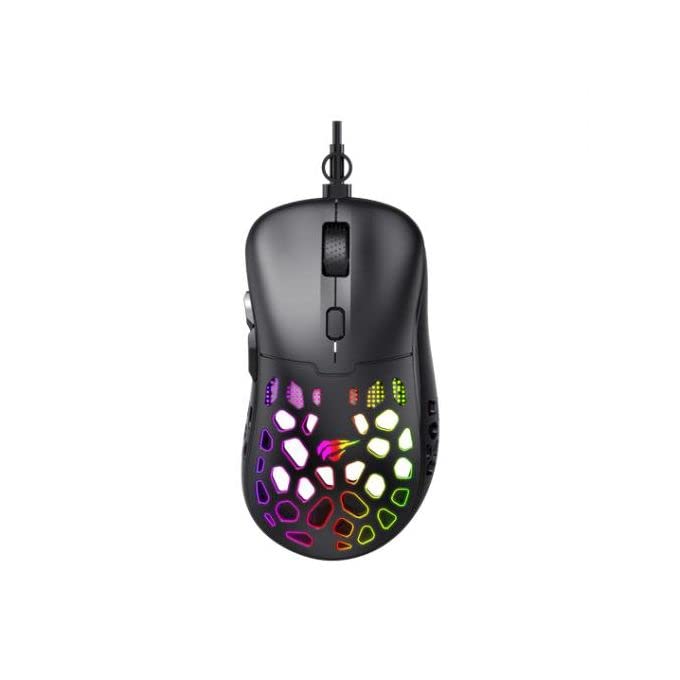
ምስል፡ ከላይ ወደ ታች view of the Havit Gaming Mouse MS955, showcasing its ergonomic design and vibrant RGB lighting through the honeycomb shell.
ማዋቀር
- ማውዙን ይንቀሉት፡- Carefully remove the Havit Gaming Mouse MS955 from its packaging.
- ከኮምፒዩተር ጋር ይገናኙ; Locate an available USB port on your computer. Insert the USB connector of the mouse into the USB port.
- የአሽከርካሪ ጭነት; The mouse is plug-and-play. Your operating system (Windows XP, Windows 7, Linux, etc.) will automatically detect and install the necessary drivers. No additional software installation is typically required for basic functionality.
- የሙከራ ተግባር Once connected, move the mouse and click the buttons to ensure it is working correctly.
የአሠራር መመሪያዎች
The Havit Gaming Mouse MS955 features 6 programmable buttons and adjustable DPI settings for precise control.

ምስል: ጎን view of the Havit Gaming Mouse MS955, highlighting the left-side buttons and scroll wheel.
- የግራ ጠቅታ አዝራር፡- Primary button for selection and interaction.
- በቀኝ ጠቅ ያድርጉ አዝራር; Secondary button for context menus and alternative actions.
- የማሽከርከር ጎማ፡ ሰነዶችን ለማሸብለል እና ለማሸብለል ያገለግላል web pages. It also functions as a clickable middle button.
- የዲፒአይ ማስተካከያ አዝራር፡- Located behind the scroll wheel. Press this button to cycle through different DPI sensitivity levels (800-1200-2400-3200 DPI). Each press changes the sensitivity, allowing you to adapt to various gaming or work scenarios.
- የጎን ቁልፎች; Two buttons are located on the left side of the mouse. These are typically used for 'forward' and 'backward' navigation in web browsers or can be programmed for in-game actions.
RGB መብራት
The Havit Gaming Mouse MS955 features an integrated RGB backlight system. The lighting effects are typically automatic and may change with DPI settings or cycle through various colors. There are no dedicated buttons for controlling the RGB lighting directly on the mouse.
ጥገና
- ማጽዳት፡ To clean the mouse, disconnect it from your computer. Use a soft, dry cloth to wipe the surface. For stubborn dirt, a slightly damp cloth can be used, ensuring no liquid enters the mouse. Do not use harsh chemicals or abrasive cleaners.
- ማከማቻ፡ አይጡን ከከፍተኛ የሙቀት መጠን እና ቀጥተኛ የፀሐይ ብርሃን ርቆ ንጹህና ደረቅ በሆነ አካባቢ ያስቀምጡት።
- የኬብል እንክብካቤ; ጉዳትን ለመከላከል የዩ ኤስ ቢ ገመዱን ከመጠን በላይ ማጠፍ ወይም ማጠፍ ያስወግዱ።
መላ መፈለግ
- አይጥ ምላሽ የማይሰጥ፡
- የዩ ኤስ ቢ ገመዱ ደህንነቱ በተጠበቀ ሁኔታ በኮምፒዩተርዎ ላይ በሚሰራ የዩኤስቢ ወደብ ላይ መሰካቱን ያረጋግጡ።
- መዳፊቱን ወደ ሌላ የዩኤስቢ ወደብ ለመሰካት ይሞክሩ።
- ኮምፒተርዎን እንደገና ያስጀምሩ.
- ዲፒአይ አይለወጥም፦
- Press the DPI button firmly. Ensure you are pressing the correct button.
- The mouse cycles through fixed DPI settings; there is no visual indicator other than cursor speed change.
- የ RGB መብራቶች አይሰሩም;
- አይጤው በትክክል ከኮምፒዩተርዎ ጋር መገናኘቱን ያረጋግጡ።
- The RGB lighting is automatic; if the mouse is functioning otherwise, the lighting should also be active.
ዝርዝሮች
| ባህሪ | ዝርዝር |
|---|---|
| የምርት ስም | Havit |
| ሞዴል | MS955 |
| የበይነገጽ አይነት | ዩኤስቢ |
| መጠኖች | 115.2 x 63 x 37.6 ሚ.ሜ |
| የቁልፎች ብዛት | 6 |
| ቺፕሴት | NST5311 |
| የዲፒአይ ጥራት | 800-1200-2400-3200 ዲ ፒ አይ |
| ኦፕሬቲንግ ቁtage | 5V |
| ቁልፍ የህይወት ዘመን | 3,000,000 ጠቅታዎች |
| የኬብል ርዝመት | 1.5 ሜ |
| የእንቅስቃሴ ማወቂያ | ኦፕቲካል |
| የእጅ አቀማመጥ | ቀኝ |
| የሚመከር አጠቃቀም | ጨዋታ |
| ስርዓተ ክወናዎች | ሊኑክስ፣ ዊንዶውስ 7፣ ዊንዶውስ ኤክስፒ |
| ቀለም | ጥቁር |
ዋስትና እና ድጋፍ
For warranty information or technical support, please refer to the documentation included with your purchase or visit the official Havit webጣቢያ. ለዋስትና ጥያቄዎች የግዢ ማረጋገጫዎን ያስቀምጡ።


