1. መግቢያ
Thank you for choosing the MEDION P66400 All-in-One Audio System. This manual provides essential information for the safe and efficient operation of your device. Please read it thoroughly before use and retain it for future reference.

ፊት ለፊት view of the MEDION P66400 All-in-One Audio System.
2. የደህንነት መረጃ
የኤሌክትሪክ ንዝረትን፣ እሳትን ወይም ጉዳትን ለመከላከል ሁል ጊዜ የሚከተሉትን የደህንነት ጥንቃቄዎች ይከተሉ።
- መሳሪያውን ለዝናብ ወይም ለእርጥበት አያጋልጡት.
- ሐ አይክፈቱasinሰ; ሁሉንም አገልግሎቶች ብቁ ለሆኑ ሠራተኞች ያመልክቱ።
- ከመጠን በላይ ሙቀትን ለመከላከል ትክክለኛ የአየር ዝውውርን ያረጋግጡ.
- ከመሳሪያው ጋር የቀረበውን የኃይል ገመድ ብቻ ይጠቀሙ።
- መሳሪያውን ከሙቀት ምንጮች እና ከፀሀይ ብርሀን ያርቁ.
- በመሳሪያው ላይ ከባድ ዕቃዎችን አታስቀምጡ.
3. የጥቅል ይዘቶች
ሁሉም እቃዎች በጥቅሉ ውስጥ መኖራቸውን ያረጋግጡ፡-
- MEDION P66400 All-in-One Audio System
- የርቀት መቆጣጠሪያ (ከ2 AAA ባትሪዎች ጋር)
- አንቴና ይገርፉ
- የኃይል ገመድ
- የተጠቃሚ መመሪያ
- የዋስትና ካርድ

The remote control for the MEDION P66400, showing various buttons for power, navigation, volume, EQ, and playback.
4. ምርት አብቅቷልview
4.1 የፊት ፓነል መቆጣጠሪያዎች
- የኃይል ቁልፍ፡- ስርዓቱን ያበራል / ያጠፋል.
- LCD ማሳያ፡- 7.1 cm color display for menus, station information, and playback details. Dimmable in 4 levels.
- የድምፅ ቁልፍ; ዋናውን የድምፅ መጠን ያስተካክላል።
- የማውጫ ቁልፎች: For menu navigation and track selection.
- ምንጭ ቁልፍ Selects input sources (Internet Radio, DAB+, FM, CD, Bluetooth, USB, AUX).
- ቅድመ-ቅምጥ አዝራሮች፡- ለተከማቹ የሬዲዮ ጣቢያዎች ፈጣን መዳረሻ።
4.2 የኋላ ፓነል ግንኙነቶች
- የኃይል ግቤት፡ ከዋናው የኃይል አቅርቦት ጋር ይገናኛል.
- የአንቴና ግቤት፡ Connects the supplied whip antenna for DAB+ and FM reception.
- AUX ውስጥ (3.5 ሚሜ)፦ ውጫዊ የድምጽ መሳሪያዎችን ለማገናኘት.
- የመስመር መግቢያ (RCA): For connecting external audio devices with RCA output.
- የዩኤስቢ ወደብ፡ For playing music from USB storage devices.
- የጆሮ ማዳመጫ ጃክ ለግል ማዳመጥ።

Diagram showing the dimensions and rear connections of the MEDION P66400.
5. ማዋቀር
5.1 የመጀመሪያ አቀማመጥ
Place the audio system on a stable, flat surface. Ensure there is adequate space around the unit for ventilation. Avoid placing it near strong magnetic fields or direct heat sources.

The MEDION P66400 All-in-One Audio System placed on a desk.
5.2 አንቴናን ማገናኘት
Connect the supplied whip antenna to the antenna input on the rear panel for optimal DAB+ and FM radio reception. Extend the antenna fully for best signal quality.
5.3 የኃይል ግንኙነት
Connect the power cable to the power input on the rear of the unit, then plug it into a standard wall outlet (220V).
5.4 First-Time Setup (Wi-Fi)
Upon first power-on, the system will guide you through the initial setup, including language selection and Wi-Fi network configuration. Follow the on-screen prompts to connect to your home Wi-Fi network. This is essential for Internet Radio and streaming services.
6. የአሠራር መመሪያዎች
6.1 የበይነመረብ ሬዲዮ
Select 'Internet Radio' from the source menu. You can browse stations by genre, location, or search for specific stations. The system provides access to over 25,000 internet radio stations and numerous podcasts.
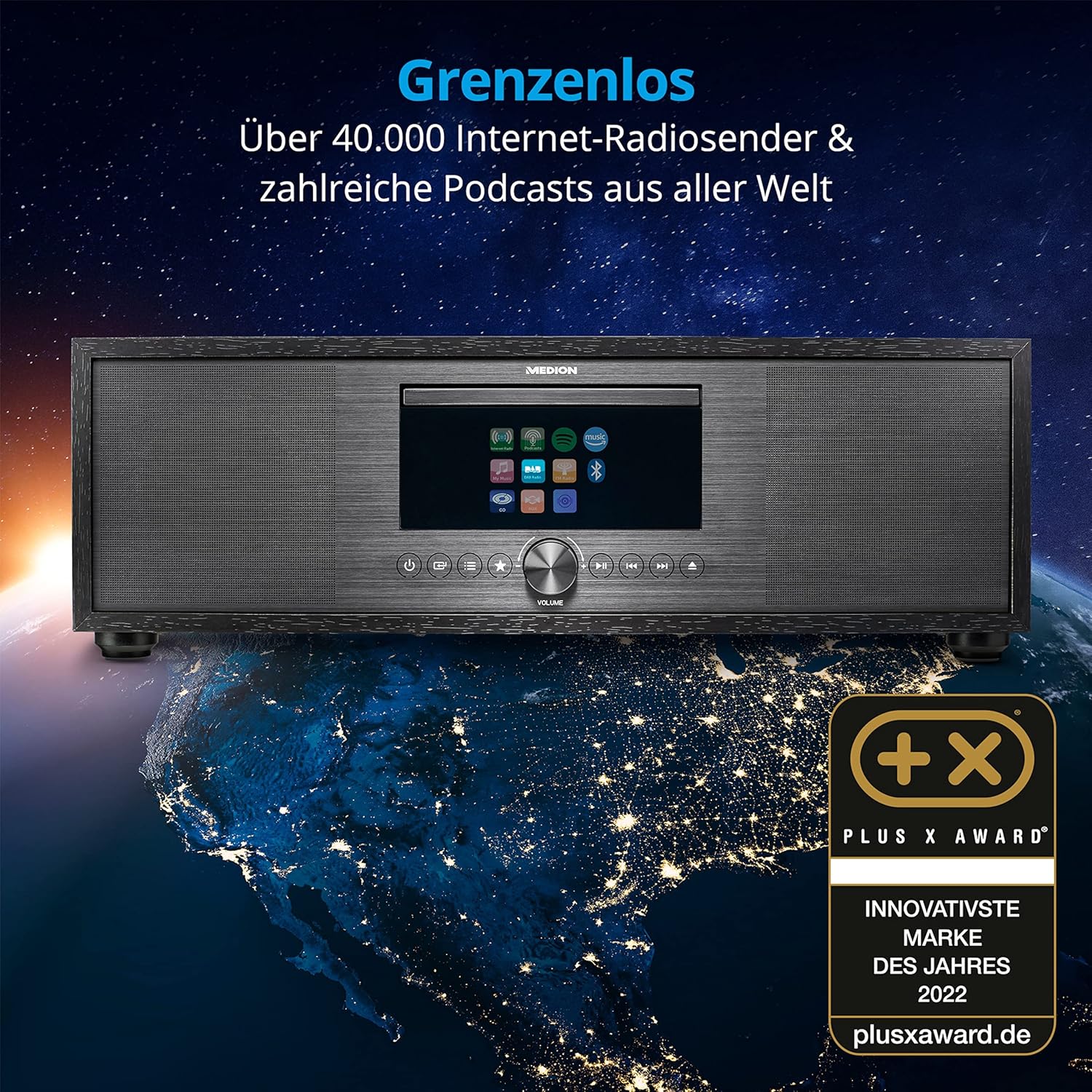
The MEDION P66400 system displaying its internet radio capabilities.
6.2 DAB+ and FM Radio
Switch to 'DAB+' or 'FM' mode. The system will automatically scan for available stations. You can save up to 40 stations as presets for quick access.
6.3 CD/MP3 Player
Insert an audio CD or an MP3 CD into the CD slot. The system will automatically detect and begin playback. Use the navigation buttons to control playback (play, pause, skip tracks).

Inserting a CD into the integrated CD player.
6.4 የብሉቱዝ ግንኙነት
Select 'Bluetooth' mode. On your smartphone or other Bluetooth device, search for 'MEDION P66400' and pair. Once connected, you can stream audio wirelessly from your device to the audio system.

Streaming music via Bluetooth from a smartphone.
6.5 የዩኤስቢ መልሶ ማጫወት
Insert a USB storage device into the USB port on the rear panel. Select 'USB' as the source. The system will display the contents of the USB device, allowing you to browse and play audio files.
6.6 AUX and Line In
Connect an external audio device (e.g., MP3 player, TV) to the AUX In (3.5 mm) or Line In (RCA) ports. Select 'AUX' or 'Line In' as the source to play audio from the connected device.
6.7 Spotify Connect and Amazon Music
The system supports Spotify Connect and Amazon Music. Ensure your device is connected to Wi-Fi. Use the respective apps on your smartphone or tablet to control music playback directly on the MEDION P66400.
6.8 የማንቂያ ደወል ተግባር
Access the alarm settings through the system menu. You can set multiple alarms with various sources (radio, buzzer) and snooze/sleep timer functions.
6.9 የድምጽ ቅንብሮች
The system features a 2.1 audio system with an integrated subwoofer, providing rich sound. Access the equalizer settings via the menu or remote control to choose from 9 sound presets or customize your audio experience.

Illustration of the 2.1 sound system with integrated subwoofer.
7. ጥገና
To ensure the longevity and optimal performance of your audio system:
- ማጽዳት፡ Use a soft, dry cloth to clean the exterior. Do not use liquid cleaners or abrasive materials.
- ሲዲ ማጫወቻ፡ Regularly clean the CD lens with a specialized CD lens cleaner.
- የአየር ማናፈሻ; የአየር ማናፈሻ ክፍተቶችን ከአቧራ እና እንቅፋቶች ያጽዱ።
- ማከማቻ፡ መሣሪያውን ረዘም ላለ ጊዜ ካስቀመጠው ከኃይል ጋር ያለውን ግንኙነት ያላቅቁት እና በቀዝቃዛና ደረቅ ቦታ ያስቀምጡት።
8. መላ መፈለግ
| ችግር | ሊሆን የሚችል ምክንያት | መፍትሄ |
|---|---|---|
| ኃይል የለም | የኃይል ገመድ አልተገናኘም; የኃይል መውጫው የተሳሳተ. | የኃይል ገመድ ግንኙነትን ያረጋግጡ; የተለየ መውጫ ይሞክሩ። |
| ድምጽ የለም። | የድምጽ መጠኑ በጣም ዝቅተኛ ነው፤ የተሳሳተ ምንጭ ተመርጧል፤ ድምጸ-ከል ነቅቷል። | Increase volume; select correct source; deactivate mute. |
| ደካማ የሬዲዮ አቀባበል | Antenna not properly connected or extended; weak signal. | Ensure antenna is fully extended and positioned correctly; try repositioning the unit. |
| የብሉቱዝ ማጣመር ጉዳዮች | Device not in pairing mode; distance too far. | Ensure both devices are in pairing mode; move devices closer. |
| ሲዲ አይጫወትም። | CD inserted incorrectly; CD scratched or dirty; unsupported format. | ሲዲ በትክክል አስገባ; ንጹህ ሲዲ; የድምጽ ሲዲ ወይም MP3 ሲዲ መሆኑን ያረጋግጡ። |
9. ዝርዝሮች
| ባህሪ | ዝርዝር መግለጫ |
|---|---|
| የሞዴል ቁጥር | P66400 |
| የድምጽ ስርዓት | 2.1 with integrated subwoofer |
| የውጤት ኃይል (RMS) | 2 x 20 W + 1 x 40 W (subwoofer) |
| ሬዲዮ መቃኛ | Internet Radio, DAB+, PLL FM (40 presets) |
| ማሳያ | 7.1 cm LCD, 4-level dimmable |
| ግንኙነት | Bluetooth, USB, AUX In (3.5 mm), Line In (RCA), Headphone Jack, Wi-Fi |
| ሲዲ ማጫወቻ | Supports Audio-CDs, MP3-CDs |
| የዥረት አገልግሎቶች | Spotify Connect, Amazon Music |
| የኃይል ምንጭ | AC 220V (Electric Cable) |
| ልኬቶች (L x W x H) | 44 ሴሜ x 26 ሴሜ x 14.7 ሴ.ሜ |
| ክብደት | 5.15 ኪ.ግ |
| የርቀት መቆጣጠሪያ ባትሪዎች | 2 x AAA (ተካቷል) |
10. ዋስትና እና ድጋፍ
For warranty information and customer support, please refer to the warranty card included in your package or visit the official MEDION webጣቢያ. ለዋስትና ጥያቄዎች የግዢ ማረጋገጫዎን ያስቀምጡ።
አምራች፡ MEDION
Webጣቢያ፡ www.medion.com


